
zhwangart/hexo-theme-ocean
À propos
Ocean est un thème Hexo adapté aux appareils mobiles, basé sur les fonctionnalités du thème par défaut de Hexo, Landscape.
Web et applicationsProgression mesurée des étoiles
- in 24h
- 0
- in 7 days
- 0
- in 15 days
- Historique en cours
- in 1 month
- Historique en cours
Variations nettes sur des périodes qui se chevauchent, pas des totaux quotidiens. Les mesures absentes restent vides. Les étoiles indiquent l’intérêt, pas la qualité.
README.md
OriginalOcean
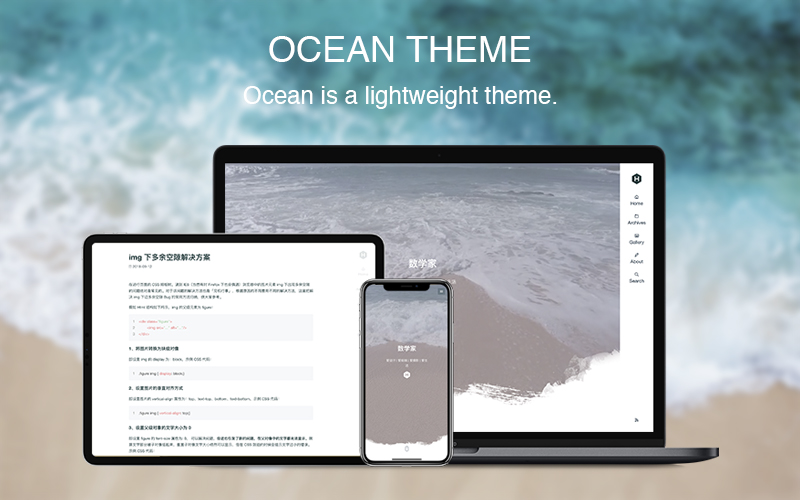
Ocean is a mobile-enabled Hexo theme based on the features in Hexo's default theme landscape. Since I am a Designer and not a Coder, so please advise! I am very grateful to youchen1992 for providing technical support during the Ocean production process.
Install
$ git clone https://github.com/zhwangart/hexo-theme-ocean.git themes/ocean
Enable
Modify theme setting in _config.yml to ocean
theme: ocean
Update
cd themes/ocean
git pull
Configuration
let me know if you can’t find something.
# Menu
menu:
  Home: /
  Archives: /archives
  Gallery: /gallery
  About: /about
  Links: /links
rss: /atom.xml

# Miscellaneous
favicon: /favicon.ico
brand: /images/hexo.svg

# Ocean Video
# Because I put videos in multiple formats on the same path, I just labeled the path here.
ocean:
  overlay: true
  path: images/ocean/      # Video storage path, formats: mp4/ogg/webm
  brand: /images/hexo-inverted.svg      # Optional, a small logo

# Content
excerpt_link: Read More...

# fancybox
fancybox: true

# Local search
search_text: Search

# Gitalk
gitalk:
  enable: true
  clientID: # GitHub Application Client ID
  clientSecret: # Client Secret
  repo: # Repository name
  owner: # GitHub ID
  admin: # GitHub ID

# Valine
valine:
  enable: false    # Default: false.
  el: 'vcomments'    # The DOM element to be mounted on initialization.
  appId:    # Application appId from Leancloud.
  appKey:    # Application appKey from Leancloud.
  notify: false    # Mail notifier, Default: false.
  verify: true    # Validation code, Default: true.
  avatar: 'mp'    # Gravatar type.
  pageSize: '10'    # Number of pages per page.
  placeholder: '请输入...'    # Comment box placeholders.
The feathericon in the menu is programmed ordely in "CSS source/css/_partial/navbar.styl " and can be changed or added if needed.
.nav-item
  &:nth-child(1)         // home
    .nav-item-link
      &::before
        content '\f12f'
  &:nth-child(2)         // archives
    .nav-item-link
      &::before
        content '\f12a'
  //&:nth-child(3)         // gallery
  //  .nav-item-link
  //    &::before
  //      content '\f1a9'
  //&:nth-child(4)         // about
  //  .nav-item-link
  //    &::before
  //      content '\f174'
Plugins
hexo-generator-search Local search
$ npm install hexo-generator-searchdb --saveThen add the plugin configuration for hexo's configuration file
_config.yml(note: not the theme's configuration file):# Hexo-generator-search search: path: search.xml field: post format: html-
$ npm install hexo-generator-feed --saveThen add the plugin configuration for hexo's configuration file
_config.yml(note: not the theme's configuration file):feed: type: atom path: atom.xml limit: 20 hub: content: content_limit: 140 content_limit_delim: ' ' order_by: -date -
$ npm uninstall hexo-generator-index --save
$ npm install hexo-generator-index-pin-top --save
Post poster
---
title: Post name

photos: [
        ["img_url"],
        ["img_url"]
        ]
---
Gallery
Need to write in the head of the markdown, this is not a good way to write, I hope to get a better way to write on github.
---
title: Gallery

albums: [
        ["img_url","img_caption"],
        ["img_url","img_caption"]
        ]
---
Toc
Use Tocbot to parse the title tags (h1~h6) in the content and insert the directory.
ocean/_config.yml
# Toc
toc: true
If Toc is turned on in ocean/_config.yml, then Tocbot will generate a Toc article directory in the title tag of each blog parsing content, but not all blogs require Toc, so in the Front-matter section of markdown Can be closed:
---
toc: false
---
Explorer des projets similaires
Chargement…