
zaaach/CityPicker
zaaach/CityPicker has 3,118 GitHub stars and 587 forks. GitHot measured -1 stars in 24 hours and -4 in 7 days. Last checked 2026-11-11 07:29 UTC. Last push 2021-07-07.
Comment ces chiffres sont mesurés
:fire::fire::fire:城市选择、定位、搜索及右侧字母导航,类似美团 百度糯米 饿了么等APP选择城市功能
Progression mesurée des étoiles
- in 24h
- -1
- in 7 days
- -4
- in 15 days
- Mise à jour retardée
- in 1 month
- Mise à jour retardée
Variations nettes sur des périodes qui se chevauchent, pas des totaux quotidiens. Les mesures absentes restent vides. Les étoiles indiquent l’intérêt, pas la qualité.
README.md
Original

CityPicker


现在使用较多的类似美团、外卖等APP的城市选择界面,一行代码搞定,就是这么简单粗暴!!!
Tips:(旧版本1.x)会报高德定位jar包冲突,推荐使用2.x版本。
主要功能:
- 字母悬浮栏
- 指定热门城市
- 自定义动画效果
- 自定义主题
- 名称或拼音搜索
- 返回城市名、code等数据
- 提供定位接口,解耦定位SDK
Preview


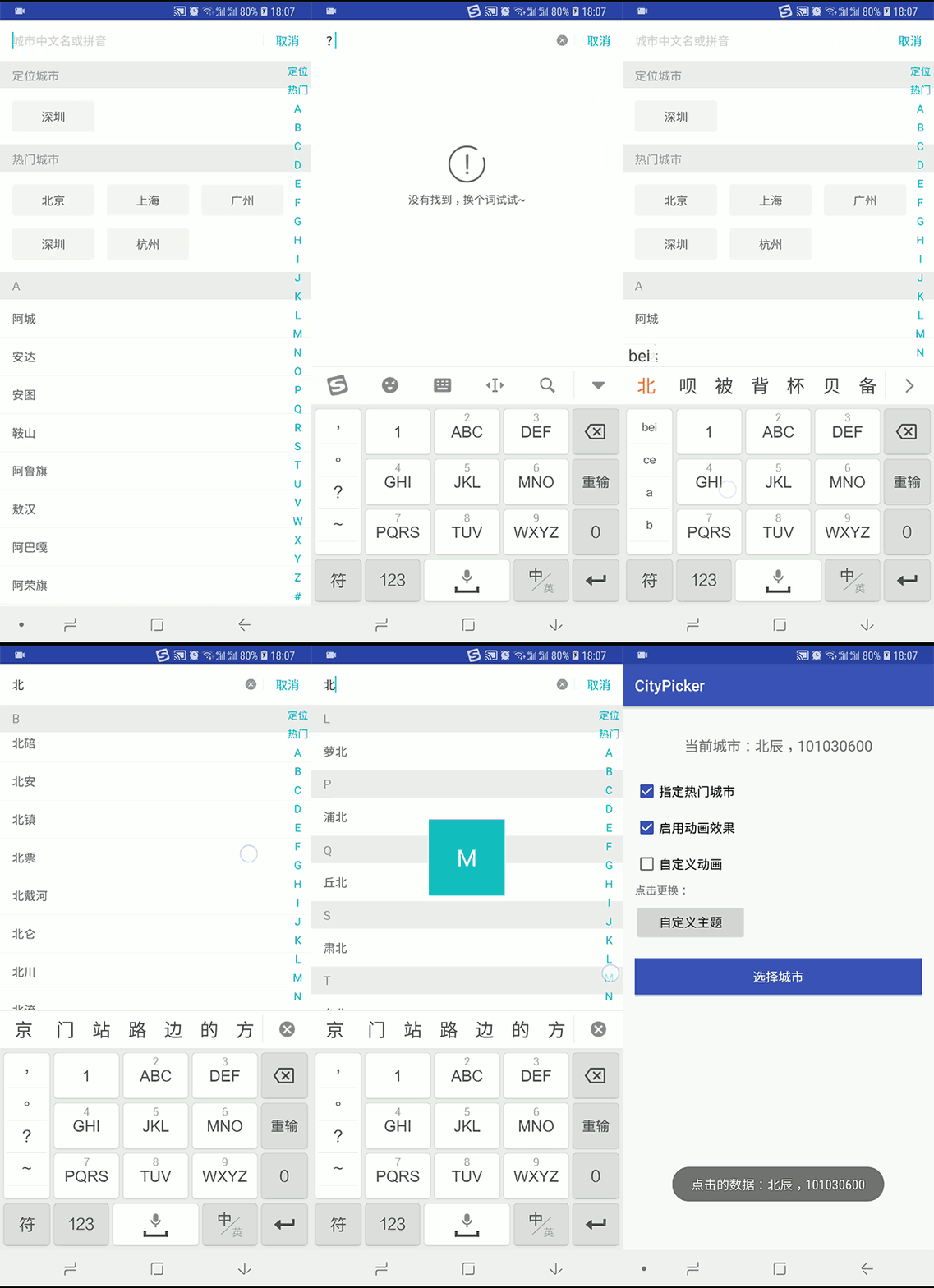
APK
下载demo.apk体验.
Download
1: 项目根目录的build.gradle添加如下配置:
allprojects {
	repositories {
		...
		maven { url 'https://jitpack.io' }
	}
}
2: app添加依赖:
dependencies {
	 implementation 'com.github.zaaach:CityPicker:x.y.z'
}
记得把x.y.z替换为 中的数字
Usage
CityPicker 基于DialogFragment 实现,已提供定位接口,需要APP自身实现定位。
基本使用:
Step1:
在manifest.xml中给使用CityPicker 的activity添加主题android:theme="@style/DefaultCityPickerTheme"
<activity android:name=".MainActivity" android:theme="@style/DefaultCityPickerTheme">
  ......
</activity>
Step2:
注意:热门城市使用HotCity ,定位城市使用LocatedCity
List<HotCity> hotCities = new ArrayList<>();
hotCities.add(new HotCity("北京", "北京", "101010100")); //code为城市代码
hotCities.add(new HotCity("上海", "上海", "101020100"));
hotCities.add(new HotCity("广州", "广东", "101280101"));
hotCities.add(new HotCity("深圳", "广东", "101280601"));
hotCities.add(new HotCity("杭州", "浙江", "101210101"));
......

CityPicker.from(activity) //activity或者fragment
  .enableAnimation(true)	//启用动画效果,默认无
  .setAnimationStyle(anim)	//自定义动画
  .setLocatedCity(new LocatedCity("杭州", "浙江", "101210101")))  //APP自身已定位的城市,传null会自动定位(默认)
  .setHotCities(hotCities)	//指定热门城市
  .setOnPickListener(new OnPickListener() {
    @Override
    public void onPick(int position, City data) {
      Toast.makeText(getApplicationContext(), data.getName(), Toast.LENGTH_SHORT).show();
    }

    @Override
    public void onCancel(){
      Toast.makeText(getApplicationContext(), "取消选择", Toast.LENGTH_SHORT).show();
    }

    @Override
    public void onLocate() {
      //定位接口,需要APP自身实现,这里模拟一下定位
      new Handler().postDelayed(new Runnable() {
        @Override
        public void run() {
          //定位完成之后更新数据
          CityPicker.getInstance()
            .locateComplete(new LocatedCity("深圳", "广东", "101280601"), LocateState.SUCCESS);
        }
      }, 3000);
    }
  })
  .show();
关于自定义主题:
在style.xml 中自定义主题并且继承DefaultCityPickerTheme ,别忘了在manifest.xml 设置给activity。
<style name="CustomTheme" parent="DefaultCityPickerTheme">
        <item name="cpCancelTextColor">@color/color_green</item>
        <item name="cpSearchCursorDrawable">@color/color_green</item>
        <item name="cpIndexBarNormalTextColor">@color/color_green</item>
        <item name="cpIndexBarSelectedTextColor">@color/color_green</item>
        <item name="cpSectionHeight">@dimen/custom_section_height</item>
        <item name="cpOverlayBackground">@color/color_green</item>
  		......
</style>
CityPicker 中自定义的所有属性如下,有些属性值必须是引用类型refrence,使用时注意。
<resources>
    <attr name="cpCancelTextSize" format="dimension|reference" />
    <attr name="cpCancelTextColor" format="color|reference" />

    <attr name="cpClearTextIcon" format="reference" />
    <attr name="cpSearchTextSize" format="dimension|reference" />
    <attr name="cpSearchTextColor" format="color|reference" />
    <attr name="cpSearchHintText" format="string|reference" />
    <attr name="cpSearchHintTextColor" format="color|reference" />
    <attr name="cpSearchCursorDrawable" format="reference" />

    <attr name="cpListItemTextSize" format="dimension|reference" />
    <attr name="cpListItemTextColor" format="color|reference" />
    <attr name="cpListItemHeight" format="dimension|reference"/>

    <attr name="cpEmptyIcon" format="reference"/>
    <attr name="cpEmptyIconWidth" format="dimension|reference"/>
    <attr name="cpEmptyIconHeight" format="dimension|reference"/>
    <attr name="cpEmptyText" format="string|reference"/>
    <attr name="cpEmptyTextSize" format="dimension|reference"/>
    <attr name="cpEmptyTextColor" format="color|reference"/>

    <attr name="cpGridItemBackground" format="color|reference"/>
    <attr name="cpGridItemSpace" format="reference"/>
	<!--悬浮栏-->
    <attr name="cpSectionHeight" format="reference"/>
    <attr name="cpSectionTextSize" format="reference" />
    <attr name="cpSectionTextColor" format="reference" />
    <attr name="cpSectionBackground" format="reference" />

    <attr name="cpIndexBarTextSize" format="reference" />
    <attr name="cpIndexBarNormalTextColor" format="reference" />
    <attr name="cpIndexBarSelectedTextColor" format="reference" />
	<!--特写布局-->
    <attr name="cpOverlayWidth" format="dimension|reference"/>
    <attr name="cpOverlayHeight" format="dimension|reference"/>
    <attr name="cpOverlayTextSize" format="dimension|reference"/>
    <attr name="cpOverlayTextColor" format="color|reference"/>
    <attr name="cpOverlayBackground" format="color|reference"/>
</resources>
OK,enjoy it~
Changelog
v2.1.0
- 迁移至AndroidX
v2.0.3
- 修复状态栏变黑问题
- 修复字母索引栏被软遮挡的问题
- 新增取消选择监听
- 方法调用方式稍微改变
v2.0.2
- 修复定位城市偶尔不刷新的bug
v2.0.1
- 新增定位接口
- 修改返回类型为
City,可获取城市名、code等数据
v2.0.0
- 项目重构优化,结构更清晰
- 使用RecyclerView
感谢
About me
掘金: https://juejin.im/user/56f3dfe8efa6310055ac719f
简书: https://www.jianshu.com/u/913a8bb93d12
淘宝店: LEON家居生活馆 (动漫摆件)

:wink:淘宝店求个关注:wink:
QQ群
有兴趣可以加入QQ群一起交流:

Explorer des projets similaires
codecrafters-io/build-your-own-x
Maîtrisez la programmation en recréant de zéro vos technologies préférées.
561,917 étoilespublic-apis/public-apis
Une liste collective d'API gratuites
498,305 étoilesmorluto/rea
Rétro-ingénierie de n'importe quoi avec des agents, du comportement des applications jusqu'aux binaires natifs.
453,216 étoilesopenclaw/openclaw
L'IA qui fait vraiment les choses. Tout système d'exploitation, toute plateforme. À la manière du homard. 🦞
394,371 étoiles