
yetidevworks/drydock
yetidevworks/drydock has 355 GitHub stars and 12 forks. GitHot measured +29 in 7 days. Last checked 2026-11-11 04:24 UTC. Last push 2026-11-02.
Comment ces chiffres sont mesurés
What's uncommitted, unpushed, and unreleased across every repo you own. A live TUI dashboard for a fleet of git repos.
Progression mesurée des étoiles
- in 24h
- Mise à jour retardée
- in 7 days
- +29
- in 15 days
- Historique en cours
- in 1 month
- Historique en cours
Variations nettes sur des périodes qui se chevauchent, pas des totaux quotidiens. Les mesures absentes restent vides. Les étoiles indiquent l’intérêt, pas la qualité.
README.md
Originaldrydock
     _                _            _
  __| |_ __ _   _  __| | ___   ___| | __
 / _` | '__| | | |/ _` |/ _ \ / __| |/ /
| (_| | |  | |_| | (_| | (_) | (__|   <
 \__,_|_|   \__, |\__,_|\___/ \___|_|\_\
            |___/   what's still in for work.
What's uncommitted, unpushed, and unreleased across every repo you own.
A drydock is where vessels sit while work is done on them, before they go back out. If you keep dozens or hundreds of checkouts on disk and lose track of which ones still have work sitting in them, this tells you, in one screen, live.
Written in Rust. Works on macOS and Linux.
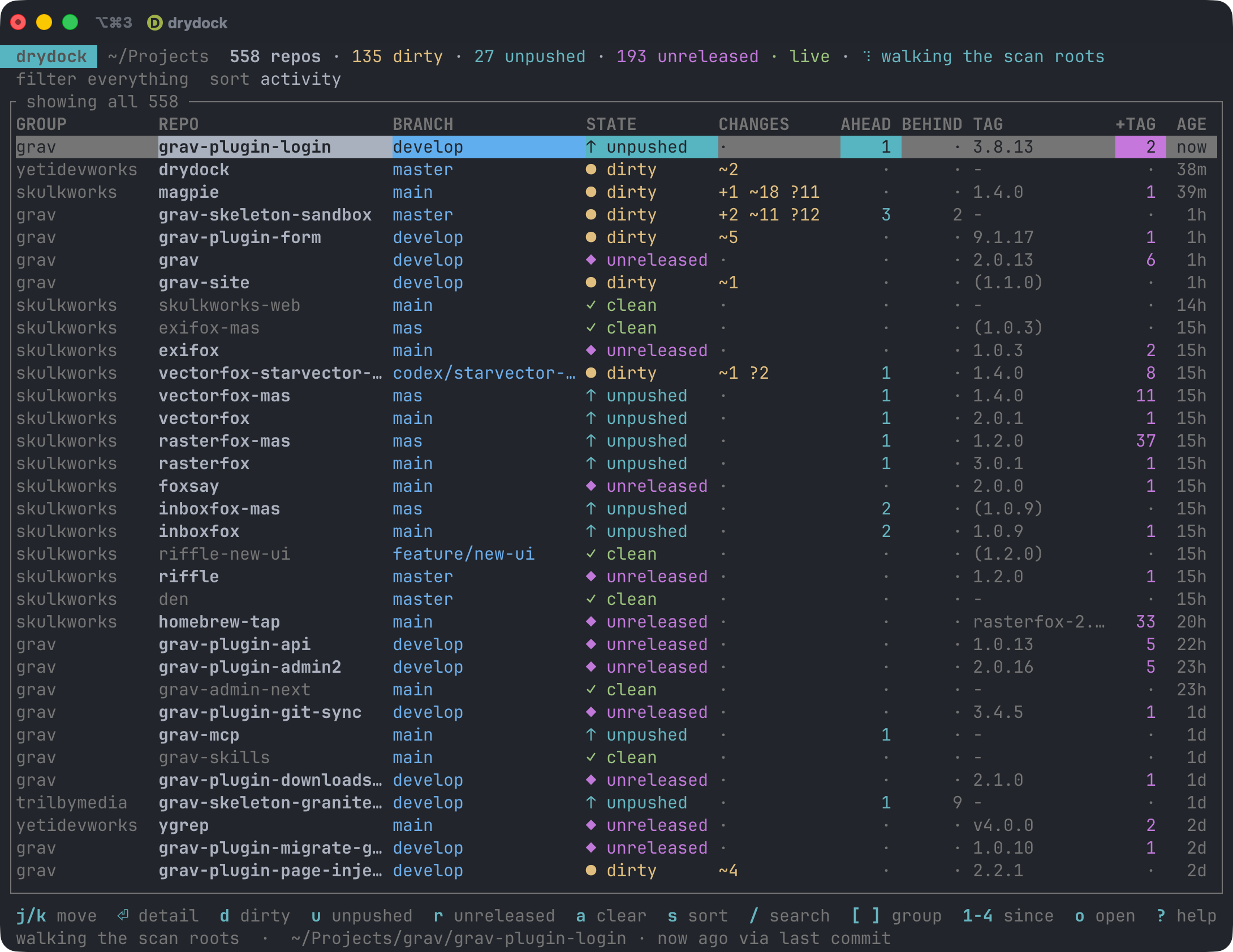
Colour carries the state, so the rows worth acting on stand out without reading a word: yellow for uncommitted changes, cyan for commits you haven't pushed, bold light red for commits waiting on the remote, magenta for commits past the last tag, red for conflicts and half-finished merges, and everything clean dimmed out of the way.
What it answers
What did I touch recently? Filter to the last hour, day, week or month. A clean repo's activity is its newest commit; a dirty repo's is when you last saved a changed file, which is usually much more recent.
What have I not committed? Staged, unstaged, untracked and conflicted counts per repo, plus stashes and any half-finished merge or rebase.
What have I not pushed? Across every local branch, not just the one that happens to be checked out. Side branches are exactly where work goes missing.
What's worth releasing? Every repo sits in one of four release states, in their own column:
· unreleasedno tags at all, never been released ✓ releasedtagged, with nothing since ◆ needs releasetagged, but with commits or uncommitted changes past the tag ◇ heldpast the tag, and you've said this commit isn't worth a release Plus the commits since the last tag with their actual subjects, and whether
CHANGELOG.mdhas run ahead of the newest tag.Release state is a separate axis from working state: a repo can be dirty and released, or spotless and still needing a release.
Install
Homebrew
brew install yetidevworks/drydock/drydock
Cargo
cargo install drydock
From source
git clone https://github.com/yetidevworks/drydock
cd drydock
make install          # into ~/.local/bin
Use
Run it with no arguments for the live dashboard:
drydock
It scans the directories in your config (~/Projects by default), not the
current directory, so it behaves the same wherever you invoke it.
--root overrides that for one run, and takes as many as you like:
drydock --root ~/work --root ~/oss          # the dashboard, over those two trees
drydock list --root ~/clients --dirty       # any command, before or after it
Given even once it replaces the configured roots rather than adding to them, so
one flag is enough to look at a tree drydock has never heard of. Each set of
roots gets its own cache file, so a --root run doesn't cost your main fleet
its warm start, and repeating the same one is still instant.
Roots expand ~ and $VAR, in the config file as well as on the command line,
which is what makes ghq checkouts work:
drydock --root "$GHQ_ROOT"                  # everything ghq has cloned
drydock --root "$GHQ_ROOT/github.com"       # groups become the owner names
ghq's layout is $GHQ_ROOT/<host>/<owner>/<repo>, and the group is the first
segment below a root — so point drydock at $GHQ_ROOT and every repo lands in
a github.com group, or point it a level deeper and the groups are the owners,
which is usually what you want. Either way it's worth putting in the config
once:
roots = ["$GHQ_ROOT/github.com", "~/Projects"]
Or, since it works as a git alias:
[alias]
    projects = !drydock --root \"$GHQ_ROOT/github.com\"
Dashboard keys
j k ↑ ↓ |
move · ctrl-d / ctrl-u half a page · home / end ends |
| mouse | click a row to select it · wheel moves the selection · drag a header edge to resize a column, double-click it to reset |
⏎ |
detail view: branches, commits since the last tag, changed files |
space |
history: recent commits and what each one changed, space again to close |
| mouse | wheel scrolls the help and detail panes, and moves the column picker |
d u b |
filter to dirty, unpushed, behind |
r N H |
filter to needs-release, never-released, held |
h |
hold this repo out of needs-release, or lift the hold it's under |
c i x e |
conflicts, operation in progress, detached HEAD, probe errors |
n |
only repos with nothing outstanding |
& |
switch between matching any active filter and all of them |
a |
clear every filter |
/ |
fuzzy search on name, group and branch |
[ ] |
step through groups |
1 2 3 4 |
touched in the last hour, day, week, month · 0 any age |
s S |
cycle the sort key · reverse it |
o O |
show the folder in Finder · open in your editor |
t |
open in your git client |
T ctrl-o |
open a terminal there |
w y |
open the remote in a browser · copy the path |
f F |
fetch the selected repo · everything on screen |
ctrl-f |
fetch every repo in the fleet, whatever is filtered or scrolled off |
C |
choose which columns to show |
R ctrl-r |
rescan now — the local twin of ctrl-f |
? q |
help, with a legend for every marker on screen · quit |
Hold shift or ctrl and the hints along the bottom change to what those keys
would do — o finder becomes O editor, ctrl shows ^o terminal and the rest
of its row. That needs a terminal which reports a modifier being held on its
own (the kitty keyboard protocol: kitty, Ghostty, WezTerm, iTerm2 3.5+, foot).
Anywhere else the footer is the static list it always was, and ? still lists
everything.
History
space on a row opens that repo's recent history, full screen. The commits run down the left with git's graph beside them, and the right side shows what the selected one changed: author and date, the full message, the files with their line counts, then the diff itself with line numbers. It's for checking what's been going on in a repo without opening a git client window for it, so nothing in here writes anything; space or esc puts you back on the table where you were.
The list is the branch you have checked out plus its upstream, so commits you haven't pulled yet appear too, with their hashes in the BEHIND colour and a ↓ incoming count in the title. Unpushed commits get the AHEAD colour. A dirty repo gets an uncommitted changes entry at the top, and that's where the view opens, since uncommitted work is usually what you wanted to see. A merge is diffed against its first parent, so it reads as what the merge brought in.
j k |
step through the commits · home / end for the ends |
J K pgdn pgup |
scroll the diff · ctrl-d / ctrl-u by half a page |
n p |
jump to the next or previous file in the diff |
W |
wrap long lines in the diff, or stop; remembered as [ui] history_wrap |
a |
every branch and tag, or back to this branch and its upstream |
y |
copy the commit hash |
t o O T w |
hand off, the same as from the table |
| mouse | wheel over the list moves through it, over the diff scrolls it · click a commit to select it |
It reads the newest 400 commits and stops a diff at a couple of megabytes, which is far past what anyone scrolls in a terminal; t opens the repo in your git client for anything bigger. The view follows the repo while it's open, so a commit, a pull or a fetch shows up without closing it.
Commands
drydock list --dirty --since 1d              # a table, then exit
drydock list --root ~/work                   # scan somewhere else for one run
drydock list --unpushed --group acme --json  # machine-readable
drydock list --cached                        # last known state, no probing (~5ms)
drydock list --behind --fetch                # check every remote, then show what's behind
drydock list --behind --fetch -g acme        # ...just that group's remotes
drydock releasable --min-commits 3           # what's worth a release pass
drydock hold . --note "changelog only"       # not this commit, thanks
drydock unhold .                             # back into the list
drydock holds                                # what's held, and what has lifted
drydock status .                             # everything about one repo
drydock scan                                 # refresh the cache
drydock scan --fetch                         # ...checking the remotes as it goes
drydock groups                               # per-group tallies
drydock config init                          # write a config file
Every command takes --json, so drydock list --cached --json is cheap enough
to drive a status line.
Filters
--dirty --unpushed --behind --conflicted --in-progress --detached
--no-remote --no-upstream --stashed --clean --errored
--behind reads what your last fetch left behind; add --fetch to check the
remotes first.
Release state: --unreleased (never tagged), --needs-release, --released,
--held.
Several filters widen the result by default: --dirty --unpushed means
"either". Pass --match all (or press &) to require all of them instead.
How it works, and why it's quick
Measured on a real tree of ~550 repos, on an Apple silicon Mac:
| Walk the tree | ~0.9s |
| Refs, tags, tracking (tier 1) | ~1.4s |
| Full sweep, working trees from cache | ~2.2s |
| Full sweep, cold | ~6.2s |
list --cached |
~5ms |
| Watcher startup | ~19ms |
The split is the whole design. Reading refs and tags is cheap. Scanning working
trees is not: git status across that many repos costs around 40 seconds of
syscall time, roughly 85% of the total. So:
- Tier 1 — refs, tags, tracking counts, stash count, in-progress operations — runs on every sweep.
- Tier 2 — the working-tree scan — is cached against HEAD and the index mtime, and only reruns where something actually moved.
- A filesystem watcher then re-probes individual repos as they change, which costs milliseconds. That is what makes leaving the dashboard open all day reasonable rather than a background CPU tax.
Some implementation notes worth knowing:
- It shells out to
gitrather than linking a git library, so the numbers match exactly what you see on the command line, including whatever per-repo config is in play. Process startup is noise next to the scan it wraps. - Every invocation passes
--no-optional-locks. Without it, polling hundreds of repos would takeindex.lockand rewrite indexes constantly, fighting your editor and any GUI client you have open. - The index mtime is deliberately not treated as activity. Any tool that runs
git statusrefreshes it, so an editor sitting open on a repo would otherwise make it read as recently active when nothing had happened. - Git-flow back-merges are not counted as work to release. After a release,
developcarries a "Merge tag 'x.y.z' into develop" commit the tag cannot reach; counting it reported one commit to release when there was none. Merge commits are excluded, unless a merge is the only thing there and it genuinely changes the tree. - Discovery stops descending the moment it finds a repo, which keeps submodules and vendored checkouts out of the list without enumerating them.
Ahead, behind, and the network
Ahead and behind counts come from remote-tracking refs you have already fetched, so no network access is involved and they are safe to recompute constantly. That also means "behind" is only as fresh as your last fetch.
Both columns report the branch you have checked out — the one BRANCH names
in the same row — not every local branch summed. A topic branch you abandoned
a month ago being 128 commits behind is not your main being 128 behind, and
the row said so with a number next to the wrong branch's name. When another
local branch is ahead or behind on its own, the cell picks up a *: ·* is
"this branch is in sync, some other one isn't". Select the repo to see which,
in the per-branch table. --unpushed, --behind and both sort keys still work
from the repo-wide totals, so a repo with only a stale side branch still turns
up in those.
--json carries all four numbers. ahead and behind are the repo-wide sums
they have always been, because 1.0 promised those fields wouldn't change
incompatibly and quietly redefining a number is the one break a script can't
notice. The per-branch pair the columns show is branch_ahead and
branch_behind.
Which is why a repo nothing has ever fetched shows ? in BEHIND rather than
·. Zero there would say "in sync", and for a repo that has never fetched
that's a claim nobody checked — the count is zero because there was nothing to
compare against. The header counts them: 57 behind · 59 never fetched.
Fetching is off by default, because it is real traffic against every remote you own and a remote that wants credentials can hang. To do it:
f F ctrl-f |
in the dashboard: the selected repo, everything on screen, the whole fleet |
--fetch |
on drydock list and drydock scan, before anything is probed |
remote.fetch = true |
on a timer, every remote.interval |
Every one of those is bounded by remote.concurrency (4 by default — raise it
if you're fetching hundreds and can wait less), capped per repo by
remote.timeout, and refuses credential prompts rather than letting one hang.
A remote that can't be reached leaves that repo's counts exactly as stale as
they were, and says so rather than passing them off as checked.
drydock list --fetch narrows to --group when you pass one, so
--group acme --behind --fetch is thirty fetches rather than five hundred.
Tags come along with a fetch, by git's ordinary auto-follow. They have to: the
release half of the table is built on them, so a tag pushed from another
machine that never arrived meant a repo went on reporting needs release for
work that had already been released. Local tags are never pruned, though — a
tag you've cut but not pushed is exactly what needs release exists to find.
The FETCHED column, off by default, shows how long since each repo last heard
from its remote (never if it never has). The detail view (⏎) says the same
for whichever repo you're on. Both read git's own FETCH_HEAD, so a git pull
you ran yourself in a terminal counts.
Worktrees
A bare repo with its worktrees beside it — .git/ next to trunk/ and
branch/ — is listed as you'd expect: each worktree is a repo in its own
right, grouped under the bare repo's name, and the bare repo itself gets a
bare state rather than being scanned for a working tree it doesn't have.
This works with follow_nested_repos left off. That setting exists to keep
submodules and vendored checkouts from being listed separately from the repo
containing them, and a bare repo has no working tree for anything to be
contained in — so it's descended into regardless. A checkout genuinely
nested inside a working tree is still pruned.
Any linked worktree, wherever it was checked out, leads its REPO cell with
the repo it belongs to: grav-theme-kahuna ↳ kahuna-theme-blocks. That's read
from git's own worktree pointer rather than guessed from the folder name, so
a _worktrees/ folder full of feature names still tells you whose each one
is. Worktrees sort in beside their repo by name, searching for a repo finds
its worktrees too, and ⏎, drydock show and --json (worktree_of) give
the full path of the checkout it came from.
Visibility
The VISIBILITY column shows whether each repo is public, private, or (on
GitHub Enterprise) internal. This isn't a git concept — nothing under
.git records it — so it's the one column that asks the hosting provider
directly, rather than reading anything local. Right now the only provider
supported is GitHub, via gh. (GitLab is the
natural next provider to add, since glab mirrors gh closely; Bitbucket
has no equivalent first-party CLI, so supporting it would mean handling API
tokens directly rather than riding on a CLI you've already authenticated.)
It's off by default (visibility.enabled = false), for the same reason
fetching is: it's real API traffic, and it depends on gh being installed
and already authenticated (gh auth status). Set visibility.enabled = true
to turn it on — the column appears with it, since a VISIBILITY column with
checking off would just read "checking off" on every row while still costing
the width. A checked value is cached and trusted for visibility.interval
(a day, by default — visibility changes rarely) so repeat runs stay cheap.
Filter with --public or --private on list.
Every non-value in this column says specifically why, rather than a bare -:
| Cell | Meaning |
|---|---|
no remote configured |
Nothing to ever check. Free to know, shown even with checking off. |
unsupported |
The remote is on a host nothing recognises. Also free. |
checking disabled |
The remote is checkable, but visibility.enabled is off. Shown in the table as not checked. |
unknown |
The repo itself couldn't be read, so whether it even has a remote isn't established. |
check failed |
A check was attempted and failed (rate limited, not authenticated, timed out), with nothing cached to fall back to. The actual reason is never shown in a table — one long message would widen the column for every row — but it's always available via status <repo> or --json (visibility_error). |
A GitHub wiki's clone URL (<repo>.wiki.git) isn't a repository the API can
look up on its own, so it's resolved to its parent repo instead: a wiki's
VISIBILITY cell shows the parent repo's actual visibility, not
unsupported.
Markers, so the column scans without reading the words: ● public, ⊘
private, ◐ internal, ! a check that was attempted and failed, · a cell
with no answer for one of the reasons above. Public is green and private is
blue — private isn't a warning state, it's the one most repos should be in —
and grey is kept for the cells that hold no answer at all.
If you know the markers the words are redundant, so there's a VIS
column that's just the marker. It's four characters instead of fifteen, which
at 120 columns is the difference between drydock and dryd… in the repo
name. Pick it in the C picker, or use "visibility_short" in [ui] columns. The two forms are the same value, so asking for both gives you
whichever you listed first.
Remote URLs are parsed rather than prefix-matched, so the awkward-but-real
shapes are recognised too: ssh.github.com on port 443 (what you end up with
on a network that blocks 22), an explicit port, git://, credentials in an
https URL, a trailing slash. A web URL deeper than owner/repo is rejected
rather than guessed at.
Columns
Press C in the dashboard to choose which columns to show. Space toggles the
one under the cursor, J and K move it left and right, a goes back to the
defaults, and esc saves. The table behind the panel redraws as you go, so
you can see what each change costs before committing to it. Only REPO can't be
turned off.
Closing the panel writes the list to [ui] columns in your config, which the
plain drydock list table reads too:
[ui]
columns = ["group", "repo", "branch", "state", "changes", "age"]
Leave it unset and you get the defaults, which are every column except
VISIBILITY, STASH and FETCHED, and VISIBILITY as well when visibility.enabled
is on. Set it and you get exactly what you list, in the order you list it.
STASH is off by default rather than absent: the count is already read as part of
every sweep, so it costs nothing to know, but most repos have no stashes and a
column of · is six characters an entire row wide taken off the repo name. Turn
it on if you park work across a tree, or leave it off and press s to stashes
when you want to find it — the sort key works whether or not the column is
showing.
Turning VISIBILITY on in the picker turns visibility.enabled on with it and
kicks off a sweep — otherwise the column could only ever say "checking off".
Turning it back off leaves checking on, since --public, --private and
--json still read it; set visibility.enabled = false yourself to stop the
API traffic.
Column widths
Drag an edge in the column header to make a column wider or narrower. Moving
the mouse along the header lights up the edge under it with a │ and the
column it resizes in the accent colour, and the footer shows the width as you
drag. Letting go saves it to [ui] column_widths, so it's the same next time:
[ui]
column_widths = { branch = 30, group = 10 }
Double-click an edge to put that column back on its automatic width. A dragged BRANCH width replaces the automatic sizing to fit the branch names.
REPO is the one column you don't size directly: it takes whatever the others leave, which is what keeps the counts on the right in the same place as the terminal resizes. So left of REPO an edge resizes the column before it, and right of REPO it resizes the column after it, and either way the edge goes where the mouse goes. On a terminal too narrow for the widths you dragged, they give way, back as far as their automatic widths, before REPO drops under 20 characters. The saved widths are left alone, so they come back when the window is wide enough again.
The plain drydock list table sizes itself to its content and ignores these.
Configuration
drydock config init writes the defaults to
~/Library/Application Support/drydock/config.toml on macOS, or
~/.config/drydock/config.toml on Linux. The cache lives under
~/Library/Caches/drydock or ~/.cache/drydock. drydock config path
prints both, whatever they resolved to.
If you keep every tool's config in ~/.config and sync it between machines,
you can have that on macOS too. Either set XDG_CONFIG_HOME (and
XDG_CACHE_HOME) explicitly, or just create ~/.config/drydock — drydock
uses it if it's already there. Neither moves an existing config, so doing
nothing keeps the platform default.
roots = ["~/Projects"]       # each immediate subdirectory becomes a "group"
                             # `~` and `$VAR` expand; `--root` overrides them
max_depth = 4
follow_nested_repos = false  # keeps submodules and vendored checkouts out
                             # (bare repos always descend — see "Worktrees")
follow_symlinks = false      # so a symlinked tree can't be counted twice
exclude = ["fixtures/**"]    # globs, relative to a root
prune = []                   # extra directory names to skip

[refresh]
interval = "5m"              # backstop sweep; the watcher handles the rest
watch = true
debounce = "1s"

[status]
untracked = "normal"         # normal | all | no
concurrency = 12             # omit to size from your core count
max_files = 200

[release]
# Requires a digit, so marker tags like `latest` aren't mistaken for releases.
tag_pattern = "*[0-9]*"
read_changelog = true

[remote]
fetch = false                # see "Ahead, behind, and the network"
interval = "1h"
concurrency = 4              # how many fetches run at once
timeout = "20s"              # per repo, then it's given up on

[visibility]
enabled = false               # see "Visibility"; requires `gh`
interval = "24h"

[ui]
# columns = [...]            # unset = the defaults; the `C` key writes this
history_wrap = false         # wrap long diff lines in the history view; `W` writes this
# column_widths = { ... }    # dragged header widths; dragging an edge writes this
default_filters = []         # e.g. ["dirty", "unpushed"]
default_sort = "activity"
default_since = ""           # e.g. "1w"
editor_command = ["zed", "{path}"]              # O
file_manager_command = ["open", "{path}"]      # o — `open -R` reveals instead
git_client_command = ["open", "-a", "Tower", "{path}"]      # t
terminal_command = ["open", "-a", "Terminal", "{path}"]     # T and ctrl-o
Every one of those is a command template with {path} replaced by the repo
root, so point them at whatever you actually use — ["open", "-a", "iTerm", "{path}"] for iTerm2, ["open", "-a", "Ghostty", "{path}"] for Ghostty.
drydock config show prints the effective config; drydock config path says
where things live — config, holds and cache.
Holding a repo out of needs-release
Plenty of what lands past a tag isn't worth a version: a changelog line, a merge of a branch that already shipped, a README fix. Across a few hundred repos those add up until the needs-release list is mostly noise, which is the one thing a list like that can't afford to be.
Press h on a row — or run drydock hold <path> — and that repo drops out of
needs release and reads ◇ held instead. It comes out of the header count,
out of the r filter and out of --needs-release, and H or --held shows
what you've put there.
The hold is pinned to the commit it was placed at, and that's the whole point:
the next commit lifts it. You're saying "not this, not today", not "never
tell me about this repo again", so there's no hold left behind to hide real work
later. Press h again to lift one by hand.
Holds live in holds.toml next to your config, not in the cache, so
drydock scan --no-cache doesn't throw them away. drydock holds lists every
one with whether it still covers HEAD, and drydock holds --prune forgets the
ones that have lifted.
drydock hold ~/Projects/grav/grav-plugin-cors --note "changelog only"
drydock list --held
drydock holds --prune
--json reports a held repo as release_state: "held", alongside
release_state_raw — what it would say without the hold — and the hold itself,
so a script can still see the unfiltered list.
Tags, and a note on git-flow
With git-flow, tags land on master while work carries on on develop, so the
newest tag by date often isn't an ancestor of HEAD. drydock reports the nearest
reachable tag as the primary number and flags the discrepancy rather than
quietly picking one.
A tag shown in parentheses, like (1.9.4), means the newest tag isn't reachable
from the current branch. The +TAG column always counts commits since the
reachable tag.
Development
make check        # fmt, clippy with -D warnings, and tests
cargo test
cargo test -- --ignored    # plus the slow watcher-startup regression test
drydock tui-snapshot --width 150 --height 40 --view help renders one dashboard
frame to plain text, which is how the layout gets reviewed without a terminal.
Views: none, filtered, detail, help, search, scanning.
Licence
MIT
Explorer des projets similaires
codecrafters-io/build-your-own-x
Maîtrisez la programmation en recréant de zéro vos technologies préférées.
561,746 étoilespublic-apis/public-apis
Une liste collective d'API gratuites
498,144 étoilesmorluto/rea
Rétro-ingénierie de n'importe quoi avec des agents, du comportement des applications jusqu'aux binaires natifs.
451,696 étoilesopenclaw/openclaw
L'IA qui fait vraiment les choses. Tout système d'exploitation, toute plateforme. À la manière du homard. 🦞
394,331 étoiles