
vmaltarello/whyd has 87 GitHub stars and 5 forks. Star changes are not measured yet. Last checked 2026-11-09 08:33 UTC. Last push 2026-10-31.
Comment ces chiffres sont mesurés
Find out why your Linux PC froze, crashed or shut down: whyd reads the journal of the previous boot and tells you in one screen.
Progression mesurée des étoiles
- in 24h
- Mise à jour retardée
- in 7 days
- Mise à jour retardée
- in 15 days
- Mise à jour retardée
- in 1 month
- Mise à jour retardée
Variations nettes sur des périodes qui se chevauchent, pas des totaux quotidiens. Les mesures absentes restent vides. Les étoiles indiquent l’intérêt, pas la qualité.
README.md
Original
Why did my PC stop?





whyd reads the journal of the previous session and tells you, in one screen, how it ended and what went wrong before.
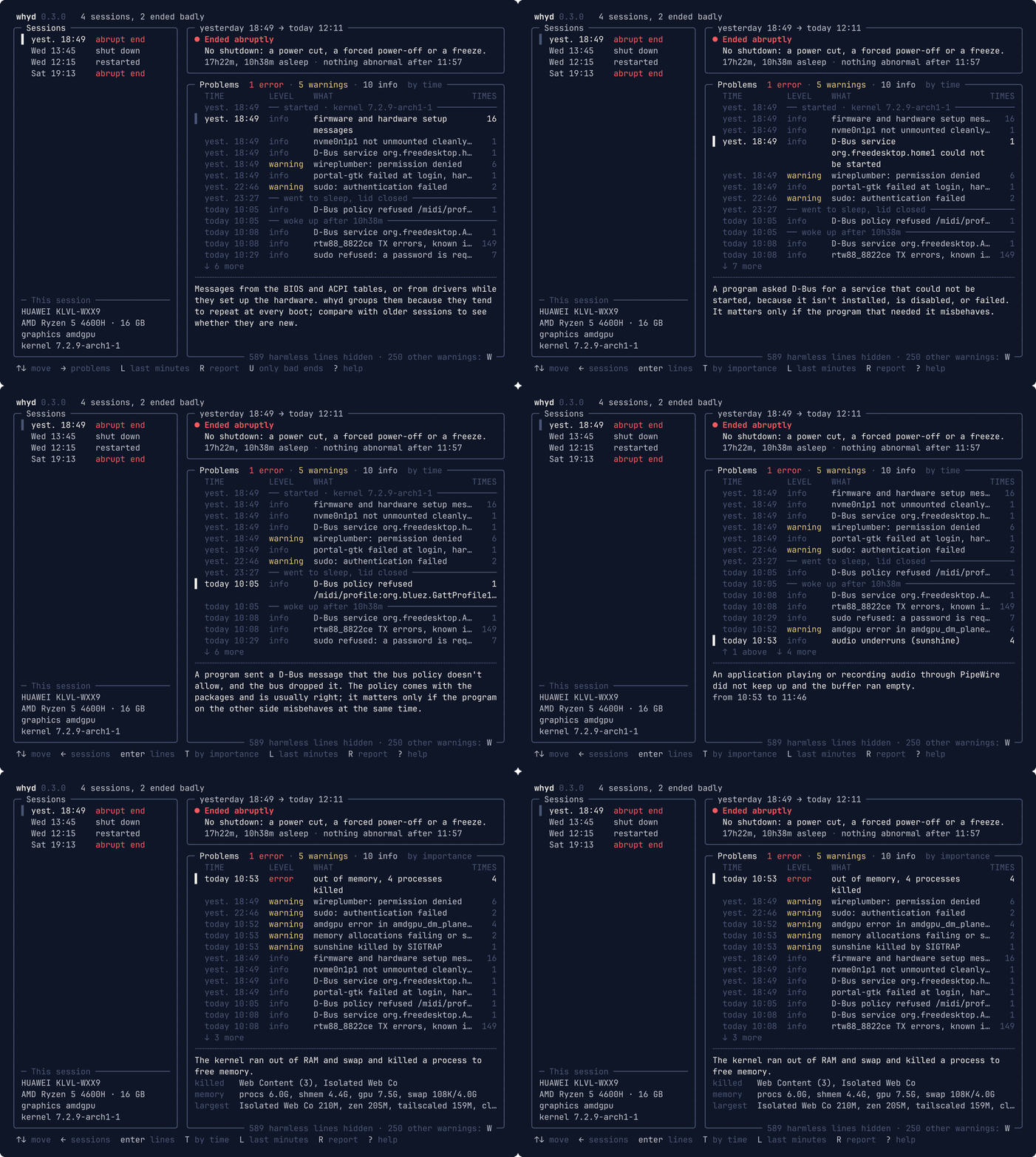
Your laptop froze, you held the power button, it came back up. The answer is in the journal, buried under thousands of harmless lines. whyd finds it:
- how it ended: clean power-off or reboot and who asked for it (
sudo reboot, the login screen, the power key), hard power-off, never woke up from sleep, kernel panic; and why each sleep began (lid closed, battery critical) - what went wrong before: out-of-memory kills, GPU errors, crashes, failed services, hung tasks, overheating, disk errors, each with a short explanation (the full list)
- the last minutes of the session, with the harmless lines folded away
- a report to paste on a forum, with addresses, hostname, user and Wi-Fi names removed
journalctl -b -1 -p err shows dozens of harmless errors, and nothing at all when the power
was cut: a hard power-off leaves no error behind. whyd tells the two apart, says how the
session ended, and explains each problem.
whyd only reads the journal: it doesn't go on the network, and on its own it writes nothing but
a small cache of the sessions already read, in ~/.cache/whyd.
Install
# any distribution: downloads the latest release, checks it, installs to /usr/local/bin
curl -fsSL https://raw.githubusercontent.com/vmaltarello/whyd/main/install.sh | sh

# Arch Linux and derivatives
curl -fLO https://github.com/vmaltarello/whyd/releases/latest/download/whyd_linux_amd64.pkg.tar.zst
sudo pacman -U ./whyd_linux_amd64.pkg.tar.zst

# Debian, Ubuntu and derivatives
curl -fLO https://github.com/vmaltarello/whyd/releases/latest/download/whyd_linux_amd64.deb
sudo apt install ./whyd_linux_amd64.deb

# Fedora (openSUSE: sudo zypper install with the same link)
sudo dnf install https://github.com/vmaltarello/whyd/releases/latest/download/whyd_linux_amd64.rpm

# from source, with Go 1.26 or newer
go install github.com/vmaltarello/whyd/cmd/whyd@latest
For ARM, replace amd64 with arm64. Without sudo, the script installs to ~/.local/bin with
... | PREFIX=~/.local sh; to update, run the same line again.
Requirements
- Linux with systemd: whyd is a single program and needs only
journalctl. - A user in the
systemd-journal,admorwheelgroup (the first user usually is, on Ubuntu and Arch); otherwise run whyd withsudo. - A journal kept on disk. If whyd finds only the current session even after a few reboots, the
journal is kept in memory and lost at every shutdown:
sudo mkdir -p /var/log/journaland reboot, and from then on whyd has the sessions to look at.
Use
whyd                 the previous session, in the interface (as text in a pipe or a file)
whyd -b -3           another session (same numbers as journalctl -b; 1 is the oldest)
whyd report          a Markdown report, redacted, ready to paste
whyd --file F        a session recorded on another machine
                     (journalctl -b -1 -o json --all > F, - for stdin)
whyd rules           the rules in use, checked
In the interface the arrows do everything: ↑ ↓ move, → and ← switch panel, Enter opens a
problem's journal lines. Problems are listed by time, between the moments of the session
(started, asleep, woke up, the end); T lists them by importance. U keeps only the sessions
that ended badly, L shows the last minutes, R the report, ? every key.
Rules
Problems are recognised by rules written in TOML, not code. Your own go in
~/.config/whyd/rules/ and can add to, change or turn off the built-in ones. Found a problem
whyd didn't recognise? A rule with a real example line is the best contribution:
docs/RULES.md explains the format step by step, and
CONTRIBUTING.md how to build, test and send changes.
License
Explorer des projets similaires
codecrafters-io/build-your-own-x
Maîtrisez la programmation en recréant de zéro vos technologies préférées.
561,398 étoilespublic-apis/public-apis
Une liste collective d'API gratuites
497,679 étoilesmorluto/rea
Rétro-ingénierie de n'importe quoi avec des agents, du comportement des applications jusqu'aux binaires natifs.
447,495 étoilesopenclaw/openclaw
L'IA qui fait vraiment les choses. Tout système d'exploitation, toute plateforme. À la manière du homard. 🦞
394,261 étoiles