
vitalik/django-ninja
vitalik/django-ninja has 9,243 GitHub stars and 626 forks. GitHot measured +1 stars in 24 hours and +11 in 7 days. Last checked 2026-11-12 07:13 UTC. Last push 2026-11-05.
Comment ces chiffres sont mesurés
💨 Fast, Async-ready, Openapi, type hints based framework for building APIs
Progression mesurée des étoiles
- in 24h
- +1
- in 7 days
- +11
- in 15 days
- Historique en cours
- in 1 month
- Historique en cours
Variations nettes sur des périodes qui se chevauchent, pas des totaux quotidiens. Les mesures absentes restent vides. Les étoiles indiquent l’intérêt, pas la qualité.
README.md
Original

Fast to learn, fast to code, fast to run


Django Ninja - Fast Django REST Framework
Django Ninja is a web framework for building APIs with Django and Python 3.6+ type hints.
Key features:
- Easy: Designed to be easy to use and intuitive.
- FAST execution: Very high performance thanks to Pydantic and async support.
- Fast to code: Type hints and automatic docs lets you focus only on business logic.
- Standards-based: Based on the open standards for APIs: OpenAPI (previously known as Swagger) and JSON Schema.
- Django friendly: (obviously) has good integration with the Django core and ORM.
- Production ready: Used by multiple companies on live projects (If you use django-ninja and would like to publish your feedback, please email [email protected]).
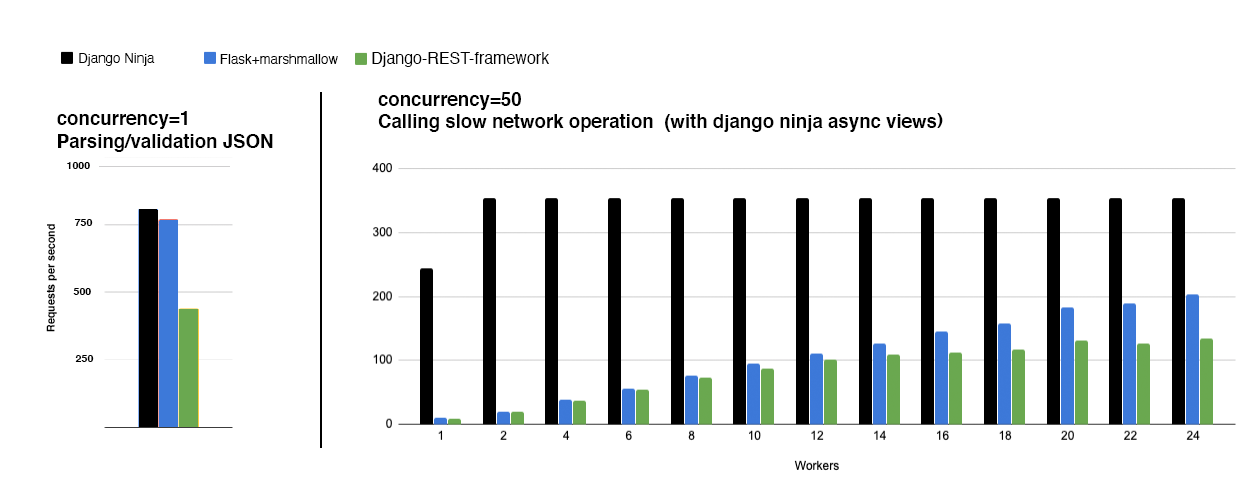
Documentation: https://django-ninja.dev
Installation
pip install django-ninja
Usage
In your django project next to urls.py create new api.py file:
from ninja import NinjaAPI

api = NinjaAPI()


@api.get("/add")
def add(request, a: int, b: int):
    return {"result": a + b}
Now go to urls.py and add the following:
...
from .api import api

urlpatterns = [
    path("admin/", admin.site.urls),
    path("api/", api.urls),  # <---------- !
]
That's it !
Now you've just created an API that:
- receives an HTTP GET request at
/api/add - takes, validates and type-casts GET parameters
aandb - decodes the result to JSON
- generates an OpenAPI schema for defined operation
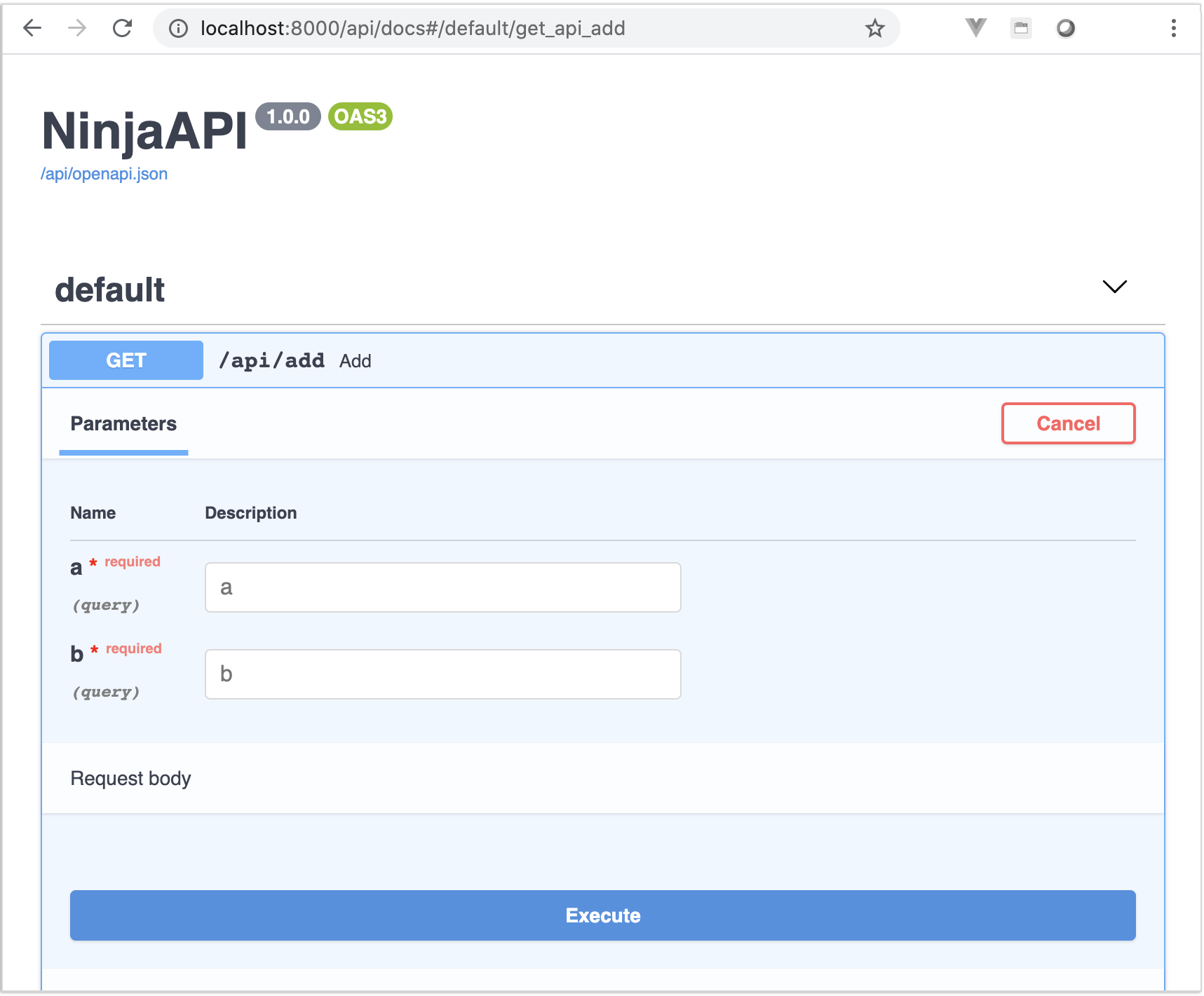
Interactive API docs
Now go to http://127.0.0.1:8000/api/docs
You will see the automatic interactive API documentation (provided by Swagger UI or Redoc):
Sponsors
What next?
- Read the full documentation here - https://django-ninja.dev
- To support this project, please give star it on Github.

- Share it via Twitter
- If you already using django-ninja, please share your feedback to [email protected]
Explorer des projets similaires
codecrafters-io/build-your-own-x
Maîtrisez la programmation en recréant de zéro vos technologies préférées.
561,976 étoilespublic-apis/public-apis
Une liste collective d'API gratuites
498,371 étoilesmorluto/rea
Rétro-ingénierie de n'importe quoi avec des agents, du comportement des applications jusqu'aux binaires natifs.
453,770 étoilesopenclaw/openclaw
L'IA qui fait vraiment les choses. Tout système d'exploitation, toute plateforme. À la manière du homard. 🦞
394,380 étoiles