
tinydesk-project/tinydesk
tinydesk-project/tinydesk has 105 GitHub stars and 15 forks. GitHot measured 0 stars in 24 hours. Last checked 2026-11-14 20:01 UTC. Last push 2026-11-13.
Progression mesurée des étoiles
- in 24h
- 0
- in 7 days
- Historique en cours
- in 15 days
- Historique en cours
- in 1 month
- Historique en cours
Variations nettes sur des périodes qui se chevauchent, pas des totaux quotidiens. Les mesures absentes restent vides. Les étoiles indiquent l’intérêt, pas la qualité.
À propos
A mouse-operated, windowed desktop for microcontrollers, drawn in your terminal: Files, Editor, Shell, MQTT, Modbus. Tested on ESP32 boards; also runs on Windows and Linux.
Outils de développementREADME.md
Original
v0.5.2 · Developer preview.
Install it from the browser: flash an ESP32 (Chrome or Edge, no toolchain), or download the Windows and Linux programs. Then open the board in the web terminal, or in PuTTY. Full documentation. To build from source, see below.
Desktop accounts and kiosk login, generated bitmap fonts, and GUI rendering and page caching have local guides.
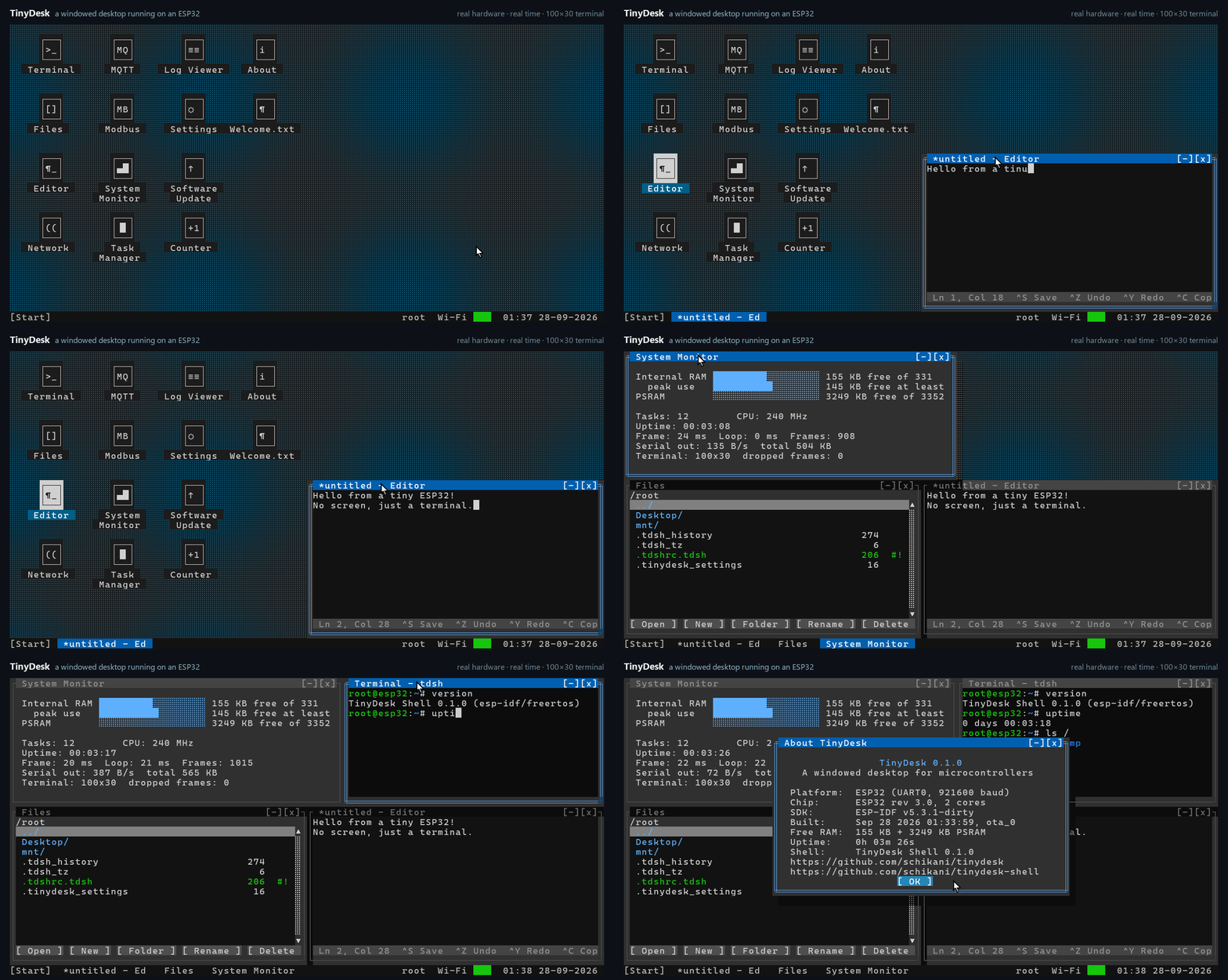
One continuous take from an ESP32 over USB serial, at normal speed: Editor, Files, System Monitor and Terminal are opened, dragged and resized side by side, then About. The board runs the desktop; the computer only displays it. Watch the MP4 or read the capture details.
TinyDesk draws overlapping, draggable text-mode windows with ANSI escape sequences and reads the keyboard and mouse back from the terminal. There is no display hardware: open a UTF-8 terminal with ANSI/VT cursor control and xterm mouse reporting (for example, configured PuTTY) on the board's serial port and you get a desktop, with a full shell, TinyDesk Shell, in a Terminal window. The core is portable C11; ports exist for ESP32 boards (ESP-IDF), Linux and Windows, and a new target needs four functions.
- Pure C11 core with no third-party dependencies. Screen buffers are allocated
at initialization; pasted text can grow a heap buffer with
realloc(). Only changed cells are sent each frame. - Runs on the ESP32-C6 (built-in USB port), the classic ESP32 and the ESP32-S3 (USB-UART, 921600 baud, PSRAM boards), and natively in Windows, Linux and macOS terminals for development.
- On the ESP32-S3, a USB keyboard and mouse can also be plugged into the
board itself (
usb.host = 1), with Windows-key shortcuts. - An SD card as a drive: it mounts by itself, shows on the desktop, and holds
apps and caches (
/sd/TinyDesk). - Bluetooth LE keyboards and mice on the ESP32 boards with PSRAM (
bt.enable = 1): pair them in the Bluetooth app or withbt; they reconnect by themselves. - Kiosk mode: one Python app on the whole screen instead of the desktop
(
kiosk.app), for operator panels; root's password leaves it. - Two displays (Settings -> Displays): the board's own link, Telnet clients or a second serial port, duplicated or extended on any side, each with its own resolution (and the CrowPanel's LCD turned); windows move between them with Alt+Shift+Left / Right.
- Windows with z-order, drag, resize, minimise, maximise; taskbar, start
menu, mouse and keyboard; copy and paste with the PC; screen size follows
the terminal. Desktop icons that stay where they are dragged, shortcuts
(Send to Desktop), each user's Start menu entries and
~/Appsfolder. - Apps: Terminal (the shell), Files, Editor, Network, MQTT, Modbus (TCP and
RTU), Task Manager, System Monitor, Log Viewer, Settings, Users
(accounts, Admin and User roles, rights, password hints), Recycle Bin
(restore what was deleted), Search (Alt+S: apps, files, folders), Software Update
(OTA), Pixels, Image Viewer (BMP, PPM, PGM), Mouse and Keyboard (with USB
on the ESP32-S3), On-screen keyboard (large touch keys), Store (installs
apps from the tinydesk-apps catalog), Remote Desktop (another TinyDesk's
desktop in a window, over Telnet), and a small API for writing your own, with a pixel
canvas (
td_canvas.h: two pixels per cell in any terminal, four with a font that has the quadrant characters). - Shell scripts (
.tdsh): variables,if/while/for, functions, pipes and redirection, run from the Terminal or with right-click → Run on the desktop. Language reference:docs/SCRIPTING.mdin TinyDesk Shell. - Python scripts with MicroPython:
py script.pyin the Terminal, orpyfor the interactive prompt. Scripts read and write TinyDesk's files, and thetinydeskmodule runs shell commands, publishes MQTT messages and reads or writes Modbus registers.asyncioruns several jobs in one script, and precompiled.mpyfiles load too. On the boards, root's scripts drive pins and buses withmachine(Pin, ADC, PWM, I2C, SPI, UART, NeoPixel LEDs); pins TinyDesk uses are refused. Withtduia script opens windows of its own (buttons, text boxes, lists, canvases, dialogs) and handles them in Python.with canvas.batch():groups visible drawing without intermediate frames (a 1000 ms deadline releases an unfinished group);canvas.bar()repaints a meter in one request. Canvas buttons belong to their page. The Editor colours Python, runs the file with F5 (output underneath), goes to the line of an error and suggests names. - Optional, root-only desktop takeover over unencrypted Telnet. SSH provides an encrypted shell and SFTP, not the windowed desktop. FTP, SMB mounts, Wi-Fi and W6100 Ethernet are available from the shell.
Choose a target
| Desktop target | Hardware | Console / limits |
|---|---|---|
| ESP32-S3 with PSRAM | 16 MB flash, Octal PSRAM | USB-UART, 921600 baud; optional USB keyboard and mouse on the chip's USB port (usb.host = 1): one device, no hubs, so a set with one receiver |
| ESP32-C6 | 8 MB flash | Built-in USB Serial/JTAG |
| Classic ESP32 with PSRAM | 16 MB flash, PSRAM required | USB-UART, 921600 baud |
| Classic ESP32, 4 MB | PSRAM optional | USB-UART, 921600 baud; 80×25, no SSH server or OTA |
| Elecrow CrowPanel 7.0 | ESP32-S3, 4 MB flash, 8 MB PSRAM | The desktop on its 800×480 touch LCD (100×30 cells, larger text with lcd.font), keyboard on UART0 at 921600 baud; kiosk HMIs; no OTA (one app slot) |
| Arduino Nano ESP32 | ESP32-S3, 16 MB flash, 8 MB Octal PSRAM | Built-in USB Serial/JTAG on its USB-C port; no USB keyboard; community port by aquasock |
| PC | Linux, Windows with MinGW, or macOS | Compatible terminal; host simulator for development |
TinyDesk Shell also runs as
standalone firmware or a POSIX host program. Every
release has the firmware
images for both editions, the PC programs and SHA256SUMS.txt; the
web installer uses the same files.
Community ports
Maintained by their authors, not built or tested here:
| Port | Hardware | Notes |
|---|---|---|
| TinyTang by @aquasock | BL616 on the Sipeed Tang Console 138K | Desktop over USB CDC, SD card as filesystem; loads FPGA cores and ROMs from the shell |
First connection
Open the board's serial port (any speed on the ESP32-C6; 921600 baud for
the desktop on the ESP32 and ESP32-S3, 115200 for the shell) and press a key. Sign in
as root. Run passwd locally (old password: TinyDesk) before enabling
remote access. Telnet starts disabled and requires an explicit Network
setting. Telnet, SSH and FTP refuse remote authentication while the factory
root password remains. After any Telnet takeover, physical rootrecover
requires a local reboot; disconnecting does not restore recovery privileges.
Build from source
The shell is a git submodule, so clone with --recursive:
git clone --recursive https://github.com/tinydesk-project/tinydesk.git
cd tinydesk
(Already cloned without it? git submodule update --init.)
| Target | Commands |
|---|---|
| Desktop on the PC (Linux, macOS, WSL, Windows with MinGW) | cmake -B build -G Ninja && cmake --build build && ./build/tinydesk |
| ESP32-S3 with PSRAM, ESP-IDF 5.3.1 | cd ports/esp32s3 && idf.py build && idf.py -p PORT -b 921600 flash |
| ESP32-C6, ESP-IDF 5.3.1 | cd ports/esp32c6 && idf.py build && idf.py -p PORT flash |
| Classic ESP32 with PSRAM, ESP-IDF 5.3.1 | cd ports/esp32 && idf.py build && idf.py -p PORT -b 921600 flash |
| Classic ESP32, 4 MB flash, no PSRAM | cd ports/esp32-4mb && idf.py build && idf.py -p PORT -b 921600 flash |
| Elecrow CrowPanel 7.0, ESP-IDF 5.3.1 | cd ports/crowpanel7 && idf.py build && idf.py -p PORT -b 921600 flash |
| Arduino Nano ESP32, ESP-IDF 5.3.1 | cd ports/nanoesp32 && idf.py build && idf.py -p PORT flash (read ports/nanoesp32/README.md first) |
Step-by-step instructions, terminal settings and troubleshooting are in the getting started guide.
Your board's pins
Pins are not in the code. RS-485 lines, W6100 Ethernet, the SD card, the
ESP32's console UART and the ESP32-S3's USB keyboard and mouse come from a
small key = value file:
cd ports/esp32c6
cp board.example.conf board.conf     # your wiring; board.conf is in .gitignore
On a running board, board set rs485.1.tx 16 (as root) does the same
without a rebuild. See
example board configuration.
Repositories
| Repository | What it is | Licence |
|---|---|---|
| tinydesk (this one) | the desktop, apps, ports and tools | MIT |
| tinydesk-shell | TinyDesk Shell (tdsh): the shell, its ESP-IDF services and host port; included here as the submodule third_party/tdsh |
MIT, with third-party parts under their own licences |
Licence
TinyDesk is released under the MIT licence.
The firmware images also contain third-party code under its own licence,
notably wolfSSH and wolfSSL (GPLv3) for the SSH/SFTP server. Firmware
built with them, including the prebuilt releases, is therefore distributed
under the terms of the GPLv3 as a whole. The source code in this repository
stays MIT. See third_party/tdsh/THIRD_PARTY_LICENSES.md
for the list. The py command is MicroPython
(MIT; its SHA-256 code from lib/crypto-algorithms is public domain), which
comes with TinyDesk Shell (third_party/tdsh/third_party/micropython, its
port in third_party/tdsh/python); TinyDesk adds its own modules in
ports/common/python. The pixel text of Python windows uses glyphs of the
console font Uni2-VGA16 by Dmitry Bolkhovityanov (MIT), in
apps/pyui_font.c. The CrowPanel's larger LCD fonts are made from
Terminus Font by Dimitar Toshkov Zhekov (SIL Open Font License 1.1,
ports/crowpanel7/main/OFL-Terminus.txt).
Contributing
Bug reports and pull requests are welcome: see CONTRIBUTING.md. The people who made TinyDesk are listed in CONTRIBUTORS.md. Security problems: please report them privately (GitHub → Security → Report a vulnerability), see SECURITY.md.
Canvas buttons also support press, release and cancel handlers. Keyed picture corners retain their actual canvas background; load UI skins with dither=False for clean fills. See hardware and Studio validation for the COM19/COM22 checks and the Studio examples/button_events.json starter.