
stephencelis/SQLite.swift
stephencelis/SQLite.swift has 10,188 GitHub stars and 1,612 forks. GitHot measured +1 stars in 24 hours and +1 in 7 days. Last checked 2026-11-11 13:38 UTC. Last push 2026-10-25.
Comment ces chiffres sont mesurés
A type-safe, Swift-language layer over SQLite3.
What you can do
- A pure-Swift interface
- A type-safe, optional-aware SQL expression builder
- A flexible, chainable, lazy-executing query layer
- Automatically-typed data access
Progression mesurée des étoiles
- in 24h
- +1
- in 7 days
- +1
- in 15 days
- Mise à jour retardée
- in 1 month
- Mise à jour retardée
Variations nettes sur des périodes qui se chevauchent, pas des totaux quotidiens. Les mesures absentes restent vides. Les étoiles indiquent l’intérêt, pas la qualité.
README.md
OriginalSQLite.swift


A type-safe, Swift-language layer over SQLite3.
SQLite.swift provides compile-time confidence in SQL statement syntax and intent.
Features
- A pure-Swift interface
- A type-safe, optional-aware SQL expression builder
- A flexible, chainable, lazy-executing query layer
- Automatically-typed data access
- A lightweight, uncomplicated query and parameter binding interface
- Developer-friendly error handling and debugging
- Full-text search support
- Well-documented
- Extensively tested
- SQLCipher support via Swift Package Manager
- Schema query/migration
- First-class WAL mode and journaling configuration via
Connection(_, journalMode: .wal)and theenableWAL()/walCheckpoint(...)APIs - Works on Linux (with some limitations)
- Active support at StackOverflow, and Gitter Chat Room (experimental)
Usage
import SQLite

// Wrap everything in a do...catch to handle errors
do {
    let db = try Connection("path/to/db.sqlite3")

    let users = Table("users")
    let id = SQLite.Expression<Int64>("id")
    let name = SQLite.Expression<String?>("name")
    let email = SQLite.Expression<String>("email")

    try db.run(users.create { t in
        t.column(id, primaryKey: true)
        t.column(name)
        t.column(email, unique: true)
    })
    // CREATE TABLE "users" (
    //     "id" INTEGER PRIMARY KEY NOT NULL,
    //     "name" TEXT,
    //     "email" TEXT NOT NULL UNIQUE
    // )

    let insert = users.insert(name <- "Alice", email <- "[email protected]")
    let rowid = try db.run(insert)
    // INSERT INTO "users" ("name", "email") VALUES ('Alice', '[email protected]')

    for user in try db.prepare(users) {
        print("id: \(user[id]), name: \(user[name]), email: \(user[email])")
        // id: 1, name: Optional("Alice"), email: [email protected]
    }
    // SELECT * FROM "users"

    let alice = users.filter(id == rowid)

    try db.run(alice.update(email <- email.replace("mac.com", with: "me.com")))
    // UPDATE "users" SET "email" = replace("email", 'mac.com', 'me.com')
    // WHERE ("id" = 1)

    try db.run(alice.delete())
    // DELETE FROM "users" WHERE ("id" = 1)

    try db.scalar(users.count) // 0
    // SELECT count(*) FROM "users"
} catch {
    print (error)
}
[!WARNING] Iterating the sequence that
prepare(_:)returns force-tries each step. If SQLite reports an error partway through the results (for exampleSQLITE_BUSYwhile another connection holds a lock, or an I/O error), your app crashes instead of throwing. To handle these errors, read rows withprepareRowIterator(_:)instead. See Failable iteration.
Note that Expression should be written as SQLite.Expression to avoid
conflicts with the SwiftUI.Expression if you are using SwiftUI too.
SQLite.swift also works as a lightweight, Swift-friendly wrapper over the C API.
// Wrap everything in a do...catch to handle errors
do {
    // ...

    let stmt = try db.prepare("INSERT INTO users (email) VALUES (?)")
    for email in ["[email protected]", "[email protected]"] {
        try stmt.run(email)
    }

    db.totalChanges    // 3
    db.changes         // 1
    db.lastInsertRowid // 3

    for row in try db.prepare("SELECT id, email FROM users") {
        print("id: \(row[0]), email: \(row[1])")
        // id: Optional(2), email: Optional("[email protected]")
        // id: Optional(3), email: Optional("[email protected]")
    }

    try db.scalar("SELECT count(*) FROM users") // 2
} catch {
    print (error)
}
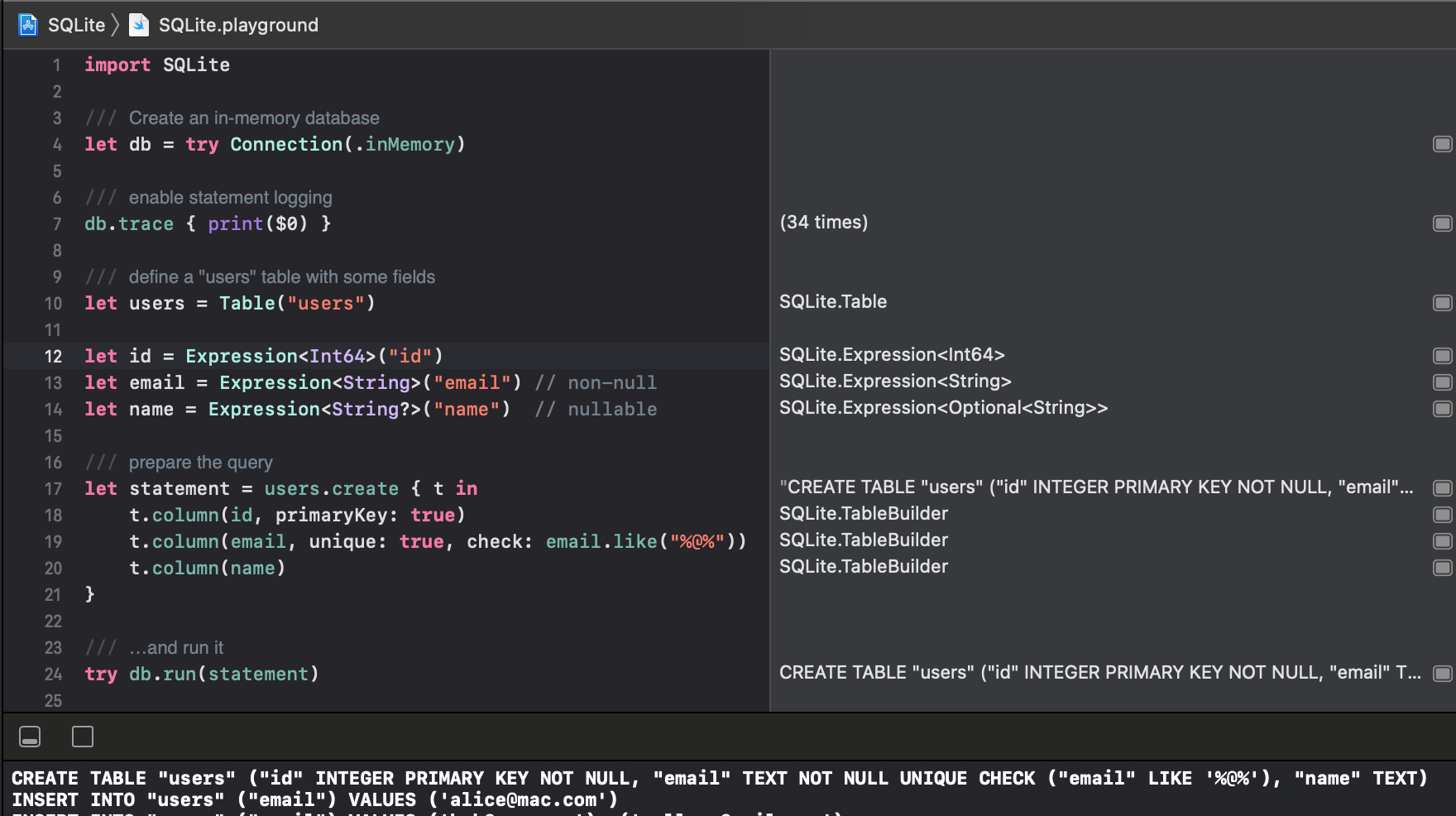
Read the documentation or explore more, interactively, from the Xcode project’s playground.
Installation
Swift Package Manager
The Swift Package Manager is a tool for managing the distribution of Swift code.
- Add the following to your
Package.swiftfile:
dependencies: [
    .package(url: "https://github.com/stephencelis/SQLite.swift.git", from: "0.17.0")
]
- Build your project:
$ swift build
See the Tests/SPM folder for a small demo project which uses SPM.
Manual
To install SQLite.swift as an Xcode sub-project:
Drag the SQLite.xcodeproj file into your own project. (Submodule, clone, or download the project first.)
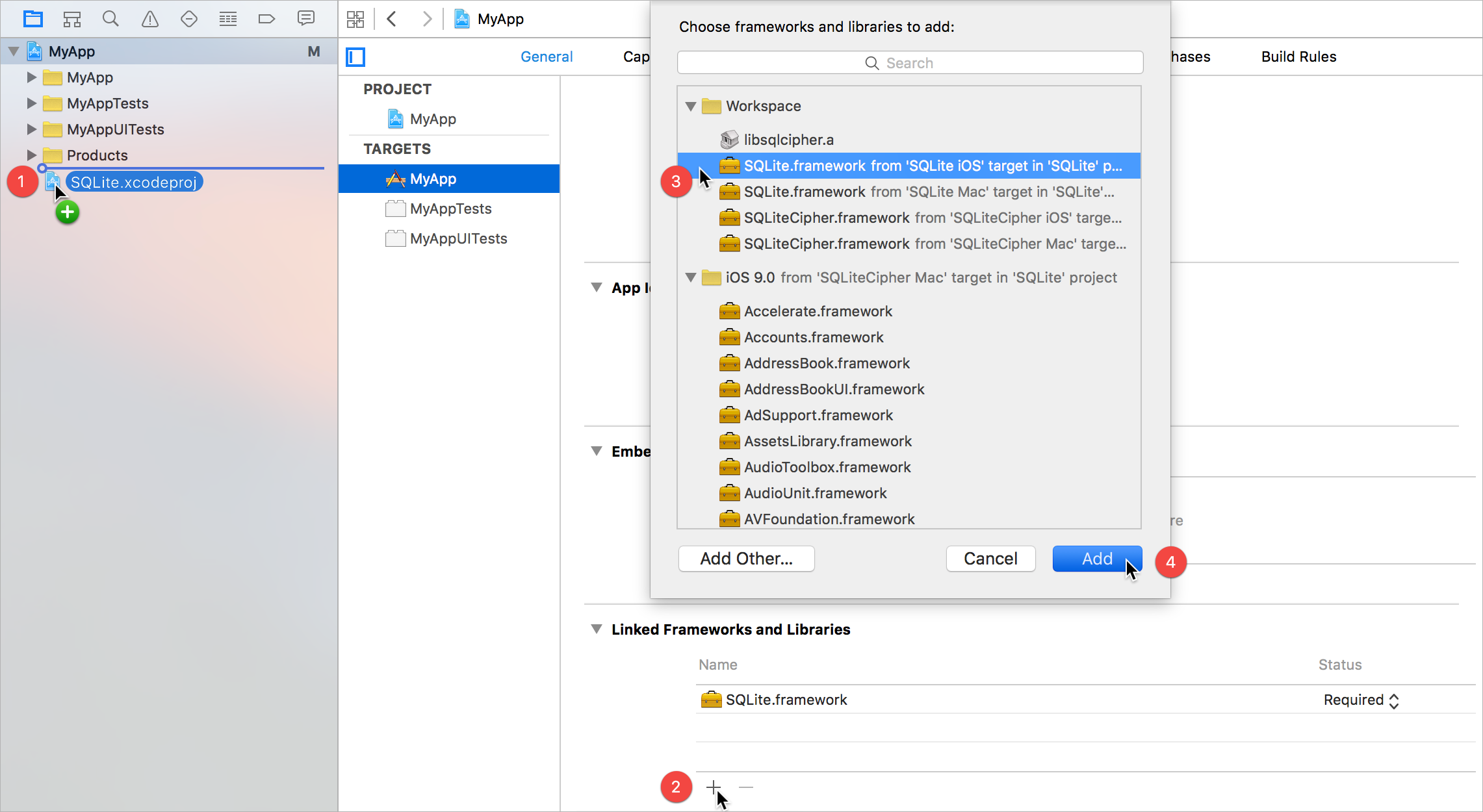
In your target’s General tab, click the + button under Linked Frameworks and Libraries.
Select the appropriate SQLite.framework for your platform.
Add.
Some additional steps are required to install the application on an actual device:
In the General tab, click the + button under Embedded Binaries.
Select the appropriate SQLite.framework for your platform.
Add.
Communication
Read the contributing guidelines. The TL;DR (but please; R):
- Need help or have a general question? Ask on Stack
Overflow (tag
sqlite.swift). - Found a bug or have a feature request? Open an issue.
- Want to contribute? Submit a pull request.
Original author
License
SQLite.swift is available under the MIT license. See the LICENSE file for more information.
Related
These projects enhance or use SQLite.swift:
- SQLiteMigrationManager.swift (inspired by FMDBMigrationManager)
Alternatives
Looking for something else? Try another Swift wrapper (or FMDB):
Explorer des projets similaires
Asabeneh/30-Days-Of-Python
Le défi de programmation 30 Days of Python est un guide pas à pas pour apprendre le langage de programmation Python en 30 jours. Ce défi peut prendre plus de 100 jours. Avancez à votre rythme. Ces vidéos peuvent aussi vous aider : https://www.youtube.com/channel/UC7PNRuno1rzYPb1xLa4yktw
78,618 étoilesgrafana/grafana
Plateforme ouverte et composable d’observabilité et de visualisation de données. Visualise les métriques, les journaux et les traces issus de plusieurs sources, comme Prometheus, Loki, Elasticsearch, InfluxDB, Postgres et bien d’autres.
77,859 étoilesredis/redis
Pour les développeurs qui créent des applications en temps réel pilotées par les données, Redis est le cache, le serveur de structures de données et le moteur de requêtes documentaires et vectorielles préféré, le plus rapide et le plus riche en fonctionnalités.
77,472 étoilesapache/superset
Apache Superset est une plateforme de visualisation et d'exploration de données.
75,495 étoiles