
sharkdp/pastel
sharkdp/pastel has 6,537 GitHub stars and 139 forks. GitHot measured +2 stars in 24 hours and +16 in 7 days. Last checked 2026-11-09 00:57 UTC. Last push 2026-05-01.
Comment ces chiffres sont mesurés
Un outil en ligne de commande pour générer, analyser, convertir et manipuler des couleurs
Progression mesurée des étoiles
- in 24h
- +2
- in 7 days
- +16
- in 15 days
- Historique en cours
- in 1 month
- Historique en cours
Variations nettes sur des périodes qui se chevauchent, pas des totaux quotidiens. Les mesures absentes restent vides. Les étoiles indiquent l’intérêt, pas la qualité.
README.md
Originalpastel




pastel is a command-line tool to generate, analyze, convert and manipulate colors. It supports many different color formats and color spaces like RGB (sRGB), HSL, CIELAB, CIELCh as well as ANSI 8-bit and 24-bit representations.
In action
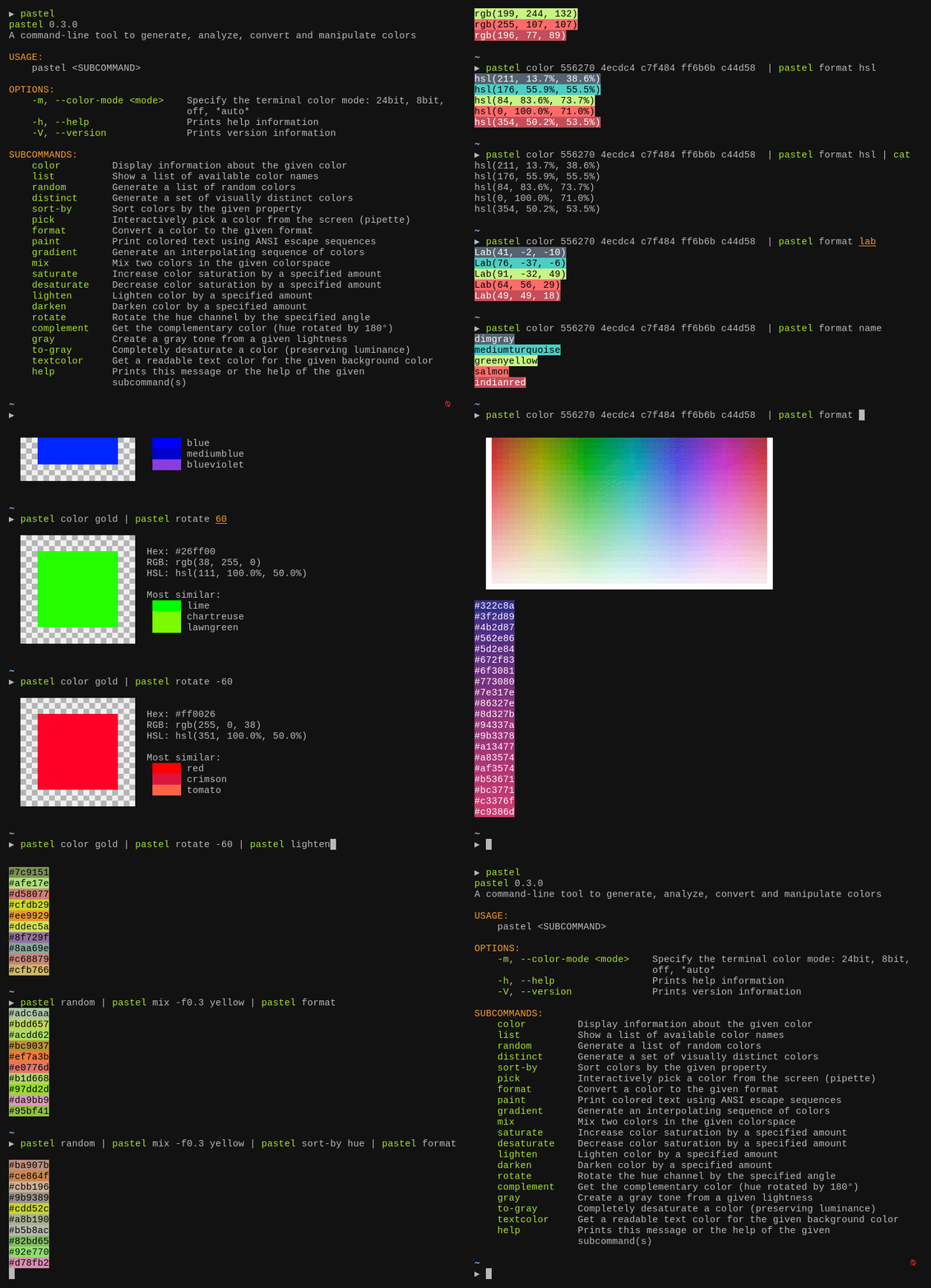
Tutorial
Getting help
pastel provides a number of commands like saturate, mix or paint. To see a complete list, you can simply run
pastel
To get more information about a specific subcommand (say mix), you can call pastel mix -h or pastel help mix.
Composition
Many pastel commands can be composed by piping the output of one command to another, for example:
pastel random | pastel mix red | pastel lighten 0.2 | pastel format hex
Specifying colors
Colors can be specified in many different formats:
lightslategray
'#778899'
778899
789
'rgb(119, 136, 153)'
'119,136,153'
'hsl(210, 14.3%, 53.3%)'
Colors can be passed as positional arguments, for example:
pastel lighten 0.2 orchid orange lawngreen
They can also be read from standard input. So this is equivalent:
printf "%s\n" orchid orange lawngreen | pastel lighten 0.2
You can also explicitly specify which colors you want to read from the input. For example, this mixes red (which is read from STDIN) with blue (which is passed on the command line):
pastel color red | pastel mix - blue
Use cases and demo
Converting colors from one format to another
pastel format hsl ff8000
Show and analyze colors on the terminal
pastel color "rgb(255,50,127)"

pastel color 556270 4ecdc4 c7f484 ff6b6b c44d58
Pick a color from somewhere on the screen
pastel pick
Generate a set of N visually distinct colors
pastel distinct 8
Get a list of all X11 / CSS color names
pastel list
Name a given color
pastel format name 44cc11
Print colorized text from a shell script
bg="hotpink"
fg="$(pastel textcolor "$bg")"

pastel paint "$fg" --on "$bg" "well readable text"
pastel paint -n black --on red --bold "   ERROR!   "
echo " A serious error"

pastel paint -n black --on yellow --bold "  WARNING!  "
echo " A warning message"

pastel paint -n black --on limegreen --bold "    INFO    "
echo -n " Informational message with a "
echo -n "highlighted" | pastel paint -n default --underline
echo " word"
Installation
On Debian-based systems
You can download the latest Debian package from the release page and install it via dpkg:
wget "https://github.com/sharkdp/pastel/releases/download/v0.12.0/pastel_0.12.0_amd64.deb"
sudo dpkg -i pastel_0.12.0_amd64.deb
Alternatively, pastel is available in the official Debian repositories (currently in testing and unstable):
sudo apt update
sudo apt install pastel
On Arch Linux
You can install pastel from the Extra repositories:
sudo pacman -S pastel
On Nix
You can install pastel from the Nix package:
nix-env --install pastel
On MacOS
You can install pastel via Homebrew
brew install pastel
On Windows
You can install pastel via Scoop
scoop install pastel
With Winget
You can install pastel via Winget:
winget install sharkdp.pastel
Via snap package
sudo snap install pastel
On NetBSD
Using the package manager:
pkgin install pastel
From source:
cd /usr/pkgsrc/graphics/pastel
make install
On other distributions
Check out the release page for binary builds.
Via cargo (source)
If you do not have cargo, install using rust's installation documentation.
If you have Rust 1.83 or higher, you can install pastel from source via cargo:
cargo install pastel
Alternatively, you can install pastel directly from this repository by using
git clone https://github.com/sharkdp/pastel
cargo install --path ./pastel
Resources
Interesting Wikipedia pages:
- Color difference
- CIE 1931 color space
- CIELAB color space
- Line of purples
- Impossible color
- sRGB
- Color theory
- Eigengrau
Color names:
- XKCD Color Survey Results
- Peachpuffs and Lemonchiffons - talk about named colors
- List of CSS color keywords
Maximally distinct colors:
- How to automatically generate N "distinct" colors?
- Publication on two algorithms to generate (maximally) distinct colors
Other articles and videos:
License
Licensed under either of
- Apache License, Version 2.0, (LICENSE-APACHE or http://www.apache.org/licenses/LICENSE-2.0)
- MIT license (LICENSE-MIT or http://opensource.org/licenses/MIT)
at your option.
Explorer des projets similaires
codecrafters-io/build-your-own-x
Maîtrisez la programmation en recréant de zéro vos technologies préférées.
561,168 étoilespublic-apis/public-apis
Une liste collective d'API gratuites
497,378 étoilesmorluto/rea
Rétro-ingénierie de n'importe quoi avec des agents, du comportement des applications jusqu'aux binaires natifs.
444,731 étoilesopenclaw/openclaw
L'IA qui fait vraiment les choses. Tout système d'exploitation, toute plateforme. À la manière du homard. 🦞
394,222 étoiles