
sasha240100/between.js
sasha240100/between.js has 702 GitHub stars and 18 forks. GitHot measured 0 stars in 24 hours and -1 in 7 days. Last checked 2026-11-24 22:03 UTC. Last push 2023-04-24.
Progression mesurée des étoiles
- in 24h
- 0
- in 7 days
- -1
- in 15 days
- Historique en cours
- in 1 month
- Historique en cours
Variations nettes sur des périodes qui se chevauchent, pas des totaux quotidiens. Les mesures absentes restent vides. Les étoiles indiquent l’intérêt, pas la qualité.
À propos
Moteur de tweening léger pour JavaScript (ES6)
Création et médiasREADME.md
Original
Lightweight JavaScript (ES6) tweening library.



EXAMPLES
DOCUMENTATION
Purpose
Make tweening usage convenient and powerful. There are certain things that we were following while developed this library, we wanted to make it:
- Lightweight :snowflake: JS Tweening library.
The library is only
9.08 Kb (3Kb gzip)
- Performant :zap: JS Tweening library.
It uses optimization patterns to speed up & smooth animation.
- Modern :gem: JS Tweening library
The library is written in
ES6, compiled to ES5 for global browsers support and providesES6 API.
Install
With npm
$ npm install between.js
Or fetch from CDN
<script src="https://rawgit.com/sasha240100/between.js/master/build/between.js"></script>
Basic usage
Module
import Between from 'between.js';

// new Between(from, to).time(duration)
new Between(1, 10).time(1000)
  .on('update', (value) => { // This callback is executed in every frame
      console.log(value);
  });
Or in HTML:
<script src="./path/to/between.js"></script>
<script>
  new Between(1, 10).time(1000)
    .on('update', (value) => {
        console.log(value);
    });
</script>
API
// Constructor
new Between(
 [Number|Object|Array] from,
 [Number|Object|Array] to
)

// Methods
  .time([Number] duration) // Set duration
  .loop([String] mode, [?Number] repeatTimes) // Set loop mode, if "repeatTimes" is falsy, treats as "endless"
  .easing([Function] easing) // Set easing function
  .on([String] eventName, [Function] callback) // Add event listener
  .pause() // Pauses
  .play() // Resumes

// Getters
  .isPaused // returns true if paused
There is no need to "start" the tween. It is executed immediately once it was created.
Events
import Between from 'between.js';

new Between(1, 10).time(1000)
  .on('update', (value) => {
      console.log(value);
  })
  .on('start', (value) => {
      console.log(value);
  })
  .on('pause', (value) => {
      console.log(value);
  })
  .on('play', (value) => {
      console.log(value);
  })
  .on('complete', (value) => {
      console.log(value);
  });
Different values
- Numbers
- Arrays
- Objects
Numbers
import Between from 'between.js';

new Between(1, 10).time(1000)
  .on('update', (value) => {
      console.log(value);
  });
Arrays
import Between from 'between.js';

new Between([1, 5], [10, 10]).time(1000)
  .on('update', (value) => {
      console.log(value);
   });
Objects
import Between from 'between.js';

new Between({x: 2, y: 3, z: 4}, {x: 4, y: 6, z: 10}).time(1000)
  .on('update', (value) => {
      console.log(value);
  });
Looping
Repeat N times
import Between from 'between.js';

new Between(1, 10).time(4000)
  .loop('repeat', N)
  .on('update', (value, {times}) => {
      console.log(value);
      console.log(times);
  });
Repeat endless
import Between from 'between.js';

new Between(1, 10).time(4000)
  .loop('repeat')
  .on('update', (value) => {
      console.log(value);
  });
Bounce N times
import Between from 'between.js';

new Between(1, 10).time(4000)
  .loop('bounce', N)
  .on('update', (value, {times}) => {
      console.log(value);
      console.log(times);
  });
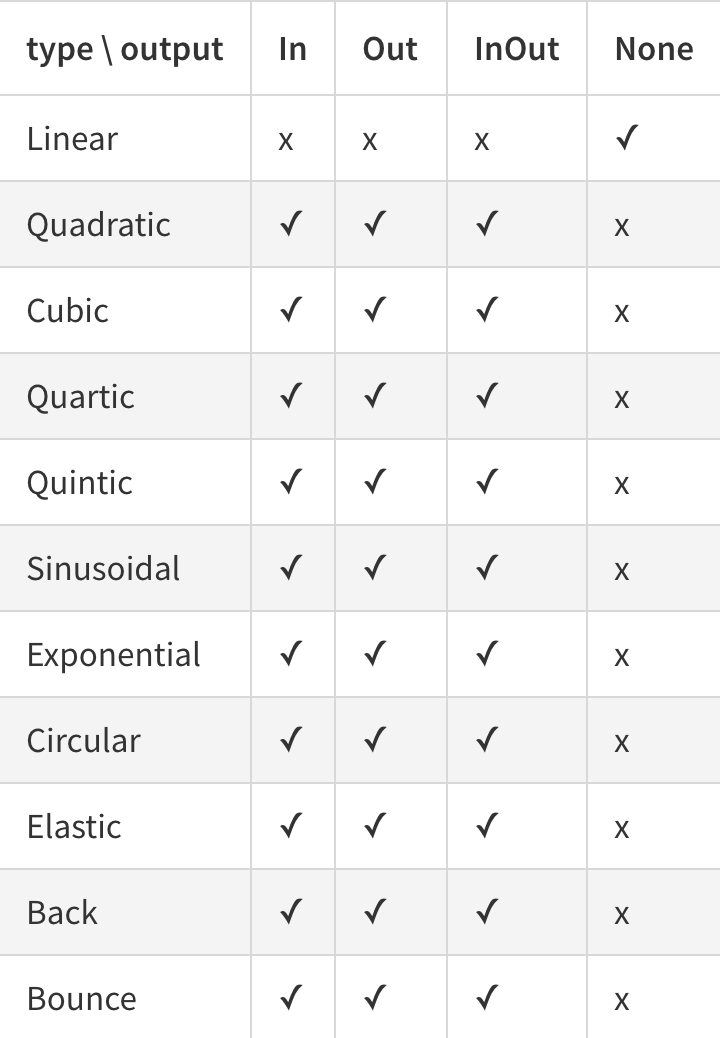
Easing
import Between from 'between.js';
import Easing from 'easing-functions';

// choose easing mode frome easing-functions

new Between(1, 10).time(4000)
  .easing(Between.Easing.Cubic.InOut)
  .on('update', (value) => {
      console.log(value);
  });
Color
Color types:
- HEX
- HSL
- RGB
- Words (red, yellow...)
import Between from 'between.js';
import ColorPlugin from 'between.js/build/dom-color.between.js';

Between._plugins.color = ColorPlugin;

new Between('red', 'rgb(255,40,30)').time(4000)
  .on('update', (value) => {
      console.log(value);
  });
Or in HTML:
<script src="./path/to/between.js"></script>
<script src="./path/to/dom-color.between.js"></script>
Mixed examples
import Between from 'between.js';
import Easing from 'easing-functions';
import ColorPlugin from 'between.js/build/dom-color.between.js';

Between._plugins.color = ColorPlugin;

// choose easing mode frome easing-functions

new Between('red', 'rgb(255,40,30)').time(4000)
  .loop('repeat', 3)
  .easing(Between.Easing.Linear)
  .on('update', (value) => {
      console.log(value);
  });
import Between from 'between.js';
import Easing from 'easing-functions';

// choose easing mode frome easing-functions

new Between(1, 10).time(4000)
  .loop('bounce', 3)
  .easing(Between.Easing.Cubic.InOut)
  .on('update', (value) => {
      console.log(value);
  });
import Between from 'between.js';
import Easing from 'easing-functions';

// choose easing mode frome easing-functions

new Between(1, 10).time(4000)
  .loop('repeat', 4)
  .easing(Between.Easing.Elastic.In)
  .on('update', (value) => {
      console.log(value);
  })
  .on('complete', (value) => {
      console.log(value);
  });
Explorer des projets similaires
Chargement…