
rffrasca/PDFKeeper
À propos
Open Source PDF Document Management
DonnéesWhat you can do
- Store and manage PDF documents in a single‑user or compatible multi‑user (on‑premises or cloud) database, where they are indexed to provide full‑text search functionality.
- Upload PDF documents individually or in bulk. In addition, Upload Profile folders can be set up to support integration and automation workflows.
- Apply a Title, Author, Subject, Category, and Tax Year to selected documents or automatically during upload. Keywords can also be applied during upload.
- Set the flag state on a selected document—or automatically during upload—to mark items for follow‑up.
Progression mesurée des étoiles
- in 24h
- 0
- in 7 days
- 0
- in 15 days
- Historique en cours
- in 1 month
- Historique en cours
Variations nettes sur des périodes qui se chevauchent, pas des totaux quotidiens. Les mesures absentes restent vides. Les étoiles indiquent l’intérêt, pas la qualité.
README.md
Original
PDFKeeper
Open Source PDF Document Management



Report Bug
·
Request Feature/Enhancement
·
Request Database Compatibility
·
Forum
Table of Contents
About The Project
Description
PDFKeeper is a free, open‑source application that stores and organizes PDF documents in a searchable database.
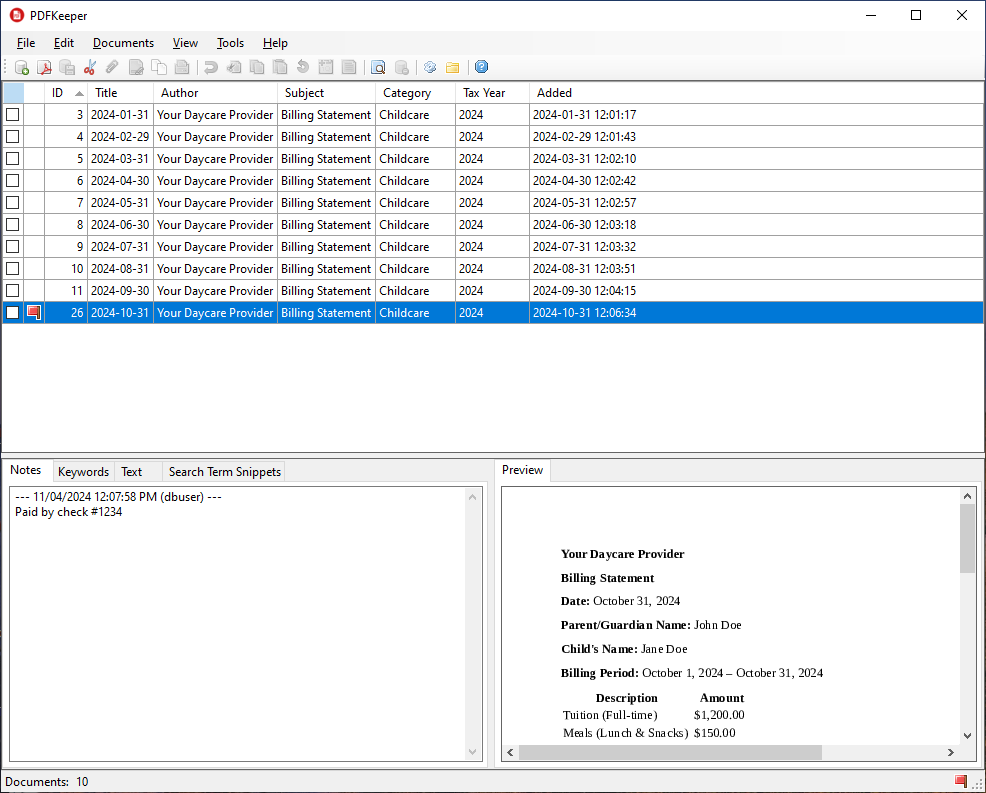
User Interface in version 11.2.0 and later.
Features
- Store and manage PDF documents in a single‑user or compatible multi‑user (on‑premises or cloud) database, where they are indexed to provide full‑text search functionality.
- Upload PDF documents individually or in bulk. In addition, Upload Profile folders can be set up to support integration and automation workflows.
- Apply a Title, Author, Subject, Category, and Tax Year to selected documents or automatically during upload. Keywords can also be applied during upload.
- Set the flag state on a selected document—or automatically during upload—to mark items for follow‑up.
- Add notes to a selected document, including date, time, and user account name. All notes can be edited and are indexed by the database.
- Find documents by Search Term, by Selections (Author, Subject, Category, and/or Tax Year), or by Date Added. You can also list Flagged Documents or All Documents.
- With PDFKeeper, you can perform the following functions on a selected document: view the PDF with the bundled or default viewer; burst the PDF; extract attachments and embedded files from the PDF; copy the PDF to the Clipboard or drag and drop it into other applications; replace the PDF; manage the document’s flag state; view and edit notes; and display keywords, a PDF preview, extracted text, and search‑term snippets (when applicable).
- Export selected PDF documents—including their category, tax year, notes, and flag state—from the database for easy importing.
These features are available in version 12.0.0 and later.
Release History
Full release history is available in the Changelog.
Getting Started
Installation
- Client prerequisites and compatible Database Management Systems are listed on the release page.
- Download and install the latest version of PDFKeeper from here or install using Windows Package Manager (winget install pdfkeeper --source=winget).
- PDFKeeper is installed per-user.
- Database setup instructions are available in the Help file that can be viewed post-install.
Building from Source
Build Instructions for v12 is available here.
Build Instructions for v11 is available here.
Build Instructions for v10 is available here.
License
PDFKeeper is distributed under the terms of the GNU General Public License (GPL) version 3.


Contact
Robert F. Frasca - Project Owner and Maintainer
Acknowledgments
Explorer des projets similaires
Chargement…