
À propos
[ICCV'21] Apprentissage d’un Transformer spatio-temporel pour le suivi visuel
ApprentissageProgression mesurée des étoiles
- in 24h
- 0
- in 7 days
- 0
- in 15 days
- Historique en cours
- in 1 month
- Historique en cours
Variations nettes sur des périodes qui se chevauchent, pas des totaux quotidiens. Les mesures absentes restent vides. Les étoiles indiquent l’intérêt, pas la qualité.
README.md
OriginalSTARK
The official implementation of the ICCV2021 paper Learning Spatio-Temporal Transformer for Visual Tracking
Hiring research interns for visual transformer projects: [email protected]
News
- STARK has been integrated into the mmtracking library!
- :trophy: We are the Winner of VOT-21 RGB-D challenge
- :trophy: We won the Runner-ups in VOT-21 Real-Time and Long-term challenges
- We release an extremely fast version of STARK called STARK-Lightning :zap: . It can run at 200~300 FPS on a RTX TITAN GPU. Besides, its performance can beat DiMP50, while the model size is even less than that of SiamFC! More details can be found at STARK_Lightning_En.md/中文教程
- The raw results of STARK and other trackers on NOTU (NFS, OTB100, TC128, UAV123) have been uploaded to here
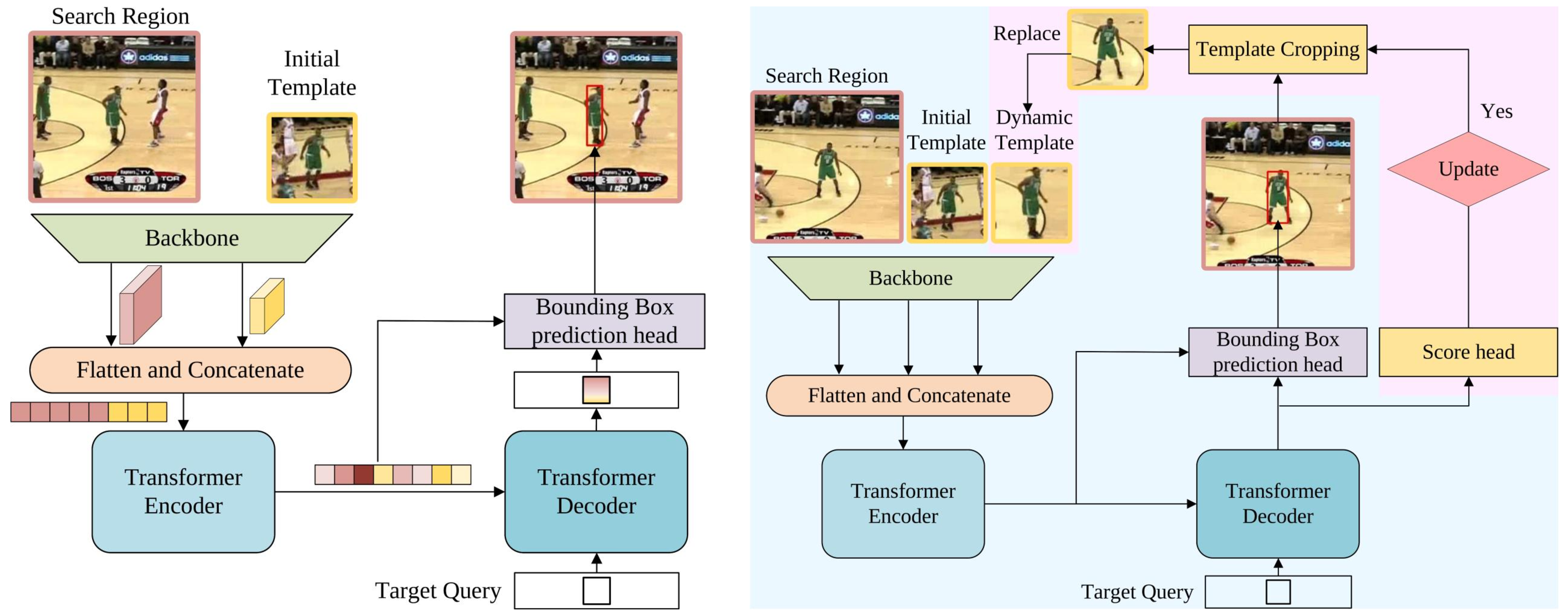
Highlights
End-to-End, Post-processing Free
STARK is an end-to-end tracking approach, which directly predicts one accurate bounding box as the tracking result.
Besides, STARK does not use any hyperparameters-sensitive post-processing, leading to stable performances.
Real-Time Speed
STARK-ST50 and STARK-ST101 run at 40FPS and 30FPS respectively on a Tesla V100 GPU.
Strong performance
| Tracker | LaSOT (AUC) | GOT-10K (AO) | TrackingNet (AUC) |
|---|---|---|---|
| STARK | 67.1 | 68.8 | 82.0 |
| TransT | 64.9 | 67.1 | 81.4 |
| TrDiMP | 63.7 | 67.1 | 78.4 |
| Siam R-CNN | 64.8 | 64.9 | 81.2 |
Purely PyTorch-based Code
STARK is implemented purely based on the PyTorch.
Install the environment
Option1: Use the Anaconda
conda create -n stark python=3.6
conda activate stark
bash install_pytorch17.sh
Option2: Use the docker file
We provide the complete docker at here
Data Preparation
Put the tracking datasets in ./data. It should look like:
${STARK_ROOT}
 -- data
     -- lasot
         |-- airplane
         |-- basketball
         |-- bear
         ...
     -- got10k
         |-- test
         |-- train
         |-- val
     -- coco
         |-- annotations
         |-- images
     -- trackingnet
         |-- TRAIN_0
         |-- TRAIN_1
         ...
         |-- TRAIN_11
         |-- TEST
Set project paths
Run the following command to set paths for this project
python tracking/create_default_local_file.py --workspace_dir . --data_dir ./data --save_dir .
After running this command, you can also modify paths by editing these two files
lib/train/admin/local.py  # paths about training
lib/test/evaluation/local.py  # paths about testing
Train STARK
Training with multiple GPUs using DDP
# STARK-S50
python tracking/train.py --script stark_s --config baseline --save_dir . --mode multiple --nproc_per_node 8  # STARK-S50
# STARK-ST50
python tracking/train.py --script stark_st1 --config baseline --save_dir . --mode multiple --nproc_per_node 8  # STARK-ST50 Stage1
python tracking/train.py --script stark_st2 --config baseline --save_dir . --mode multiple --nproc_per_node 8 --script_prv stark_st1 --config_prv baseline  # STARK-ST50 Stage2
# STARK-ST101
python tracking/train.py --script stark_st1 --config baseline_R101 --save_dir . --mode multiple --nproc_per_node 8  # STARK-ST101 Stage1
python tracking/train.py --script stark_st2 --config baseline_R101 --save_dir . --mode multiple --nproc_per_node 8 --script_prv stark_st1 --config_prv baseline_R101  # STARK-ST101 Stage2
(Optionally) Debugging training with a single GPU
python tracking/train.py --script stark_s --config baseline --save_dir . --mode single
Test and evaluate STARK on benchmarks
- LaSOT
python tracking/test.py stark_st baseline --dataset lasot --threads 32
python tracking/analysis_results.py # need to modify tracker configs and names
- GOT10K-test
python tracking/test.py stark_st baseline_got10k_only --dataset got10k_test --threads 32
python lib/test/utils/transform_got10k.py --tracker_name stark_st --cfg_name baseline_got10k_only
- TrackingNet
python tracking/test.py stark_st baseline --dataset trackingnet --threads 32
python lib/test/utils/transform_trackingnet.py --tracker_name stark_st --cfg_name baseline
- VOT2020
Before evaluating "STARK+AR" on VOT2020, please install some extra packages following external/AR/README.md
cd external/vot20/<workspace_dir>
export PYTHONPATH=<path to the stark project>:$PYTHONPATH
bash exp.sh
- VOT2020-LT
cd external/vot20_lt/<workspace_dir>
export PYTHONPATH=<path to the stark project>:$PYTHONPATH
bash exp.sh
Test FLOPs, Params, and Speed
# Profiling STARK-S50 model
python tracking/profile_model.py --script stark_s --config baseline
# Profiling STARK-ST50 model
python tracking/profile_model.py --script stark_st2 --config baseline
# Profiling STARK-ST101 model
python tracking/profile_model.py --script stark_st2 --config baseline_R101
# Profiling STARK-Lightning-X-trt
python tracking/profile_model_lightning_X_trt.py
Model Zoo
The trained models, the training logs, and the raw tracking results are provided in the model zoo
Acknowledgments
- Thanks for the great PyTracking Library, which helps us to quickly implement our ideas.
- We use the implementation of the DETR from the official repo https://github.com/facebookresearch/detr.
Explorer des projets similaires
Chargement…