
rapidaai/voice-ai
rapidaai/voice-ai has 759 GitHub stars and 126 forks. GitHot measured -1 stars in 24 hours and -3 in 7 days. Last checked 2026-11-24 20:56 UTC. Last push 2026-11-22.
What you can do
- Real-time Voice OrchestrationStream and process audio with low latency using gRPC.
- Ownership by DefaultSelf-host or run managed while keeping control of infrastructure, credentials, and runtime behavior.
- Provider and Model ControlBring your own model—OpenAI, Anthropic, open-source models, or custom inference.
- Production-grade ReliabilityBuilt-in retries, error handling, call lifecycle management, and health checks.
Progression mesurée des étoiles
- in 24h
- -1
- in 7 days
- -3
- in 15 days
- Historique en cours
- in 1 month
- Historique en cours
Variations nettes sur des périodes qui se chevauchent, pas des totaux quotidiens. Les mesures absentes restent vides. Les étoiles indiquent l’intérêt, pas la qualité.
À propos
Rapida est une plateforme open source d’orchestration de l’IA vocale de bout en bout, destinée à créer des agents vocaux conversationnels en temps réel. Elle intègre le streaming audio, le STT, le TTS, le VAD, l’intégration multicanale, la gestion de l’état des agents et l’observabilité.
Création et médiasREADME.md
Original
Rapida: End-to-End Voice Orchestration Platform
Rapida is an open-source voice AI orchestration platform for agencies that need ownership and enterprises that need scale, control, and deploy-anywhere flexibility.
It’s built around three core principles:
- Ownership — run managed or self-hosted while keeping control of data, credentials, branding, and deployment boundaries
- Control — choose your models, prompts, tools, and integrations without vendor lock-in
- Scale — operate real-time voice workloads with observability, governance, and production-grade reliability
Rapida provides both a platform and a framework for teams building white-label client deployments, internal AI operations, and enterprise voice infrastructure.
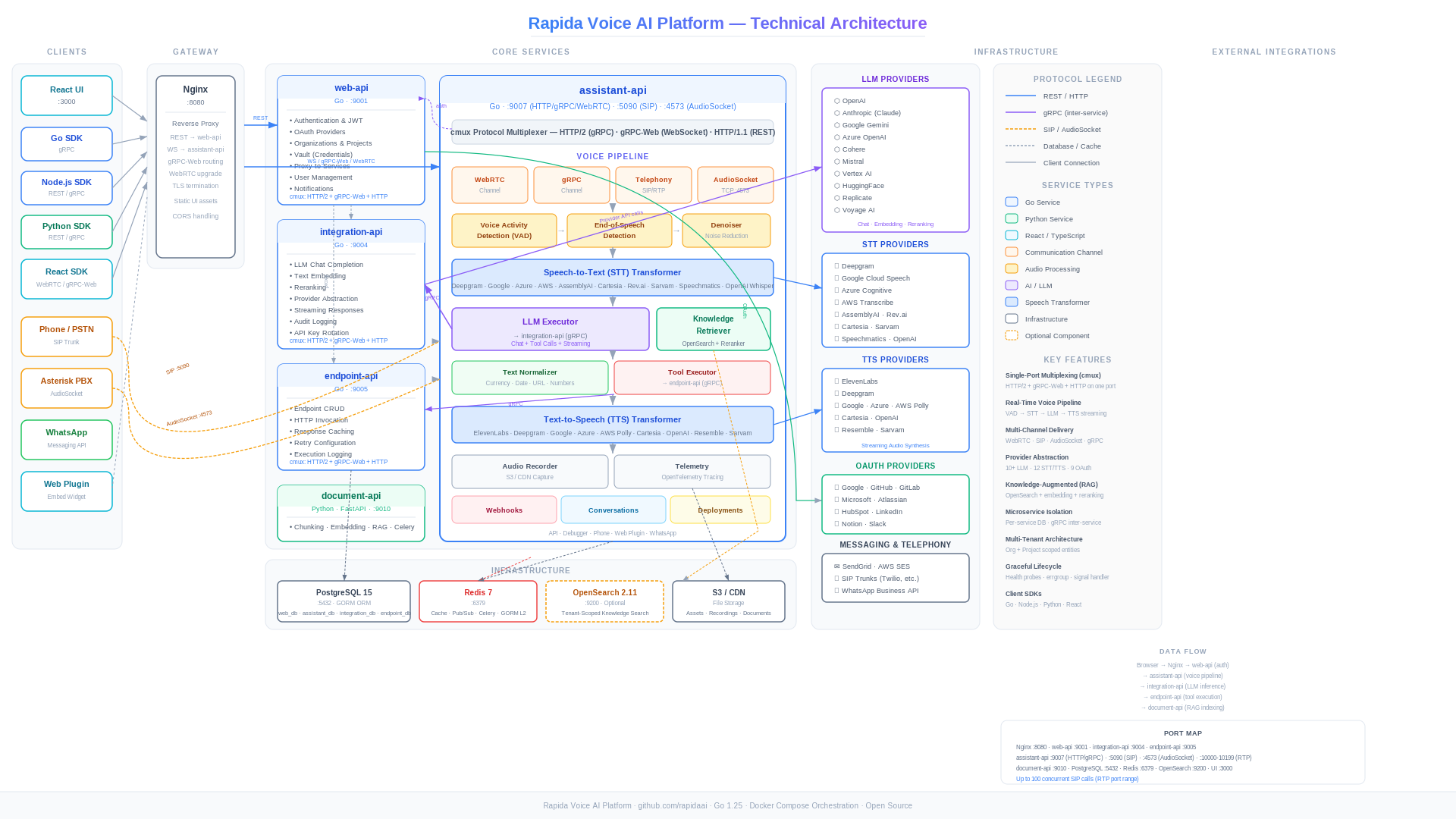
Rapida is written in Go, using the highly optimized gRPC protocol for fast, efficient, bidirectional communication.







Architecture
Features
Real-time Voice Orchestration
Stream and process audio with low latency using gRPC.Ownership by Default
Self-host or run managed while keeping control of infrastructure, credentials, and runtime behavior.Provider and Model Control
Bring your own model—OpenAI, Anthropic, open-source models, or custom inference.Production-grade Reliability
Built-in retries, error handling, call lifecycle management, and health checks.Full Observability
Call logs, streaming events, tool traces, latency breakdowns, metrics, and dashboards.Governance-ready Tooling
Build custom tools, lock down API surfaces, and manage deployments with audit-friendly controls.Built for Agencies and Enterprise
Support multi-client delivery, private deployments, and large-scale internal operations from the same platform.
Documentation & Guides
Prerequisites
- Docker & Docker Compose (Install)
- Just command runner (Install)
- Go 1.26.10, Node.js 22, and Yarn 1.22.22 for
just ci - Process Compose (Install) for host-native development
- 16GB+ RAM (for all services)
Quick Start
Get all services running in 4 commands:
# Clone repo
git clone https://github.com/rapidaai/voice-ai.git && cd voice-ai

# Setup & build
just setup-local build-all

# Start all services
just up-all

# View running services
docker compose ps
Services Ready (just up-all):
- UI: http://localhost:3000
- API Gateway (nginx): http://localhost:8080
- Web API: internal-only by default (container network)
- Assistant API: http://localhost:9007
- Endpoint API: http://localhost:9005
- Integration API: http://localhost:9004
To include knowledge services (OpenSearch + Document API), run:
just up-all-with-knowledge
Then:
- Document API: http://localhost:9010
Stop services:
just down-all
Development
Continuous Integration and Build Packages
Run the same required checks used by pull requests from the repository root:
just ci
The command bootstraps its pinned Python, commitlint, and shellcheck tooling in local cache directories. Docker remains required for image, integration, and smoke-test stages.
After Continuous Integration succeeds for a push to main, GitHub creates an immutable
tag named build-YYYYMMDD-<short-merge-commit-sha>. The matching GitHub prerelease
contains packages for web-api, integration-api, endpoint-api, assistant-api, and
ui, plus a SHA256SUMS file. The deprecated document-api is intentionally excluded
from CI and release packaging.
Work on Specific Services
# Start only database
just up-db

# Start only UI
just up-ui

# Start only Assistant API
just up-assistant

# List all start commands
just --list
View Logs
# All services
just logs-all

# Specific service
just logs-web
just logs-assistant
Rebuild After Code Changes
# Rebuild and restart one service
just rebuild-assistant

# Rebuild all
just rebuild-all
Configure Services
Edit YAML config files before starting:
docker/web-api/web.yml- Web API (port 9001)docker/assistant-api/assistant.yml- Assistant API (port 9007)docker/endpoint-api/endpoint.yml- Endpoint API (port 9005)docker/integration-api/integration.yml- Integration API (port 9004)docker/document-api/config.yaml- Document API (port 9010)
Add your API keys (OpenAI, Anthropic, Deepgram, Twilio, etc.) in these files.
Local Development with Process Compose
Use Process Compose for faster service iteration. The Go APIs and UI run on the host, while Docker continues to own PostgreSQL, Redis, and the nginx gateway. This path starts the core stack without OpenSearch or Document API.
Install Process Compose
Choose one installation method. Homebrew is recommended on macOS and supported on Linux:
brew install f1bonacc1/tap/process-compose
Alternatively, install with the Go toolchain:
go install github.com/f1bonacc1/process-compose@latest
The Go installation places the binary in GOBIN, or in the bin directory under
GOPATH when GOBIN is unset. Adding that directory to PATH is recommended for direct
CLI use. The Just recipes also search these Go locations and ./bin/process-compose.
Prebuilt packages for macOS, Linux, and Windows are available from the
latest Process Compose release.
Extract the package and place the process-compose executable in a directory on PATH.
The repository configuration uses Bash. On Windows, run it from WSL 2 with Docker Desktop WSL integration enabled.
Verify the required tools before continuing:
docker compose version
just --version
go version
node --version
yarn --version
process-compose version
Expected development versions are Go 1.26.10, Node.js 22, and Yarn 1.22.22.
Prepare Local Dependencies
Prepare Go modules, UI dependencies, and local data directories once:
just dev-local-setup
Run the Core Stack
Start Docker first, then start the core development stack. PostgreSQL, Redis, and nginx remain Docker-backed processes in this workflow.
just dev-local
Process Compose uses control port 8090 because nginx uses application port 8080.
Press Ctrl+C for an ordered shutdown, or stop it from another terminal:
just dev-local-down
The local services are available at:
- UI: http://localhost:3000
- API Gateway: http://localhost:8080
- Web API: http://localhost:9001
- Integration API: http://localhost:9004
- Endpoint API: http://localhost:9005
- Assistant API: http://localhost:9007
Check service readiness directly:
curl --fail http://localhost:8080/readiness/
curl --fail http://localhost:9001/readiness/
curl --fail http://localhost:9004/readiness/
curl --fail http://localhost:9005/readiness/
curl --fail http://localhost:9007/readiness/
To run individual host-native processes instead, start dependencies with just deps,
then use just run-web, just run-integration, just run-endpoint,
just run-assistant, or just run-ui in separate terminals.
Knowledge mode remains on the Docker workflow. Stop Process Compose with
just dev-local-down first if it is running, then start the knowledge stack:
just up-all-with-knowledge
Troubleshooting
Process Compose is not found:
command -v process-compose
process-compose version
For a Go installation, ensure the Go binary directory described above is on PATH.
The just dev-local recipe can also discover the standard Go installation directory or
an executable at ./bin/process-compose when the command is not on PATH.
Port already in use:
for port in 3000 5432 6379 8080 8090 9001 9004 9005 9007; do
  lsof -nP -iTCP:"$port" -sTCP:LISTEN
done
Stop the owning development stack before retrying. Use just dev-local-down for Process
Compose or just down-all for the Docker stack.
Services won't start:
just logs-all    # Check logs
docker compose ps  # Verify status
Database issues:
# Test connection
docker compose exec postgres psql -U rapida_user -d web_db -c "SELECT 1"

# Reset everything
just clean
just setup-local
just build-all
just up-all
All Commands
just --list          # Show all available commands
just setup-local     # Create data directories
just build-all       # Build all Docker images
just up-all          # Start all services
just down-all        # Stop all services
just dev-local-setup # Prepare host-native development dependencies
just dev-local       # Start the core stack with Process Compose
just dev-local-down  # Stop the Process Compose stack
just logs-all        # View all logs
just clean           # Remove containers & volumes
just restart-all     # Restart all services
Run the same repository checks locally:
just ci-fast        # Go, UI, contracts, workflow, and tooling checks
just ci-integration # Build and verify the complete Docker stack
just ci-smoke       # Run API smoke tests against the complete stack
just ci             # Run every CI lane, including security and native-runtime checks
Contributing
See CONTRIBUTING.md for guidelines.
Want to add:
- New STT/TTS provider? Check
api/assistant-api/internal/transformer/ - New telephony channel? Check
api/assistant-api/internal/telephony/
SDKs & Tools
Client SDKs
Client SDKs enable your frontend to include interactive, multi-user experiences.
| Language | Repo | Docs |
|---|---|---|
| Web (React) | rapida-react | docs |
| Web Widget (react) | react-widget |
Server SDKs
Server SDKs enable your backend to build and manage agents.
| Language | Repo | Docs |
|---|---|---|
| Go | rapida-go | docs |
| Python | rapida-python | docs |
Contributing
For those who'd like to contribute code, see our Contribution Guide. At the same time, please consider supporting RapidaAi by sharing it on social media and at events and conferences.
Security disclosure
To protect your privacy, please avoid posting security issues on GitHub. Instead, report issues to [email protected], and our team will respond with detailed answer.
License
Rapida is open-source under the GPL-2.0 license, with additional conditions:
- Open-source users must keep the Rapida logo visible in UI components.
- Future license terms may change; this does not affect released versions.
A commercial license is available for enterprise use, which allows:
- Removal of branding
- Closed-source usage
- Private modifications Contact [email protected] for details.
Explorer des projets similaires
Chargement…