
phrp720/aw-sync-suite
phrp720/aw-sync-suite has 44 GitHub stars and 3 forks. GitHot measured 0 stars in 24 hours and +1 in 7 days. Last checked 2026-11-21 13:20 UTC. Last push 2026-08-21.
What you can do
- 🌐 Centralized Monitoring: Aggregate data from multiple devices effortlessly.
- 🛡️ Data Filtering: Protect sensitive information by filtering or sanitizing it at the source.
- 📍 Checkpointing Mechanism: Smart synchronization with automatic tracking of synced data.
- 🔌 Plugin Mechanism: Use the pre-built plugins or create your own for custom data processing.
Progression mesurée des étoiles
- in 24h
- 0
- in 7 days
- +1
- in 15 days
- Historique en cours
- in 1 month
- Historique en cours
Variations nettes sur des périodes qui se chevauchent, pas des totaux quotidiens. Les mesures absentes restent vides. Les étoiles indiquent l’intérêt, pas la qualité.
À propos
Sync multiple ActivityWatch instances to Prometheus, centralized and visualized with Grafana.
DonnéesREADME.md
OriginalAw-Sync-Suite
Open-Source Solution for Securely Syncing and Visualizing Multiple ActivityWatch Instances.


If you’ve ever wished for a simple, centralized solution to sync and visualize data from multiple instances of ActivityWatch, you’re in the right place.
📖 For detailed documentation, visit our GitHub Wiki.
📑 Table of Contents
🔍 About
Aw-Sync-Suite provides an easy-to-deploy solution on syncing data from multiple ActivityWatch instances to a centralized Prometheus database with easy visualization in Grafana.
The project operates independently of ActivityWatch and supports all ActivityWatch versions with a REST API.
👁️ Preview
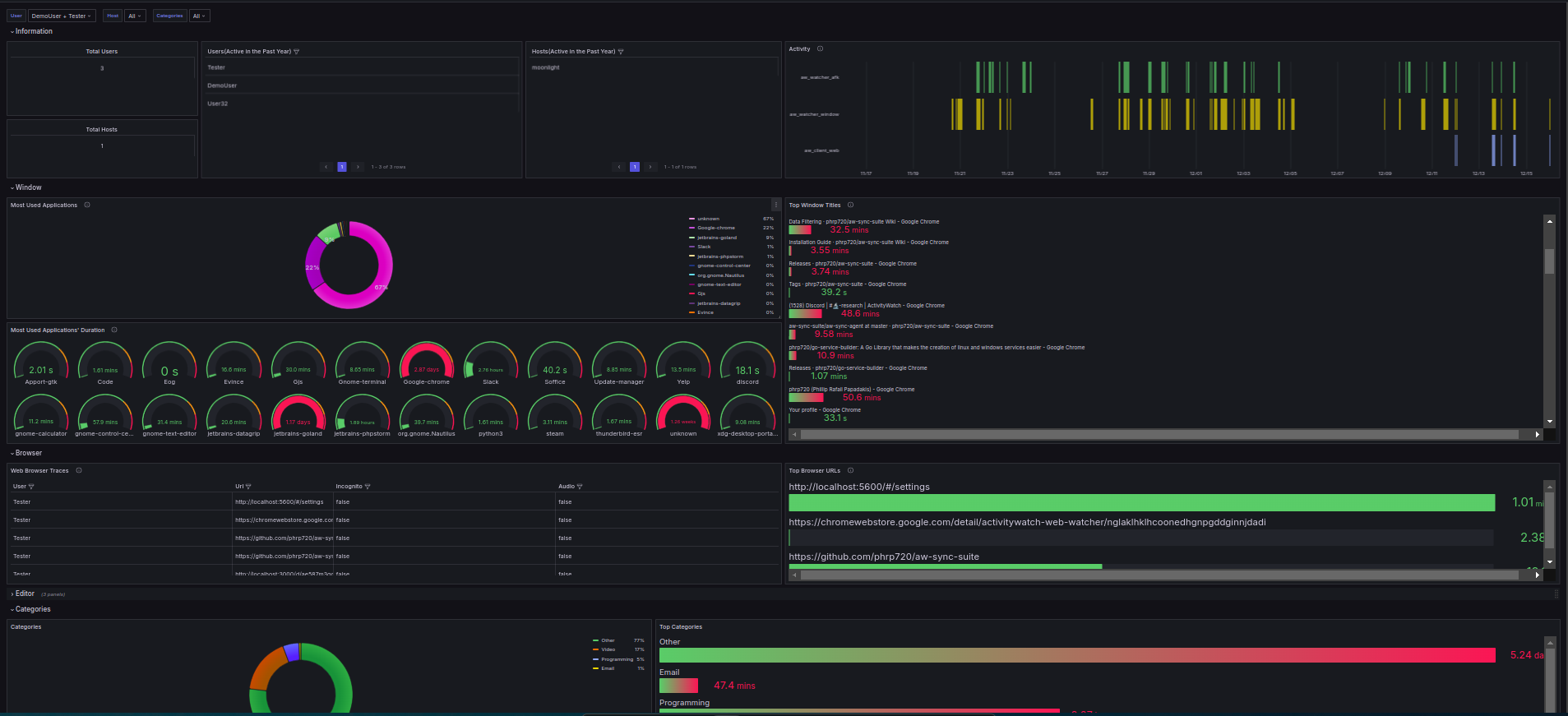 |
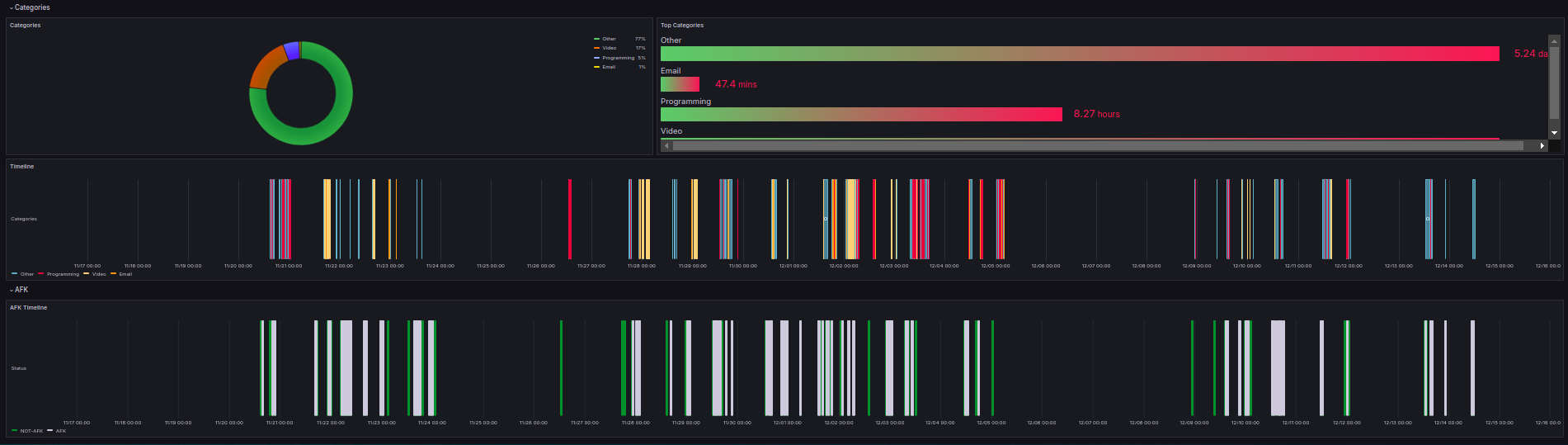 |
|---|
You can check also the screenshots for more insights.
🌟 Features
- 🌐 Centralized Monitoring: Aggregate data from multiple devices effortlessly.
- 🛡️ Data Filtering: Protect sensitive information by filtering or sanitizing it at the source.
- 📍 Checkpointing Mechanism: Smart synchronization with automatic tracking of synced data.
- 🔌 Plugin Mechanism: Use the pre-built plugins or create your own for custom data processing.
- 📈 Pre-Built Dashboards: Use intuitive Grafana dashboards for instant insights.
- ⚙️ Effortless Deployment: Simple setup for both agent and central components.
🚀 Installation & Usage
Downloads are available on the releases page.
For instructions on how to get started, please see the guide in the documentation.
🧩 Components
📦 aw-sync-agent
Runs on each device, retrieves and filters ActivityWatch data, and sends it securely to Prometheus via remote-write.
- Purpose: Syncs data from ActivityWatch to Prometheus.
- Deployment: Run on each computer you wish to track user activity from.
- Configuration: Configurable via the
aw-sync-settings.yamlfile and its plugins.
| Platform Support | Runs as a Service (-service) |
General Workability |
|---|---|---|
| Windows | ✅ | ✅ |
| Linux | ✅ | ✅ |
| macOS | ❌ | ✅ |
[!Note]
- The aw-sync-agent is fully operational on macOS, but the
-servicefeature (which allows the agent to run as a background service) is not yet implemented for macOS.- On macOS, you can still manually start and run the agent to sync ActivityWatch data without issues.
🔌 aw-sync-suite-plugins
The aw-sync-suite supports a range of plugins that allow for custom data processing before pushing the data to Prometheus. You can utilize these plugins to enhance your data synchronization capabilities.
- Purpose: Plugins enable pre-processing of ActivityWatch data, allowing for filtering, transformation, and custom handling based on specific requirements(read more on how they work here).
- Integration: Easily configurable within the
aw-sync-agentthrough theaw-sync-settings.yamlfile and their configuration files. - Repository: For a list of available plugins and their usage, visit the aw-sync-suite-plugins repository.
How to Use Plugins
- Add the Plugin: Ensure the desired plugin is available in the
aw-sync-suite-pluginsrepository and modify theaw-sync-settings.yamlfile to include the plugin. - Configure the Plugin: If the plugin is configurable add the plugin configuration in the
configfolder to configure the plugin settings. - Run the Agent: Start the
aw-sync-agent, and it will automatically utilize the configured plugins for data processing.
📦 aw-sync-center
A centralized Prometheus and Grafana setup for aggregating and visualizing data.
- Purpose: Centralized cloud setup that includes Prometheus and Grafana for monitoring and visualization.
- Deployment: Set up once for centralized control and management.
- Included Services: Prometheus, Grafana, and necessary dashboards.
📊 Architecture
Sync-Suite contains two available setups: one without Bearer Token Authentication and another with Bearer Token Authentication.
The latter provides an additional layer of security by securing the Prometheus endpoints with a Bearer token if it is exposed to the internet. This setup uses a Nginx reverse proxy to secure the Prometheus endpoints.
| Without Bearer Token Authentication 🔓 | With Bearer Token Authentication 🔐 |
|---|---|
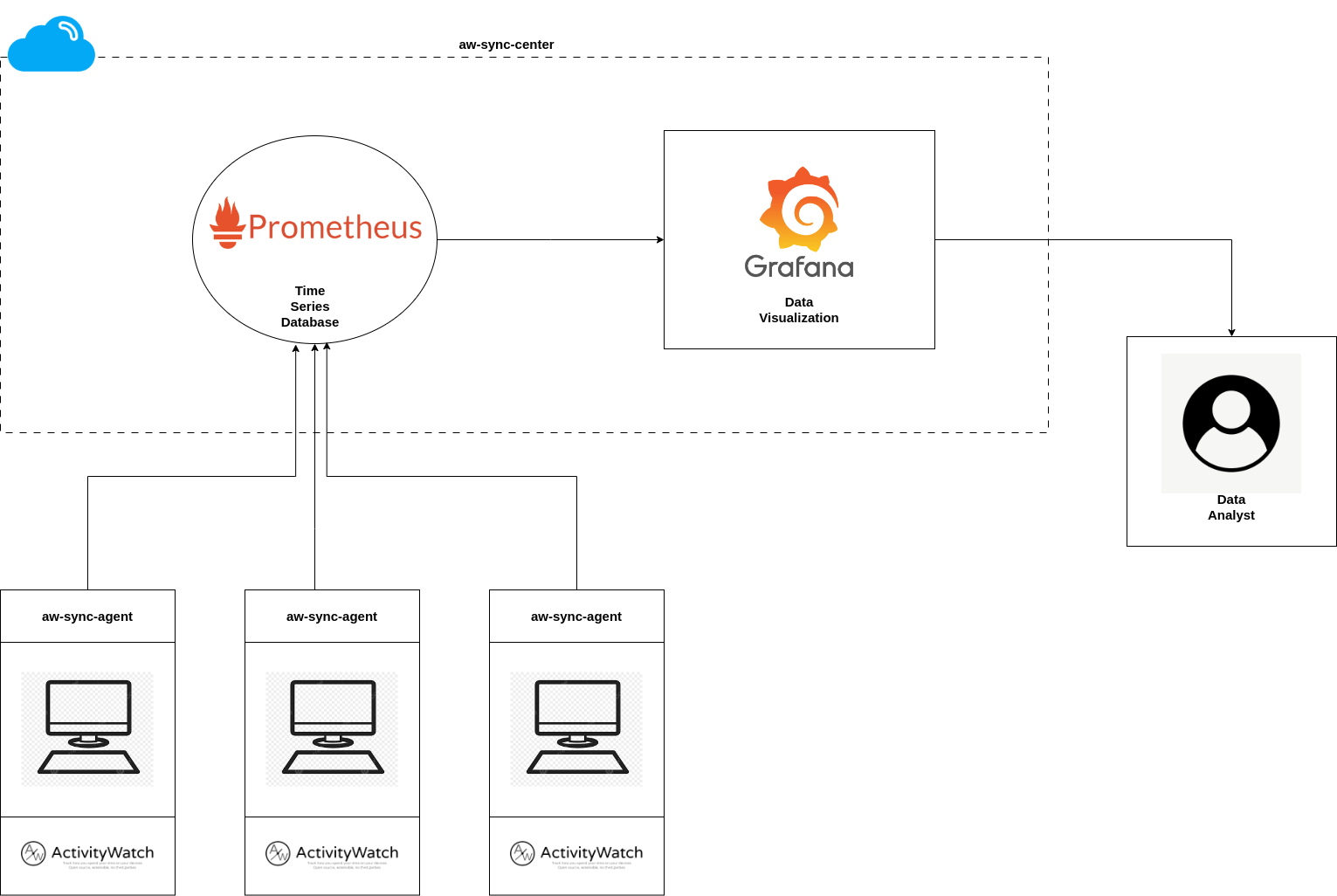 |
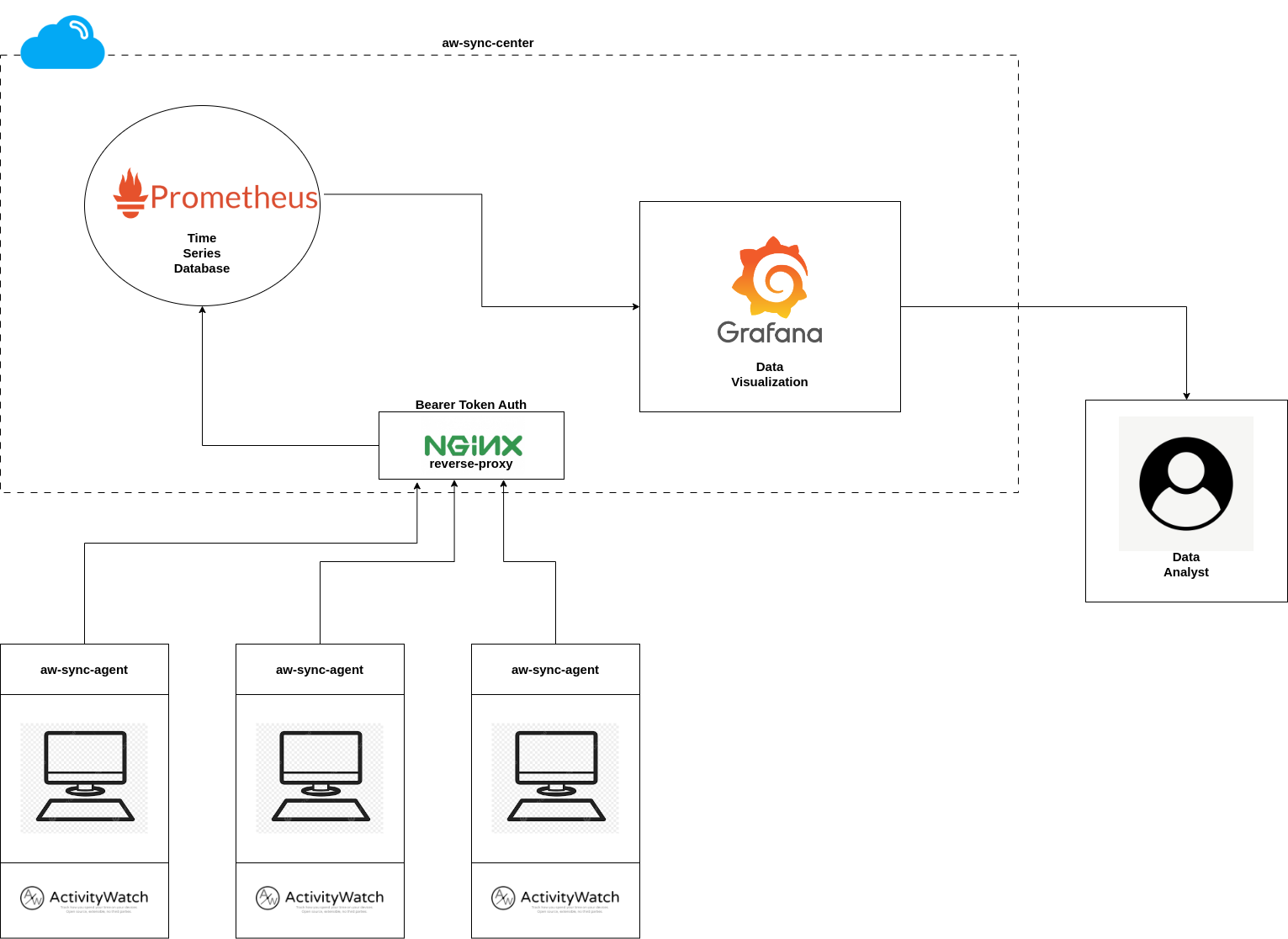 |
🛠️ Requirements
- Docker and Docker Compose for easy setup of
aw-sync-center. - A running instance of ActivityWatch on the computers you want to monitor.
👥 Contributing
Contributions are welcomed! If you have ideas, improvements, or bug fixes, feel free to open an issue or submit a pull request.
📝 License
This project is licensed under the MIT license.
See LICENSE for more information.
Explorer des projets similaires
Chargement…