
orangekame3/ghfetch
orangekame3/ghfetch has 66 GitHub stars and 2 forks. Star changes are not measured yet. Last checked 2026-11-11 12:07 UTC. Last push 2026-11-11.
Comment ces chiffres sont mesurés
:octocat: ghfetch is a CLI tool to fetch GitHub user information and show like neofetch.
Progression mesurée des étoiles
- in 24h
- Mise à jour retardée
- in 7 days
- Mise à jour retardée
- in 15 days
- Mise à jour retardée
- in 1 month
- Mise à jour retardée
Variations nettes sur des périodes qui se chevauchent, pas des totaux quotidiens. Les mesures absentes restent vides. Les étoiles indiquent l’intérêt, pas la qualité.
README.md
Originalghfetch
:octocat: ghfetch is a CLI tool to fetch GitHub user information and show like neofetch


Demo

Install
Go
go install github.com/orangekame3/ghfetch@latest
Homebrew
brew install orangekame3/tap/ghfetch
Manual Download
Download the latest compiled binaries and put it anywhere in your executable path.
Quick Start
ghfetch -u <your_github_account_name> --access-token=<YOUR_GITHUB_PERSONAL_ACCESS_TOKEN>
Usage
❯ ghfetch -h
Fetch GitHub user's profile, just like neofetch

Usage:
  ghfetch [flags]

Flags:
      --access-token string   Your GitHub access token
  -c, --color string          Highlight color red, green, yellow, blue, magenta, cyan (default "blue")
  -h, --help                  help for ghfetch
  -u, --user string           GitHub username
  -v, --version               version for ghfetch
Obtaining a GitHub Personal Access Token
ghfetch requires a GitHub personal access token to fetch user information. You can create a personal access token by following the instructions on the GitHub documentation:
Managing your personal access tokens
Generating a gif Image Using GitHub Actions and ghfetch
Here's a GitHub Actions workflow for generating a gif image. The gif creation uses vhs
#.github/workflows/ghfetch.yml
name: Update ghfetch gif with vhs

on:
  workflow_dispatch:
  schedule:
    - cron: '0 */6 * * *' # every 6 hours

jobs:
  build:
    runs-on: ubuntu-latest

    steps:
    - name: Checkout code
      uses: actions/checkout@v2

    - name: Set up Go
      uses: actions/setup-go@v3
      with:
        go-version: '1.21'

    - name: Install latest ttyd
      run: |
        wget https://github.com/tsl0922/ttyd/releases/download/1.7.4/ttyd.x86_64
        chmod +x ttyd.x86_64
        sudo mv ttyd.x86_64 /usr/local/bin/ttyd
        ttyd --version

    - name: Install ffmpeg
      run: |
        sudo apt update
        sudo apt install -y ffmpeg

    - name: Install vhs and ghfetch
      run: |
        go install github.com/orangekame3/ghfetch@latest
        go install github.com/charmbracelet/vhs@latest
    - name: Generate ghfetch gif with vhs
      run: |
        export GITHUB_TOKEN=${{ secrets.GH_PAT }}
        vhs < img/demo.tape
    - name: Commit and push if there are changes
      run: |
        git add img/demo.gif
        git config --local user.email "[email protected]"
        git config --local user.name "GitHub Action"
        git commit -m "Update ghfetch gif with vhs" -a || echo "No changes to commit"
        git push
To make this work, create a secret named GH_PAT in your repository settings with your GitHub personal access token.
Next, add a file named img/demo.tape to your repository.
# img/demo.tape
# VHS documentation
Output img/demo.gif
Set Margin 20
Set MarginFill "#674EFF"
Set BorderRadius 10

Set FontSize 32
Set Width 1500
Set Height 1000

Sleep 500ms
Type "ghfetch -u orangekame3 --access-token=$GITHUB_TOKEN" Sleep 1000ms Enter
Sleep 10s
Once set up, triggering the workflow will generate and display the gif image at img/demo.gif in your profile README repository.
Creating a Profile README
For creating and managing a profile README, refer to this GitHub documentation:
To showcase the gif in your profile README, simply reference the gif from your profile README managing repository:
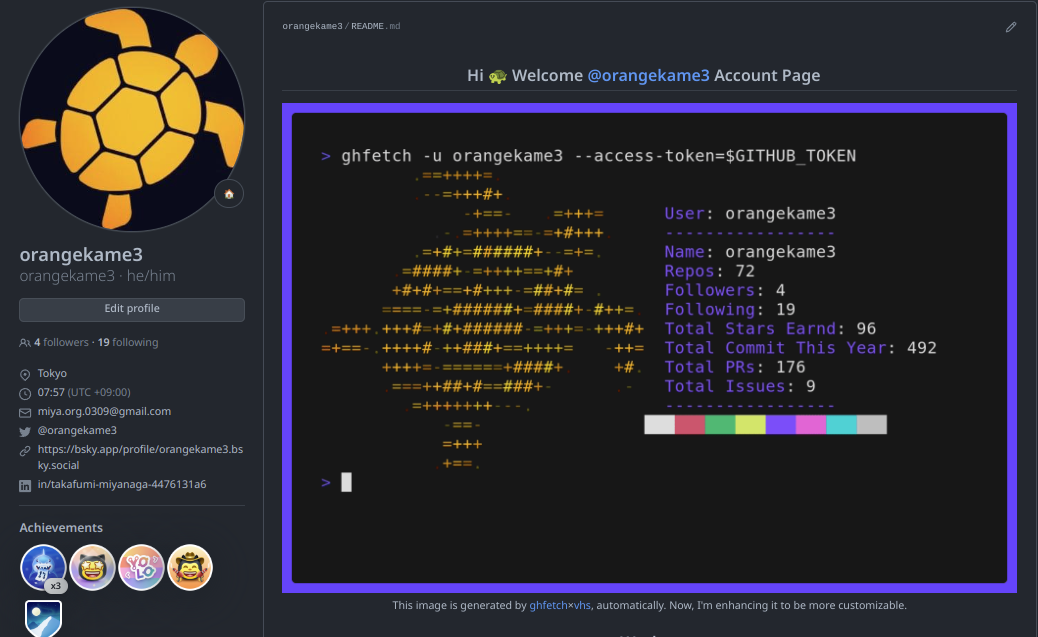
See more examples in my profile README
License
ghfetch is licensed under the MIT License - see the LICENSE file for details.
Author
Explorer des projets similaires
codecrafters-io/build-your-own-x
Maîtrisez la programmation en recréant de zéro vos technologies préférées.
562,045 étoilespublic-apis/public-apis
Une liste collective d'API gratuites
498,442 étoilesmorluto/rea
Rétro-ingénierie de n'importe quoi avec des agents, du comportement des applications jusqu'aux binaires natifs.
454,483 étoilesopenclaw/openclaw
L'IA qui fait vraiment les choses. Tout système d'exploitation, toute plateforme. À la manière du homard. 🦞
394,405 étoiles