
onmyway133/Promptberry
onmyway133/Promptberry has 32 GitHub stars and 2 forks. GitHot measured 0 stars in 24 hours. Last checked 2026-11-12 17:09 UTC. Last push 2026-11-09.
Comment ces chiffres sont mesurés
🍓 Beautiful, interactive CLI prompts for Swift
Progression mesurée des étoiles
- in 24h
- 0
- in 7 days
- Historique en cours
- in 15 days
- Historique en cours
- in 1 month
- Historique en cours
Variations nettes sur des périodes qui se chevauchent, pas des totaux quotidiens. Les mesures absentes restent vides. Les étoiles indiquent l’intérêt, pas la qualité.
README.md
OriginalPromptberry
Beautiful, interactive CLI prompts for Swift
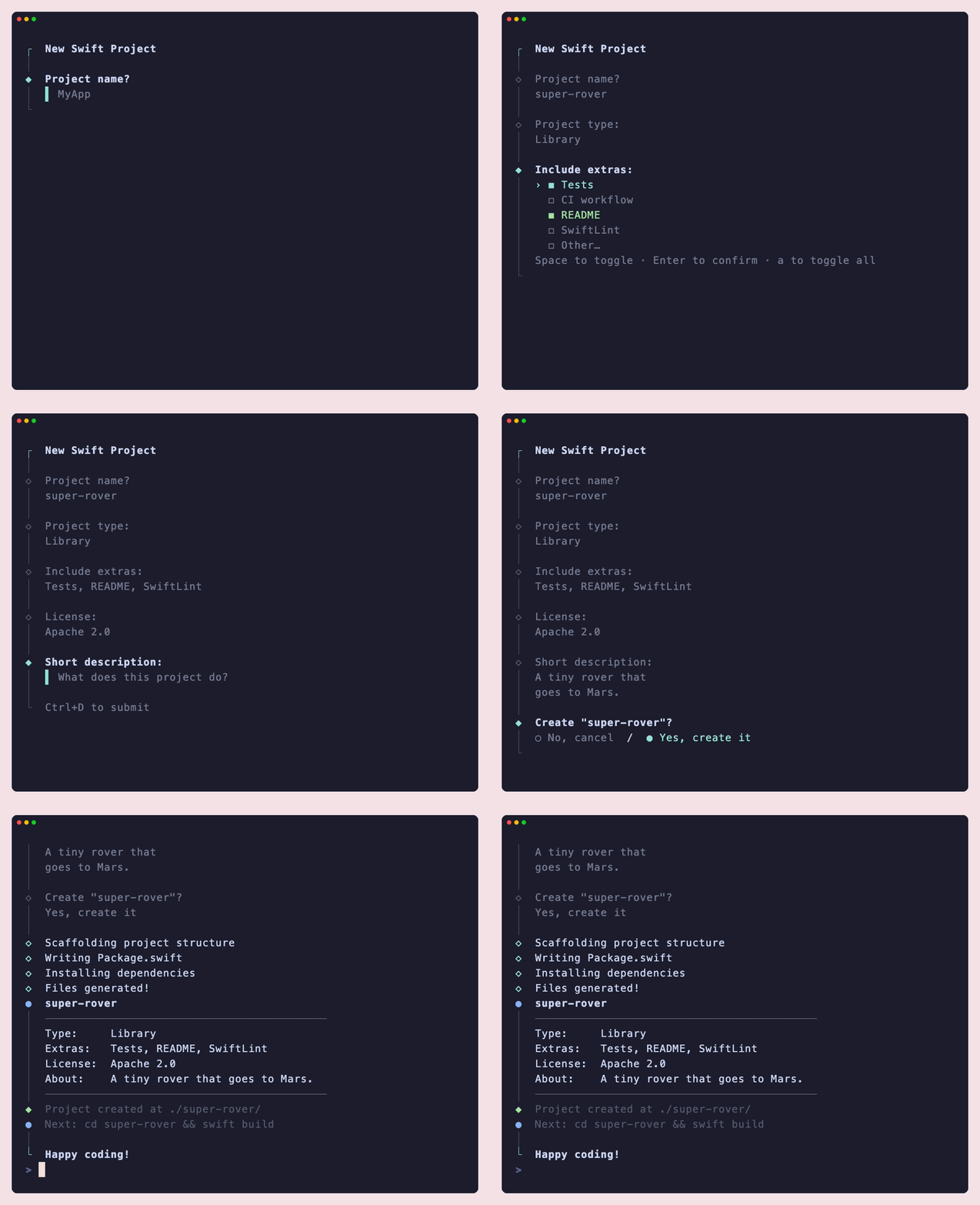
┌  My App v1.0
│
◆  What's your name?
│  ▌ Ada_
│
◆  Select language:
│  › ● Swift  (recommended)
│    ○ Kotlin
│    ○ Python
│
⠋  Installing...
◇  Done!
│
└  Happy coding, Ada.
Requirements
- Swift 6.0+
- macOS 13+, or Linux (Glibc or Musl, including the Static Linux SDK)
Installation
Add to your Package.swift:
dependencies: [
    .package(
        url: "https://github.com/onmyway133/Promptberry",
        from: "1.0.0"
    )
],
targets: [
    .executableTarget(
        name: "MyApp",
        dependencies: [
            .product(name: "Promptberry", package: "Promptberry")
        ]
    )
]
Try it
Clone the repo and run the demo wizard from the GIF above:
swift run SimpleExample
swift run Example shows more: password, spinner, group and the log styles.
Usage
import Promptberry

Promptberry.intro("My App v1.0")

let name = try Promptberry.text("What's your name?", placeholder: "e.g. Ada")
let pass = try Promptberry.password("Choose a password:")
let go   = try Promptberry.confirm("Continue?")

Promptberry.outro("All done, \(name)!")
Wrap everything in a do/catch to handle cancellation (Ctrl+C):
do {
    let name = try Promptberry.text("Name?")
} catch is PromptCancelled {
    Promptberry.cancel("Aborted.")
    exit(0)
}
Prompts
text
Single-line text input.
let name = try Promptberry.text(
    "What's your name?",
    placeholder: "e.g. Ada Lovelace",   // shown when empty
    defaultValue: "Anonymous",           // returned on empty Enter
    validate: { value in
        value.count < 2 ? "Too short." : nil
    }
)
password
Like text, but input is masked.
let secret = try Promptberry.password("Password:", mask: "•")
confirm
Yes/No toggle. Use arrow keys, y/n, or Space to switch.
let ok = try Promptberry.confirm(
    "Continue?",
    active: "Yes",
    inactive: "No",
    initialValue: true
)
select
Pick one item from a list. Navigate with ↑/↓ or j/k.
Pass a plain [String] for quick use:
let choice = try Promptberry.select("Pick one:", options: ["a", "b", "c"])
Add allowOther: true to let the user type a custom value if none of the options fit:
let type_ = try Promptberry.select(
    "Project type:",
    options: ["Executable", "Library", "Plugin"],
    allowOther: true
)
Or use SelectOption for labels and hints:
let lang = try Promptberry.select(
    "Preferred language:",
    options: [
        SelectOption(value: "swift",  label: "Swift",  hint: "recommended"),
        SelectOption(value: "kotlin", label: "Kotlin"),
        SelectOption(value: "python", label: "Python"),
    ],
    initialValue: "swift",
    maxItems: 5          // how many options to show at once
)
Or pass your own enum — conform it to Promptable:
enum Language: String, CaseIterable, Promptable {
    case swift, kotlin, python, rust
}

let lang = try Promptberry.select("Language:", from: Language.self)
// returns Language.swift, .kotlin, etc.
Or select from any array of values with a custom label:
let server = try Promptberry.select(
    "Target server:",
    from: servers,
    label: { $0.hostname }
)
multiselect
Pick multiple items. Space to toggle, a to toggle all, Enter to confirm.
// Simple string array
let features = try Promptberry.multiselect(
    "Features:",
    options: ["tests", "ci", "docs"],
    initialValues: ["tests"]   // pre-selected
)
Use allowOther: true to let the user append a custom entry:
let extras = try Promptberry.multiselect(
    "Include extras:",
    options: ["Tests", "CI workflow", "README", "SwiftLint"],
    allowOther: true
)

// Or with SelectOption for hints
let tools = try Promptberry.multiselect(
    "Build tools:",
    options: [
        SelectOption(value: "spm",   label: "Swift Package Manager"),
        SelectOption(value: "cmake", label: "CMake"),
        SelectOption(value: "bazel", label: "Bazel", hint: "large-scale"),
    ],
    initialValues: ["spm"],
    required: true       // at least one must be selected
)
// returns [String]
Or with a Promptable enum:
enum Feature: String, CaseIterable, Promptable {
    case tests, ci, docs, linting
}

let features = try Promptberry.multiselect("Features:", from: Feature.self)
// returns [Feature]
multiline
Multi-line text input. Press Enter for new lines, Ctrl+D to submit.
let description = try Promptberry.multiline(
    "Describe your project:",
    placeholder: "What does it do?",
    validate: { $0.isEmpty ? "Description required." : nil }
)
autocomplete
Searchable select — filters options as you type. Tab or Enter to confirm.
let pkg = try Promptberry.autocomplete(
    "Find package:",
    options: ["ArgumentParser", "AsyncHTTPClient", "Crypto", "NIO", "Vapor"],
    placeholder: "Type to filter..."
)
Also works with SelectOption for typed values:
let server = try Promptberry.autocomplete(
    "Select server:",
    options: servers.map { SelectOption(value: $0, label: $0.hostname) }
)
spinner
Show an animated spinner while doing async work.
let s = Promptberry.spinner()
await s.start("Installing packages...")

try await installPackages()    // your async work runs concurrently

await s.stop("Packages installed!")    // or s.error("Failed.")
Update the message while it's running:
await s.update("Almost there...")
progress
Progress bar for known-length operations.
let p = Promptberry.progress(total: files.count, message: "Copying files...")
for file in files {
    try await copy(file)
    await p.advance()
}
await p.complete("All files copied!")
You can also jump to an absolute value:
await p.update(42, message: "Step 42...")
Call p.error("message") to abort with error styling.
tasks
Run a sequence of async operations sequentially, each with its own spinner.
try await tasks([
    PromptTask("Scaffolding project structure") {
        try await scaffold()
    },
    PromptTask("Writing Package.swift") {
        try await writeManifest()
    },
    PromptTask("Installing dependencies") {
        try await installDeps()
    },
])
If any task throws, its spinner shows an error and the error propagates.
Info & Logging
// Bordered info box
Promptberry.note("Line 1\nLine 2", title: "Important")

// Cancellation message
Promptberry.cancel("Setup aborted.")

// Semantic log lines (non-interactive)
log.info("Reading config...")
log.success("Build passed in 1.2s")
log.warning("Deprecated API used")
log.step("Running post-install hooks")
log.error("Connection refused (non-fatal)")
Group
Sequence multiple prompts with a shared cancellation handler:
let profile = try Promptberry.group(
    onCancel: { _ in
        Promptberry.cancel("Cancelled.")
        exit(0)
    }
) {
    let email = try Promptberry.text("Email?")
    let age   = try Promptberry.text("Age?",
        validate: { Int($0) == nil ? "Enter a number." : nil })
    return (email: email, age: age)
}
Colors
All strings support colorful text chaining:
"success".green.bold
"warning".yellow
"error".red
"hint".dim
"label".cyan.underline
"bg".onBlue
Disable colors globally (e.g. for piped output):
ColorSupport.enabled = false
Colors are also auto-disabled when:
NO_COLORenvironment variable is set- stdout is not a TTY (piped to a file)
TERM=dumb
Force colors on even in non-TTY contexts:
ColorSupport.enabled = true
// or set FORCE_COLOR=1 in the environment
Recording the demo
The GIF is generated from demo.tape with VHS:
brew install vhs
vhs demo.tape   # writes images/prompt.gif
Reference
- Inspired by clack
License
Promptberry is available under the MIT license. Copyright (c) 2026 Khoa Pham.
Explorer des projets similaires
codecrafters-io/build-your-own-x
Maîtrisez la programmation en recréant de zéro vos technologies préférées.
562,096 étoilespublic-apis/public-apis
Une liste collective d'API gratuites
498,491 étoilesmorluto/rea
Rétro-ingénierie de n'importe quoi avec des agents, du comportement des applications jusqu'aux binaires natifs.
454,827 étoilesopenclaw/openclaw
L'IA qui fait vraiment les choses. Tout système d'exploitation, toute plateforme. À la manière du homard. 🦞
394,406 étoiles