
ndleah/python-mini-project
ndleah/python-mini-project has 4,446 GitHub stars and 1,807 forks. GitHot measured +2 stars in 24 hours and +8 in 7 days. Last checked 2026-11-09 13:34 UTC. Last push 2024-08-16.
Comment ces chiffres sont mesurés
🙌 Welcome open-source Python mini-project contributions!
Progression mesurée des étoiles
- in 24h
- +2
- in 7 days
- +8
- in 15 days
- Historique en cours
- in 1 month
- Historique en cours
Variations nettes sur des périodes qui se chevauchent, pas des totaux quotidiens. Les mesures absentes restent vides. Les étoiles indiquent l’intérêt, pas la qualité.
README.md
Original





Python Mini Projects 
A collection of easy Python small projects to help you improve your programming skills.


Table Of Contents
 Aim Of The Project
As a Python newbie, I understand the problems that people face when they first begin studying and attempting to understand various Data Science concepts, particularly Python. This project is designed for folks who are just getting started with Python principles and exploring GitHub as "contributors."
My goal is to build a common playground where everyone, from beginners to experts, can learn and share knowledge, and I hope you enjoy your stay here!
Let's "folk-ing" create amazing things together! 👉
 Contributing
Step 1: Star The Repo
Star the repo by pressing the topmost-right button to start your wonderful journey


Step 3: Clone it
- Method 1: GitHub Desktop
⚠️ NOTE: If you're not familiar with Git, using GitHub Desktop Application is a better start. If you choose this method, make sure to download it before continuing reading.
❗❗ Access link to download here.
Learn more about how to clone the remote respository on your local machine using GitHub Desktop here.
- Method 2: Git
Clone the forked repository. Open git bash and type:
git clone https://github.com/<your-github-username>/python-mini-project.git
This makes a local copy of the repository in your machine.
⚠️ Replace <your-github-username>!
Learn more about forking and cloning a repo.
Step 4: Create your feature branch
Always keep your local copy of the repository updated with the original repository. Before making any changes and/or in an appropriate interval, follow the following steps:
- Method 1: GitHub Desktop
Learn more about how to create new branch here and how to fetch and pull origin from/to your local machine here.
Learn more about how to fetch and pull origin from/to your local machine using GitHub Desktop here.
- Method 2: Git
Run the following commands carefully to update your local repository
# If you cloned a while ago, get the latest changes from upstream
git checkout <master>
git pull upstream <master>

# Make a feature branch (Always check your current branch is up to date before creating a new branch from it to avoid merge conflicts)
git checkout -b <branch-name>

#
Step 5: Ready, Set, Go...
Once you have completed these steps, you are ready to start contributing to the project and creating pull requests.
- Create a folder in
projects directory according to your project name.
The folder name should follow the following format "Your_Project_Name_Here". For example: Dice_Stimulator
- Write your code and add to the respective folder in the projects directory, locally.
- Don't forget to add a
README.mdin your folder, according to the README_TEMPLATE.
- Method 1: GitHub Desktop
Learn more how to pull request from your local machine using GitHub Desktop to the main repo here.
- Method 2: Git
Add the changes with git add, git commit:
git add -A
git commit -m "<your message>"
Push the code to your repository.
git push origin <branch-name>
Step 6: Pull Request
Go to the GitHub page of your fork, and make a pull request:
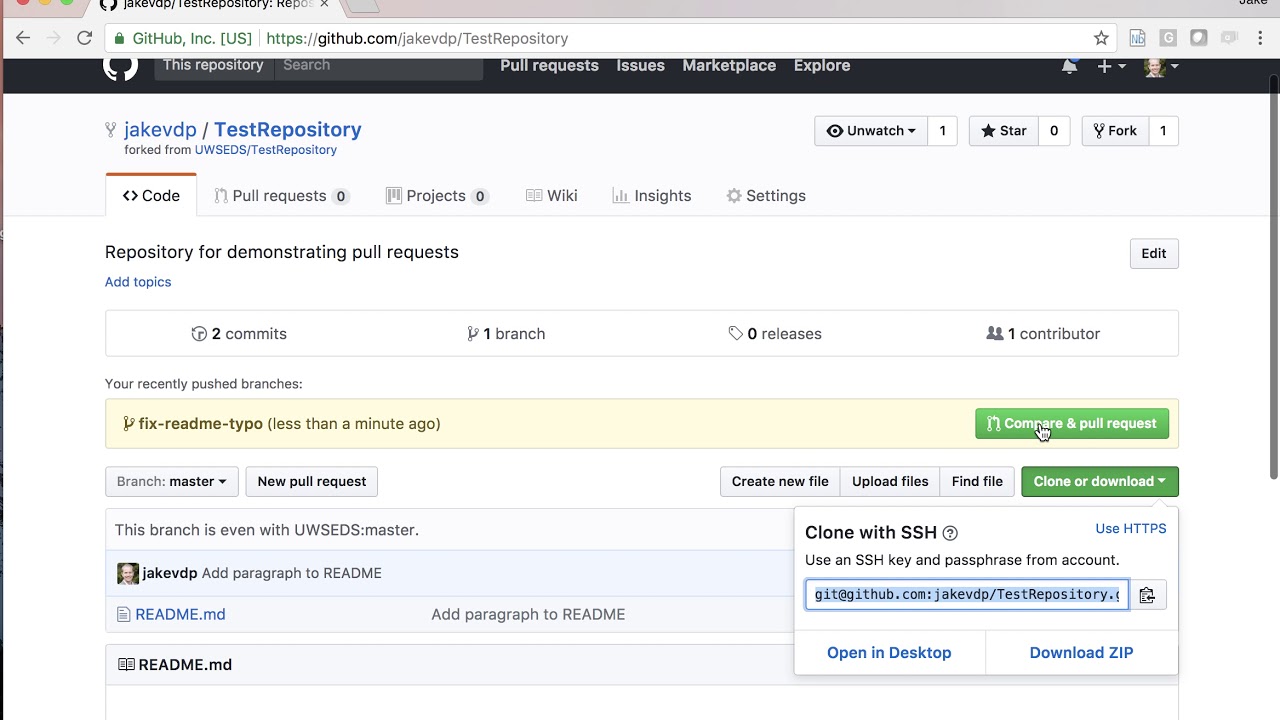
Read more about pull requests on the GitHub help pages.
Now wait, until your Pull Request is approved! If there are any conflicts, you will get a notification.
 README Template for scripts
please make sure to add a README.md file that follow the same construction as this template for consistency.
 Our Contributors
 Feedback
If you have any feedback or ideas to improve this project, feel free to contact me via


Explorer des projets similaires
Asabeneh/30-Days-Of-Python
Le défi de programmation 30 Days of Python est un guide pas à pas pour apprendre le langage de programmation Python en 30 jours. Ce défi peut prendre plus de 100 jours. Avancez à votre rythme. Ces vidéos peuvent aussi vous aider : https://www.youtube.com/channel/UC7PNRuno1rzYPb1xLa4yktw
78,423 étoilesgrafana/grafana
Plateforme ouverte et composable d’observabilité et de visualisation de données. Visualise les métriques, les journaux et les traces issus de plusieurs sources, comme Prometheus, Loki, Elasticsearch, InfluxDB, Postgres et bien d’autres.
77,763 étoilesredis/redis
Pour les développeurs qui créent des applications en temps réel pilotées par les données, Redis est le cache, le serveur de structures de données et le moteur de requêtes documentaires et vectorielles préféré, le plus rapide et le plus riche en fonctionnalités.
77,309 étoilesapache/superset
Apache Superset est une plateforme de visualisation et d'exploration de données.
75,453 étoiles