
mbrlabs/Lorien
mbrlabs/Lorien has 6,876 GitHub stars and 314 forks. GitHot measured 0 stars in 24 hours and +7 in 7 days. Last checked 2026-11-08 14:44 UTC. Last push 2025-09-22.
Comment ces chiffres sont mesurés
Application de dessin et de tableau blanc sur une toile infinie pour Windows, Linux et macOS. Créée avec Godot.
What you can do
- Infinite canvas
- Infinite undo/redo
- (Almost) Infinite zoom
- Zen mode (toggles the UI on/off)
Progression mesurée des étoiles
- in 24h
- 0
- in 7 days
- +7
- in 15 days
- Mise à jour retardée
- in 1 month
- Mise à jour retardée
Variations nettes sur des périodes qui se chevauchent, pas des totaux quotidiens. Les mesures absentes restent vides. Les étoiles indiquent l’intérêt, pas la qualité.
README.md
Original
Lorien


Lorien is an infinite canvas drawing/note-taking app that is focused on performance, small savefiles and simplicity. It's not based on bitmap images like Krita, Gimp or Photoshop; it rather saves brush strokes as a collection of points and renders them at runtime (kind of like SVG). It's primarily designed to be used as a digital notebook and as brainstorming tool. While it can totally be used to make small sketches and diagrams, it is not meant to replace traditional art programs that operate on bitmap images. It is entirely written in the Godot Game Engine. For an overview on how to use Lorien have a look at the manual.
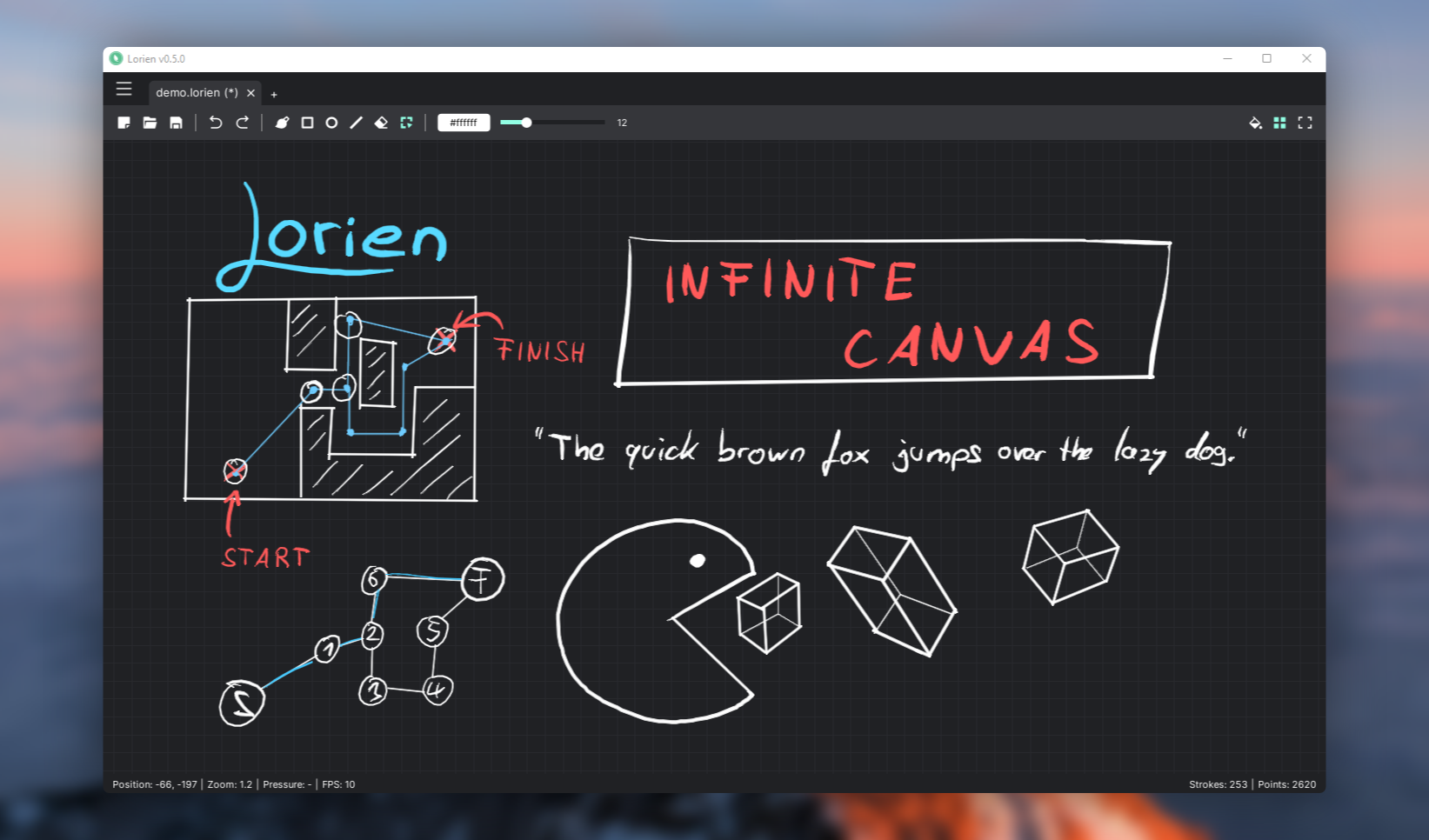
⚠ This is very much a WIP and still a bit rough around the edges ⚠. The savefile format might also change in the future. Contributions (be it bug reports, code, art or translations) are very welcome.
Features as of v0.7.0-dev:
- Infinite canvas
- Infinite undo/redo
- (Almost) Infinite zoom
- Infinite grid
- Zen mode (toggles the UI on/off)
- Extremely small savefiles (File format specs)
- Work on multiple documents simultaneously
- Tools: Freehand brush, eraser, line tool, rectangle tool, circle/ellipse tool, selection tool
- Move and delete selected brush strokes
- SVG export
- Rebindable keyboard shortcuts
- Built-in and custom color palettes
- Designed to be used with a drawing tablet (Wacom, etc.). It also supports pressure sensitivity
- A little Surprise Mechanic™ when pressing F12
- Runs on Windows, Linux & macOS
- Localizations: German, English, Spanish, French, Italian, Korean, Brasilian Portuguese, Russian, Turkish, Ukrainian, Chinese
Download
You can download the latest stable releases on Github.
If you want to check out the bleeding edge main branch without building the project yourself you can also check out the CI builds. But make sure to backup your files and be prepared for bugs if you do that.
More information
Credits
- Brush stroke antialiasing: godot-antialiased-line2d
- Icons used for the UI: Remix Icon
- Blurred background image of demo screenshot: https://unsplash.com/photos/nO0V_T0g2fM
Explorer des projets similaires
n8n-io/n8n
Plateforme Fair-code d’automatisation des flux de travail, avec des capacités d’IA natives. Elle associe la conception visuelle au code personnalisé, peut être hébergée sur vos propres serveurs ou utilisée dans le cloud, et propose plus de 400 intégrations.
209,888 étoileslanggenius/dify
Créer des workflows agentiques et des pipelines RAG, avec une prise en charge riche des modèles et outils d’IA, dans un seul espace de travail collaboratif. Déployer dans le cloud, sur un VPC ou en auto-hébergement, afin que les équipes passent du prototype à la production sans reconstruire la pile.
160,680 étoilesmicrosoft/PowerToys
Microsoft PowerToys est un ensemble d’utilitaires qui améliorent la productivité et la personnalisation sous Windows
140,755 étoilesstablyai/orca
Orca est l'endroit pour travailler avec une flotte d'agents (p. ex. Grok Bot, Claude Code). Exécutez n'importe quel agent de programmation avec votre propre abonnement. Disponible sur ordinateur, sur mobile et en environnement d'exécution distant.
119,722 étoiles