
massCodeIO/massCode
massCodeIO/massCode has 7,096 GitHub stars and 281 forks. GitHot measured +2 stars in 24 hours, +4 in 7 days, and +11 in 15 days. Last checked 2026-11-05 03:18 UTC. Last push 2026-10-29.
Comment ces chiffres sont mesurés
Un espace de travail gratuit et à code source ouvert pour les développeurs. Extraits de code, notes, requêtes HTTP, calculs et outils de développement dans une seule application qui privilégie le local.
Progression mesurée des étoiles
- in 24h
- +2
- in 7 days
- +4
- in 15 days
- +11
- in 1 month
- Historique en cours
Variations nettes sur des périodes qui se chevauchent, pas des totaux quotidiens. Les mesures absentes restent vides. Les étoiles indiquent l’intérêt, pas la qualité.
README.md
Original
massCode
A free, open-source developer workspace.
Snippets, notes, HTTP requests, calculations, drawings, and dev tools in one local-first app.
Your workspace is stored locally as plain Markdown files.




Download | Documentation | Changelog
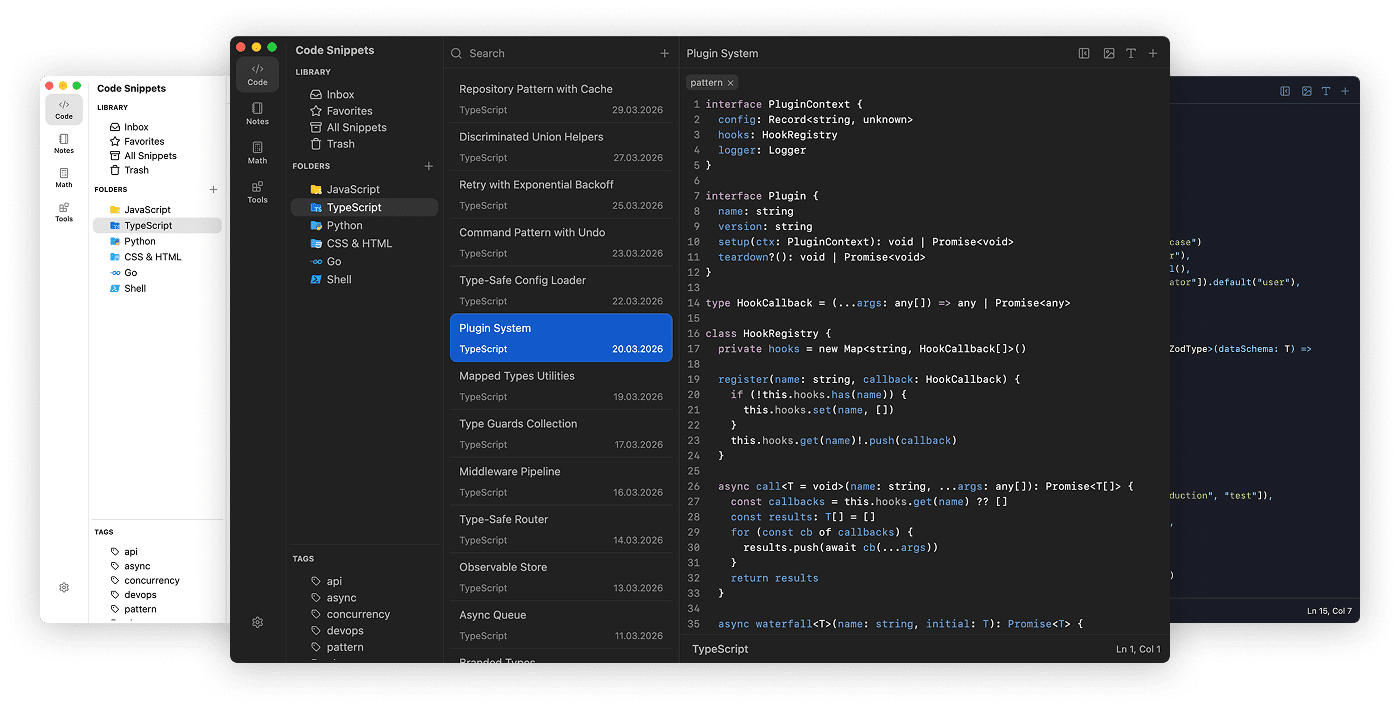
Available for macOS, Windows, and Linux
Support
massCode is free and open source. But building and maintaining a quality tool takes time. Your support helps keep development going and new features coming.


SPONSORS


About
Originally a snippet manager, massCode now brings together snippets, notes, HTTP requests, calculations, drawings, and developer tools in one desktop app, so everyday work stays in one place.
Features
Code Snippets
Use massCode as a focused snippet workspace with multi-level folders, tags, and fragments for organizing reusable code across projects and languages.
- 160+ syntax grammars out of the box (600+ supported via
.tmLanguage) - Integrated Prettier for code formatting
- Real-time HTML & CSS preview for quick prototyping
- JSON Visualizer for exploring nested structures as interactive graphs
- Export snippets as polished images with customizable themes
Notes
Write longer markdown documents right next to your snippets: project docs, drafts, research notes, and personal knowledge bases.
- Task notes with status, priority, due dates, and Today / Upcoming / Completed views
- Completed task cleanup and auto-clean scheduling
- Dashboard with activity overview, recent notes, top linked notes, and a notes graph preview
- Editor, Live Preview, and Preview modes
- Editable markdown tables with row and column controls
- Internal links to notes, snippets, and HTTP requests, with placeholders for items you plan to create later
- Note inspector with section navigation and reordering, link filters, and grouped callouts
- Fullscreen notes graph for exploring internal links between notes
- Integrated Mermaid diagrams
- Mind maps generated from markdown heading structure
- Fullscreen presentation mode for demos and meetings
- Callout blocks, including TODOs for unfinished writing, and image embedding
HTTP Client
Build and test API workflows alongside your code snippets and project notes.
- Send HTTP and GraphQL requests and exchange WebSocket messages
- Organize collections and nested folders with shared auth, headers, variables, and scripts
- Switch environments, protect tokens with local secret variables, and pass response values between requests
- Check responses with assertions and JavaScript tests, then run collections or folders in sequence
- Edit query parameters, headers, authentication, and JSON, text, form, or file payloads
- Generate request code for 20 languages and runtimes, including cURL
- Inspect responses and saved history, debug traffic in Console, and manage cookies and transport settings
- Import collections from OpenAPI, Postman, and Bruno
See the HTTP documentation to get started.
Math Notebook
A calculator-style notebook for natural-language calculations, conversions, and date math without leaving your workflow.
- Arithmetic, percentages, unit conversions, and date/time math
- 166+ fiat currencies, 21 cryptocurrencies with live exchange rates
- Variables, functions, and aggregates for quick iterative calculations
- Finance calculations (compound interest, ROI, loan repayment)
Drawings
Sketch diagrams, wireframes, and whiteboard ideas on an Excalidraw-powered canvas next to your snippets and notes.
- Searchable list of drawings with keyboard navigation
- Pan and zoom remembered per drawing, with fit-to-content to recenter
- Export drawings as images
- Embed drawings directly in your markdown notes
Developer Tools
Built-in utilities for the small tasks that usually send you to a browser tab:
- Compare: JSON Diff
- Text: Case Converter, Slug Generator, URL Parser, Line Break Normalizer
- Crypto: Hash/HMAC Generator, Password Generator, UUID
- Encoders: URL, Base64, JSON to TOML/XML/YAML, Color Converter
- Generators: JSON Generator, Lorem Ipsum
Command Palette
Jump to spaces, snippets, notes, HTTP requests, and common actions from anywhere with a keyboard-first command palette.
- Open with Cmd+P on macOS or Ctrl+P on Windows and Linux
- Search across snippets, notes, HTTP requests, spaces, and commands
- Run create actions for snippets, notes, HTTP requests, and folders
- Scope search to a space with
@or open command mode with>
Imports
Bring existing work into your vault with preview-first imports for snippets, notes, and API collections.
- Import snippets from VS Code, Raycast, SnippetsLab, and public GitHub Gists
- Import markdown notes from Obsidian folders
- Import HTTP collections from OpenAPI, Postman, and Bruno
- Review detected items, folders, tags, environments, and warnings before writing anything
Browser Clipper
Save web content from Chrome, Firefox, or Safari into the local massCode app.
- Install the Chrome version from the Chrome Web Store
- Save selected code as snippets
- Save selected text or readable page content as notes
- Save pages or links as HTTP
GETrequests - Connect through the local Integration API with an API token
AI Assistant
Ask the built-in assistant to carry out tasks across Code, Notes, and HTTP using your own AI provider account or a local model.
- Edit and format snippets, organize notes, and update tasks
- Find records across your vault and use them in a conversation
- Run HTTP collections with confirmation, explain failed checks, and save reports in Notes
- Request a preview before edits, adjust a task while it runs, and undo changes that support Undo
Cloud providers receive the context used for the task; use a model running on your computer for local processing. See the AI Assistant guide for setup and examples.
MCP Integration
Connect Claude Code, Codex, Cursor, or VS Code Copilot to your massCode vault through the built-in MCP server.
- Find and read snippets, notes, and saved HTTP requests from your coding agent
- Save snippets and notes to folders with tags, and update them with protection against overwriting newer changes
- Organize folders, move items, and send them to Trash or restore them when you allow changes to existing items
- Organize and edit HTTP requests in collections
- Preview and send requests using the active massCode environment, then inspect saved execution history
See the MCP setup guide to connect your agent.
Markdown Vault
Your snippets, notes, and HTTP requests live as plain .md files on disk with frontmatter metadata, so the data stays readable and portable.
- Git-friendly - track changes and sync via any Git remote
- Cloud sync - works with iCloud, Dropbox, Google Drive, Syncthing
- Live sync - massCode watches the vault and picks up external changes in real time
- No vendor lock-in - your data is always yours
Custom Themes
Customize the app UI and editor syntax highlighting with JSON theme files. Supports light and dark themes with live reload. See the theme docs.
Contributions
massCode accepts external pull requests only for localizations and new syntax highlighting languages. To report a bug, please open an issue. For feature requests and ideas, start a discussion in GitHub Discussions.
See CONTRIBUTING.md for details.
Build Locally
Instructions for building from source
Prerequisites
- Node.js (>=20.16.0)
- pnpm (>= 9.0.0)
Install Dependencies
pnpm install
Build
To build for current platform:
pnpm build
To build for a specific platform:
pnpm build:mac    # macOS
pnpm build:win    # Windows
pnpm build:linux  # Linux
Development
To run in development mode:
pnpm dev
Follow
- News and updates on X
- Discussions
License
Copyright (c) 2019-present, Anton Reshetov.
Explorer des projets similaires
n8n-io/n8n
Plateforme Fair-code d’automatisation des flux de travail, avec des capacités d’IA natives. Elle associe la conception visuelle au code personnalisé, peut être hébergée sur vos propres serveurs ou utilisée dans le cloud, et propose plus de 400 intégrations.
209,591 étoileslanggenius/dify
Créer des workflows agentiques et des pipelines RAG, avec une prise en charge riche des modèles et outils d’IA, dans un seul espace de travail collaboratif. Déployer dans le cloud, sur un VPC ou en auto-hébergement, afin que les équipes passent du prototype à la production sans reconstruire la pile.
160,424 étoilesmicrosoft/PowerToys
Microsoft PowerToys est un ensemble d’utilitaires qui améliorent la productivité et la personnalisation sous Windows
140,536 étoilesstablyai/orca
Orca est l'endroit pour travailler avec une flotte d'agents (p. ex. Grok Bot, Claude Code). Exécutez n'importe quel agent de programmation avec votre propre abonnement. Disponible sur ordinateur, sur mobile et en environnement d'exécution distant.
115,911 étoiles