Projets Voir sur GitHub
jeancsanchez/JcPlayer
À propos
:musical_note: A simple audio player for Android applications.
Création et médiasProgression mesurée des étoiles
- in 24h
- 0
- in 7 days
- 0
- in 15 days
- Historique en cours
- in 1 month
- Historique en cours
Variations nettes sur des périodes qui se chevauchent, pas des totaux quotidiens. Les mesures absentes restent vides. Les étoiles indiquent l’intérêt, pas la qualité.
README.md
Original

A simple audio player for Android that you can plugin to your apps quickly get audio playback working.
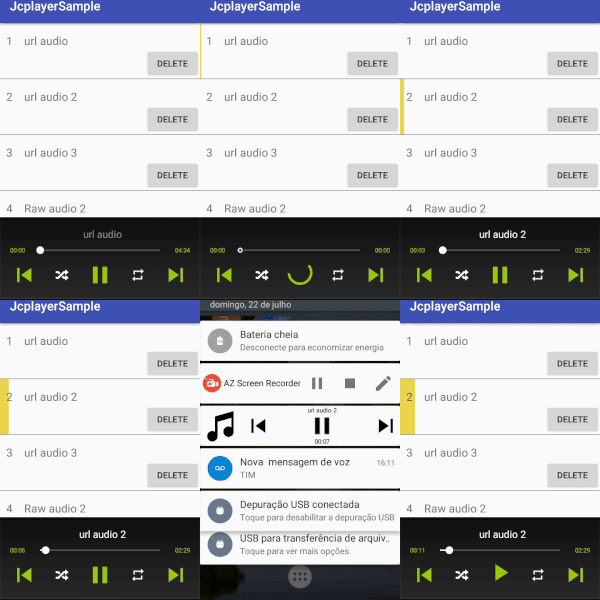
New features
- Raw files
- Asset Files
- Custom layout
Tested files
Not tested URLs
- http://xxxx/abc.m4a
- http://xxxx:1232
- http://xxxx/abc.pls
- http://xxxx/abc.ram
- http://xxxx/abc.wax
- rtmp://xxxx
- http://xxxx/abc.aspx
- http://xxxx/abc.php
- http://xxxx/abc.html
- mms://xxxx
Support us
You can support us by becoming a patron on Patreon, any support is much appreciated.

Gradle Dependency (Project level)
allprojects {
	repositories {
		jcenter()
	        maven { url "https://jitpack.io" }
	    }
	}
Gradle Dependency (Module level)
dependencies {
    // ... other dependencies
     implementation 'com.github.jeancsanchez:JcPlayer:{version}'
}
Getting Started
You only need a JcPlayerView on your Layout Activity/Fragment. All the controls and everything else are created by the player view itself.
<com.example.jean.jcplayer.view.JcPlayerView
    android:id="@+id/jcplayer"
    android:layout_width="match_parent"
    android:layout_height="match_parent"/>
Code Setup
Find your JcPlayerView xml and...
jcplayerView = (JcPlayerView) findViewById(R.id.jcplayerView);
Option 1: Just init a playlist
    ArrayList<JcAudio> jcAudios = new ArrayList<>();
    jcAudios.add(JcAudio.createFromURL("url audio","http://xxx/audio.mp3"));
    jcAudios.add(JcAudio.createFromAssets("Asset audio", "audio.mp3"));
    jcAudios.add(JcAudio.createFromRaw("Raw audio", R.raw.audio));

    jcplayerView.initPlaylist(jcAudios, null);
Option 2: Initialize an anonymous playlist with a default title for all
jcplayerView.initAnonPlaylist(jcAudios);
Option 3: Initialize an playlist with a custom title for all
jcplayerView.initWithTitlePlaylist(urls, "Awesome music");
Call the notification player where you want.
jcplayerView.createNotification(); // default icon
OR
jcplayerView.createNotification(R.drawable.myIcon); // Your icon resource
How can I get callbacks of player status?
    MyActivity implements JcPlayerManagerListener {
        ....
        jcplayerView.setJcPlayerManagerListener(this);
        // Just be happy :D
 }
Custom layout
You can customize the player layout by manipulating these attributes.
        app:next_icon
	app:next_icon_color
	app:pause_icon
	app:pause_icon_color
	app:play_icon
	app:play_icon_color
	app:previous_icon
	app:previous_icon_color
	app:progress_color
	app:random_icon_color
	app:repeat_icon
	app:repeat_icon_color
	app:seek_bar_color
	app:text_audio_current_duration_color
	app:text_audio_duration_color
	app:text_audio_title_color
Please, if you liked this project or help you to do your job, support me by being a sponsor <3
TODO LIST
- Set custom layouts for player.
- Add Instrumentation tests
- Add unit tests.
Explorer des projets similaires
Chargement…