int128/oauth2cli
int128/oauth2cli has 65 GitHub stars and 20 forks. GitHot measured 0 stars in 24 hours. Last checked 2026-11-15 01:53 UTC. Last push 2026-11-13.
Progression mesurée des étoiles
- in 24h
- 0
- in 7 days
- Historique en cours
- in 15 days
- Historique en cours
- in 1 month
- Historique en cours
Variations nettes sur des périodes qui se chevauchent, pas des totaux quotidiens. Les mesures absentes restent vides. Les étoiles indiquent l’intérêt, pas la qualité.
À propos
Go package of OAuth 2.0 authorization for command line tools, which allows simple authorization flow for better UX
Outils de développementREADME.md
Originaloauth2cli 

This is a Go package for OAuth 2.0 authorization in a command line interface (CLI) tool. You can create a CLI tool with the simple authorization flow for better UX.
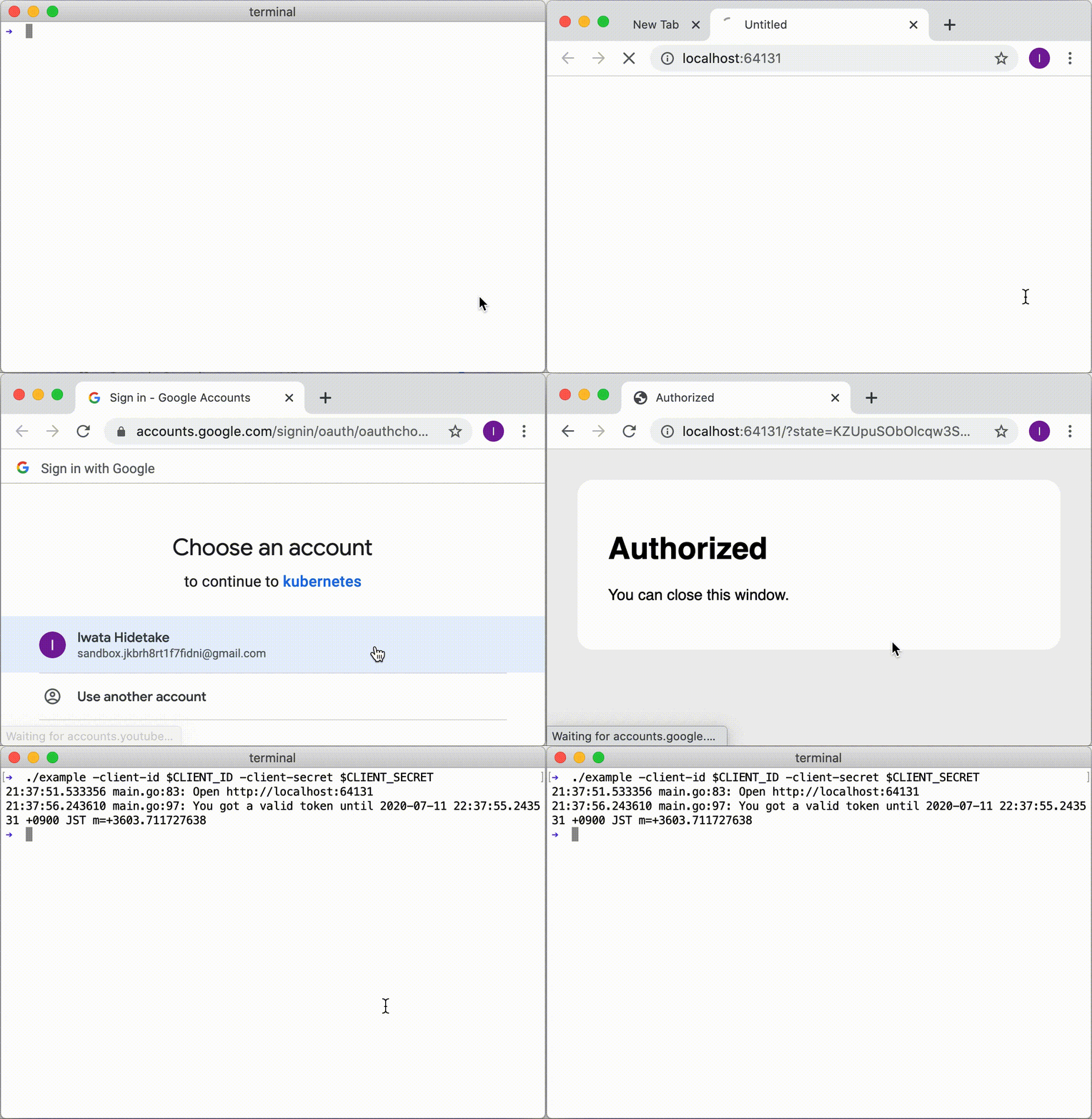
Take a look at the screencast of the example application.
Purpose
When we create a CLI tool which accesses an API with OAuth, it needs the complicated flow such as copy/paste of a URL and code, as follows:
- User runs the command.
- Command shows the URL for authorization.
- User opens the browser, logs in to the server and approves the authorization.
- Server shows an authorization code.
- User copies the code and pastes into the command.
- Command accesses the API with the token.
You can make it simple by using oauth2cli as follows:
- User runs the command.
- Command opens the browser.
- User logs in to the server and approves the authorization.
- Command gets a token and access the API with the token.
How it works
oauth2cli starts the local server and initiates the flow of OAuth 2.0 Authorization Code Grant.
Testing OAuth 2.0 Auth Code Flow using oauth2cli
sequenceDiagram
    autonumber
    participant RO as Resource Owner (User)
    participant CLI as oauth2cli
    participant UA as User Agent (Browser)
    participant Client as Local Server <br/> (client)
    participant AS as Auth Server

    Note over Client,RO: (Prereq) Client registered with Authorization Server and has client_id

    RO->>CLI: Command
    CLI->>UA: Open
    UA->>AS: Authorization Request
    AS-->>UA: Login / Consent
    RO->>UA: AuthN/AuthZ
    UA->>AS: AuthN/AuthZ
    AS-->>UA: AuthZ Response (redirect)
    UA->>Client: Follow redirect
    Client-->>UA: Success Response
    UA-->>CLI: Close
    CLI->>AS: Token Request
    AS->>CLI: Token Response
    CLI-->>RO: Exit
Contributions
This is an open source software licensed under Apache 2.0. Feel free to open issues and pull requests.