
gl0di/clawseccheck
gl0di/clawseccheck has 59 GitHub stars and 13 forks. Star changes are not measured yet. Last checked 2026-11-14 00:57 UTC. Last push 2026-11-13.
Progression mesurée des étoiles
- in 24h
- Historique en cours
- in 7 days
- Historique en cours
- in 15 days
- Historique en cours
- in 1 month
- Historique en cours
Variations nettes sur des périodes qui se chevauchent, pas des totaux quotidiens. Les mesures absentes restent vides. Les étoiles indiquent l’intérêt, pas la qualité.
À propos
🦞 Local, read-only security audit for your OpenClaw agent. Finds config, prompt-injection and supply-chain risks, watches for drift, and vets a skill before you install it. Offline, zero deps. A–F grade when all five layers ran.
Outils de développementREADME.md
Original
Is your OpenClaw agent safe? Ask it - you get a straight answer in words, right in the chat, and an honest A-F grade once all five audit layers have run.
The claw that checks your claws.



Verified against OpenClaw 2026.11.3 on Linux · also reads the pre-2026.8.1 config shapes · Python 3.10+ · details
Your OpenClaw agent reads your messages, remembers your conversations, holds your keys, and acts on your behalf. That power is exactly what attackers want to borrow: one poisoned message or one malicious skill can quietly turn your agent against you.
ClawSecCheck is a security check-up for your agent - one you run again, not
once. A setup is not safe or unsafe forever: you add a skill, connect an MCP
server, edit a config, and the answer changes. So it runs in three modes - a
deliberate full check, an ongoing watch that tells you what changed since
last time, and a before-you-install gate - and explains, in plain language,
right in your chat, what is risky and why. A full check earns an A-F grade,
but only once all five of its audit layers have run; short of that it leads with
the most urgent finding in words and names what didn't run, never a guessed
number. It reports, it doesn't
remediate: it never touches your OpenClaw config, needs no API key, and the
scanner itself makes no network calls - no telemetry, no uploads, ever.
(Two narrow, opt-in exceptions write inside the audited home - its own
suppression file, and a no-path --pdf into OpenClaw's managed attachment
directory. Neither is your config; see Safe to run below.)
🚀 Start in one minute - no terminal needed
1. Tell your agent:
Install the clawseccheck skill from ClawHub.
...or with a command: openclaw skills install @gl0di/clawseccheck · skill page on ClawHub
2. Then ask:
Audit my OpenClaw setup with clawseccheck.
3. The findings come back in the conversation - most urgent first, with an A-F grade if that run covered all five audit layers, and a plain-language note on what it didn't get to if it didn't. Done.
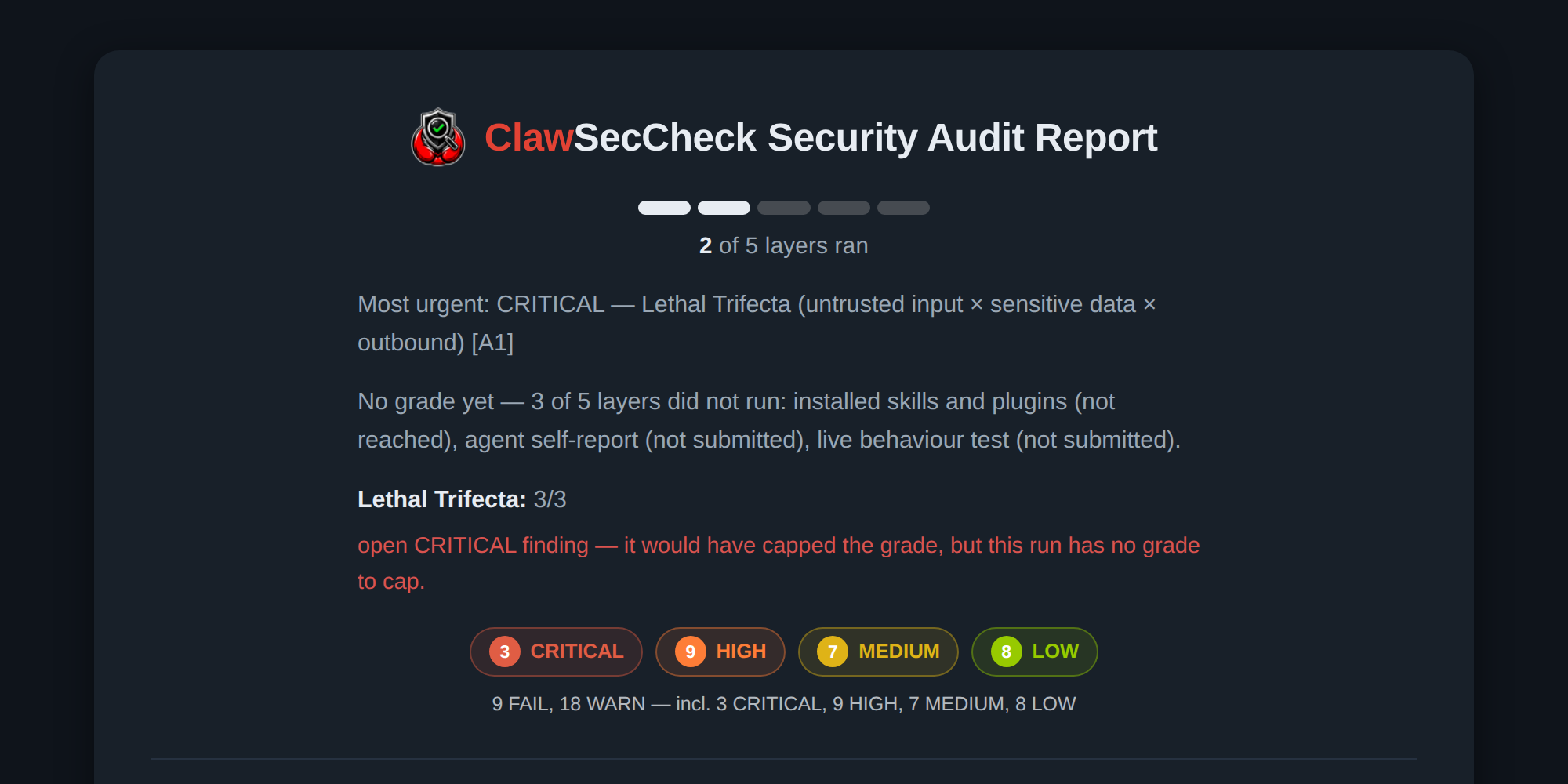
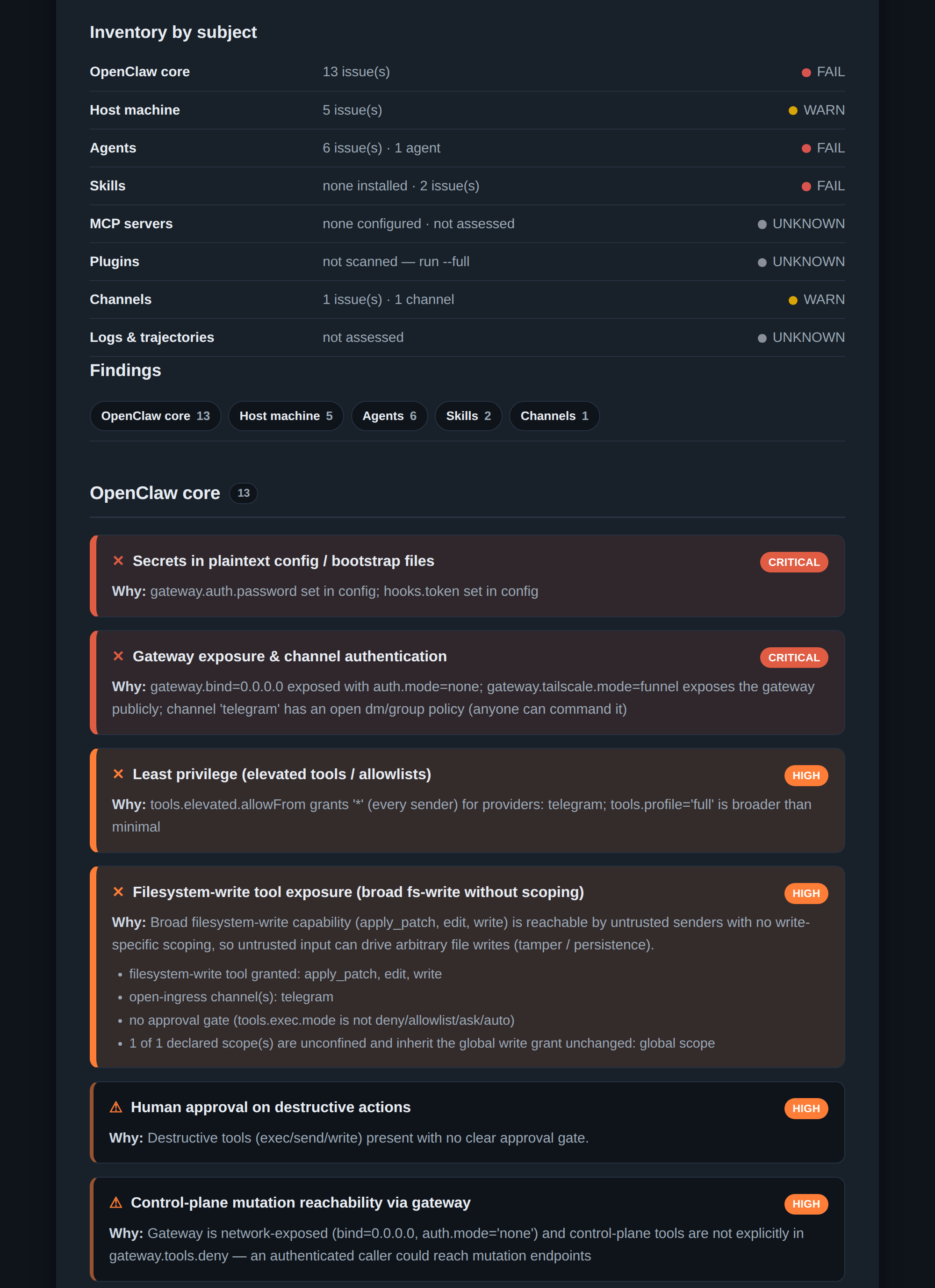
What you'll see - the report itself, from a real default run against the deliberately vulnerable test setup bundled with the repo. Your agent will summarise it in chat in its own words; the report is rendered by the skill, not by the agent, and you can ask for it any time ("save the full report"). A default run reaches 2 of the 5 layers, so it names the most urgent finding and says which layers it skipped, rather than printing a grade it hasn't earned:
See a longer excerpt of the same report
💬 You talk - it audits
No flags, no commands. Everything works as a conversation, across three modes - pick one by what you're actually asking:
A · Full check - how safe is this setup?
Run it once, deliberately. Gives you findings - and a grade only when all five audit layers behind it ran (see Five layers, one grade below).
| You say | You get |
|---|---|
| "Audit my OpenClaw setup" | A chat-sized card - findings, an inventory by subject, and the urgent problems most dangerous first, with an A-F grade when the run covered all five layers - plus a PDF companion carrying the rest: every installed skill/plugin/MCP server vetted, the riskiest capability chains, a behavioral replay, and a second opinion on any borderline call |
| "Am I vulnerable to prompt injection?" | An optional canary self-test you run against your own agent, alongside the static audit |
| "What's the most important thing to look at?" | A prioritised next-steps list based on your findings |
| "Share my grade" | A badge with the grade - only if one was issued; your findings stay private |
| "I think I've been hacked" | An evidence-preservation bundle for investigation |
B · Watch - what changed since last time?
Run it repeatedly. Gives you events, never a number.
| You say | You get |
|---|---|
| "Watch my setup for changes" | Alerts when something changes - a new skill, config drift, a finding that appeared or cleared |
| "What changed since the last check?" | The same, on demand - the diff since the last recorded baseline |
How the watch actually behaves. The first run records a local baseline and says so; it does not invent a "before" it never saw. Every later run compares against it and reports only the difference:
Baseline saved. Future runs will alert on what changes since now.
Baseline reference: a6a061e78c6239b7
1 change(s) detected since last check:
⛔ NEW MCP server connected since last check: 'newthing' — vet it before
   trusting (new tool/data trust surface).
Three things make this a watch rather than a re-run:
- It reports the change, not the state. A run with nothing new says
No new threats among what was compared- you are not asked to re-read a full report to spot what moved. - It says what it could not compare. Once a baseline exists, every run ends
with a count of dimensions it had no basis to diff (
ℹ️ 5 things could not be
compared this run
), so a quiet run is never mistaken for a clean one. (The very first run has nothing to compare against yet and says that instead - the block above is what it prints.) - The baseline has a reference fingerprint. Each run prints a short value;
keep a copy off the machine and re-check it later with
--verify-baseline. It moves whenever anything the watch recorded is different - so a copy you hold elsewhere is how you notice a local record that was quietly rewritten. It also moves when you change the flags you run with, and the check prints what it covered so you can tell those two apart.
Ask your agent to watch on a schedule, or run it yourself:
clawseccheck --monitor
Nothing leaves the machine: the baseline, the event journal and the score
history all live under ~/.clawseccheck/ and are removable at any time
(--purge). Points elsewhere with --state / --events if you want to keep
several watches apart.
Prefer it running continuously instead of on a schedule? --watch is the
same mode, run a different way: instead of you or a cron job invoking
--monitor again, it stays running and re-scans automatically the moment
something relevant changes under --home (debounced - real-time on Linux via
inotify, a bounded poll elsewhere). It never returns until stopped (Ctrl-C),
and writes only under --data-dir, exactly like --monitor:
clawseccheck --watch
Check whether one is already running with --watch-status - read-only, and
it never starts a watch itself. Full mechanism and liveness details:
User guide.
C · Before you install - is this thing safe to add?
Run it on the event. Gives you INSTALL / CAUTION / DO-NOT-INSTALL - not a letter grade.
| You say | You get |
|---|---|
| "Is this skill safe to install?" | A pre-install risk verdict with the reasons - flags suspicious and dangerous skills before you enable them |
Everything else - verifying its own integrity, purging its local data, and every flag below - works the same way regardless of which mode you're in.
🧬 Five layers, one grade
A full check (Mode A) is built from five layers, and they cost three different
things. Two run on a bare command (1 and 3). One needs a flag (2, --full).
The last two cannot run from a flag at all - one needs your agent to answer and
the other pokes your running agent live, so each closes only when its answer
is submitted back:
| # | Layer | Runs on its own? | How you get it |
|---|---|---|---|
| 1 | Static: config, files, permissions | yes - the default run | (default) |
| 2 | Sweep of what's installed: skills + plugins | no | --full |
| 3 | Logs and trajectories: what already happened | yes, budget-bounded | (default) - given up by --full --fast |
| 4 | Agent self-report | no - the agent has to answer | --ask -> fill it in -> --attest <file> |
| 5 | Live behaviour test | no - pokes the running agent | run --canary / --dryrun / --redteam / --multiturn, have your agent judge the result, then feed the verdict back with --judged-bundle <file> |
A grade is issued only when all five ran. Short of that no security score or
grade is printed - you get findings, led by the most urgent one in words, plus a line
naming which layers didn't run. Concretely: a bare run leaves 3 of 5 untouched
(the installed sweep, the self-report, the live test); --full closes one of
those - the installed sweep - and leaves 2 of 5 (self-report, live test);
--full --fast gives up the deep phases for speed and leaves 4 of 5.
The last two layers are submissions, not flags to stack. Running a self-test
alongside an audit does nothing: the self-test flags are standalone modes, and
the CLI says so (--full --canary prints note: --full has no effect with --canary and runs only the canary). Layers 4 and 5 close when their answers
come back in, so the one command that earns a grade is:
clawseccheck --full --attest filled-template.json --judged-bundle verdicts.json
Ask your agent to do it and it handles both round-trips for you - that is what "audit my OpenClaw setup, all five layers" means in chat.
🔍 What it checks
These are the areas a full check covers across its five layers:
| Area | The question it answers |
|---|---|
| 🌐 Exposure & network | Can strangers reach your agent - open gateway, open DMs, missing TLS? |
| ⚡ Privilege & execution | Could one injected message run commands or write files on your machine? |
| 🧩 Installed skills & plugins | Is anything you installed malicious - hidden payloads, credential theft, supply-chain traps? |
| 💉 Prompt-injection surface | Can untrusted text steer your agent through chat context or bootstrap files? |
| 🔐 Secrets & data at rest | Are your tokens, keys, and conversations lying around readable? |
| 📡 Monitoring & readiness | Would you even notice a compromise - and could you investigate it? |
On top of the 230 individual checks, a risk engine hunts for deadly combinations - chains like "untrusted input -> reachable secrets -> outbound tool" that make an attack trivial. Full list: check catalog.
🏆 Why ClawSecCheck
- Private by architecture. Unlike scanners that upload your configuration for analysis, ClawSecCheck's engine runs entirely on your machine. No account, no API key - and the scanner contains no telemetry client and makes no network requests.
- Sees what the built-in audit misses. OpenClaw's own audit doesn't inspect
your bootstrap files (
SOUL.md,AGENTS.md, ...) - the ones injected straight into the model as trusted context. ClawSecCheck checks them for injection. It also runs the native audit for you and folds the results into one report. - Protects you before it's too late. After the ClawHavoc wave of credential-stealing skills, "check before install" matters: ask it to vet any skill, plugin, or MCP server before you enable it.
- Honest by design. A grade is issued only when all five audit layers ran -
short of that, no security score or grade is printed, just findings and a line naming what
didn't run. What it can't determine is reported as
UNKNOWN, never quietly counted as safe, and every mode ends by naming what it did not check: no mode ever prints "clear" about a subject it never looked at. An open CRITICAL finding also hard-caps a grade when one is issued: you can never get a pretty "A" with a real hole in it. - Not a rebadged lookup. No network calls means no verdict borrowed from someone else's reputation database and presented as ours. Every finding traces to a real check with its own fixture and test, an AST layer that reasons about code structure, and a combinational risk engine for the attacks that only show up as a combination of individually-ordinary capabilities - plus a documented zero-false-positive-FAIL release discipline: an alarm reaching you is a specific, reproducible, test-pinned condition in your own config, not a keyword match dressed up as a scan.
- Built like it matters. 42,191 automated tests run on every change, a false alarm is treated as a release-blocking bug, and every release is cryptographically signed.
- Free and readable. MIT-licensed, pure Python standard library, zero dependencies - the entire engine is source you can read.
🔒 Safe to run
The tool that audits your agent survives an audit itself: it is read-only
with respect to your OpenClaw setup, its engine is offline by design, and
by default it writes only its own local history under ~/.clawseccheck/ -
removable any time by asking your agent to "purge the clawseccheck data".
A few flags write local files only when you explicitly ask for them
(--save, --badge, --html, --sarif, --pdf, --monitor, --log) - see the
User guide for the full list. Two of those writes can land
inside the audited home, both only because you asked for them:
--apply-ignore-proposals appends entries - never invents them - to its own
.clawseccheckignore suppression file there, and is confirmation-gated on top;
and --pdf given with no path puts the report in <home>/media/outbound/,
which is the one directory OpenClaw always lets its own read tool open, so the
file can be attached into your chat. It writes there only if that directory
already exists and is writable - it is never created - and falls back to
~/.clawseccheck/report.pdf (<DIR>/report.pdf under --data-dir DIR) otherwise. Name a path (--pdf report.pdf) and it
goes exactly there instead. Neither touches your OpenClaw config.
The widest read that reaches outside your OpenClaw home is on by default: to
catch a dependency that would run code the moment it is installed, the tool
locates your installed OpenClaw package through your PATH (no subprocess),
then walks that package's node_modules to read each dependency's manifest,
its build config, and the in-package files those name as install-time targets.
Bounded to 2,000 packages, symlinks are never followed, and nothing is ever
executed - --no-deptree skips the walk. (The host-posture scan and the
listening-socket scan also read outside the home; --no-host and --no-sockets
skip those.) See the
security model for the complete, itemized capability
surface.
One honest nuance: when you use it through OpenClaw chat, the report text becomes part of your conversation and is handled by whatever model provider your agent already uses - the scanner itself adds no channel of its own. Details: security model · FAQ.
The bundled known-bad IOC catalog is the same story: a small, dated, provenance-tagged dataset that ships in-repo with each release and is never fetched - no feed, no update endpoint, not even opt-in. See Bundled IOC dataset for the provenance policy and how staleness is surfaced.
Verify your copy is genuine (for the cautious)
Every release ships a SHA256SUMS.txt signed with keyless
cosign; clawseccheck --verify-self
prints your copy's digest to compare.
# Get the release assets (adjust the version):
curl -LO https://github.com/gl0di/clawseccheck/releases/download/vX.Y.Z/SHA256SUMS.txt
curl -LO https://github.com/gl0di/clawseccheck/releases/download/vX.Y.Z/SHA256SUMS.txt.bundle

cosign verify-blob \
  --bundle SHA256SUMS.txt.bundle \
  --certificate-identity-regexp "^https://github\.com/gl0di/clawseccheck/\.github/workflows/clawhub-publish\.yml@refs/tags/v" \
  --certificate-oidc-issuer https://token.actions.githubusercontent.com \
  SHA256SUMS.txt
A passing verification proves the reference digest was produced by this repo's
clawhub-publish.yml workflow running on a vX.Y.Z release tag, and hasn't been
altered since - not merely that some workflow, on some branch, in this repo signed
it. (The identity pins the workflow file and the refs/tags/v ref prefix; the
version suffix varies per release and cannot be pinned here.)
SHA256SUMS.txt also lists the files shipped beside the engine package
(SKILL.md, audit.py, pyproject.toml, references/cli-flags.md, docs/, ...)
under a separate, labelled section, as they sit in the installed bundle. Compare
any of them with sha256sum <file> from the install directory. The published
CHANGELOG.md is the trimmed copy, so its digest is of that copy.
🚩 Why security scanners flag this repo
If you arrived from a directory listing showing a red verdict on this repository, this section is for you - and everything in it is checkable in the source in about a minute.
A detection tool has to contain the things it detects. Three classes of alarming-looking string live here on purpose:
- A known-bad IOC dataset.
clawseccheck/iocdb.pyships a small, dated, provenance-tagged list - host indicators91.92.242.30,121.199.24.94,laosji.net,letssendit.funandiseekaigogo.com, plus known-bad ClawHub slugs and npm packages - each carrying the primary report it came from (Koi Security, Palo Alto Unit 42, StepSecurity, the GitHub Advisory Database). It exists so the tool can warn you about them. A scanner matching raw strings sees a repository that contains malicious infrastructure. - Detection signatures. The checks look for pipe-to-shell installs,
obfuscated
exec, and credential-exfiltration shapes. Those patterns are in the source as patterns - that is what a signature is. - Deliberately vulnerable fixtures.
fixtures/holds hundreds ofbad_*configs andtests/holds the payload each check must fire on. That is where the two URLs most often quoted back at us live -http://evil.example/xandhttp://evil/x. Neither can resolve:.exampleis reserved by RFC 2606 for documentation, andevilis a bare label with no TLD.
What you can verify yourself, without trusting this paragraph:
- Nothing here fetches anything. No network client is imported anywhere in
the package - read the import lines.
urllib.parseis string parsing; the singleimport socket(clawseccheck/checks/_egress.py) is used only forinet_aton/inet_ntoaIP-string conversion; and insideclawseccheck/the only.connect(calls aresqlite3.connect(..., mode=ro)against local files. A repo-wide grep does turn up real socket connects - every one of them is in a deliberately vulnerable fixture skill underfixtures/, which is point 3. The namesurlopen,requestsandhttpxdo appear throughoutclawseccheck/skillast.py- as string literals in the sink tables the AST layer uses to spot network calls in your skills. Data, not imports. - The flagged URLs are inert.
grep -rn "evil.example" clawseccheck/returns only comments and docstrings that explain a check; every executable occurrence is undertests/orfixtures/- the deliberately vulnerable payloads of point 3. - The whole engine is stdlib.
pyproject.tomldeclaresdependencies = [].
A worked example, as of 2026-08-27. The skills.sh listing shows a Gen
Agent Trust Hub: FAIL, risk HIGH badge (audited 2026-07-21). That same audit's
own FULL ANALYSIS section contains five [SAFE] findings stating, correctly,
that the flagged patterns are "detection signatures for the auditing engine and
are not executed by the tool itself", that the flagged URLs are "an internal
reputation blacklist", and that the injection strings "belong to intentionally
vulnerable test fixtures". Its RECOMMENDATIONS section then still emits
HIGH: Downloads and executes remote code from: http://evil/x, http://evil.example/x. Both statements are in the same report; the second does
not survive the first. We read this as a verdict-aggregation issue in that
tool - the false-positive-on-your-own-signatures problem every security scanner
has to solve - and not as a finding about this one.
We say this without smugness: the same class of false positive is what this
project treats as a release-blocking bug in its own output, which is why a
false FAIL here is a hard blocker and not a tuning preference. See the
security model for the complete capability surface, and
docs/IOC_DATA.md for the IOC dataset's provenance policy.
A second worked example, from ClawHub's own listing scan (2026-09-08).
Its "hardcoded secret" and "disabled TLS verification" findings are the same
point-3-adjacent shape as above, aimed at different lines: the flagged
"secret" is checks/_content.py's _URL_AUTH_QUERY_PARAM_NAME_RE - a regex
of REST auth query-parameter names (access_token, api_key...), no value,
used to recognize the ?api_key= idiom in a scanned skill's prose; the
flagged "disabled TLS verification" is checks/_mcp.py reading sslVerify
out of the audited MCP server's own config and FAILing when it is
false - this tool makes no TLS connection of its own to have a verification
setting for. Its "env var access + network transmission" finding is
skillast.py's ENV_EXFIL_FLOW taint rule: plain set/tuple literals of
library and attribute names (requests, urlopen, getenv...) that the
AST walker compares a scanned skill's parsed nodes against - never
imported, never called here. And its "in-memory retention of sensitive
environment values" finding is real in the narrow sense that collector.py
does read the two dotenv files' raw KEY=VALUE pairs into memory for the
run - see security model for
exactly what that's for (truthy/strength/hostname checks only) and where a
regression test pins that the value never reaches a finding, a log, or disk.
⚙️ For terminal users: CLI, JSON, SARIF, CI gates
ClawSecCheck is also a full standalone CLI (zero dependencies, Python 3.10+).
Nothing above replaced this: the three conversational modes sit on top of the
same CI/power surface, they didn't shrink it. One flag did go in 4.0.0 -
--fail-under <score>, because a default run no longer carries a score to
threshold on. Use --fail-on <severity> instead, or --exit-code to trip on
any FAIL.
pipx install "git+https://github.com/gl0di/[email protected]"   # pin a release tag (recommended)
pipx install git+https://github.com/gl0di/clawseccheck             # or track the latest source
clawseccheck                         # audits ~/.openclaw by default
clawseccheck --json                  # machine-readable result
clawseccheck --sarif results.sarif   # SARIF 2.1.0 for GitHub Code Scanning
clawseccheck --html report.html      # standalone HTML report (private; folds home paths like --json/--pdf)
clawseccheck --pdf report.pdf        # complete audit as a paginated PDF (attach into chat)
clawseccheck --exhaustive            # raise the scan caps: slower, maximum coverage
clawseccheck --fail-on high          # CI gate: exit 1 if an unsuppressed FAIL at/above HIGH exists
clawseccheck --explain B2            # full detail on one check, no full re-scan
clawseccheck --retest B2             # re-check just that one after a fix
clawseccheck --save-run              # snapshot this run so a later --diff can compare it
clawseccheck --diff RUN1 RUN2        # new/fixed findings between two saved runs
clawseccheck --incident-open         # open a tracked incident record from this run's findings
clawseccheck --incident-mark ID investigating   # move it through open/investigating/mitigated/closed
clawseccheck --incident-show ID      # its status, history, and the --monitor timeline since it opened
clawseccheck --judge-packet          # export borderline findings for a host-agent second opinion
Two more nuances the User guide covers in full: --save-sbom-run / --sbom-diff do for
the bill-of-materials what --save-run / --diff do for findings - added/removed/changed
components between two points in time - and --exit-code-scheme graduated reuses
--monitor's 0/1/3 convention for --fail-on/--exit-code instead of the default binary
0/1, for a CI consumer that wants "could not produce a verdict" told apart from a real FAIL.
The User guide covers the modes and recipes - vetting engines,
drift monitoring, attestation, red-team self-tests. clawseccheck --help is the
complete flag list.
[!IMPORTANT] An honest limit: a clean report means "no known attack pattern matched" - not "provably safe." Most checks are static: they bound what your agent can do, not how it behaves under a live attack. The optional self-tests exercise selected live paths but are graded by your own agent, so they can't prove safety against arbitrary attacks either.
UNKNOWNis always shown asUNKNOWN, never hidden. Hold it to this contract: every mode ends by naming what it did not check, and no mode prints "clear" about a subject it never looked at. The full, unvarnished list of limitations is in the User guide.
✅ Compatibility
Three different kinds of evidence, kept apart on purpose - "the code handles it" is not the same claim as "we ran it".
| Verified against a running install | OpenClaw 2026.11.3. The schema snapshots this repo ships - tests/dist_verified_paths.txt, tests/state_schema_snapshot.sql, tests/vendor_state_tables.txt, tests/dm_policy_shape_manifest.txt - are generated from an installed 2026.11.2 and each carries that version in its header. The state-schema snapshot's stamp is enforced: on a machine with OpenClaw installed, the suite re-derives the schema and fails if the stamp does not match the running build. tests/dist_citation_baseline.txt (a frozen ledger of pre-existing citation debt) is stamped and enforced the same way: its stamp must equal the installed build, and it is re-recorded as a deliberate act after each upgrade's citations have been re-grounded, never to absorb a new stale citation. |
| Read by the code, each measured against a running install while it was written | 2026.7.1-2, 2026.8.1, 2026.8.2 - the three builds that moved settings the audit reads. Every moved key is read in both spellings: the agent roster as agents.list and agents.entries, the gateway command lists under their old and new parents, and the three settings 2026.8.1 moved out of openclaw.json into OpenClaw's machine-owned store. An older or not-yet-migrated config is read, not silently skipped. |
| On anything else | The audit still runs. This is deliberately not a claim of a contiguous supported range: the builds between the measured points (2026.7.2 - 2026.8.0) were never run against, so the tool treats a config it cannot date as undated - it names both key spellings in its fix advice rather than guessing which one your build accepts, and a key whose home this build does not have is reported as retired or UNKNOWN, never resolved to nothing and given a verdict anyway. |
Operating systems. CI runs the full suite on Linux (Python 3.12 and 3.14) and
macOS (Python 3.12) for every push. Windows runs the read-only audit and is
advertised in the skill manifest, but it has no CI job and two protections degrade
there: ClawSecCheck's own ~/.clawseccheck/ store is not owner-restricted (file modes are
not enforced as NTFS ACLs) and the symlink-clobber guard is a no-op. Treat the local store
as unprotected on Windows - see the User guide for the detail.
📚 Documentation
| Document | What it covers |
|---|---|
| User guide | Recipes, monitoring modes, and trust details |
| Check catalog | All 230 checks: what they verify and how to remediate |
| Threat coverage | OWASP LLM Top 10 / Agentic threat mapping |
| Bundled IOC dataset | Provenance policy, refresh cadence, and freshness discipline for the known-bad catalog |
| Output schema | The frozen --json / SARIF contract |
| FAQ | Common questions, incl. the compromised-host protocol |
| Troubleshooting | ClawSecCheck itself won't run, crashes, or OpenClaw doesn't see it |
| Security model | ClawSecCheck's own capability surface and self-defense |
| Contributing | Dev setup, tests, how to author a new check |
| Support | Where a report goes - issue, discussion, or private advisory |
🙌 Feedback, security, license
- Something looks wrong? Open an issue - false alarms are treated as bugs. If the tool itself won't run or crashes, try Troubleshooting first.
- Questions, false positives, or an attack class we don't cover yet? Start a discussion - see SUPPORT.md for where each kind of report goes.
- Found a vulnerability? Report privately via SECURITY.md.
- License: MIT for the code. The ClawSecCheck name and logo are not covered by it - see TRADEMARK.md. Contributors sign a short CLA. Maintained by gl0di.
Explorer des projets similaires
codecrafters-io/build-your-own-x
Maîtrisez la programmation en recréant de zéro vos technologies préférées.
562,351 étoilespublic-apis/public-apis
Une liste collective d'API gratuites
498,794 étoilesmorluto/rea
Rétro-ingénierie de n'importe quoi avec des agents, du comportement des applications jusqu'aux binaires natifs.
457,728 étoilesopenclaw/openclaw
L'IA qui fait vraiment les choses. Tout système d'exploitation, toute plateforme. À la manière du homard. 🦞
394,399 étoiles