
fivetaku/whosup
fivetaku/whosup has 36 GitHub stars and 6 forks. GitHot measured +1 stars in 24 hours. Last checked 2026-11-14 10:27 UTC. Last push 2026-11-11.
What you can do
- Auto-discovery - Every running herdr session and pane, no configuration
- Attention states - needs input · failed · finished · running · idle · empty
- Question extraction - Permission boxes, trust-folder prompts, and "A or B?" questions are shown verbatim
- Jump - Click → pane.focus, and on macOS the terminal window showing that session comes forward. The terminal app is found automatically; when no window shows the session, a new one opens (Ghostty and Terminal)
Progression mesurée des étoiles
- in 24h
- +1
- in 7 days
- Historique en cours
- in 15 days
- Historique en cours
- in 1 month
- Historique en cours
Variations nettes sur des périodes qui se chevauchent, pas des totaux quotidiens. Les mesures absentes restent vides. Les étoiles indiquent l’intérêt, pas la qualité.
À propos
Stop abandoning your agent sessions. One board for every herdr session: what needs input, what finished, what's running. Click to jump to that pane.
Outils de développementREADME.md
OriginalEnglish | 한국어 | 日本語 | 中文 | Español
whosup

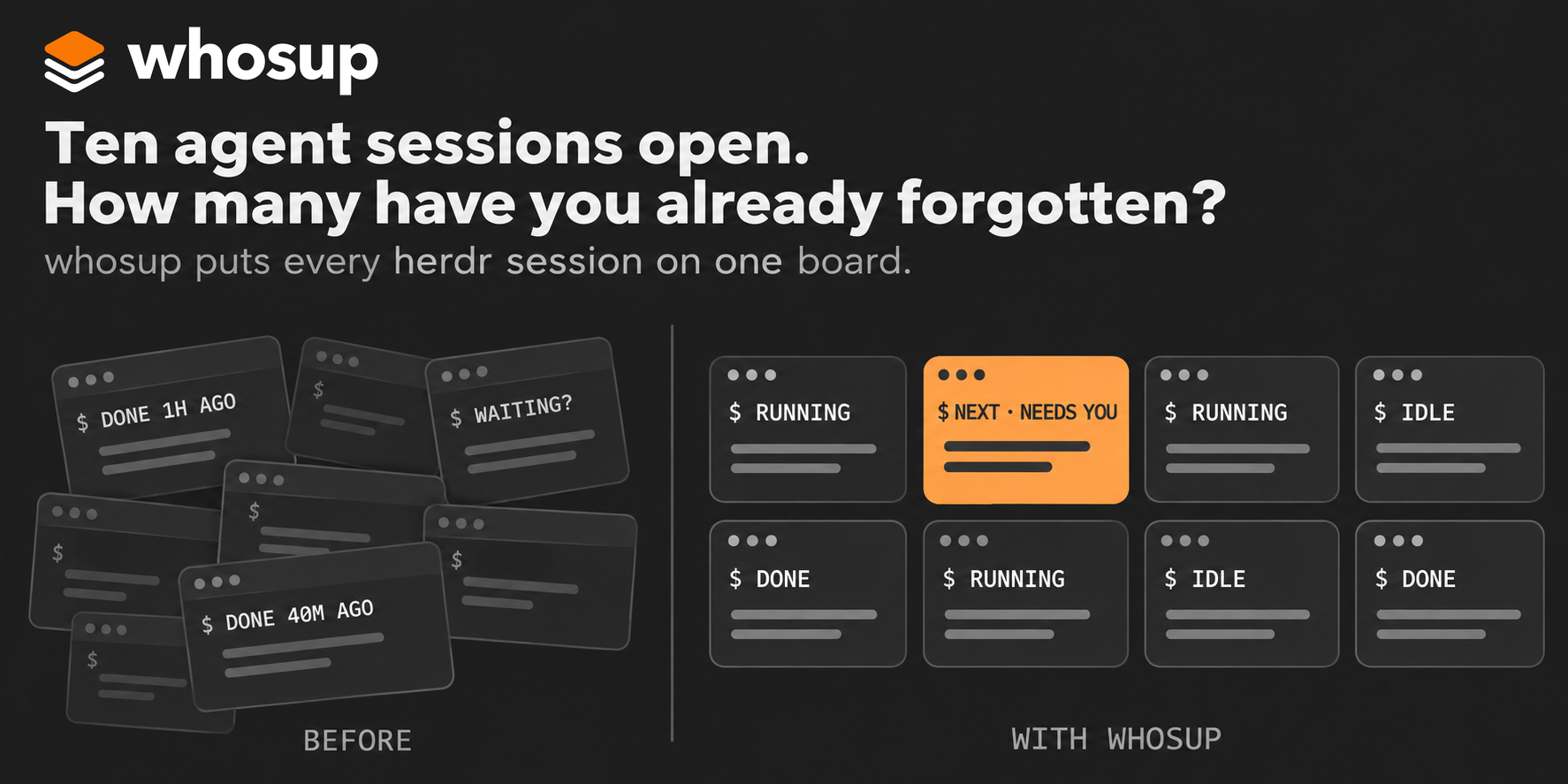
Stop abandoning your agent sessions. whosup puts every herdr session on one board and shows which pane needs you next.
You run six, ten, fifteen coding agents in herdr panes. Some are working, some finished an hour ago, one is sitting on a permission prompt you never saw. whosup turns every pane of every running herdr session into one browser page: what needs your input, what just finished, what is still running, what went quiet. Click a cell and herdr jumps to that pane.
Quick Start • Why whosup? • What you see • How it works • Features • Settings • Setup • Requirements
Quick Start
1. Install the herdr plugin
herdr plugin install fivetaku/whosup --yes
2. Start it (or just restart herdr)
herdr plugin action invoke fivetaku.whosup.start
The board comes up at http://127.0.0.1:4790 and opens in your browser once. From then on it starts with herdr.
3. Open more herdr sessions whenever you like
herdr --session work # any name, any terminal
Every running session shows up on the board by itself. No list to maintain.
On Windows
The same plugin runs on Windows; its actions carry a win- prefix (win-start, win-doctor, …). See Windows.
Why whosup?
- You stop polling panes. The top band tells you how many panes need input, failed, finished, or are running. The "next" line names the one to look at first and quotes the question it is asking.
- One click, right pane. Click a cell and herdr focuses that pane, in any tab of any session. On macOS it can bring your terminal app forward too.
- Restarts don't lose conversations. After a reboot herdr restores the panes but not the agents. Empty cells get a resume button that finds the newest Claude Code conversation for that folder and runs
AGENT_CMD --resume <id>in the pane. Resume reads Claude Code's conversation history only; with any other agent the pane starts a fresh session. - Colour means something. Black and white everywhere, orange for the one thing to look at next, red for failures. Nothing blinks on a loop.
- It tells you even when you look away. The tab title shows how many panes are waiting, e.g.
(3) whosup, and the favicon lights its orange cell. A pane that just raised its hand gets one short orange ring. The header's sort button switches between by desk and neglected first, which slides the longest-waiting panes to the front of each desk. Turn on alerts in the header for a desktop notification; clicking it jumps to that pane. - Nothing waiting gets lost. A pane that needs you stays on the board until you deal with it — past midnight, after a restart, through a herdr hiccup. seen only snoozes it for 30 minutes; if it still needs you, it comes back. Closed panes stay in a recently closed row for 7 days and panes you stash stay there until you restore them; from that row you can resume or restore them. A stashed pane that starts working again comes back by itself. Pin the panes you always watch to a row at the top.
- It says when it doesn't know. If whosup cannot reach herdr, the header shows disconnected · last collect HH:MM, the tab title turns into
(!) whosup, and the favicon goes grey — instead of a calm board that is quietly out of date. - Light, dark, your language. The header button cycles the mode (auto / light / dark); the settings panel switches the language (English / 한국어). Palettes follow what real IDE themes use, with text contrast kept at WCAG AA.
What you see
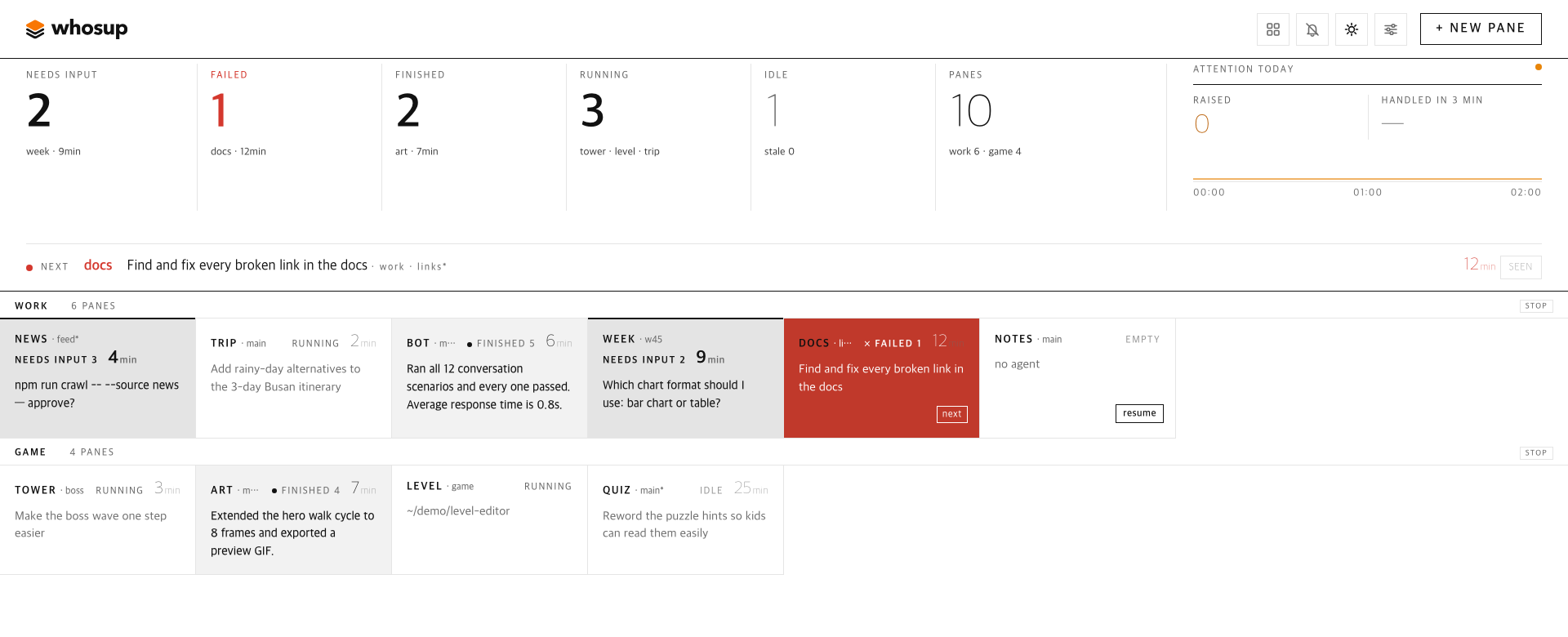
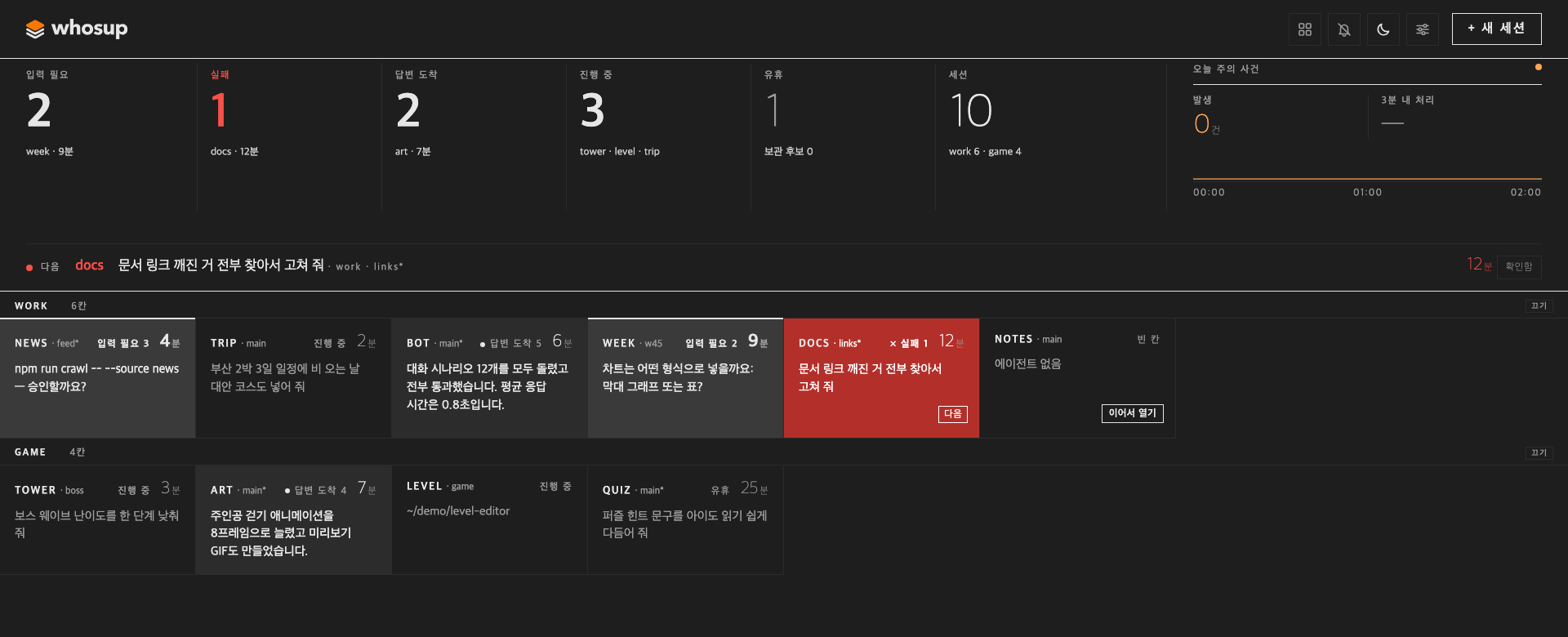
| Area | Meaning |
|---|---|
| State band | Counts for needs input · failed · finished · running · idle · panes, plus today's attention events and how many were handled within 3 minutes. Click a number to filter. |
| Next line | The single pane to look at first and why: the pending question, the failure, or the finished answer. |
| Desks | One row (desk) per herdr session, one cell per pane in pane order. Cell header: label · git branch (the session name when there is no branch) · state, with a number 1–9 on the first nine waiting panes in the shared order (e.g. needs input 3; press 3 to jump there) · time waiting (for running and idle panes, time since your last request) · tags for the failure kind (e.g. usage limit) and unreachable. Below it, one line of context. |
| Cell line | The question the agent is asking (permission box, trust prompt, A-or-B), its last sentence, or your last request, whichever matters for that state. |
| resume | On empty panes after a restart: continue the newest conversation for that folder. |
| + new pane | Pick a session and a folder; whosup opens a tab there, starts your agent, and focuses it. |
How it works
herdr sessions (main, side, …)
   └─ pane list + agent list, every 3 s  ──►  whosup collector  ──►  SQLite (node:sqlite)
                                                                       │
browser  ◄──  http://127.0.0.1:4790  ◄──  board server  ◄─────────────┘
   │
   └─ click  ──►  pane.focus over herdr's socket  ──►  the pane
One Node process, no build step. herdr's startup hook is a one-shot command: when herdr starts, it launches whosup as a background server and returns. The server then keeps running on its own — herdr does not supervise or stop it — so use the stop action to shut it down. Pane state comes from herdr's agent detection (working / blocked / done / idle); the question text is read from the pane screen; the last request comes from Claude Code's conversation history (~/.claude/projects, or CLAUDE_PROJECTS_DIR). Panes running other agents show no last request, and resume starts them fresh. The collector also listens to herdr's events, so a pane that changes state is collected right away instead of waiting for the next 3 s pass, and open board tabs are updated at once. Without the event stream the 3 s pass still runs.
Trust model. The server listens on 127.0.0.1 only and has no login. Browser requests from other sites that try to change something are refused (a change must come from the board's own address and be sent as JSON), but any program running on the same computer can use its API — including changing settings such as AGENT_CMD, the command whosup types into a pane for resume and new panes. Do not expose the port to other people. The server also answers 403 local only to any request whose Host header is not 127.0.0.1, localhost or [::1], so tunnels that forward a public hostname (Tailscale Serve, cloudflared, ngrok) cannot open the board at all. To watch from another machine of yours, use a port forward that keeps a localhost host, such as ssh -L 4790:127.0.0.1:4790 <host> and then http://localhost:4790, and run the server with WHOSUP_READONLY=1. Read-only blocks changes, not viewing: it does not list folders under your home, but everything on the board stays visible — pane folder paths in the cell tooltips, last request text, question text — and GET /api/settings still returns agent_cmd.
Features
| Feature | Description |
|---|---|
| Auto-discovery | Every running herdr session and pane, no configuration |
| Attention states | needs input · failed · finished · running · idle · empty |
| Question extraction | Permission boxes, trust-folder prompts, and "A or B?" questions are shown verbatim |
| Jump | Click → pane.focus, and on macOS the terminal window showing that session comes forward. The terminal app is found automatically; when no window shows the session, a new one opens (Ghostty and Terminal) |
| Where a click goes | settings → Clicking a pane opens: terminal window (default), web address, or both, saved per browser. Web address opens the pane in a web terminal for herdr in a new tab, with {session} and {pane} filled in; each herdr session can have its own address (a web terminal usually runs one server per session, on its own port), and a Herdr app row opens on the web only when it has an address of its own. The tab is reused per row, so it stays linked to the board that opened it: set only the address of a web terminal you trust. Pick it when you use the board from another device. The board must not be read-only for this: read-only mode blocks every click |
| Herdr app terminals | When herdr-core (the terminals of the Herdr desktop app) is running on this machine, each of its terminals is a card too: one row per space of the app, with the status and the question text the core reports. A click jumps to that pane in the Herdr app and brings the app forward; when the app is not open the terminal opens in a terminal window (hc attach). Close, resume, new pane and turning a row off and on work as they do for herdr sessions. Nothing to configure, and whosup never starts a core that is not running. An agent stopped at its trust-folder prompt, which the core does not report, is read from the screen and shown as needing input; no other state is guessed from the screen |
| Resume | The pane's own conversation, else the newest one in its folder that is not live in another pane → AGENT_CMD --resume; the board shows which one before you click. Claude Code conversations only; other agents start fresh |
| New pane | Session + folder picker, runs your agent command |
| Desks (optional) | Declare sessions and panes per monitor in desks.json; the desks-apply action creates what is missing, idempotently |
| i18n | English by default, 한국어 on request (settings panel, ?lang=ko) |
| Theme | auto / light / dark (header button, ?theme=), researched IDE palettes |
| Read-only mode | WHOSUP_READONLY=1 hides the action buttons and + new pane, blocks clicks, Enter, 1–9, n, alert clicks and settings changes (the settings panel shows only the language choice), and does not list folders. It blocks changes, not viewing — see the trust model |
| Seen = snooze | seen on any waiting cell hides it for 30 min; unsee brings it back now |
| Pin | Pinned panes sit in a row above every desk, in both sort modes |
| Stash & recently closed | Stash an idle pane; closed panes stay under recently closed for 7 days, stashed panes until you restore them; a stashed pane that starts working again comes back by itself |
| One order | The next line, Enter, keys 1–9, alerts and the neglected sort all use the same order: failed → needs input → finished, oldest first |
| Keyboard | n (or ㅜ with a Korean layout) opens new pane · Tab moves between panes and Enter or Space opens the focused one · with no pane focused, Enter jumps to the next pane, or saves/opens in an open panel · 1–9 jump to the numbered pane · Esc closes the panel. n and 1–9 are ignored while you type in a field |
| Re-alerts | A pane left waiting is alerted again every 15 min, up to 4 times; alerts close when the pane is handled |
| macOS alerts (optional) | The server can send macOS notifications even with the tab closed — off by default |
| Split screen (optional, macOS) | Clicking a pane puts the board on the left part of the screen and the terminal on the rest (split_pct) — off by default, needs Accessibility permission |
| Honest state | Last collect time in the header; disconnected when collects stop; panes in an unreachable session are kept and marked |
| Settings panel | settings in the header: snooze, re-alert interval and limit, closed-after, disconnect warning, keep days, stale days, macOS alerts, unreachable timeout, split screen, agent command, where a click goes (this browser only), terminal app. In read-only mode it shows only the language choice |
Plugin actions
| Action | What it does |
|---|---|
fivetaku.whosup.start |
Start the board (also runs at herdr startup) |
fivetaku.whosup.stop |
Stop it |
fivetaku.whosup.status |
URL (port) and PID |
fivetaku.whosup.open |
Open the board in the browser |
fivetaku.whosup.desks-apply |
Create sessions/panes from desks.json |
fivetaku.whosup.desks-status |
Declared vs existing panes |
fivetaku.whosup.autoconf |
Check this machine again, update the auto-detected values and print them (see Where each value comes from) |
fivetaku.whosup.win-* |
The same actions on Windows (win-start, win-stop, win-status, win-open, win-desks-apply, win-desks-status, win-autoconf), plus win-doctor |
Settings
Put KEY=value lines in .env inside the plugin config dir (herdr plugin config-dir fivetaku.whosup; ~/.config/whosup when run outside herdr). The file is read only when start launches the server, so after a change run the stop action and then start. A value set here wins over auto setup; the settings panel wins over both (see Where each value comes from). The desks-apply action does not read .env; it takes the agent command from agent_cmd in desks.json.
| Key | Default | Meaning |
|---|---|---|
PORT |
4790 | next free port is used if taken |
OPEN_BROWSER |
1 | open the tab once when herdr starts |
AGENT_CMD |
claude | command used by resume and new pane — put your wrapper here; the settings panel can override it |
FRONT_APP |
auto | macOS terminal app to bring forward on jump, e.g. Ghostty. When unset, auto setup picks one (lane L4 in the rules), and Terminal opens a new window if there is none. On Windows: blank = auto (Windows Terminal if found, else a PowerShell window), PowerShell, Windows Terminal, or off (any value is accepted there). The settings panel changes it without a restart |
STALE_DAYS (or WHOSUP_STALE_DAYS) |
3 | quiet days before a pane is an archive candidate |
WHOSUP_READONLY |
0 | 1 = read-only view: no changes, no folder list |
WHOSUP_SEEN_SNOOZE_MIN · WHOSUP_RENOTIFY_MIN · WHOSUP_RENOTIFY_MAX · WHOSUP_GONE_MISSES · WHOSUP_STALE_COLLECT_SEC · WHOSUP_CLOSED_KEEP_DAYS · WHOSUP_OS_NOTIFY · WHOSUP_UNREACHABLE_TTL_H · WHOSUP_SPLIT_PCT |
30 · 15 · 4 · 3 · 30 · 7 · 0 · 24 · 0 | starting values; the settings panel in the header overrides them per computer |
WHOSUP_INTERVAL |
3 | seconds between collects |
CLAUDE_PROJECTS_DIR |
~/.claude/projects |
where resume and the last request look for Claude Code conversations |
HERDR_BIN_PATH (or HERDR_BIN) |
auto | path to the herdr binary; otherwise whosup tries /opt/homebrew/bin, /usr/local/bin, ~/.local/bin, then PATH |
WHOSUP_RUNTIMES |
auto | what to read: auto (herdr sessions and herdr-core terminals, whichever is there), herdr, or herdr-core |
HC_SOCKET |
auto | herdr-core socket; otherwise taken from the core's own core.lock (follows HC_SESSION and XDG_STATE_HOME) |
WHOSUP_CLICK_TARGET |
terminal | where a click goes in a browser that has not chosen yet: terminal, web or both; the first-run card sets it, and Clicking a pane opens in settings overrides it in one browser |
HERDR_APP_BIN · HERDR_APP_NAME · HC_BIN |
herdr-app · Herdr · hc |
the Herdr app command (jump, new tab, close a space), the app to bring forward on macOS, and the command used to open a herdr-core terminal in a terminal window |
Desks (optional)
If you like a fixed layout — say one herdr session per monitor — describe it once and let whosup create it:
{ "agent_cmd": "claude",
  "desks": [
    { "session": "main", "note": "left monitor", "agent": true,
      "panes": [ { "label": "api", "cwd": "~/src/api" }, { "label": "web", "cwd": "~/src/web" } ] },
    { "session": "side", "panes": [ { "label": "notes", "cwd": "~/notes" } ] }
  ] }
Save it as desks.json in the plugin config dir (herdr plugin config-dir fivetaku.whosup; ~/.config/whosup when run outside herdr) and run herdr plugin action invoke fivetaku.whosup.desks-apply. It only adds what is missing. Open a terminal per session wherever you like (herdr --session main).
Agent restore
herdr can restart agents itself after a reboot ([session] resume_agents_on_restore). If you launch agents through a wrapper, set that to false and use whosup's resume instead, so the wrapper is used.
Setup
Herdr desktop app
whosup reads the terminals of the Herdr desktop app through herdr-core, the app's core. There is nothing to configure when these are in place:
- herdr-core is running on this computer. The core writes its socket path to
<state>/herdr-core/<session>/core.lock(<state>isXDG_STATE_HOME, else~/.local/state, plus%LOCALAPPDATA%on Windows;<session>isHC_SESSION, elsedefault);HC_SOCKEToverrides that. The core counts as running while its socket exists. whosup never starts a core. herdr-appis onPATH(or setHERDR_APP_BIN): jump, new tab and closing a space go through it. Without it the cards are still read.hcis onPATH(or setHC_BIN): it opens a terminal in a terminal window when the app has no window open.
Auto setup (lane L6) checks the socket and herdr-app at install and at every start. A click on a Herdr app card shows that terminal in the app and brings the app (HERDR_APP_NAME, default Herdr) forward; with no app window open, hc attach <terminal> opens in a terminal window.
If its terminals do not show up:
WHOSUP_RUNTIMESmust beauto(the default) or includeherdr-core;herdralone leaves the app out.HC_SOCKET,HC_SESSIONandXDG_STATE_HOME, if you set them for whosup, must point at the same core the app uses.node scripts/doctor.mjsprints the core line (its socket, or not running), the state folders it looked in, and whetherherdr-appwas found; theautoconfaction prints lane L6 with its reason (see Where each value comes from).- On Windows it is not checked yet whether herdr-core listens on a named pipe.
ovis: open panes from another device or a phone
ovis is a web client for herdr (chat, live terminal, phone app). whosup only finds a running ovis and fills in its address; it never starts or stops it.
herdr plugin install devswha/ovis --yes          # from ovis's INSTALL.md
herdr plugin action invoke devswha.ovis.start
- As a herdr plugin, ovis starts with herdr on
http://127.0.0.1:7317and follows the socket of the herdr session that started it. - One ovis server shows one herdr session. For another session, run another ovis server on its own port with
PORTandHERDR_SOCKET=~/.config/herdr/sessions/<name>/herdr.sockset (see Configuration in ovis's INSTALL.md). whosup looks at ports 7317–7330. - At install and every start whosup checks those ports (lane L7). A port counts as ovis only when
GET /api/health?scope=bridgeanswers with ovis's own fields. The session comes fromHERDR_SOCKET(orHERDR_SESSION) of the process listening on that port, read withpson macOS and/procon Linux. For each session herdr lists, the addresshttp://127.0.0.1:<port>/?pane={pane}is filled in. - When the session cannot be told (on Windows, a session herdr does not list, two servers on one session), nothing is filled in and the port is listed as "check". Set that address yourself in settings.
- A click still goes to the terminal window by default, with or without ovis. The first time the board opens, a card shows what was detected and, when an ovis server matches a session, asks where a click should go: terminal window, ovis, or both. The card saves your pick on the server (
click_target), where it is the default for every browser; settings → Clicking a pane opens changes it and the addresses for that browser only, and a browser keeps what it saved.
The filled address is 127.0.0.1, so it opens on the computer running ovis. From another device forward that port as well (ssh -L 4790:127.0.0.1:4790 -L 7317:127.0.0.1:7317 <host>), or replace the address in settings with one your device can reach. On a phone, ovis's own app and relay are the way in (see ovis's README). Opening panes from the board needs a board that is not read-only.
Windows
whosup runs on Windows too (Node and PowerShell, no sh). The plugin has Windows-only entries that herdr runs with node, so install and start the same way; the actions carry a win- prefix:
herdr plugin install fivetaku/whosup --yes
herdr plugin action invoke fivetaku.whosup.win-start
herdr plugin action invoke fivetaku.whosup.win-doctor    # read-only check of this machine
herdr plugin action invoke fivetaku.whosup.win-autoconf  # what auto setup detected
To run it by hand instead (from the whosup folder, in your desktop session — not over SSH, where windows stay invisible):
node scripts\doctor.mjs                 # what whosup can see: Node, herdr, pipes, PowerShell, Windows Terminal, desktop session
node scripts\launch.mjs start           # same as the start action (status · stop · open too)
# or in the foreground; settings go in as PowerShell variables (VAR=value is sh syntax and does not work here):
$env:FRONT_APP='Windows Terminal'; node bin\whosup.mjs
- Auto setup runs at install (
launch.mjs preflight) and before every start. Withwt.exeonPATHit picks Windows Terminal; otherwise clicks open a PowerShell window. - Started over SSH, or in Windows session 0 (a service; checked by
SESSIONNAME, then the process session number — a logon task on the desktop has noSESSIONNAMEbut still counts as desktop), whosup counts as remote: it opens no browser and raises no windows (Terminal app = off), because nothing would show on the desktop. Start it from the desktop session to get windows. - Clicking a pane brings its terminal window forward, or opens a PowerShell window attached to that session when none shows it. Pick Auto, PowerShell, Windows Terminal or off under Terminal app in the settings panel (or set
FRONT_APP). node bin\whosup.mjsdoes not read.env;launch.mjsand the plugin actions do (plainKEY=valuelines, nothing is executed).- Needs Node 22.13+ for Windows from nodejs.org (or nvm-windows, Volta, fnm) on
PATH, and herdr onPATH(orHERDR_BIN_PATH). - Not checked on a Windows machine yet: whether the Herdr desktop app (herdr-core) listens on a named pipe there, and whether herdr keeps whosup running after its startup hook returns.
win-doctorshows both. ovis ports are found on Windows, but not the session each one shows, so they are listed as "check".
Where each value comes from
Every setting takes the first value it finds in this order: settings panel > environment variable (.env included) > auto-detected > built-in default. A value you set in the panel or the environment is never changed by auto setup, and auto setup never writes .env or panel values.
- Settings panel: saved in whosup's database on this computer and used right away. Clearing a field falls back to the next layer.
- Environment /
.env:KEY=valuelines in.envin the plugin config dir (herdr plugin config-dir fivetaku.whosup;~/.config/whosupoutside herdr). Read only whenstartlaunches the server, so after an edit runstop, thenstart. - Auto-detected: checked again at install (the build hook) and before every start, and written to
auto.jsonin the state folder (herdr's plugin state dir;~/.config/whosupoutside herdr). The server reads it when it starts if it was just written there (same platform, under 2 minutes old); otherwise, as when you runbin/whosup.mjsdirectly, it detects again and rewrites the file, and a failed check leaves no auto values.
To see what was detected, run the autoconf action (win-autoconf on Windows) or node scripts/autoconf.mjs from the whosup folder (--json for JSON). It prints every lane with its value and reason, and marks values where an environment variable wins. A running board answers GET /api/autoconf, and GET /api/settings gives the origin of each setting in origins.
| Lane | What is checked | What it sets | Where you change it |
|---|---|---|---|
| L1 | Operating system | Reported: herdr runs the sh entries on macOS and Linux and the node entries on Windows; OS alerts are not offered on Windows |
— |
| L2 | Node 22.13+ with node:sqlite |
Install stops with a message when Node is older | Upgrade Node |
| L3 | Desktop session: SSH (SSH_CONNECTION, SSH_TTY), Windows session 0 (no SESSIONNAME and session number 0), Linux without DISPLAY/WAYLAND_DISPLAY |
Remote: the browser is not opened (OPEN_BROWSER 0); window raising is off too (macOS and Windows, FRONT_APP value off) |
OPEN_BROWSER, FRONT_APP, Terminal app |
| L4 | Terminal app. macOS: the app showing herdr now, else an installed Ghostty, iTerm, WezTerm or kitty. Windows: wt.exe on PATH. Linux: not checked |
macOS: a new window opens in this app when no window shows the session — a click still raises whichever app shows it, and the panel shows Auto. Windows: the terminal to use. Nothing found = the app showing herdr at click time, else Terminal (macOS), or a PowerShell window (Windows) | Terminal app, FRONT_APP |
| L5 | herdr: binary, version, running sessions | Reported; herdr sessions are read when herdr is found | HERDR_BIN_PATH, WHOSUP_RUNTIMES |
| L6 | Herdr desktop app: herdr-core socket, herdr-app command |
Reported; its terminals are read while the core runs | WHOSUP_RUNTIMES, HC_SOCKET, HERDR_APP_* |
| L7 | ovis on 127.0.0.1:7317–7330 and the herdr session each server shows | A web address per session; the click stays on the terminal window | First-run card, Clicking a pane opens and the per-session addresses |
| L8 | claude, else codex on PATH; the Claude Code conversation folder |
The agent command for resume and new pane; whether resume can find conversations | Agent command in settings, AGENT_CMD |
| L9 | macOS Accessibility permission (seen when a click raises a window) | Split screen marked unavailable when the permission is missing | System Settings → Privacy & Security → Accessibility |
| L10 | Free port from PORT (4790) |
Reported; whosup moves to the next free port by itself | PORT |
Requirements
- herdr 0.9.0 or newer. Terminals of the Herdr desktop app (herdr-core) are picked up as well when it is running; either one is enough
- Node.js 22.13 or newer (
node:sqlitewithout a flag); no bun, no build - curl (the
start,statusandopenactions use it for health checks on macOS and Linux; Windows uses Node's ownfetch) - macOS, Linux, or Windows 10/11 (PowerShell 5.1+, run in the desktop session; see Windows)
Not whosup
Terminal mirroring, chat, and typing from a phone: ovis. Kanban-driven agents: herdr-board. whosup only looks and jumps.
License
MIT — see LICENSE.
Look once. Jump to the one that needs you.
Explorer des projets similaires
codecrafters-io/build-your-own-x
Maîtrisez la programmation en recréant de zéro vos technologies préférées.
562,446 étoilespublic-apis/public-apis
Une liste collective d'API gratuites
498,914 étoilesmorluto/rea
Rétro-ingénierie de n'importe quoi avec des agents, du comportement des applications jusqu'aux binaires natifs.
458,758 étoilesopenclaw/openclaw
L'IA qui fait vraiment les choses. Tout système d'exploitation, toute plateforme. À la manière du homard. 🦞
394,431 étoiles