
codingo/NoSQLMap
codingo/NoSQLMap has 3,374 GitHub stars and 626 forks. GitHot measured 0 stars in 24 hours and 0 in 7 days. Last checked 2026-11-12 11:43 UTC. Last push 2026-10-13.
Comment ces chiffres sont mesurés
Automated NoSQL database enumeration and web application exploitation tool.
Progression mesurée des étoiles
- in 24h
- 0
- in 7 days
- 0
- in 15 days
- Historique en cours
- in 1 month
- Historique en cours
Variations nettes sur des périodes qui se chevauchent, pas des totaux quotidiens. Les mesures absentes restent vides. Les étoiles indiquent l’intérêt, pas la qualité.
README.md
OriginalNoSQLMap


NoSQLMap is an open source Python tool designed to audit for as well as automate injection attacks and exploit default configuration weaknesses in NoSQL databases and web applications using NoSQL in order to disclose or clone data from the database.
Originally authored by @tcsstool and now maintained by @codingo_ NoSQLMap is named as a tribute to Bernardo Damele and Miroslav's Stampar's popular SQL injection tool sqlmap. Its concepts are based on and extensions of Ming Chow's excellent presentation at Defcon 21, "Abusing NoSQL Databases".
NoSQLMap MongoDB Management Attack Demo.

Screenshots
Summary
What is NoSQL?
A NoSQL (originally referring to "non SQL", "non relational" or "not only SQL") database provides a mechanism for storage and retrieval of data which is modeled in means other than the tabular relations used in relational databases. Such databases have existed since the late 1960s, but did not obtain the "NoSQL" moniker until a surge of popularity in the early twenty-first century, triggered by the needs of Web 2.0 companies such as Facebook, Google, and Amazon.com. NoSQL databases are increasingly used in big data and real-time web applications. NoSQL systems are also sometimes called "Not only SQL" to emphasize that they may support SQL-like query languages.
DBMS Support
Presently the tool's exploits are focused around MongoDB, and CouchDB but additional support for other NoSQL based platforms such as Redis, and Cassandra are planned in future releases.
Requirements
On a Debian or Red Hat based system, the setup.sh script may be run as root to automate the installation of NoSQLMap's dependencies.
Varies based on features used:
- Metasploit Framework,
- Python with PyMongo,
- httplib2,
- and urllib available.
- A local, default MongoDB instance for cloning databases to. Check here for installation instructions.
There are some various other libraries required that a normal Python installation should have readily available. Your milage may vary, check the script.
Setup
python setup.py install
Alternatively you can build a Docker image by entering:
docker build -t nosqlmap .
or you can use Docker-compose to run Nosqlmap:
docker-compose build
docker-compose run nosqlmap
Usage Instructions
Start with
python NoSQLMap
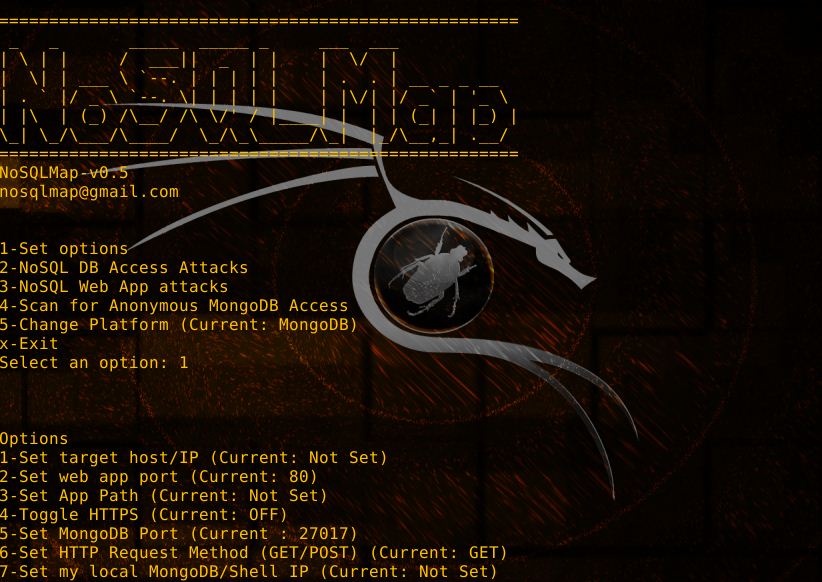
NoSQLMap uses a menu based system for building attacks. Upon starting NoSQLMap you are presented with with the main menu:
1-Set options (do this first)
2-NoSQL DB Access Attacks
3-NoSQL Web App attacks
4-Scan for Anonymous MongoDB Access
x-Exit
Explanation of options:
1. Set target host/IP-The target web server (i.e. www.google.com) or MongoDB server you want to attack.
2. Set web app port-TCP port for the web application if a web application is the target.
3. Set URI Path-The portion of the URI containing the page name and any parameters but NOT the host name (e.g. /app/acct.php?acctid=102).
4. Set HTTP Request Method (GET/POST)-Set the request method to a GET or POST; Presently only GET is implemented but working on implementing POST requests exported from Burp.
5. Set my local Mongo/Shell IP-Set this option if attacking a MongoDB instance directly to the IP of a target Mongo installation to clone victim databases to or open Meterpreter shells to.
6. Set shell listener port-If opening Meterpreter shells, specify the port.
7. Load options file-Load a previously saved set of settings for 1-6.
8. Load options from saved Burp request-Parse a request saved from Burp Suite and populate the web application options.
9. Save options file-Save settings 1-6 for future use.
x. Back to main menu-Use this once the options are set to start your attacks.
Once options are set head back to the main menu and select DB access attacks or web app attacks as appropriate for whether you are attacking a NoSQL management port or web application. The rest of the tool is "wizard" based and fairly self explanatory, but send emails to [email protected] or find me on Twitter @codingo_ if you have any questions or suggestions.
Vulnerable Applications
This repo also includes an intentionally vulnerable web application to test NoSQLMap with. To run this application, you need Docker installed. Then you can run the following commands from the /vuln_apps directory.
docker-compose build && docker-compose up
Once that is complete, you should be able to access the vulnerable application by visiting: https://127.0.0.1:8080/index.html
Scripting
The cli can also be scripted. Here's an example script using NoSQLMap to detect the vulnerabilities in vuln_apps:
$ echo  "1. Account Lookup (acct.php)"
$ docker-compose run --remove-orphans nosqlmap \
    --attack 2 \
    --victim host.docker.internal \
    --webPort 8080 \
    --uri "/acct.php?acctid=test" \
    --httpMethod GET \
    --params 1 \
    --injectSize 4 \
    --injectFormat 2 \
    --doTimeAttack n

$ echo "2. User Data Lookup (userdata.php) - JavaScript Injection"
$ docker-compose run --remove-orphans nosqlmap \
    --attack 2 \
    --victim host.docker.internal \
    --webPort 8080 \
    --uri "/userdata.php?usersearch=test" \
    --httpMethod GET \
    --params 1 \
    --injectSize 4 \
    --injectFormat 2 \
    --doTimeAttack n

$ echo "3. Order Data Lookup (orderdata.php) - JavaScript Injection"
$ docker-compose run --remove-orphans nosqlmap \
    --attack 2 \
    --victim host.docker.internal \
    --webPort 8080 \
    --uri "/orderdata.php?ordersearch=test" \
    --httpMethod GET \
    --params 1 \
    --injectSize 4 \
    --injectFormat 2 \
    --doTimeAttack n
Explorer des projets similaires
Asabeneh/30-Days-Of-Python
Le défi de programmation 30 Days of Python est un guide pas à pas pour apprendre le langage de programmation Python en 30 jours. Ce défi peut prendre plus de 100 jours. Avancez à votre rythme. Ces vidéos peuvent aussi vous aider : https://www.youtube.com/channel/UC7PNRuno1rzYPb1xLa4yktw
78,560 étoilesgrafana/grafana
Plateforme ouverte et composable d’observabilité et de visualisation de données. Visualise les métriques, les journaux et les traces issus de plusieurs sources, comme Prometheus, Loki, Elasticsearch, InfluxDB, Postgres et bien d’autres.
77,830 étoilesredis/redis
Pour les développeurs qui créent des applications en temps réel pilotées par les données, Redis est le cache, le serveur de structures de données et le moteur de requêtes documentaires et vectorielles préféré, le plus rapide et le plus riche en fonctionnalités.
77,395 étoilesapache/superset
Apache Superset est une plateforme de visualisation et d'exploration de données.
75,473 étoiles