
chartbrew/chartbrew
chartbrew/chartbrew has 4,095 GitHub stars and 458 forks. GitHot measured +31 in 7 days. Last checked 2026-11-11 02:09 UTC. Last push 2026-11-04.
Comment ces chiffres sont mesurés
Open-source reporting platform to build and share live dashboards from APIs, SQL and NoSQL databases, with powerful AI assistant, scheduling, and embeddable charts 📈📊
Progression mesurée des étoiles
- in 24h
- Mise à jour retardée
- in 7 days
- +31
- in 15 days
- Historique en cours
- in 1 month
- Historique en cours
Variations nettes sur des périodes qui se chevauchent, pas des totaux quotidiens. Les mesures absentes restent vides. Les étoiles indiquent l’intérêt, pas la qualité.
README.md
Original




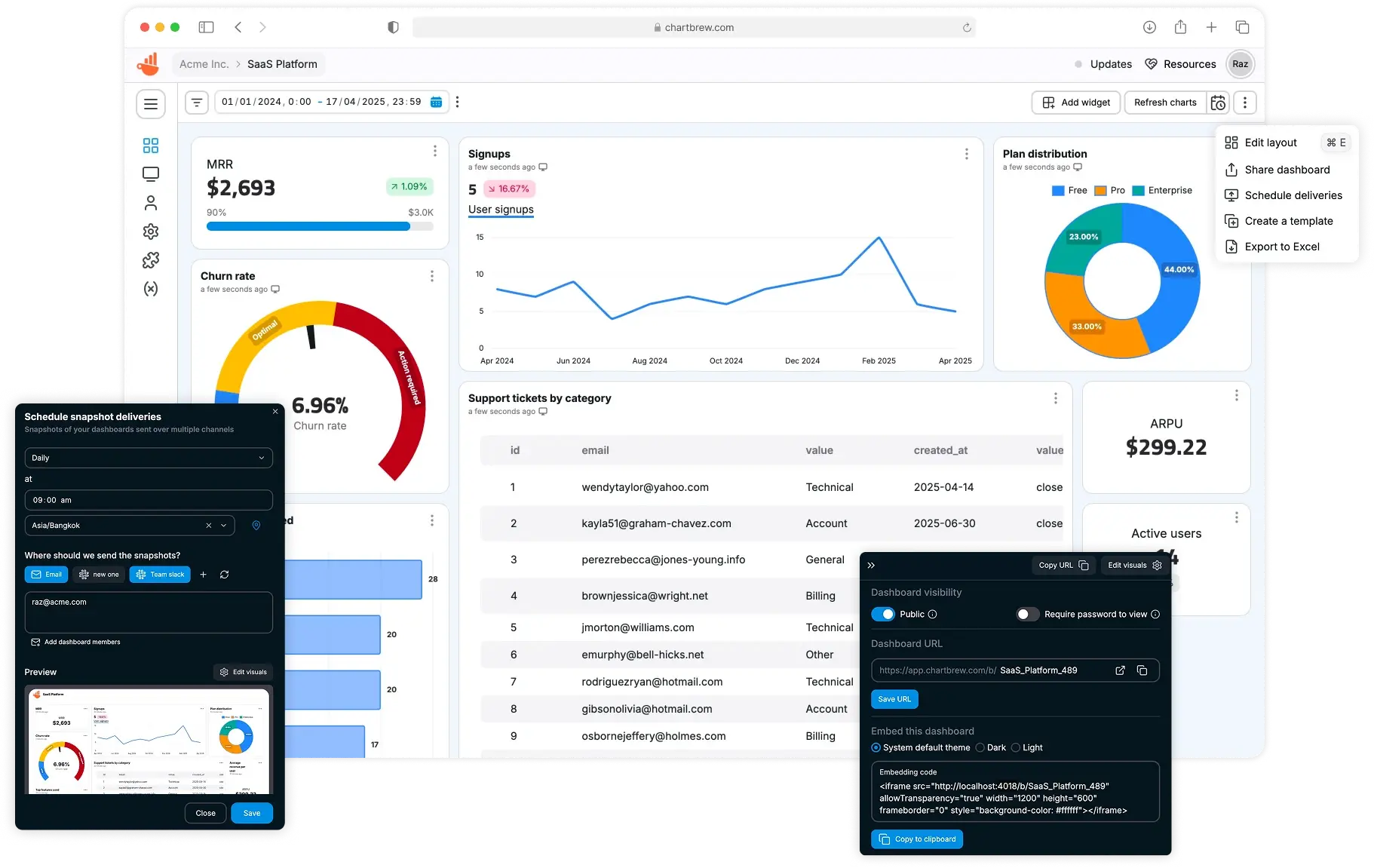
Chartbrew is an open-source web application that can connect directly to databases and APIs and use the data to create beautiful charts. It features a chart builder, editable dashboards, embedable charts, query & requests editor, and team capabilities.
Chartbrew as a service is available here
💡 Have any ideas or discussion topics?
Data sources
Check Chartbrew's website for the latest list of supported data sources
Prerequisites
- Node.js 22.23.4 (the version used in
.nvmrc, CI, and Docker) - MySQL (5+) or PostgreSQL (12.5+)
- Redis (v6+)
Start
It is recommended you head over to the more detailed documentation to find out how to set up Chartbrew
Set up Chartbrew locally
Create a new database
Chartbrew can run on MySQL or PostgreSQL. Create an empty database that Chartbrew can use.
Clone and setup
git clone https://github.com/chartbrew/chartbrew.git
cd chartbrew
nvm install
nvm use
npm run setup
The nvm commands select the version in .nvmrc. If you do not use nvm, install Node.js 22.23.4 before you run npm run setup.
Complete the required environmental variables in chartbrew/.env. Check out which need to be set here.
npm run prepareSettings creates missing client settings and updates the standard v5 host definitions
in existing client/src/config/settings.js files to use environment variables without the _DEV suffix.
Client start and build commands also run this step. Other settings remain unchanged. Custom host
definitions are preserved; if they still use _DEV variables, the command prints a warning to update
them manually. Set VITE_APP_API_HOST and VITE_APP_CLIENT_HOST to the values for your installation.
Run the project in Development
Open two terminals, one for front-end and the other for back-end.
# frontend
cd client/
npm run start

# backend
cd server/
npm run start-dev
Head over to http://localhost:4018 to see the app running and create your first user account.
Quick Chartbrew deploys
Deploy Chartbrew with one click through our hosting partners.
These are affiliate links. We may earn a commission if you purchase a plan.
Deploy on DigitalOcean

Deploy on Hostinger

Run with Docker
Check the full guide in the docs.
Node.js security updates
Node.js 22.23.4 includes the October 2026 security fixes. Earlier Node.js 22 versions do not include all these fixes.
For an existing installation, run nvm install and nvm use from the repository root, then restart the server and worker processes with the updated Node.js executable. Changing .nvmrc does not update a running process.
The Dockerfile uses node:22.23.4-slim. Rebuild your image with docker build --pull -t chartbrew ., then recreate the containers with that image. If you use a published image, first check that its release includes this update. Restarting an old container does not update Node.js.
Quickstart
A Chartbrew docker image is built whenever a new version is released.
Before running the commands below, make sure you have a MySQL server already running and an empty database that Chartbrew can use. The database name should match the value of the CB_DB_NAME variable.
You will need a 32 bytes AES encryption key for the CB_ENCRYPTION_KEY variable. Run the following command to generate one:
node -e "console.log(require('crypto').randomBytes(32).toString('hex'))"
The BullMQ admin dashboard at /apps/queues is protected with HTTP Basic Auth. Set CB_BULLMQ_USERNAME and CB_BULLMQ_PASSWORD; for local .env installations, Chartbrew defaults the username to chartbrew and generates a random password on first startup.
docker pull razvanilin/chartbrew

docker run -p 4019:4019 -p 4018:4018 \
  -e CB_ENCRYPTION_KEY=your_32_bytes_key \
  -e CB_BULLMQ_USERNAME=chartbrew \
  -e CB_BULLMQ_PASSWORD=your_strong_random_password \
  -e CB_API_HOST=0.0.0.0 \
  -e CB_API_PORT=4019 \
  -e CB_DB_HOST=host.docker.internal \
  -e CB_DB_PORT=3306 \
  -e CB_DB_NAME=chartbrew \
  -e CB_DB_USERNAME=root \
  -e CB_DB_PASSWORD=password \
  -e CB_REDIS_HOST=host.docker.internal \
  -e CB_REDIS_PORT=6379 \
  -e CB_REDIS_PASSWORD=password \
  -e VITE_APP_CLIENT_HOST=http://localhost:4018 \
  -e VITE_APP_CLIENT_PORT=4018 \
  -e VITE_APP_API_HOST=http://localhost:4019 \
  razvanilin/chartbrew
Acknowledgements
Many thanks to everybody that contributed to this open-source project 🙏
Explorer des projets similaires
Asabeneh/30-Days-Of-Python
Le défi de programmation 30 Days of Python est un guide pas à pas pour apprendre le langage de programmation Python en 30 jours. Ce défi peut prendre plus de 100 jours. Avancez à votre rythme. Ces vidéos peuvent aussi vous aider : https://www.youtube.com/channel/UC7PNRuno1rzYPb1xLa4yktw
78,560 étoilesgrafana/grafana
Plateforme ouverte et composable d’observabilité et de visualisation de données. Visualise les métriques, les journaux et les traces issus de plusieurs sources, comme Prometheus, Loki, Elasticsearch, InfluxDB, Postgres et bien d’autres.
77,830 étoilesredis/redis
Pour les développeurs qui créent des applications en temps réel pilotées par les données, Redis est le cache, le serveur de structures de données et le moteur de requêtes documentaires et vectorielles préféré, le plus rapide et le plus riche en fonctionnalités.
77,395 étoilesapache/superset
Apache Superset est une plateforme de visualisation et d'exploration de données.
75,473 étoiles