
chadgeary/cloudblock
chadgeary/cloudblock has 858 GitHub stars and 84 forks. GitHot measured 0 stars in 24 hours, -2 in 7 days, and 0 in 15 days. Last checked 2026-11-23 16:42 UTC. Last push 2024-07-06.
Progression mesurée des étoiles
- in 24h
- 0
- in 7 days
- -2
- in 15 days
- 0
- in 1 month
- Historique en cours
Variations nettes sur des périodes qui se chevauchent, pas des totaux quotidiens. Les mesures absentes restent vides. Les étoiles indiquent l’intérêt, pas la qualité.
À propos
Cloudblock déploie un bloqueur de publicités sécurisé et un VPN pour tous les appareils. Des guides écrits et vidéo sont inclus ! Il prend en charge 6 fournisseurs cloud, ainsi qu’Ubuntu et Raspberry Pi. Avec Terraform et Ansible, Cloudblock déploie WireGuard VPN, le blocage publicitaire DNS de Pi-hole et le DNS sur HTTPS chez un fournisseur cloud ou en local.
SécuritéREADME.md
OriginalOverview
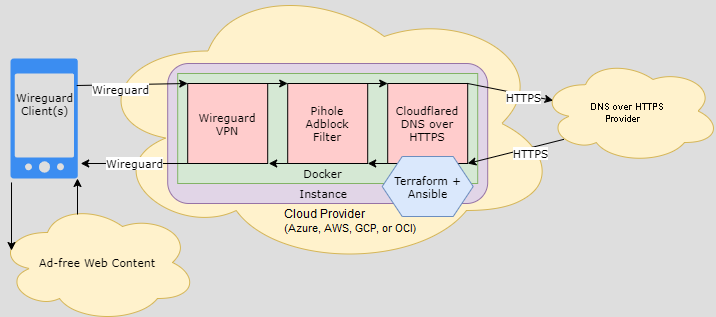
End-to-end DNS encryption with DNS-based ad-blocking, built in the cloud automatically using Terraform with Ansible. Choose your cloud provider or a standalone installation.
Combines wireguard (DNS VPN), pihole (adblock), and cloudflared (DNS over HTTPS) docker containers, as visualized:
Instructions
Several deployment options are available, see the README of each subdirectory for platform-specific guides.
- AWS (Amazon)
- Azure (Microsoft)
- DO (Digital Ocean)
- GCP (Google)
- Lightsail (Fixed-rate/Low-cost AWS)
- OCI (Oracle)
- SCW (Scaleway)
- Standalone Raspberry Pi or Ubuntu Server (under playbooks/)
Videos
As these videos have aged a bit, replace references to Ubuntu 18.04 with Ubuntu 22.04. Text guides are up to date.
Standalone Raspberry Pi or Ubuntu Server
Step-by-step, follow along with me as I install on a Raspberry Pi.
Cloud Deployments
Choosing a cloud provider? Watch this video for a mostly un-biased comparison of free options/free trials.
Step-by-step, follow along with me as I deploy from a windows desktop - for Cloud deployments.
- All cloud deployments should watch this prerequisites video first.
After watching the cloud prerequisites video, follow a guide specific to your cloud provider.
- Amazon Web Services (AWS / Lightsail) - (video - readme)
- Microsoft Azure (AZW) - (video - readme)
- Digital Ocean (DO) - (video - readme)
- Google Cloud Platform (GCP) - (video - readme)
- Oracle Cloud Infrastructure (OCI) - (video - readme)
- Scaleway Cloud (SCW) (video - readme)
For maintaining the containers running your cloudblock services, see the README (or terraform output) specific to your deployment. For Cloud deployments, this video describes maintenance steps.
Discussion
Changelog
2022-10
- Added references to Ubuntu 22.04 (replacing Ubuntu 18.04) for:
- WSL installation
- Cloud virtual machine images
- Note about Oracle's private key generation for
oci config
Explorer des projets similaires
Chargement…