Projets Voir sur GitHub
bbbscarter/UberLogger
À propos
Un framework de journalisation de remplacement pour Unity, avec un nouvel éditeur et une console en jeu.
Outils de développementWhat you can do
- Drop in replacement for Unity's Debug.Log() methods. No code changes needed.
- A threadsafe, modular backend that supports any number of loggers, so Debug.Log can be routed to multiple locations. The supplied file logger should work on mobile devices.
- Included are a replacement editor console, an in-game console and a file logger.
- Support for named debug channels - UberDebug.LogChannel("Boot", "Some message") can be filtered based on the channel name.
Progression mesurée des étoiles
- in 24h
- 0
- in 7 days
- 0
- in 15 days
- Historique en cours
- in 1 month
- Historique en cours
Variations nettes sur des périodes qui se chevauchent, pas des totaux quotidiens. Les mesures absentes restent vides. Les étoiles indiquent l’intérêt, pas la qualité.
README.md
OriginalUberLogger
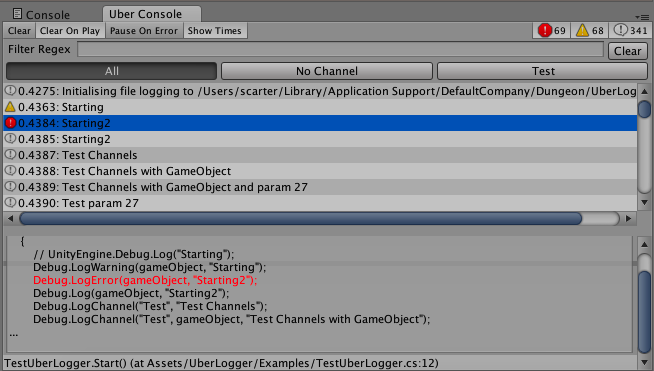
UberLogger is a free, modular, opensource replacement for Unity's Debug.Log system. It also includes UberConsole, a replacement for Unity's editor console, an in game console version of UberConsole, and a file logger.
UberConsole looks like this:
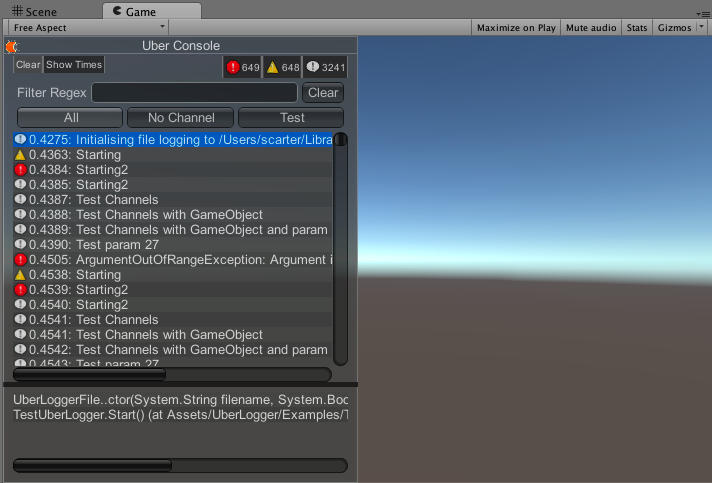
And the in-game version looks like this:
Core Features
- Drop in replacement for Unity's Debug.Log() methods. No code changes needed.
- A threadsafe, modular backend that supports any number of loggers, so Debug.Log can be routed to multiple locations. The supplied file logger should work on mobile devices.
- Included are a replacement editor console, an in-game console and a file logger.
- Support for named debug channels - UberDebug.LogChannel("Boot", "Some message") can be filtered based on the channel name.
- Methods may be marked as excluded from callstacks by tagging them with '[StackTraceIgnore]', to keep your logs tidy.
UberConsole Features
- More compact view shows more errors in the same space.
- Supports debug log channels.
- Messages can be filtered by regular expressions.
- Timestamps.
- Source code can be shown inline with the callstack.
- An in-game version of UberConsole is also provided.
Installation
- Stick the UberLogger folder somewhere under your Unity project Assets folder.
- To use additional features like channels, use UberDebug instead of Debug - it contains methods like Log, LogChannel, etc.
- To view the editor UberConsole, go to Window->Show Uber Console.
- To use UberConsole in your game, drag the UberAppConsole prefab into your scene.
- Usage examples can be seen in the Examples folder.
Notes
- Tested in Unity 5.x, 2017.x, free and Pro.
- Logging disabled in non-debug builds. To force it on, define ENABLE_UBERLOGGING.
- Due to file incompatibilities, the in-game console skin doesn't work in Unity 4 and would need to be set up again. Same with the prefab. That said, the code works, and so does the editor UberConsole.
- Pull requests welcome!
Extensions
- UberLogger-StructuredFile adds a structured log file format with timestamps, channel names, and control over which log messages are printed with callstacks and which are printed without.
- UberLogger-Stackdriver adds centralized logging. Log messages will be sent from game clients to Google's Stackdriver service. The collected logs can be browsed and searched in the Stackdriver web UI.
- UberLogger-LogChannels adds compile-time resolution and muting of log channels. This is useful for very large projects where logging to muted channels causes performance problems.
UberLogger: https://github.com/bbbscarter/UberLogger
Explorer des projets similaires
Chargement…