
awslabs/diagram-as-code
À propos
Diagrammes sous forme de code pour les architectures AWS.
Outils de développementWhat you can do
- Compliant with AWS architecture guidelinesEasily generate diagrams that follow AWS diagram guidelines.
- FlexibleAutomatically adjust the position and size of groups.
- Lightweight & CI/CD-friendlyStart quickly on a container; no dependency on headless browser or GUI.
- Integrate with your Infrastructure as CodeGenerate diagrams to align with your IaC code without managing diagrams manually.
Progression mesurée des étoiles
- in 24h
- 0
- in 7 days
- 0
- in 15 days
- -1
- in 1 month
- Historique en cours
Variations nettes sur des périodes qui se chevauchent, pas des totaux quotidiens. Les mesures absentes restent vides. Les étoiles indiquent l’intérêt, pas la qualité.
README.md
OriginalDiagram-as-code
This command line interface (CLI) tool enables drawing infrastructure diagrams for Amazon Web Services through YAML code. It facilitates diagram-as-code without relying on image libraries.
The CLI tool promotes code reuse, testing, integration, and automating the diagramming process. It allows managing diagrams with Git by writing human-readable YAML.
Example templates are here. Check out the Introduction Guide as well for additional information.
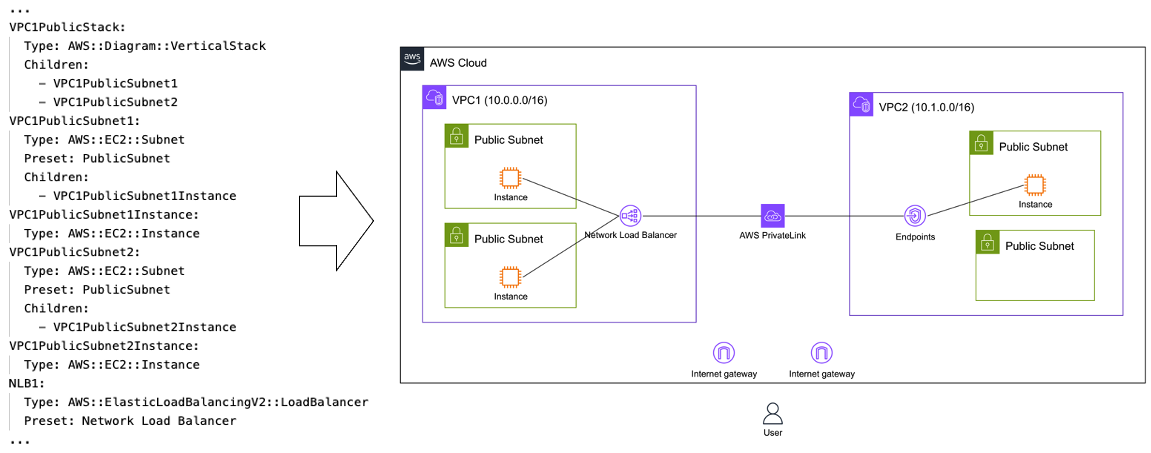

Features
- Compliant with AWS architecture guidelines
Easily generate diagrams that follow AWS diagram guidelines. - Flexible
Automatically adjust the position and size of groups. - Lightweight & CI/CD-friendly
Start quickly on a container; no dependency on headless browser or GUI. - Integrate with your Infrastructure as Code
Generate diagrams to align with your IaC code without managing diagrams manually. - As a drawing library
Use as Golang Library and integrate with other IaC tools, AI, or drawing GUI tools. - Extensible
Add definition files to create non-AWS diagrams as well.
Getting started
for Gopher (go 1.21 or higher)
$ go install github.com/awslabs/diagram-as-code/cmd/awsdac@latest
for macOS user
$ brew install awsdac
Usage
Usage:
  awsdac <input filename> [flags]

Flags:
  -c, --cfn-template               [beta] Create diagram from CloudFormation template
  -d, --dac-file                   [beta] Generate YAML file in dac (diagram-as-code) format from CloudFormation template
      --embed-yaml                 Embed the input YAML (including comments) in the output PNG metadata
  -h, --help                       help for awsdac
  -o, --output string              Output file name (default "output.png")
      --override-def-file string   For testing purpose, override DefinitionFiles to another url/local file
  -t, --template                   Processes the input file as a template according to text/template.
  -v, --verbose                    Enable verbose logging
      --version                    version for awsdac
Example
$ awsdac examples/alb-ec2.yaml
$ awsdac privatelink.yaml -o custom-output.png
Note:
--embed-yamlstores the full input YAML, including comments, in a PNGtEXtchunk (keywordawsdac.yaml). Anyone who receives the image can read it, so do not use this option with files that contain sensitive information.
Documentation
Getting Started
- Introduction Guide - Quick start (10 minutes) and core concepts
- Troubleshooting - Common issues and solutions
Core Features
- Resource Types - Available AWS resources and diagram elements
- Links - Connecting resources with arrows and lines
Tools & Integration
- MCP Server - AI assistant integration
- CloudFormation Conversion [Beta] - Convert CloudFormation templates to diagrams
Advanced Features
- Templates - Using Go templates for dynamic diagrams
- UnorderedChildren - Automatic child reordering for optimal layouts
- Auto-positioning - Smart link positioning
- Link Grouping Offset - Prevent link overlap
- BorderChildren - Place resources on borders
Guides
- Best Practices - Design patterns and diagram standards
Contributing
- Documentation Guidelines - How to contribute to documentation
Development Guide
For contributing guidelines, please see CONTRIBUTING.md.
Project Structure
cmd/- CLI tools (awsdac, awsdac-mcp-server)internal/- Core implementationcache/- Caching logicctl/- Core control logicdefinition/- Definition file handlingfont/- Font managementtypes/- Core types and structuresvector/- Vector operations
test/- Integration teststools/- Development toolsexamples/- Example YAML filesdoc/- Documentation
Security
See CONTRIBUTING for more information.
License
This project is licensed under the Apache-2.0 License.
Explorer des projets similaires
Chargement…