
arslanbilal/git-cheat-sheet
À propos
:octocat: Aide-mémoire pour git et Git Flow
Outils de développementWhat you can do
- Merge MYFEATURE into 'develop'
- Remove the feature branch
- Switch back to 'develop'
Progression mesurée des étoiles
- in 24h
- 0
- in 7 days
- +3
- in 15 days
- +7
- in 1 month
- Historique en cours
Variations nettes sur des périodes qui se chevauchent, pas des totaux quotidiens. Les mesures absentes restent vides. Les étoiles indiquent l’intérêt, pas la qualité.
README.md
OriginalGit and Git Flow Cheat Sheet


📖 About
This comprehensive Git cheat sheet helps you master Git commands without memorizing everything. Whether you're a beginner or an experienced developer, this guide provides quick reference to essential Git operations.
Contributions Welcome! Feel free to:
- Fix grammar mistakes
- Add new commands
- Translate to your language
- Improve explanations
📋 Table of Contents
- 🔧 Setup
- ⚙️ Configuration Files
- 🆕 Create Repository
- 📝 Local Changes
- 🔍 Search
- 📖 Commit History
- 📁 Move / Rename
- 🌿 Branches & Tags
- 🔄 Update & Publish
- 🔀 Merge & Rebase
- ↩️ Undo
- 🌊 Git Flow
- 🌍 Other Languages
🔧 Setup
View Configuration
Show current configuration:
git config --list
Show repository configuration:
git config --local --list
Show global configuration:
git config --global --list
Show system configuration:
git config --system --list
User Configuration
Set your name for version history:
git config --global user.name "[firstname lastname]"
Set your email address:
git config --global user.email "[valid-email]"
Display & Editor Settings
Enable automatic command line coloring:
git config --global color.ui auto
Set global editor for commits:
git config --global core.editor vi
⚙️ Configuration Files
| Scope | Location | Command Flag |
|---|---|---|
| Repository | <repo>/.git/config |
--local |
| User | ~/.gitconfig |
--global |
| System | /etc/gitconfig |
--system |
🆕 Create Repository
Clone Existing Repository
Via SSH:
git clone ssh://[email protected]/repo.git
Via HTTPS:
git clone https://domain.com/user/repo.git
Initialize New Repository
Create repository in current directory:
git init
Create repository in specific directory:
git init <directory>
📝 Local Changes
Check Status & Differences
View working directory status:
git status
Show changes to tracked files:
git diff
Show changes in specific file:
git diff <file>
Staging Changes
Add all current changes:
git add .
Add specific files:
git add <filename1> <filename2>
Interactively add parts of a file:
git add -p <file>
Committing Changes
Commit all tracked file changes:
git commit -a
Commit staged changes:
git commit
Commit with message:
git commit -m 'message here'
Skip staging and commit with message:
git commit -am 'message here'
Commit with specific date:
git commit --date="`date --date='n day ago'`" -am "<Commit Message Here>"
Modify Last Commit
⚠️ Warning: Don't amend published commits!
Amend last commit:
git commit -a --amend
Amend without changing commit message:
git commit --amend --no-edit
Change committer date:
GIT_COMMITTER_DATE="date" git commit --amend
Change author date:
git commit --amend --date="date"
Stashing Changes
Save current changes temporarily:
git stash
Apply last stashed changes:
git stash apply
Apply specific stash:
git stash apply stash@{stash_number}
Use
git stash listto see available stashes
Remove last stash:
git stash drop
Move uncommitted changes to another branch:
git stash
git checkout branch2
git stash pop
🔍 Search
Text Search
Search for text in all files:
git grep "Hello"
Search in specific version:
git grep "Hello" v2.5
Commit Search
Find commits that introduced specific keyword:
git log -S 'keyword'
Search with regular expression:
git log -S 'keyword' --pickaxe-regex
📖 Commit History
Basic History
Show all commits (detailed):
git log
Show commits (one line each):
git log --oneline
Show commits by specific author:
git log --author="username"
Show changes for specific file:
git log -p <file>
Advanced History
Compare branches:
git log --oneline <origin/master>..<remote/master> --left-right
Show who changed what and when:
git blame <file>
Reference Logs
Show reference log:
git reflog show
Delete reference log:
git reflog delete
📁 Move / Rename
Rename a file:
git mv Index.txt Index.html
🌿 Branches & Tags
List Branches
List local branches:
git branch
List all branches (local + remote):
git branch -a
List remote branches:
git branch -r
List merged branches:
git branch --merged
Switch & Create Branches
Switch to existing branch:
git checkout <branch>
Create and switch to new branch:
git checkout -b <branch>
Switch to previous branch:
git checkout -
Create branch from existing branch:
git checkout -b <new_branch> <existing_branch>
Create branch from specific commit:
git checkout <commit-hash> -b <new_branch_name>
Create branch without switching:
git branch <new-branch>
Create tracking branch:
git branch --track <new-branch> <remote-branch>
Branch Operations
Checkout single file from different branch:
git checkout <branch> -- <filename>
Apply specific commit from another branch:
git cherry-pick <commit hash>
Rename current branch:
git branch -m <new_branch_name>
Delete local branch:
git branch -d <branch>
Force delete local branch:
git branch -D <branch>
⚠️ Warning: You will lose unmerged changes!
Tags
Create tag at HEAD:
git tag <tag-name>
Create annotated tag:
git tag -a <tag-name>
Create tag with message:
git tag <tag-name> -am 'message here'
List all tags:
git tag
List tags with messages:
git tag -n
🔄 Update & Publish
Remote Management
List configured remotes:
git remote -v
Show remote information:
git remote show <remote>
Add new remote:
git remote add <remote> <url>
Rename remote:
git remote rename <remote> <new_remote>
Remove remote:
git remote rm <remote>
ℹ️ Note: This only removes the remote reference locally, not the remote repository itself.
Fetch & Pull
Download changes without merging:
git fetch <remote>
Download and merge changes:
git pull <remote> <branch>
Get changes from main branch:
git pull origin master
Pull with rebase:
git pull --rebase <remote> <branch>
Push & Publish
Publish local changes:
git push <remote> <branch>
Delete remote branch:
# Git v1.7.0+
git push <remote> --delete <branch>

# Git v1.5.0+
git push <remote> :<branch>
Publish tags:
git push --tags
🔀 Merge & Rebase
Merge Operations
Merge branch into current HEAD:
git merge <branch>
Configure merge tool globally:
git config --global merge.tool meld
Use configured merge tool:
git mergetool
Rebase Operations
⚠️ Warning: Don't rebase published commits!
Rebase current HEAD onto branch:
git rebase <branch>
Abort rebase:
git rebase --abort
Continue rebase after resolving conflicts:
git rebase --continue
Conflict Resolution
Mark file as resolved:
git add <resolved-file>
Remove resolved file:
git rm <resolved-file>
Squashing Commits
Interactive rebase for squashing:
git rebase -i <commit-just-before-first>
Example squash configuration:
# Before
pick <commit_id>
pick <commit_id2>
pick <commit_id3>

# After (squash commit_id2 and commit_id3 into commit_id)
pick <commit_id>
squash <commit_id2>
squash <commit_id3>
↩️ Undo
Discard Changes
Discard all local changes:
git reset --hard HEAD
Unstage all files:
git reset HEAD
Discard changes in specific file:
git checkout HEAD <file>
Reset Operations
Reset to previous commit (discard all changes):
git reset --hard <commit>
Reset to remote branch state:
git reset --hard <remote/branch>
# Example: git reset --hard upstream/master
Reset preserving changes as unstaged:
git reset <commit>
Reset preserving uncommitted local changes:
git reset --keep <commit>
Revert Commits
Revert commit (create new commit with opposite changes):
git revert <commit>
Clean Ignored Files
Remove accidentally committed files that should be ignored:
git rm -r --cached .
git add .
git commit -m "remove ignored files"
🌊 Git Flow
Improved Git-flow: git-flow-avh
📋 Table of Contents
🔧 Setup
Prerequisite: Working Git installation required. Git-flow works on macOS, Linux, and Windows.
macOS (Homebrew):
brew install git-flow-avh
macOS (MacPorts):
port install git-flow
Linux (Debian-based):
sudo apt-get install git-flow
Windows (Cygwin):
Requires wget and util-linux
wget -q -O - --no-check-certificate https://raw.githubusercontent.com/petervanderdoes/gitflow/develop/contrib/gitflow-installer.sh install <state> | bash
🚀 Getting Started
Git-flow needs initialization to customize your project setup.
Initialize (interactive):
git flow init
You'll answer questions about branch naming conventions. Default values are recommended.
Initialize (use defaults):
git flow init -d
✨ Features
Features are for developing new functionality for upcoming releases. They typically exist only in developer repositories.
Start new feature:
git flow feature start MYFEATURE
Creates feature branch based on 'develop' and switches to it
Finish feature:
git flow feature finish MYFEATURE
This will:
- Merge MYFEATURE into 'develop'
- Remove the feature branch
- Switch back to 'develop'
Publish feature (for collaboration):
git flow feature publish MYFEATURE
Get published feature:
git flow feature pull origin MYFEATURE
Track origin feature:
git flow feature track MYFEATURE
🎁 Make a Release
Releases support preparation of new production releases, allowing minor bug fixes and preparing meta-data.
Start release:
git flow release start RELEASE [BASE]
Creates release branch from 'develop'. Optionally specify [BASE] commit SHA-1.
Publish release:
git flow release publish RELEASE
Track remote release:
git flow release track RELEASE
Finish release:
git flow release finish RELEASE
This will:
- Merge release branch into 'master'
- Tag the release
- Back-merge release into 'develop'
- Remove release branch
💡 Don't forget: Push your tags with
git push --tags
🔥 Hotfixes
Hotfixes address critical issues in live production versions. They branch off from the corresponding tag on master.
Start hotfix:
git flow hotfix start VERSION [BASENAME]
Finish hotfix:
git flow hotfix finish VERSION
Merges back into both 'develop' and 'master', and tags the master merge
📊 Commands Overview
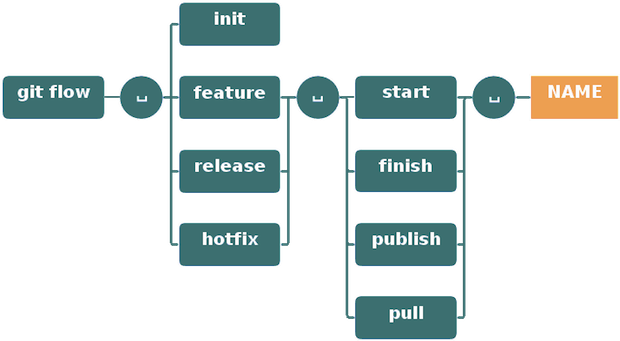
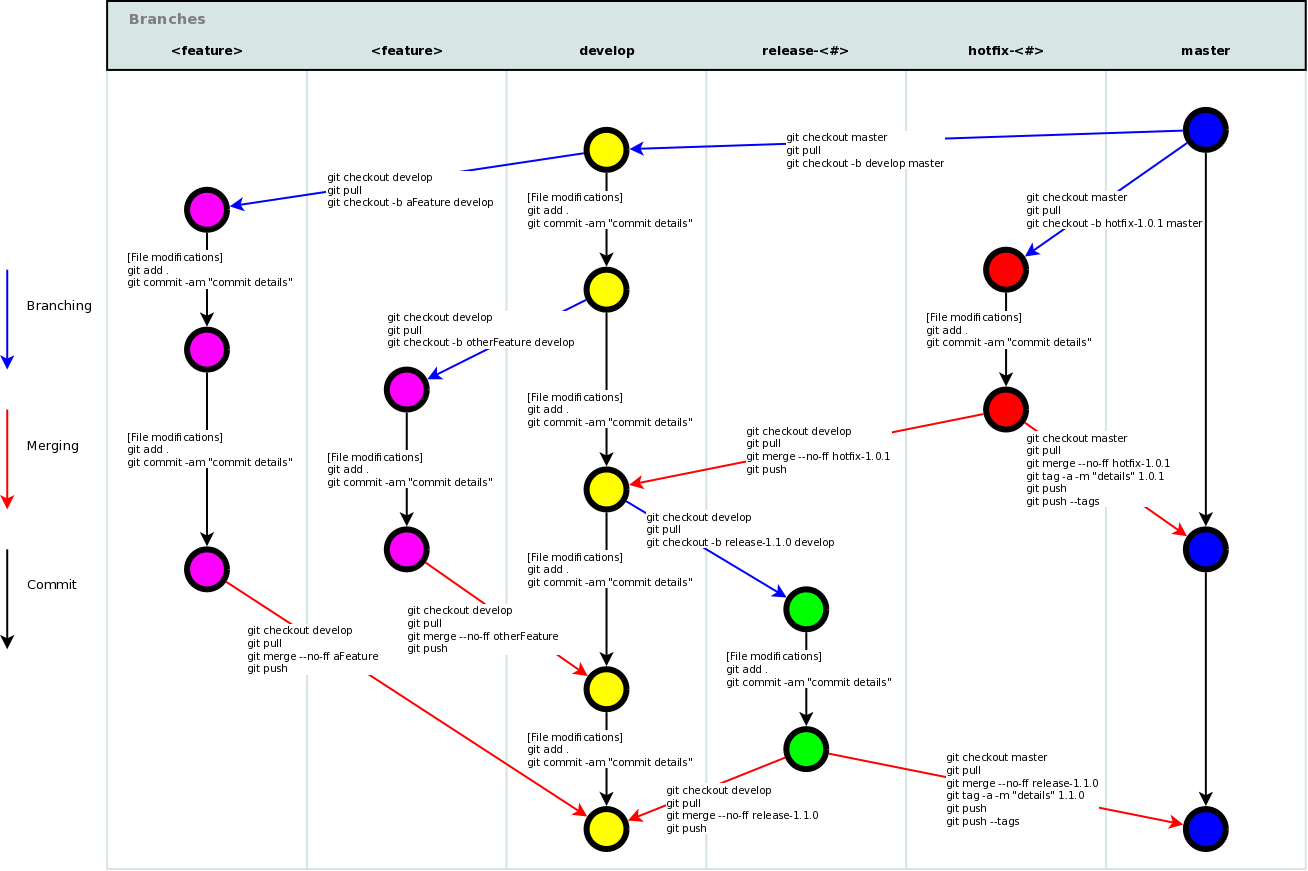
🌊 Git Flow Schema
🌍 Other Languages
This cheat sheet is available in multiple languages:
| Language | Link |
|---|---|
| 🇸🇦 Arabic | git-cheat-sheet-ar.md |
| 🇧🇩 Bengali | git-cheat-sheet-bn.md |
| 🇧🇷 Brazilian Portuguese | git-cheat-sheet-pt_BR.md |
| 🇨🇳 Chinese | git-cheat-sheet-zh.md |
| 🇩🇪 German | git-cheat-sheet-de.md |
| 🇬🇷 Greek | git-cheat-sheet-el.md |
| 🇮🇳 Hindi | git-cheat-sheet-hi.md |
| 🇰🇷 Korean | git-cheat-sheet-ko.md |
| 🇵🇱 Polish | git-cheat-sheet-pl.md |
| 🇪🇸 Spanish | git-cheat-sheet-es.md |
| 🇹🇷 Turkish | git-cheat-sheet-tr.md |
🤝 Contributing
We welcome contributions! You can:
- 🐛 Report bugs or typos
- ✨ Add new Git commands
- 🌍 Translate to new languages
- 💡 Improve explanations
- 📝 Enhance formatting
How to contribute:
- Fork this repository
- Create your feature branch (
git checkout -b feature/AmazingFeature) - Commit your changes (
git commit -m 'Add some AmazingFeature') - Push to the branch (
git push origin feature/AmazingFeature) - Open a Pull Request
📄 License
This project is open source and available under the MIT License.
⭐ Star this repository if you found it helpful!
Explorer des projets similaires
Chargement…