
Zomato/AndroidPhotoFilters
Zomato/AndroidPhotoFilters has 2,517 GitHub stars and 480 forks. GitHot measured 0 in 7 days. Last checked 2026-11-09 18:53 UTC. Last push 2023-07-18.
Comment ces chiffres sont mesurés
AndroidPhotoFilters aims to provide fast, powerful and flexible image processing instrument for creating awesome effects on any image media.
What you can do
- ToneCurveSubfilter : With this powerful filter you can change RGB channels of any image to create great results.
- SaturationSubfitler : Used for changing color saturation of an image.
- ColorOverlaySubfilter : As name suggests you can overlay any image with color of your choice.
- ContrastSubfilter : Used for changing contrast value of image.
Progression mesurée des étoiles
- in 24h
- Mise à jour retardée
- in 7 days
- 0
- in 15 days
- Mise à jour retardée
- in 1 month
- Mise à jour retardée
Variations nettes sur des périodes qui se chevauchent, pas des totaux quotidiens. Les mesures absentes restent vides. Les étoiles indiquent l’intérêt, pas la qualité.
README.md
OriginalPhotoFiltersSDK


PhotoFiltersSDK aims to provide fast, powerful and flexible image processing instrument for creating awesome effects on any image media.
Library supports OS on API 15 and above.
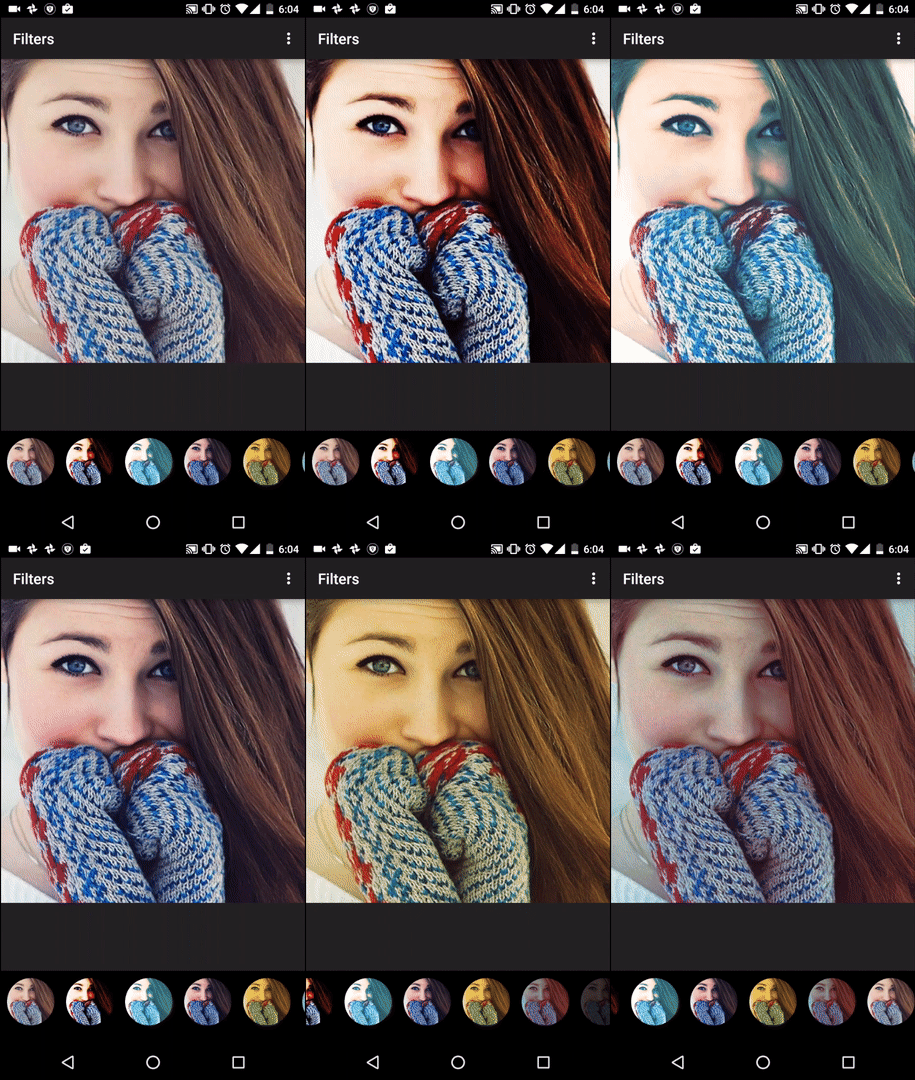
Features
PhotoFiltersSDK processes filter on any Image within fraction of second since processing logic is in NDK. At present following image filters are included:
- ToneCurveSubfilter : With this powerful filter you can change RGB channels of any image to create great results.
- SaturationSubfitler : Used for changing color saturation of an image.
- ColorOverlaySubfilter : As name suggests you can overlay any image with color of your choice.
- ContrastSubfilter : Used for changing contrast value of image.
- BrightnessSubfilter : To change brightness levels.
- VignetteSubfilter : To apply vignette effect on image.
Library also comes with inbuilt Sample Filters (Refer SampleFitlers.java). Implementation is straightforward:
Filter fooFilter = SampleFilters.getBlueMessFilter();
Bitmap outputImage = fooFilter.processFilter(inputImage);
Implementation
Adding Dependency
Simply add Dependency on artifact in your build.gradle :
dependencies {
    compile 'com.github.zomato:androidphotofilters:1.0.2'
    ...
OR
Copy|Paste photofilterssdk from the repo to your project and include photofiltersdk in your settings.gradle like this :
include ':photofilterssdk'
Add dependency in your build.gradle :
compile project(':photofilterssdk')
Usage
Load native library in your activity :
public class MainActivity extends AppCompatActivity {
    static
    {
        System.loadLibrary("NativeImageProcessor");
    }
    ...
then
Filter myFilter = new Filter();
myFilter.addSubFilter(new BrightnessSubFilter(30));
myFilter.addSubFilter(new ContrastSubFilter(1.1f));
Bitmap outputImage = myFilter.processFilter(inputImage);
Above code snippet will give you outputImage with increased brightness and contrast. You can further refer example project.
Documentation
Although there are few inbuilt filters already present, you may want to create and customize one specific to your need and show your creativity. For that you would require to know how all the Subfilters can be used. Let me take you through all of them.
ToneCurveSubfilter
This is most awesome filter present in this library which differentiates PhotoFiltersSDK from other image processing libraries out there. ToneCurveSubFilter applies the changed RGB Channel curve to create effect on image.
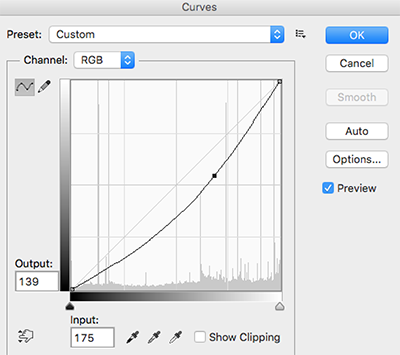
Here is the code snippet the apply the above RGB curve on an image :
Filter myFilter = new Filter();
Point[] rgbKnots;
rgbKnots = new Point[3];
rgbKnots[0] = new Point(0, 0);
rgbKnots[1] = new Point(175, 139);
rgbKnots[2] = new Point(255, 255);

myFilter.addSubFilter(new ToneCurveSubfilter(rgbKnots, null, null, null));
Bitmap outputImage = myFilter.processFilter(inputImage);
The results are nearly same as we would see in photoshop and other tools. We can also specify knots for Red, Green and Blue channels (in the ToneCurveSubfilter's constructor).
SaturationSubfilter
This fitler can be used to tweak color saturation of an image. Here is the example :
Filter myFilter = new Filter();
myFilter.addSubFilter(new SaturationSubfilter(1.3f));
Bitmap outputImage = myFilter.processFilter(inputImage);
SaturationSubfilter takes float as an argument and has no effect for value 1.
ColorOverlaySubfilter
Increases the specified red, green and blue values for each pixel in an image.
Filter myFilter = new Filter();
myFilter.addSubFilter(new ColorOverlaySubfilter(100, .2f, .2f, .0f));
Bitmap outputImage = myFilter.processFilter(inputImage);
ContrastSubfilter
To change the contrast levels of an image use this filter :
Filter myFilter = new Filter();
myFilter.addSubFilter(new ContrastSubfilter(1.2f));
Bitmap outputImage = myFilter.processFilter(inputImage);
ContrastSubfilter takes float as an argument where value 1 has no effect on the image.
BrightnessSubfilter
As the name suggest, this filter is used for changing brightness levels :
Filter myFilter = new Filter();
myFilter.addSubFilter(new BrightnessSubfilter(30));
Bitmap ouputImage = myFilter.processFilter(inputImage);
BrightnessSubfilter takes int as an argument where value 0 has no effect. Negative values can be used to decrease brightness of the image.
VignetteSubfilter
This filter can be used to put vignette effect on the image.
Filter myFilter = new Filter();
myFilter.addSubFilter(new VignetteSubfilter(context, 100));
Bitmap outputImage = myFilter.processFilter(inputImage);
VignetteSubfilter takes int as an argument whoes value ranges from 0-255, which defines intesity of the vignette effect.
Proguard
If you are using proguard, consider adding the following to your proguard rules:
-keep class com.zomato.photofilters.** {*;}
-keepclassmembers  class com.zomato.photofilters.** {*;}
License
This library falls under Apache v2
Explorer des projets similaires
codecrafters-io/build-your-own-x
Maîtrisez la programmation en recréant de zéro vos technologies préférées.
561,618 étoilespublic-apis/public-apis
Une liste collective d'API gratuites
497,948 étoilesmorluto/rea
Rétro-ingénierie de n'importe quoi avec des agents, du comportement des applications jusqu'aux binaires natifs.
450,074 étoilesopenclaw/openclaw
L'IA qui fait vraiment les choses. Tout système d'exploitation, toute plateforme. À la manière du homard. 🦞
394,304 étoiles