
SpeedHQ/RaceIQ
SpeedHQ/RaceIQ has 45 GitHub stars and 15 forks. Star changes are not measured yet. Last checked 2026-11-11 06:07 UTC. Last push 2026-11-10.
Comment ces chiffres sont mesurés
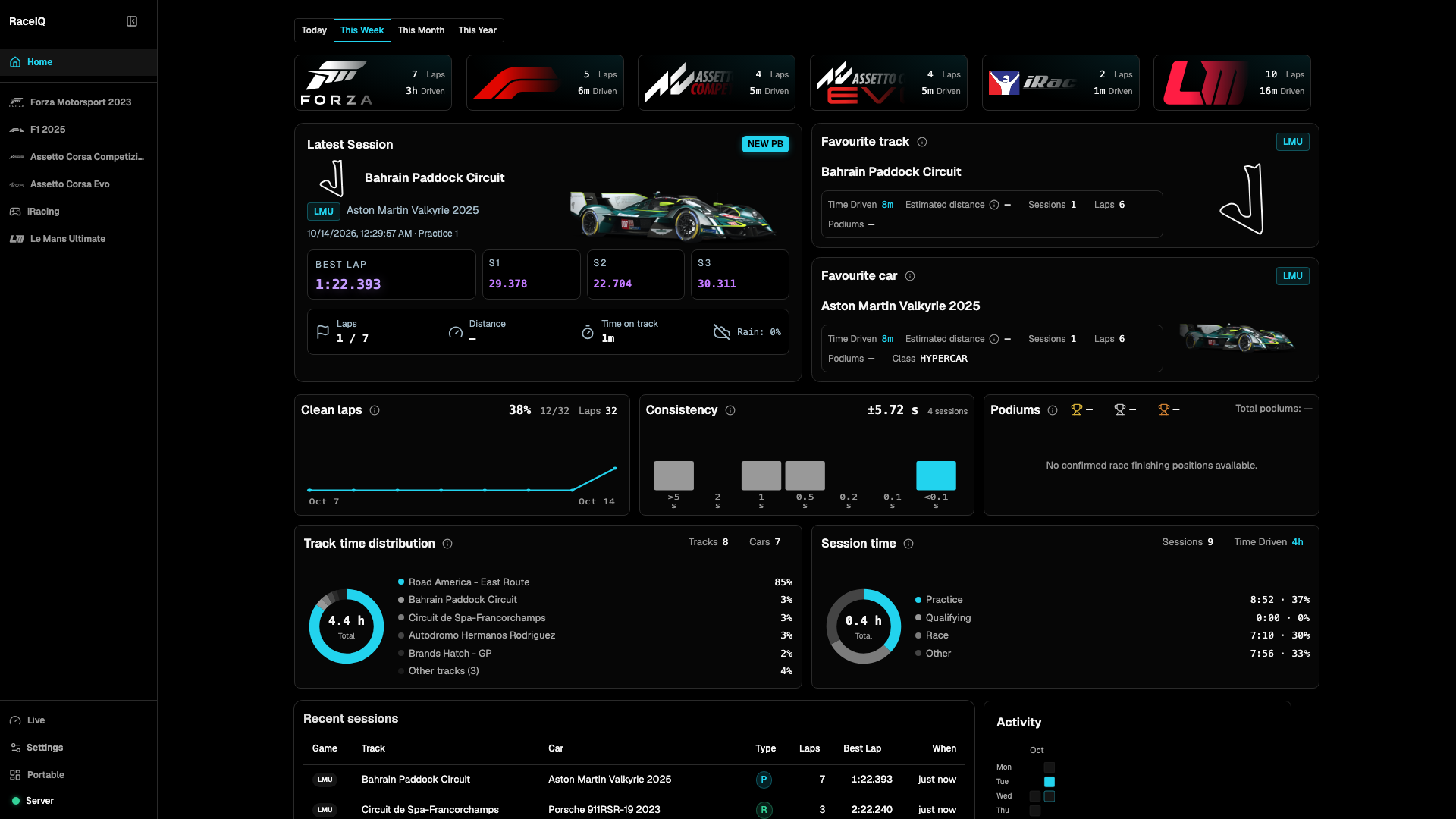
Free open-source sim racing telemetry & lap analysis for Forza Motorsport, F1 25, Assetto Corsa Competizione & Evo — live dashboard, AI coaching, lap comparison, tune catalog.
What you can do
- Live telemetry dashboards — real-time speed, inputs, tires, suspension, G-forces, fuel, ERS/DRS, and 3D car visualization
- Session recording and history — automatically save laps and sessions locally, filter your laps, review recaps, sector times, and pace statistics
- Lap analysis and replay — spot where time is gained or lost with corner detection, track playback, telemetry traces, insights, and sector maps
- Compare laps — see two laps side by side with time differences, fastest sectors, aligned track positions, and optional AI analysis
Progression mesurée des étoiles
- in 24h
- Historique en cours
- in 7 days
- Historique en cours
- in 15 days
- Historique en cours
- in 1 month
- Historique en cours
Variations nettes sur des périodes qui se chevauchent, pas des totaux quotidiens. Les mesures absentes restent vides. Les étoiles indiquent l’intérêt, pas la qualité.
README.md
Original

RaceIQ
Sim racer's companion app, real-time racing telemetry dashboard, lap analysis and iterative experiments for car setup and driving.



Download for Windows · Screenshots · Discord · Documentation
Alpha software — expect bugs, rough edges, and AI analysis that's still being fine-tuned for accuracy. Some features aren't obvious yet, so poke around and join the Discord if you get stuck.
A free, open-source alternative to Track Titan, Coach Dave Delta, Sim Racing Telemetry and Racing View.
RaceIQ is the most advanced sim racing telemetry app available to the public — and it's completely free. Whether you're chasing lap records, finding fast tunes, or just trying to understand why you're slow through turn 3, RaceIQ gives you tools that simply aren't available anywhere else.
It captures telemetry from your racing games, provides a live dashboard, records every lap to a local database, and gives you lap analysis and comparison (with optional AI coaching) and 3D visualizations — all running locally on your PC. It also includes a car and setup catalogue so you can browse and compare setups across tracks.
Check out the screenshots to see it in action.
Features
- Live telemetry dashboards — real-time speed, inputs, tires, suspension, G-forces, fuel, ERS/DRS, and 3D car visualization
- Session recording and history — automatically save laps and sessions locally, filter your laps, review recaps, sector times, and pace statistics
- Lap analysis and replay — spot where time is gained or lost with corner detection, track playback, telemetry traces, insights, and sector maps
- Compare laps — see two laps side by side with time differences, fastest sectors, aligned track positions, and optional AI analysis
- AI coaching and chats — get feedback on driving technique, setups, tires, and long-term improvement, with saved conversations and optional local AI
- Driver profile and trends — track driving style, consistency, time loss, and improvement across recent laps
- Tuning experiments — test setup changes, coaching drills, and driving improvements, then review the results
- Vehicle and setup catalogue — browse cars, tracks, performance data, tunes, setup details, and community setting ranges
- Tune analysis — compare fast tunes and find popular setup ranges across the community
- Track guides — See break down of each segment with track guides
- Race results — review qualifying, podiums, fastest laps, pit stops, strategies, and position timelines
- Data portability — import MoTeC logs and saved session captures; export individual laps or complete sessions
- Streaming widgets — transparent OBS and Streamlabs browser-source widgets for driving, inputs, timing, standings, nearby cars, damage, and distance driven
Supported Games
| Game | Priority |
|---|---|
| Assetto Corsa Evo | High |
| iRacing | High |
| Le Mans Ultimate | High |
| Automobilista 2 | High |
| F1 2025 | Medium |
| Assetto Corsa Competizione | Medium |
| Forza Motorsport 2023 | Low |
Lower priority means slower turnaround on new features for that title — it does not mean deprecated. All supported games keep working.
Supported Languages
RaceIQ's interface is available in 16 languages.
View supported languages
English, Finnish, French, German, Hindi, Italian, Japanese, Korean, Dutch, Polish, Brazilian Portuguese, European Portuguese, Russian, Simplified Chinese, Spanish, and Ukrainian.
Getting Started
1. Download and install
Grab the latest installer from the releases page and run it. Run RaceIQ and follow the setup wizard.
- You can reopen the dashboard at any time by double-clicking the RaceIQ icon in the system tray.
2. Run and Connect
For Forza and F1, configure the game's telemetry settings to send UDP data to 127.0.0.1:5301. ACC, AC Evo, iRacing, and LMU are detected automatically from native Windows telemetry. For LMU, enable Gameplay > Enable Plugins. Start driving and telemetry will appear automatically. LMU .duckdb files from UserData/Telemetry can also be uploaded from Sessions.
Already forwarding telemetry to a wheel base or other app? Use UDP Forwarder to send telemetry to multiple destinations at once.
Dashboard access and security
Choose optional password protection during setup; protected dashboards use a password-only sign-in and browser sessions. New desktop installs listen only on localhost. Enable individual LAN or Tailscale interfaces in Settings → Access & security, save, and restart before sharing links or QR codes.
Browser-origin whitelisting is off by default. Turn it on explicitly in Access & security, or supply a nonempty SERVER_ALLOWED_ORIGINS in .env; the environment list applies even when the saved toggle is off. When using the whitelist, include the exact external origin for any MagicDNS, tunnel, or HUD hostname.
Recover a forgotten password with raceiq auth reset, or remove password protection with raceiq auth disable --confirm-exposure. Use the same data directory as the server. Disabling protection lets anyone who can reach the dashboard read and edit its data and settings; remove SERVER_PASSWORD from both server and command environments first.
See dashboard access and security for platform-specific commands, session-authenticated API clients, external access, and environment overrides.
Updates
RaceIQ checks for new releases automatically and notifies you when one is available. You can also force a check at any time from Settings → About → Check for updates.
Platform
Slow 3D wireframe playback? Enable hardware acceleration in your browser when supported. Without GPU acceleration, Analyse playback may run far below the configured 60 or 120 FPS.
Game on Windows is recommended. RaceIQ runs on the same PC as the game for two reasons:
- UDP reliability — loopback delivery is lossless and low-latency, avoiding the packet loss and timing jitter of network routing.
- Native telemetry — ACC and AC Evo use Windows shared memory, iRacing uses its SDK mapping, and LMU uses the built-in
LMU_Datashared-memory interface.
Game on Console works. Just make sure both your windows machine and console is wired ethernet.
Data Storage
All data stays on your machine in %APPDATA%/raceiq:
- Database — every lap, session, analysis, tune, and profile stored in SQLite
- Settings — UDP port, units, active profile, and thresholds
The database is created automatically on first run. No cloud account or external service required.
AI Coaching Setup
AI analysis is optional. Add your API key in the RaceIQ settings panel — multiple providers are supported. Analysis is sent directly to the provider's API, no intermediary server.
Want to run AI entirely on your own PC? See the Local AI setup guide.
Sponsorship

Looking to sponsor this project or interested in a commercial license? Contact Snazzie on Discord or find my socials on GitHub.
Contributing
RaceIQ is a community project and every contribution helps — whether that's code, car/track data, tune setups, bug reports, or just telling a friend about it. See CONTRIBUTING.md for development setup, architecture, and how to add support for new games.
Explorer des projets similaires
Asabeneh/30-Days-Of-Python
Le défi de programmation 30 Days of Python est un guide pas à pas pour apprendre le langage de programmation Python en 30 jours. Ce défi peut prendre plus de 100 jours. Avancez à votre rythme. Ces vidéos peuvent aussi vous aider : https://www.youtube.com/channel/UC7PNRuno1rzYPb1xLa4yktw
78,560 étoilesgrafana/grafana
Plateforme ouverte et composable d’observabilité et de visualisation de données. Visualise les métriques, les journaux et les traces issus de plusieurs sources, comme Prometheus, Loki, Elasticsearch, InfluxDB, Postgres et bien d’autres.
77,830 étoilesredis/redis
Pour les développeurs qui créent des applications en temps réel pilotées par les données, Redis est le cache, le serveur de structures de données et le moteur de requêtes documentaires et vectorielles préféré, le plus rapide et le plus riche en fonctionnalités.
77,395 étoilesapache/superset
Apache Superset est une plateforme de visualisation et d'exploration de données.
75,473 étoiles