
Rss3208/Visiomaster
À propos
Une boîte à outils de reconstruction de graphiques Visio, basée sur l’approche de ppt-master. Elle reconstruit à partir d’images des organigrammes, des diagrammes d’architecture et des diagrammes de modules d’articles scientifiques en fichiers .vsdx modifiables, puis les exporte en SVG/PNG.
Création et médiasProgression mesurée des étoiles
- in 24h
- 0
- in 7 days
- +2
- in 15 days
- Historique en cours
- in 1 month
- Historique en cours
Variations nettes sur des périodes qui se chevauchent, pas des totaux quotidiens. Les mesures absentes restent vides. Les étoiles indiquent l’intérêt, pas la qualité.
README.md
OriginalVisiomaster
Visiomaster 是一个 Windows 优先的 Visio 图形重建工具包,也可以作为 Codex Skill 使用。它用于把 GPT、Gemini 等 AI 生成的流程图/学术示意图,以及已有的流程图、架构图、论文模块图,重建为可编辑的 Microsoft Visio 图纸。
它的目标不是把原图整张贴进 Visio,而是把主要结构拆成真正的 Visio 形状、文字、容器、端口和连接线,最终输出可继续编辑的 .vsdx,并同时导出 .svg 和 .png 便于审查。
本项目的流程设计参考了 ppt-master 的思路:先做图像理解、结构拆解和风格分析,再通过稳定的中间描述文件驱动确定性的渲染脚本。不同之处在于,Visiomaster 的最终目标是可编辑的 Visio 图纸。
能做什么
- 输出可编辑的
.vsdx - 导出高质量
.svg和预览.png - 用
scene.json描述节点、容器、连线、字体、公式、局部区域和审查元数据 - 支持论文模块图、流程框图、架构图、AI 生成学术框图的可编辑重建
- 支持“原图 vs 复刻 PNG”的视觉审查闭环,把人眼发现的问题转成下一轮重建约束
核心流程:
原始图片
  -> source staging / visual inventory
  -> scene.json
  -> validate / complexity / audit
  -> Visio COM render
  -> vsdx / svg / png
  -> visual LLM review
  -> rebuild brief / regeneration packet
  -> next full-scene rebuild
本次版本重点
相比上一个公开 release,本版本的重点不是简单增加几个组件,而是把“复刻失败后怎么有效迭代”沉淀成明确流程,并进一步强化局部箭头拓扑的可审查、可映射和可重建:
- 新增源图暂存与哈希记录:
scripts/stage_source_image.py - 新增 review bundle 生成:
scripts/make_review_assets.py - 新增视觉审查合同和双图审查提示:
references/review-contract.md、references/reviewer-two-image-prompt.md - 新增 Arrow Plan Gate:严格复刻前先记录
metadata.arrow_plan,scene edge 必须用arrow_plan_id绑定原图箭头事实 - 新增
rounded_orthogonal_connector:支持横平竖直但拐角圆滑的正交连接线,避免用全局 smooth 曲线把直线段拉弯 - 新增审查清单 gate:
scripts/review_checklist_gate.py - 新增“视觉问题 -> 重建 brief”转换:
scripts/review_findings_to_repair_plan.py - 新增下一轮重建包生成:
scripts/prepare_regeneration_packet.py - 新增 no-op gate:
scripts/round_noop_gate.py,避免只改元数据或无效渲染也算一轮进步 - 强化
scene_validate.py、scene_audit.py、scene_complexity.py、scene_to_visio.py对复杂论文图、字体、公式、箭头、区域和严格复刻流程的约束 - 新增
references/renderer-effective-fields.json,说明哪些 scene 字段会真实影响渲染
详细更新说明见:
- docs/updates/2026-05-27-release-prep.md
- docs/updates/2026-05-28-arrow-plan-gate.md
- docs/updates/2026-05-29-rounded-orthogonal-connector.md
效果示例
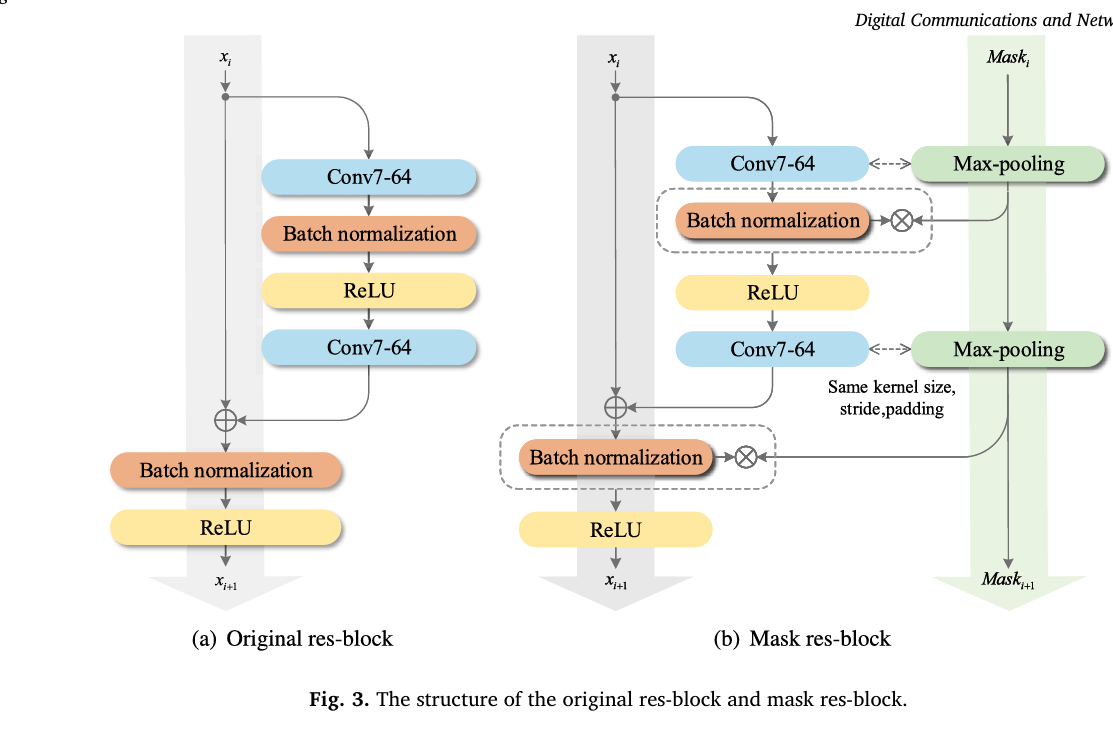
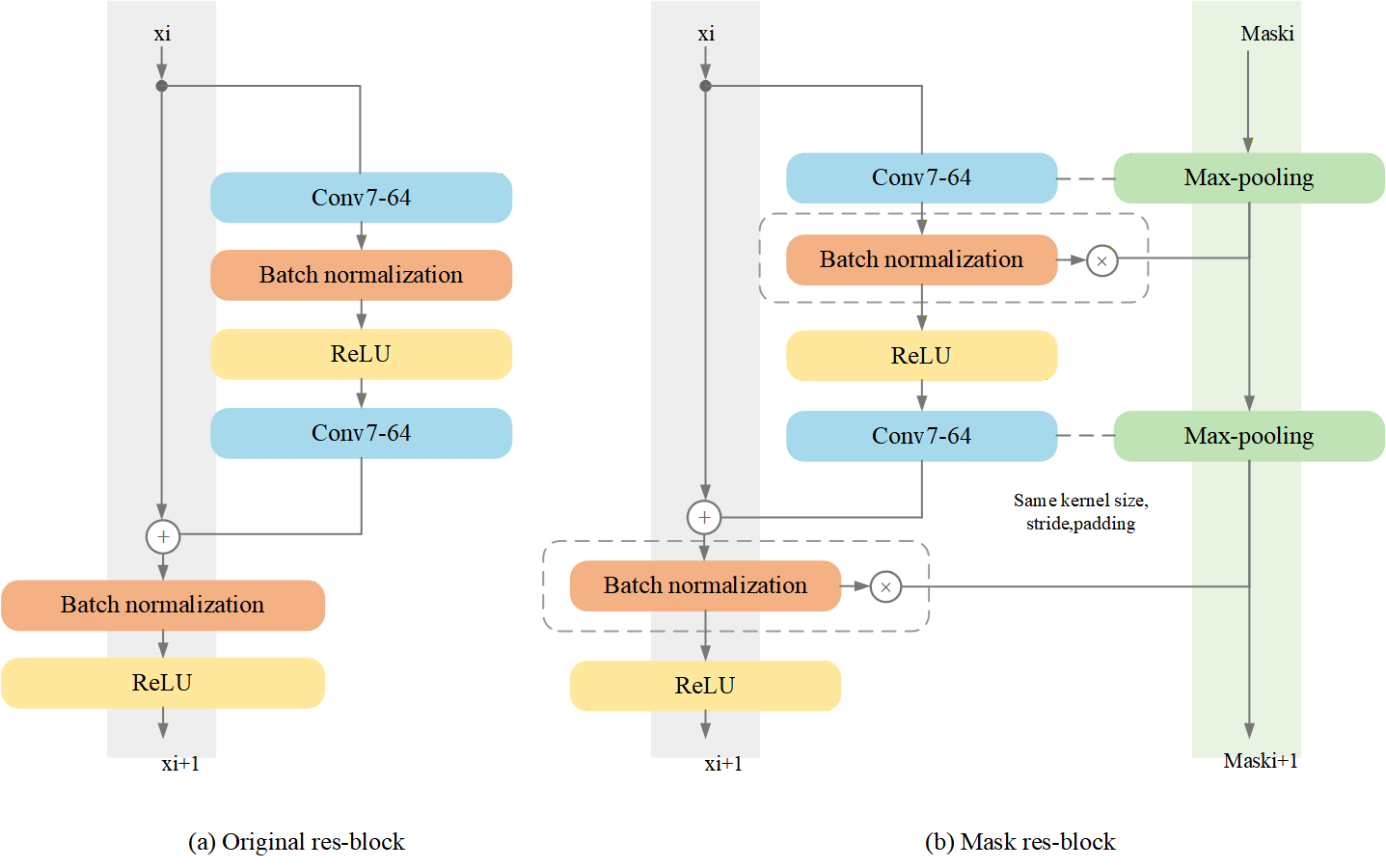
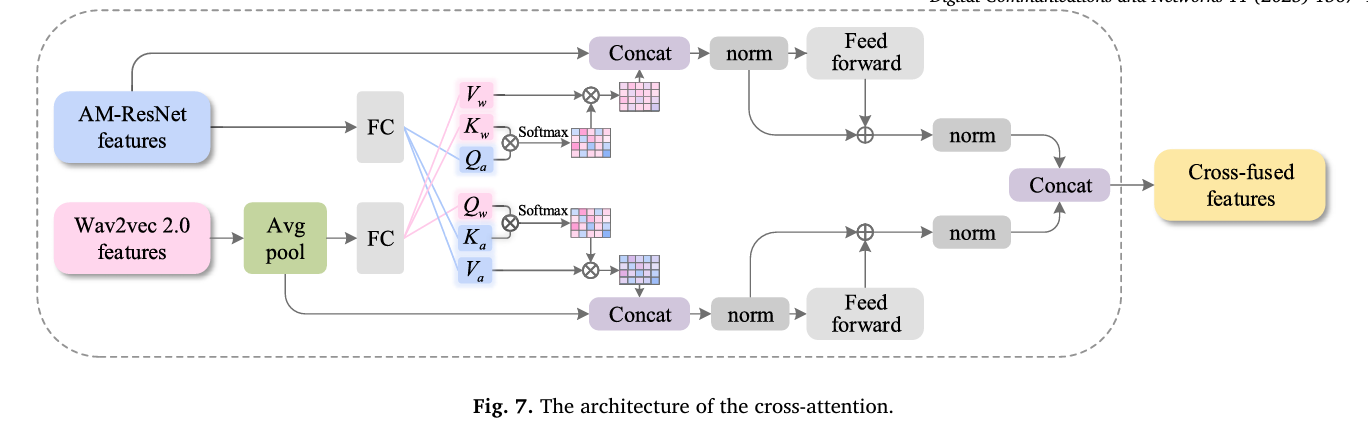
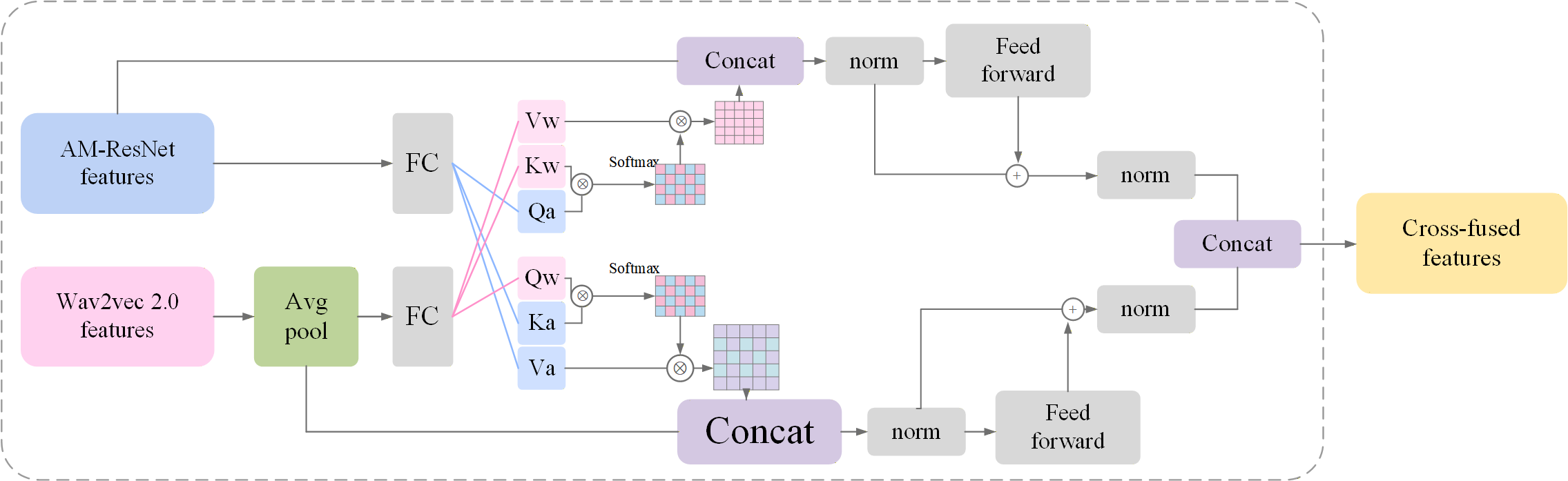
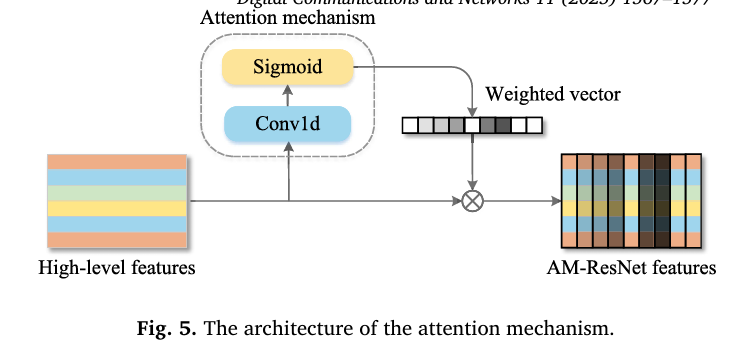
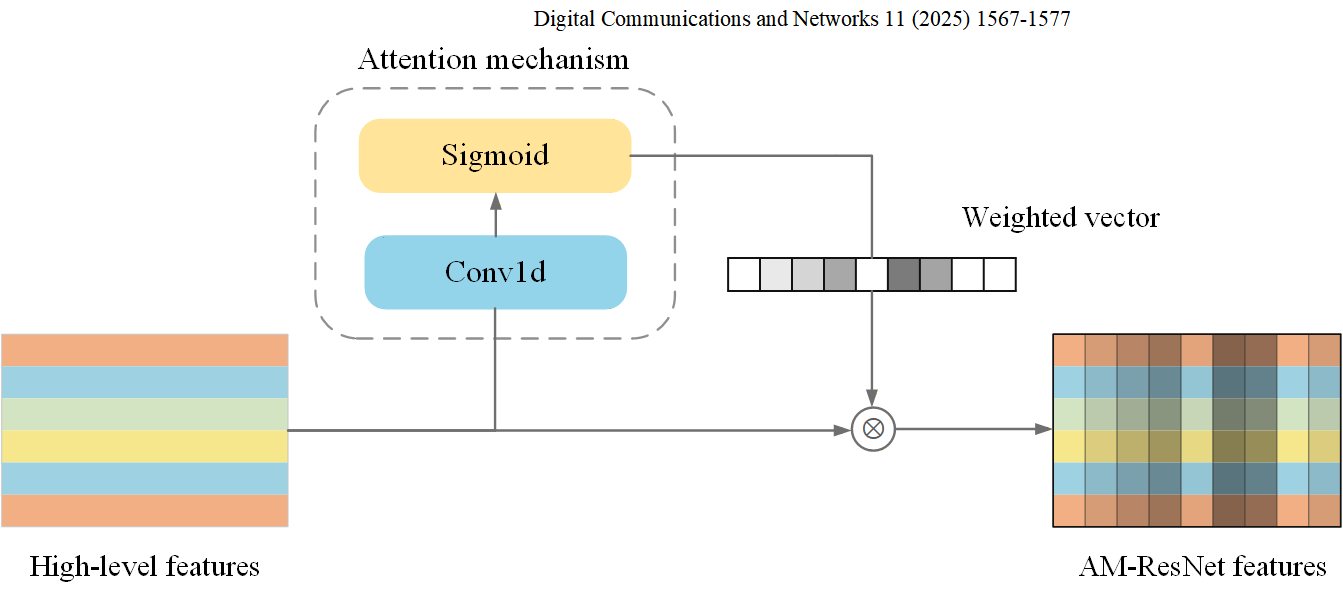
以下示例展示“参考图 -> Visiomaster 重建图”的效果。重建结果来自可编辑 Visio 图纸导出的 PNG,而不是整张贴图。
| 参考图 | Visiomaster 重建图 |
|---|---|
 |
 |
 |
 |
 |
 |
更多说明见 docs/gallery.md。
不想配置环境?

如果你只是想体验复刻效果,或者不想自己配置 Windows、Visio、Python、Agent/Skill 环境,也可以通过在线服务有偿体验。上传参考图后,我会按 Visiomaster 流程将流程图、论文模块图或 AI 生成框图重建为可编辑的 Visio 图,并导出 .vsdx / .svg / .png 等文件。
环境要求
- Windows
- Microsoft Visio 桌面版
- Python 3.10+
requirements.txt中的 Python 依赖
安装依赖:
python -m pip install -r requirements.txt
你可以使用系统 Python、venv 或 conda 环境;只要该环境能导入 pywin32,并且可以访问本机安装的 Visio COM 应用即可。
先运行环境自检:
python .\scripts\check_visio_env.py
自检会尝试启动 Visio、创建一个极简图纸、保存 .vsdx,并导出 .png / .svg。如果这一步失败,需要先修复本机 Visio COM 或导出环境。
使用方式
Visiomaster 有两种主要用法:
- 直接作为 CLI 工具使用:手写或生成
scene.json,然后用scripts/下的 Python 脚本校验、审查和渲染。 - 作为 AI 编程助手的 skill/上下文使用:Codex、Claude Code 或其他本地代理都可以读取
SKILL.md、引用scene.json规范,并调用同一套脚本。
真正的硬性要求不是 Codex,而是渲染阶段需要 Windows、Python、pywin32 和本机 Microsoft Visio 桌面版。
作为 Codex Skill 安装
把本仓库克隆或复制到 Codex 的 skills 目录:
git clone https://github.com/<owner>/visiomaster.git "$env:USERPROFILE\.codex\skills\visiomaster"
cd "$env:USERPROFILE\.codex\skills\visiomaster"
python -m pip install -r requirements.txt
之后在 Codex 里使用 $visiomaster,即可触发“图片到可编辑 Visio”的重建流程。
如果你维护一个工作副本,也可以用同步脚本复制到本机 Codex skill 目录:
python .\sync_to_skill.py --skill-dir "$env:USERPROFILE\.codex\skills\visiomaster" --merge-skill-md
--merge-skill-md 会尽量保留目标 skill 中的本机环境设置。
快速开始
校验一个示例 scene:
python .\scripts\scene_validate.py .\templates\examples\basic_flow.scene.json
生成模块级审查报告:
New-Item -ItemType Directory .\exports -Force | Out-Null
python .\scripts\scene_audit.py .\templates\examples\audit_region.scene.json --output .\exports\audit_region.audit.md
渲染为 Visio 并导出:
python .\scripts\scene_to_visio.py .\templates\examples\basic_flow.scene.json --output-dir .\exports --basename basic_flow
从图片生成一个起始版 scene.json:
python .\scripts\image_to_scene.py --image C:\path\source.png --template basic-flow --output .\work\scene.json
注意:image_to_scene.py 只是起始场景生成器,不是全自动精确复刻引擎。复杂图仍然需要视觉 LLM 或人工辅助完成结构拆解、局部复核和重建。
严格复刻流程
对于论文图、AI 生成框图、复杂架构图,不建议只看导出的整体 PNG。推荐使用严格复刻流程:
python .\scripts\stage_source_image.py --input C:\path\source.png --workspace .\work\figure_01 --id figure_01
python .\scripts\scene_validate.py .\work\figure_01\scene.json --strict
python .\scripts\scene_complexity.py .\work\figure_01\scene.json
python .\scripts\scene_audit.py .\work\figure_01\scene.json --fail-on-rebuild
python .\scripts\scene_to_visio.py .\work\figure_01\scene.json --output-dir .\work\figure_01\exports
python .\scripts\make_review_assets.py --original .\work\figure_01\source\original.png --replica .\work\figure_01\exports\figure_01.scene.png --scene .\work\figure_01\scene.json --id figure_01 --round 1 --write-review-bundle --output-dir .\work\figure_01\review_round_01
在写第一版 scene.json 时,先从原图生成 metadata.arrow_plan,逐条记录箭头连接关系、端点、直线/折线/曲线、虚线/实线、箭头头和语义 intent。每条可见 edge 用 arrow_plan_id 绑定对应箭头事实,scene_validate.py --strict 会检查缺失绑定、水平箭头变斜线、反馈路径组件错误、边界箭头未走 boundary_port、merge/fork 未走 junction/bus 等问题。
然后把原图和复刻 PNG 同时交给具备视觉能力的 LLM 审查。审查结果写成 review_findings.json 后,再运行:
python .\scripts\review_checklist_gate.py .\work\figure_01\review_round_01\figure_01_review_findings.json --manifest .\work\figure_01\review_round_01\figure_01_review_manifest.json --require-failed-refs
python .\scripts\review_findings_to_repair_plan.py .\work\figure_01\review_round_01\figure_01_review_findings.json --scene .\work\figure_01\scene.json --manifest .\work\figure_01\review_round_01\figure_01_review_manifest.json --require-checklists --output .\work\figure_01\review_round_01\figure_01_scene_rebuild_brief.json
python .\scripts\prepare_regeneration_packet.py .\work\figure_01\review_round_01\figure_01_scene_rebuild_brief.json --output-dir .\work\figure_01\review_round_02
核心原则:视觉审查必须看“原图 + 当前复刻 PNG”两张图;Python 脚本只做辅助 gate,不能替代人眼/视觉 LLM 的复刻质量判断。
工作流程
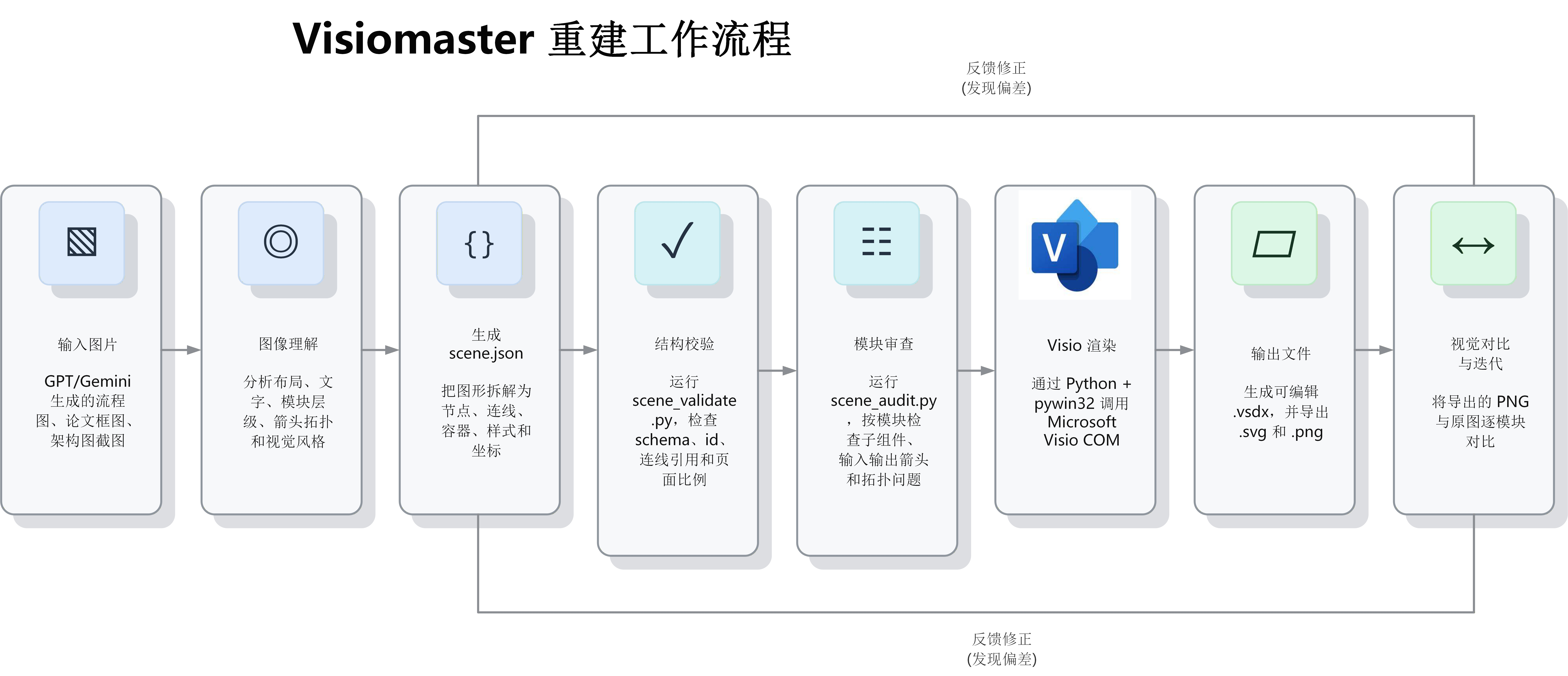
更详细的流程说明见 docs/workflow.md。
Scene 模型
scene.json 是图像分析和 Visio 渲染之间的中间协议。它描述页面尺寸、节点、连线、样式、资源和复刻元数据。
重要参考:
- references/scene-schema.md:
scene.json字段、坐标规则、保真元数据 - references/visio-component-map.md:支持的组件和渲染意图
- references/visio-export-flow.md:Visio COM 导出流程和排错
- references/review-contract.md:严格复刻审查合同
- references/reviewer-two-image-prompt.md:双图视觉审查提示
- references/full-scene-regeneration-prompt.md:失败后整图重建提示
- references/renderer-effective-fields.json:渲染器实际生效字段
- templates/visio_components.json:支持的组件词表
- templates/style_profiles.json:视觉风格配置
组件策略
Visiomaster 使用受控的语义组件词表,而不是直接暴露所有 Visio stencil。这样可以减少不同 Office 语言、版本和模板名称带来的不稳定性。
常见节点类型:
process_box、rounded_process、decision_diamond、terminatorgroup_container、audit_region、boundary_portfeature_map_grid、feature_map_banded、grid_matrix、token_gridoperator_node、merge_bus、junction_point、bracketclassifier_head、math_text、text_block、image_tiletfr_panel、loss_region、layer_sequence、gated_branch_merge
常见连线类型:
arrow_connector、dynamic_connector、line_segmentjoin_connector、fork_connector、boundary_arrowresidual_connector、residual_loop、loop_arrowdashed_feedback_path、lane_arrow、rounded_orthogonal_connector
仓库结构
visiomaster/
├── SKILL.md
├── README.md
├── LICENSE
├── requirements.txt
├── sync_to_skill.py
├── agents/
├── docs/
│   ├── workflow.md
│   ├── gallery.md
│   ├── updates/
│   └── assets/
├── references/
│   ├── scene-schema.md
│   ├── visio-component-map.md
│   ├── visio-export-flow.md
│   ├── review-contract.md
│   ├── reviewer-two-image-prompt.md
│   ├── full-scene-regeneration-prompt.md
│   └── renderer-effective-fields.json
├── scripts/
│   ├── image_to_scene.py
│   ├── scene_validate.py
│   ├── scene_complexity.py
│   ├── scene_audit.py
│   ├── scene_autofix.py
│   ├── scene_to_visio.py
│   ├── stage_source_image.py
│   ├── make_review_assets.py
│   ├── review_checklist_gate.py
│   ├── review_findings_to_repair_plan.py
│   ├── prepare_regeneration_packet.py
│   ├── round_noop_gate.py
│   ├── font_inventory.py
│   ├── font_utils.py
│   ├── check_visio_env.py
│   └── enumerate_visio_masters.py
├── templates/
│   ├── visio_components.json
│   ├── style_profiles.json
│   └── examples/
└── tests/
当前限制
- 渲染阶段依赖 Windows 和 Microsoft Visio 桌面版。
- macOS/Linux 可以编辑
scene.json、运行部分校验脚本,但不能通过 Visio COM 渲染.vsdx。 image_to_scene.py只能生成起始场景,不保证自动精确复刻。- 1:1 精确复刻仍然需要视觉 LLM 或人工审查;脚本 gate 只能检查流程和结构,不等于视觉质量通过。
- 不同 Office/Visio 版本、系统语言、默认字体和导出行为可能存在差异,需要少量适配。
兼容性说明
Visiomaster 当前主要面向 Windows + Microsoft Visio 桌面版 + pywin32 环境。由于 Visio COM、Office 版本、系统语言、默认 stencil 名称和导出行为都可能不同,其他机器或其他 Visio 版本上可能需要调试。
本项目更适合作为“论文框图/流程图到可编辑 Visio”的工作流和脚本起点,而不是覆盖所有 Visio 版本的商业级全自动转换器。如果你在其他版本的 Visio 上遇到 COM 启动、stencil 查找、导出 PNG/SVG 或连线渲染差异,欢迎通过 issue 反馈环境和复现样例。
示例中的参考图仅用于说明重建任务和效果对比。公开使用时请确保示例图片来源合规;如果不确定论文截图或第三方图片的授权,建议替换为自制图、AI 生成图或明确可公开使用的示例图。
Explorer des projets similaires
Chargement…