
Nasogaa/immich-drop
À propos
Une petite application web sans connexion requise pour recueillir les photos et vidéos de n’importe qui sur votre serveur Immich.
Création et médiasWhat you can do
- Invite Links: public-by-URL links for uploads; one-time or multi-use
- Manage Links: search/sort, enable/disable, delete, edit name/expiry
- Row Actions: icon-only actions with tooltips (Open, Copy, Details, QR, Save)
- Passwords (optional): protect invites with a password gate
Progression mesurée des étoiles
- in 24h
- 0
- in 7 days
- 0
- in 15 days
- Historique en cours
- in 1 month
- Historique en cours
Variations nettes sur des périodes qui se chevauchent, pas des totaux quotidiens. Les mesures absentes restent vides. Les étoiles indiquent l’intérêt, pas la qualité.
README.md
OriginalImmich Drop Uploader
A tiny web app for collecting photos/videos into your Immich server. Admin users log in to create public invite links; invite links are always public-by-URL. A public uploader page is optional and disabled by default.
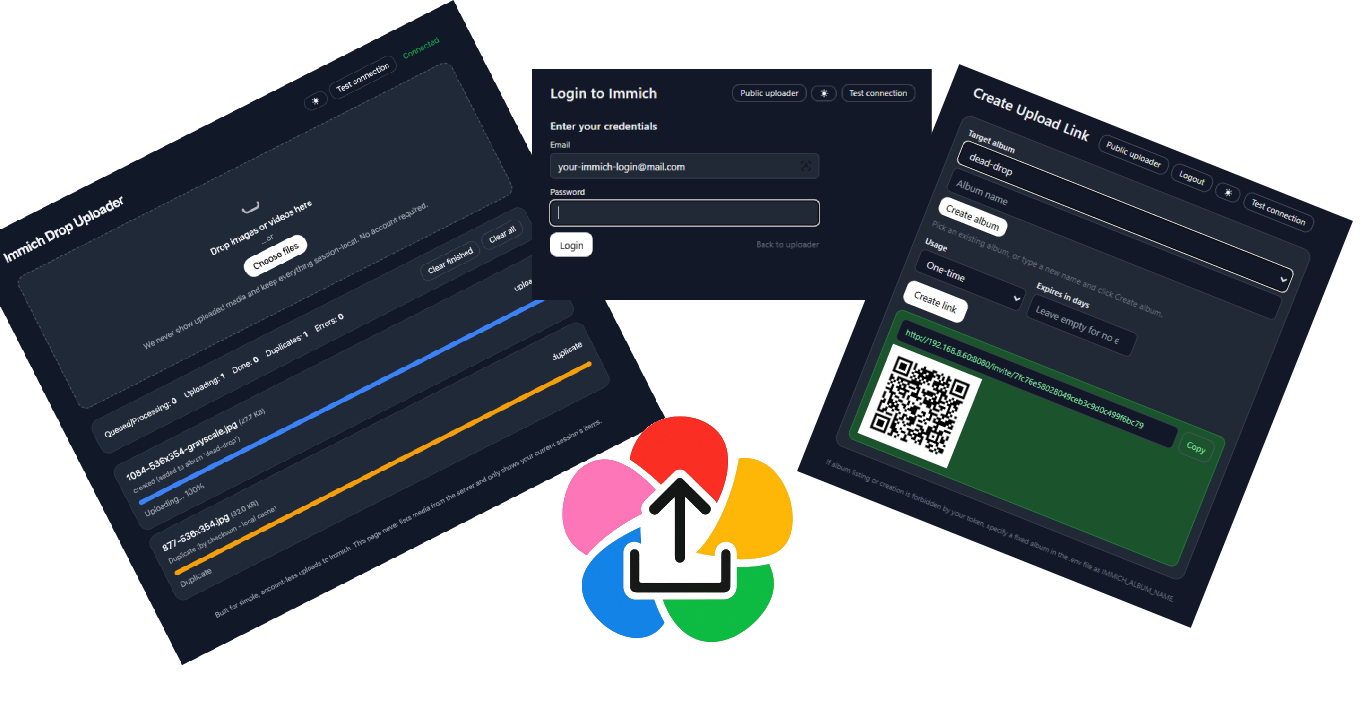
Features
- Invite Links: public-by-URL links for uploads; one-time or multi-use
- Manage Links: search/sort, enable/disable, delete, edit name/expiry
- Row Actions: icon-only actions with tooltips (Open, Copy, Details, QR, Save)
- Passwords (optional): protect invites with a password gate
- Albums (optional): upload into a specific album (auto-create supported)
- Duplicate Prevention: local SHA‑1 cache (+ optional Immich bulk-check)
- Progress Queue: WebSocket updates; retry failed items
- Chunked Uploads (optional): large-file support with configurable chunk size
- Privacy-first: never lists server media; session-local uploads only
- Mobile + Dark Mode: responsive UI, safe-area padding, persistent theme
Table of contents
- Quick start
- New Features
- Chunked Uploads
- Architecture
- Folder structure
- Requirements
- Configuration (.env)
- How it works
- Mobile notes
- Troubleshooting
- Security notes
- Development
- License
Quick start
You can run without a .env file by putting all settings in docker-compose.yml (recommended for deploys).
Use a .env file only for local development.
docker-compose.yml (deploy without .env)
version: "3.9"

services:
  immich-drop:
    image: ghcr.io/nasogaa/immich-drop:latest
    pull_policy: always
    container_name: immich-drop
    restart: unless-stopped

    # Configure all settings here (no .env required)
    environment:

      # Immich connection (must include /api)
      IMMICH_BASE_URL: https://immich.example.com/api
      IMMICH_API_KEY: ${IMMICH_API_KEY}

      # Optional behavior
      IMMICH_ALBUM_NAME: dead-drop
      PUBLIC_UPLOAD_PAGE_ENABLED: "false"   # keep disabled by default
      PUBLIC_BASE_URL: https://drop.example.com

      # Large files: chunked uploads (bypass 100MB proxy limits)
      CHUNKED_UPLOADS_ENABLED: "false"      # enable chunked uploads
      CHUNK_SIZE_MB: "95"                  # per-chunk size (MB)

      # App internals
      SESSION_SECRET: ${SESSION_SECRET}

    # Expose the app on the host
    ports:
      - 8080:8080

    # Persist local dedupe cache (state.db) across restarts
    volumes:
      - immich_drop_data:/data

    # Simple healthcheck
    healthcheck:
      test: ["CMD-SHELL", "python - <<'PY'\nimport os,urllib.request,sys; url=f\"http://127.0.0.1:{os.getenv('PORT','8080')}/\";\ntry: urllib.request.urlopen(url, timeout=3); sys.exit(0)\nexcept Exception: sys.exit(1)\nPY"]
      interval: 30s
      timeout: 5s
      retries: 3
      start_period: 10s

volumes:
  immich_drop_data:
### CLI
```bash
docker compose pull
docker compose up -d
What's New
v0.5.0 – Manage Links overhaul
- In-panel bulk actions footer (Delete/Enable/Disable stay inside the box)
- Per-row icon actions with tooltips; Save button lights up only on changes
- Per-row QR modal; Details modal close fixed and reliable
- Auto-refresh after creating a link; new row is highlighted and scrolled into view
- Expiry save fix: stores end-of-day to avoid off-by-one date issues
Roadmap highlight
- We’d like to add a per-user UI and remove reliance on a fixed API key by allowing users to authenticate and provide their own Immich API tokens. This is not in scope for the initial versions but aligns with future direction.
- The frontend automatically switches to chunked mode only for files larger than the configured chunk size.
📱 Device‑Flexible HMI (New)
- Fully responsive UI with improved spacing and wrapping for small and large screens.
- Mobile‑safe file picker and a sticky bottom “Choose files” bar on phones.
- Safe‑area padding for devices with notches; refined dark/light theme behavior.
- Desktop keeps the dropzone clickable; touch devices avoid accidental double‑open.
♻️ Reliability & Quality of Life (New)
- Retry button to re‑attempt any failed upload without re‑selecting the file.
- Progress and status updates are more resilient to late/reordered WebSocket events.
- Invites can be created without an album, keeping uploads unassigned when preferred.
Last 8 Days – Highlights
- Added chunked uploads with configurable chunk size.
- Added optional passwords for invite links with in‑UI unlock prompt.
- Responsive HMI overhaul: mobile‑safe picker, sticky mobile action bar, safe‑area support.
- Retry for failed uploads and improved progress handling.
- Support for invites with no album association.
🌙 Dark Mode
- Automatic or manual toggle; persisted preference
📁 Album Integration
- Auto-create + assign album if configured; optional invites without album
Chunked Uploads
- Enable chunked uploads by setting
CHUNKED_UPLOADS_ENABLED=true. - Configure chunk size with
CHUNK_SIZE_MB(default:95). The client only uses chunked mode for files larger than this. - Intended to bypass upstream limits (e.g., 100MB) while preserving duplicate checks, EXIF timestamps, album add, and per‑item progress via WebSocket.
Architecture
- Frontend: static HTML/JS (Tailwind). Drag & drop or "Choose files", queue UI with progress and status chips.
- Backend: FastAPI + Uvicorn.
- Proxies uploads to Immich
/assets - Computes SHA‑1 and checks a local SQLite cache (
state.db) - Optional Immich de‑dupe via
/assets/bulk-upload-check - WebSocket
/wspushes per‑item progress to the current browser session only
- Proxies uploads to Immich
- Persistence: local SQLite (
state.db) prevents re‑uploads across sessions/runs.
Folder structure
immich_drop/
├─ app/                     # FastAPI application (Python package)
│  ├─ app.py                # ASGI app (uvicorn entry: app.app:app)
│  └─ config.py             # Settings loader (reads .env/env)
├─ frontend/                # Static UI (served at /static)
│  ├─ index.html            # Public uploader (optional)
│  ├─ login.html            # Login page (admin)
│  ├─ menu.html             # Admin menu (create invites)
│  ├─ invite.html           # Public invite upload page
│  ├─ app.js                # Uploader logic (drop/queue/upload/ws)
│  ├─ header.js             # Shared header (theme + ping + banner)
│  └─ favicon.png           # Tab icon (optional)
├─ data/                    # Local dev data dir (bind to /data in Docker)
├─ main.py                  # Thin dev entrypoint (python main.py)
├─ requirements.txt         # Python dependencies
├─ Dockerfile
├─ docker-compose.yml
├─ .env.example             # Example dev environment (optional)
├─ README.md
└─ screenshot.png           # UI screenshot for README
Requirements
- Python 3.11
- An Immich server + API key
Local dev quickstart
Development
Run with live reload:
python main.py
The backend contains docstrings so you can generate docs later if desired.
Dev Configuration (.env)
# Server (dev only)
HOST=0.0.0.0
PORT=8080

# Immich connection (include /api)
IMMICH_BASE_URL=http://REPLACE_ME:2283/api
IMMICH_API_KEY=ADD-YOUR-API-KEY   # needs: asset.upload; for albums also: album.create, album.read, albumAsset.create
MAX_CONCURRENT=3

# Public uploader page (optional) — disabled by default
PUBLIC_UPLOAD_PAGE_ENABLED=TRUE

# Album (optional): auto-add uploads from public uploader to this album (creates if needed)
IMMICH_ALBUM_NAME=dead-drop

# Local dedupe cache (SQLite)
STATE_DB=./data/state.db

# Base URL for generating absolute invite links (recommended for production)
# e.g., PUBLIC_BASE_URL=https://photos.example.com
#PUBLIC_BASE_URL=

# Session and security
SESSION_SECRET=SET-A-STRONG-RANDOM-VALUE
LOG_LEVEL=DEBUG

# Chunked uploads (optional)
CHUNKED_UPLOADS_ENABLED=true
CHUNK_SIZE_MB=95
You can keep a checked‑in /.env.example with the keys above for onboarding.
How it works
- Queue – Files selected in the browser are queued; each gets a client‑side ID.
- De‑dupe (local) – Server computes SHA‑1 and checks
state.db. If seen, marks as duplicate. - De‑dupe (server) – Attempts Immich
/assets/bulk-upload-check; if Immich reports duplicate, marks accordingly. - Upload – Multipart POST to
${IMMICH_BASE_URL}/assetswith:assetData,deviceAssetId,deviceId,fileCreatedAt,fileModifiedAt(from EXIF when available; elselastModified),isFavorite=false,filename, and headerx-immich-checksum.
- Album – If
IMMICH_ALBUM_NAMEis configured, adds the uploaded asset to the album (creates album if it doesn't exist). - Progress – Backend streams progress via WebSocket to the same session.
- Privacy – UI shows only the current session's items. It never lists server media.
Security notes
- The menu and invite creation are behind login. Logout clears the session.
- Invite links are public by URL; share only with intended recipients.
- The default uploader page at
/is disabled unlessPUBLIC_UPLOAD_PAGE_ENABLED=true. - The Immich API key remains server‑side; the browser never sees it.
- No browsing of uploaded media; only ephemeral session state is shown.
- Run behind HTTPS with a reverse proxy and restrict CORS to your domain(s).
Usage flow
- Admin: Login → Menu → Create invite link (optionally one‑time / expiry / album) → Share link or QR.
- Guest: Open invite link → Drop files → Upload progress and results shown.
- Optional: Enable public uploader and set
IMMICH_ALBUM_NAMEfor a default landing page.
License
MIT.
Explorer des projets similaires
Chargement…