
Lede-Inc/LDNetDiagnoService_IOS
Lede-Inc/LDNetDiagnoService_IOS has 1,149 GitHub stars and 268 forks. GitHot measured 0 stars in 24 hours and 0 in 7 days. Last checked 2026-11-15 12:40 UTC. Last push 2018-08-29.
Progression mesurée des étoiles
- in 24h
- 0
- in 7 days
- 0
- in 15 days
- Historique en cours
- in 1 month
- Historique en cours
Variations nettes sur des périodes qui se chevauchent, pas des totaux quotidiens. Les mesures absentes restent vides. Les étoiles indiquent l’intérêt, pas la qualité.
À propos
IOS平台利用ping和traceroute的原理,对指定域名(通常为后台API的提供域名)进行网络诊断,并收集诊断日志。
Outils de développementREADME.md
OriginalLDNetDiagnoService_IOS
===============
利用ping和traceroute的原理,对指定域名(通常为后台API的提供域名)进行网络诊断,并收集诊断日志。功能通过Service的方式提供给各个产品项目,由各个项目组决定如何使用。
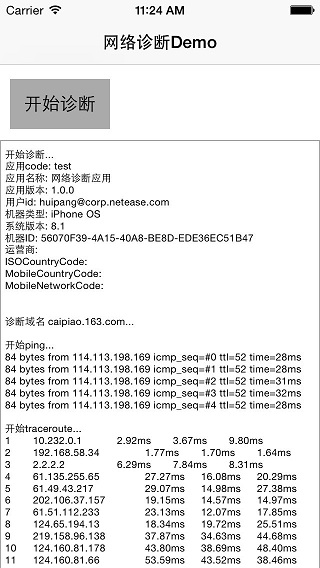
LDNetDiagnoService最终效果
- 调用网络诊断服务,监控日志输出;
- 诊断结束之后,返回日志文本;
- 调用者可以选择保存、邮件上传、接口上传等方式上传监控日志;
如下图所示:
如何集成LDNetDiagnoService_IOS
在项目工程的Podfile文件中加载LDNetDiagnoService库:
pod 'LDNetDiagnoService', :git => 'https://github.com/Lede-Inc/LDNetDiagnoService_IOS.git'
如何使用LDNetDiagnoService_IOS
通过pod或者代码拷贝service代码到工程之后,即可通过如下方式调用网络诊断服务:
- 初始化service,并为service设置监控日志输出的delegate;
tip:初始化参数只需要初始化appcode,userID, dormain(必须), 其他参数如果不设置,service会自动补上这些日志参数;
// Do any additional setup after loading the view, typically from a nib.
_netDiagnoService = [[LDNetDiagnoService alloc] initWithAppCode:@"test"
                                                        appName:@"网络诊断应用"
                                                     appVersion:@"1.0.0"
                                                         userID:@"[email protected]"
                                                       deviceID:nil
                                                        dormain:_txtfield_dormain.text
                                                    carrierName:nil
                                                 ISOCountryCode:nil
                                              MobileCountryCode:nil
                                                  MobileNetCode:nil];
_netDiagnoService.delegate = self;
- service中提供开启或停止网络诊断的功能;
- (void)startNetDiagnosis
{
    [_txtfield_dormain resignFirstResponder];
    _netDiagnoService.dormain = _txtfield_dormain.text;
    if (!_isRunning) {
       	...
        [_netDiagnoService startNetDiagnosis];
    } else {
        ...
        [_netDiagnoService stopNetDialogsis];
    }
}
重载delegate方法,监控网络诊断日志;
监控诊断开始
  #pragma mark NetDiagnosisDelegate
  -(void)netDiagnosisDidStarted {
      NSLog(@"开始诊断~~~");
  }
监控网络诊断过程中的日志输出
  -(void)netDiagnosisStepInfo:(NSString *)stepInfo {
      NSLog(@"%@", stepInfo);
      _logInfo = [_logInfo stringByAppendingString:stepInfo];
      dispatch_async(dispatch_get_main_queue(), ^{
          _txtView_log.text = _logInfo;
      });
  }
诊断结束,输出全部日志记录
  -(void)netDiagnosisDidEnd:(NSString *)allLogInfo;{
      //可以保存到文件,也可以通过邮件发送回来
      dispatch_async(dispatch_get_main_queue(), ^{
          [_indicatorView stopAnimating];
          [btn setTitle:@"开始诊断" forState:UIControlStateNormal];
          _isRunning = NO;
      });
  }
如何通过textview监控日志输出
如果产品需要通过textview接口日志输出过程,可以参考demo例子中的ViewController的代码;
在网络诊断结束的时候,将日志文件上传;
技术支持
to be continued ....
庞辉, 电商技术中心,popo:[email protected]