
AAitorG/napari-DINOSim
AAitorG/napari-DINOSim has 30 GitHub stars and 4 forks. GitHot measured 0 stars in 24 hours and +3 in 7 days. Last checked 2026-11-22 01:57 UTC. Last push 2026-10-31.
Progression mesurée des étoiles
- in 24h
- 0
- in 7 days
- +3
- in 15 days
- Historique en cours
- in 1 month
- Historique en cours
Variations nettes sur des périodes qui se chevauchent, pas des totaux quotidiens. Les mesures absentes restent vides. Les étoiles indiquent l’intérêt, pas la qualité.
À propos
This repository provides DINOSim, a method that leverages the DINOv2 foundation model for zero-shot object detection and segmentation in bioimage analysis. DINOSim uses pretrained DINOv2 embeddings to compare patch similarities, allowing it to detect and segment unseen objects in complex datasets with minimal annotations.
Apprentissage automatiqueREADME.md
OriginalDINOSim




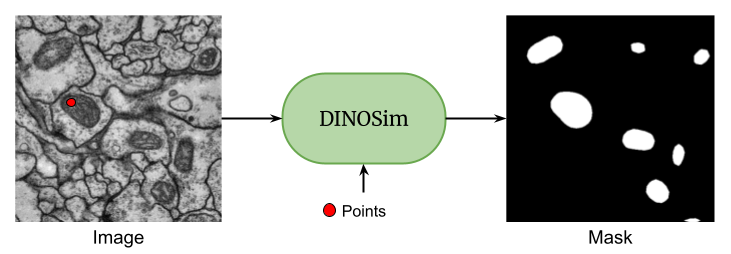
A napari plugin for zero-shot image segmentation using DINOv2 vision transformers.
Overview
napari-DINOSim enables zero-shot image segmentation by selecting reference points on an image. The plugin leverages DINOv2's powerful feature extraction capabilities to compute similarity maps and generate segmentation masks.
For detailed information about the widget's functionality, UI elements, and usage instructions, please refer to the Plugin Documentation. A simple example notebook and an advanced notebook are also available for programmatic use, showing how to load/save embeddings and references.
Installation
For a fresh environment, install napari-DINOSim with napari:
pip install "napari-dinosim[all]"
When napari is already installed, including through the napari plugin manager, install only the plugin:
pip install napari-dinosim
To install from source with conda:
# Clone the repository
git clone https://github.com/AAitorG/napari-DINOSim.git
cd napari-DINOSim

# Create and activate the conda environment
conda env create -f environment.yml
conda activate napari-dinosim
Note on GPU/CUDA Compatibility:
The runtime will automatically fall back to CPU or Apple MPS if CUDA is unavailable. However, environment installation (e.g., via conda or pip) may still fail or produce runtime errors on older systems if the installed PyTorch wheel targets an incompatible CUDA version. If you experience GPU-related installation errors, please reinstall PyTorch with a matching CUDA build or opt for the CPU-only version from the official PyTorch guide.
Usage
To launch napari, run the following command in your terminal:
napari
Within the napari interface, go to Plugins > DINOSim Segmentation > DINOSim Widget in the menu bar. You can then:
- Drag and drop your image into the napari viewer
- Select points on the objects you want to segment
- The plugin will automatically generate segmentation masks based on your selections
For more detailed instructions and examples, please refer to our Plugin Documentation.
License and contributing
The code is distributed under the MIT license. Contributions are welcome. Please open an issue if you run into a problem.
Citation
Please note that DINOSim is based on a publication. If you use DINOSim in your research, please be so kind to cite our work:
@article{Gonzalez-Marfil2026dinosim,
    author = {González-Marfil, Aitor and Gómez-de-Mariscal, Estibaliz and Arganda-Carreras, Ignacio},
    title = {DINOSim: Training-Free Semantic Segmentation on Microscopy Images},
    journal = {Microscopy Research and Technique},
    year = {2026},
    doi = {https://doi.org/10.1002/jemt.70194},
}
Explorer des projets similaires
Chargement…