
ziuus/orbit-tui
ziuus/orbit-tui has 79 GitHub stars and 6 forks. GitHot measured +2 stars in 24 hours. Last checked 2026-11-15 02:23 UTC. Last push 2026-11-11.
Crecimiento de estrellas medido
- in 24h
- +2
- in 7 days
- Recopilando historial
- in 15 days
- Recopilando historial
- in 1 month
- Recopilando historial
Cambios netos en períodos que se solapan, no totales diarios. Los datos no disponibles se dejan en blanco. Las estrellas indican interés, no calidad.
Acerca de
The most complete keyboard-driven terminal dashboard in Rust. One pane, six modes — CPU, memory, disk, network, GPU, processes, clock, calendar, media visualizer. ~3MB binary, 0.5% CPU.
Herramientas de desarrolloREADME.md
Original🪐 Orbit
The Extensible Terminal Workspace. Your machine, one pane.
Orbit is a fast, highly-aesthetic terminal OS and developer dashboard written in Rust. It's the most complete keyboard-driven workspace — one pane, four modes, zero mouse.





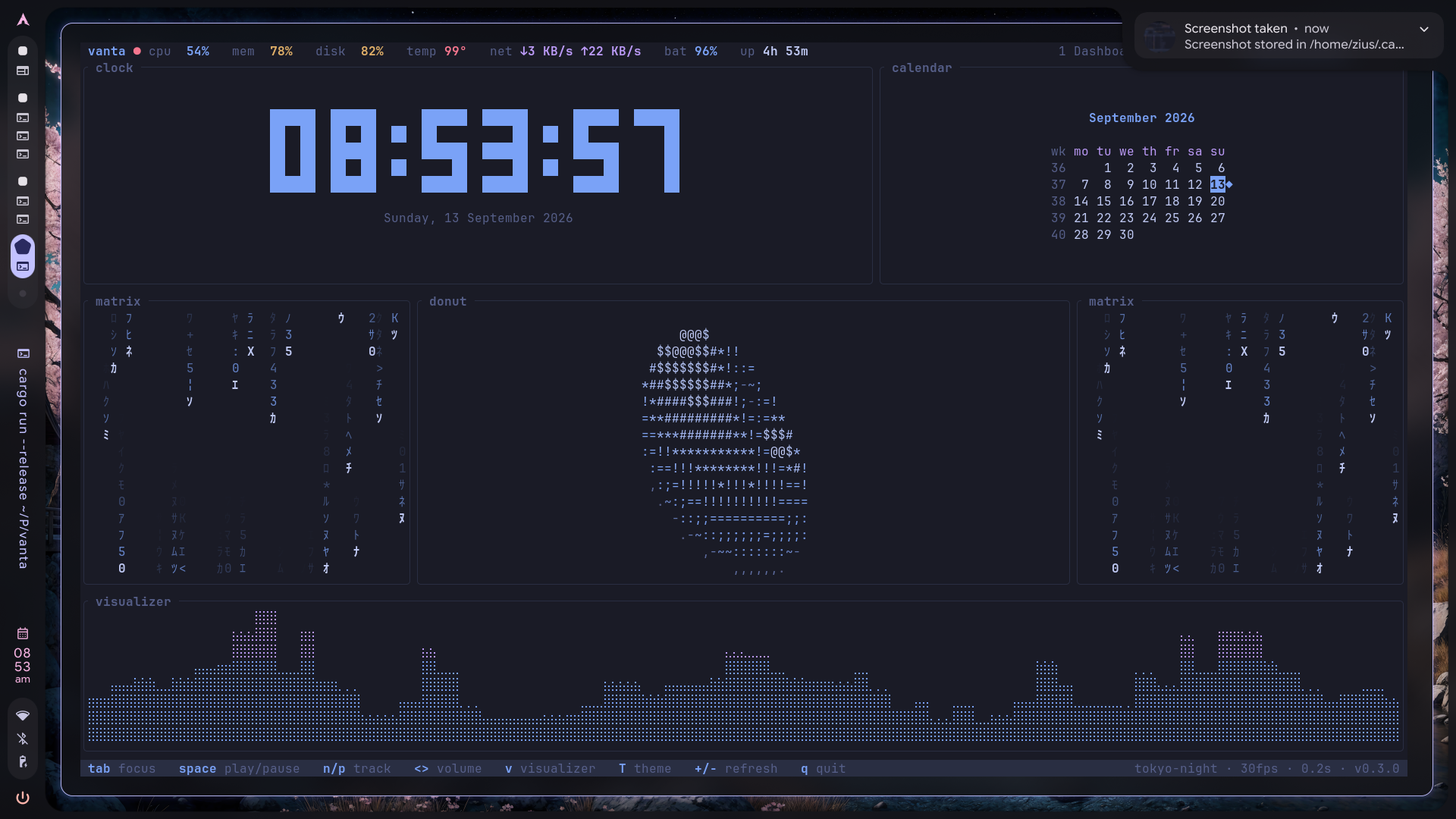
Live terminal workspace in action. Watch 1080p 60FPS video • Visit Website
Building this in the open — if it saves you time, a star helps others find it. Found a bug, or have an idea? Open an issue. New here? Start with a good first issue. Questions and ideas? Say hello in Discussions. New themes, widgets, and plugin ideas welcome.
🌌 The Terminal OS
Orbit is designed to sit on a secondary monitor and never be closed. It is not just a system monitor; it is a complete developer workspace powered by a WebAssembly plugin ecosystem.
It uses zero web tech, runs on roughly 0.5% of a core at idle, and bypasses standard terminal cell boundaries by dynamically rendering block characters at a smooth 60 FPS.
🚀 Quick Start
Install Orbit via NPM (Recommended for prebuilt binaries) or Cargo.
# Instant zero-install launch via NPX
npx @ziuus/orbit

# Via Arch Linux (AUR)
yay -S orbit-tui-bin
# or
paru -S orbit-tui-bin

# Via Cargo Binstall (Instant prebuilt binary)
cargo binstall orbit-tui

# Via Homebrew (macOS & Linux)
brew install ziuus/tap/orbit

# Via NPM (Global install)
npm install -g @ziuus/orbit

# Via Cargo (Compile from source)
cargo install orbit-tui
Note: If you are migrating from our previous iteration, simply rename your configuration folder:
mv ~/.config/vanta ~/.config/orbit
🗂️ Core Workspaces
| Key | Page | What's on it |
|---|---|---|
1 |
Dashboard | System facts, distro logo, visualizer, top processes, interactive status, memory, network, calendar. |
2 |
Monitor | Comprehensive system & process matrix. Filter, sort, and manage running tasks effortlessly. |
3 |
Aesthetic | Ambient environments. Matrix rain, 3D starfield, spinning donut, pinned media, full-width visualizer. |
4 |
Workspace | Built-in File Manager (with image previews), Agenda, Tasks, RSS feeds, and Obsidian vault viewer. |
5 |
Orbit AI | Autonomous Agent Workstation. Supervise Claude Code, OpenCode, Antigravity, or Shell sessions 24/7 with zero key conflicts and instant fullscreen handover. |
? |
Help | Keybind reference overlay. |
5 — Orbit AI (Autonomous Agent Cockpit)
Run and supervise background AI coding agents 24/7 without terminal context switches.
- Agent Fleet Telemetry: Live RAM & CPU metrics for all active agents.
- Embedded PTY Stream: 30 FPS non-blocking live terminal stream.
- Zero Key Conflicts: Dual-mode terminal focus passes all keystrokes (
space,q,Tab,1-5) directly to your agent. PressEscanytime for Orbit Nav mode, orAlt+Enterfor native fullscreen tmux handover.
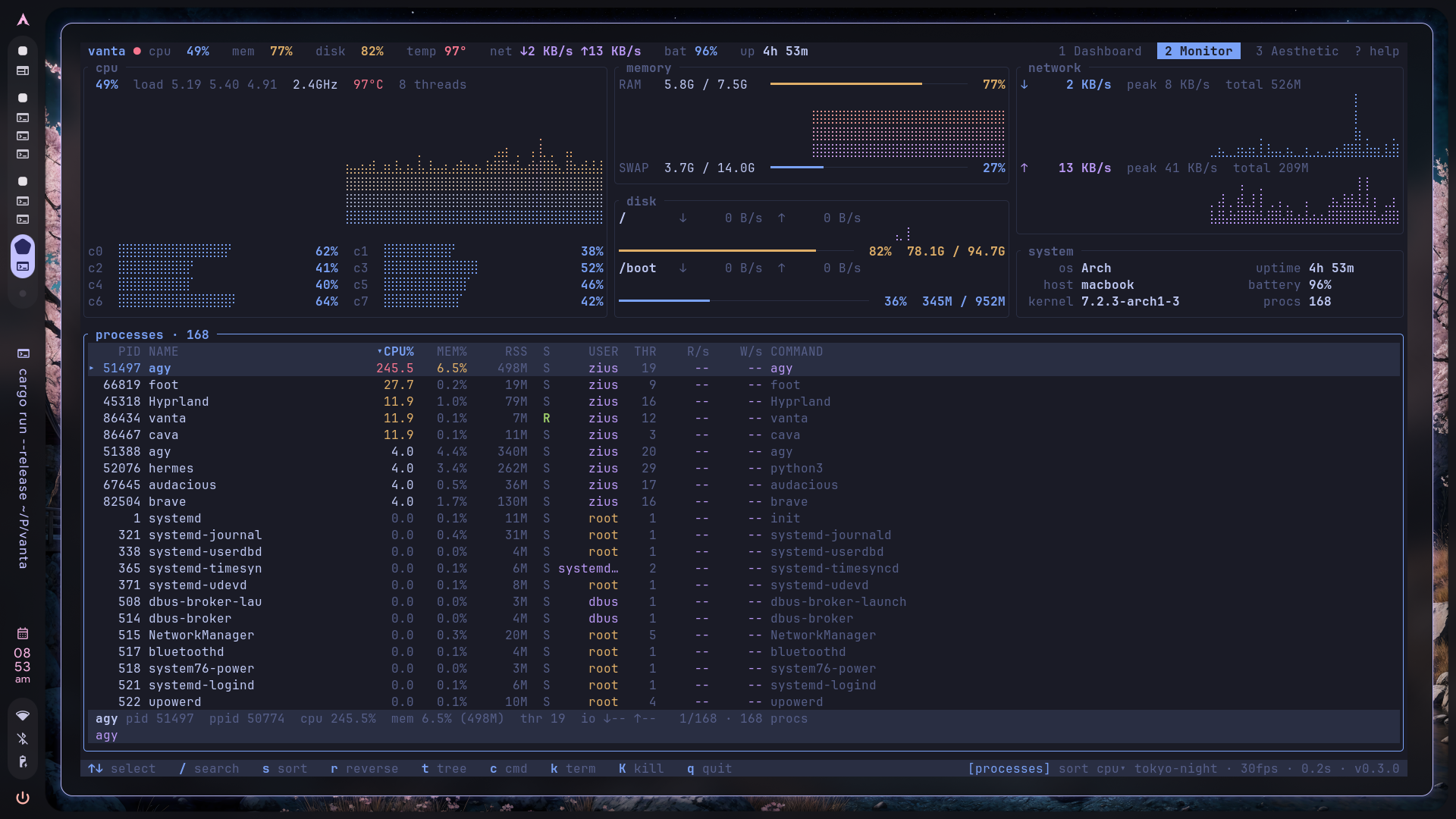
2 — Monitor
A deep dive into your system's heartbeat. Every vital graph on top, every active process below. Sort it, filter it, tree it, kill it.
3 — Aesthetic
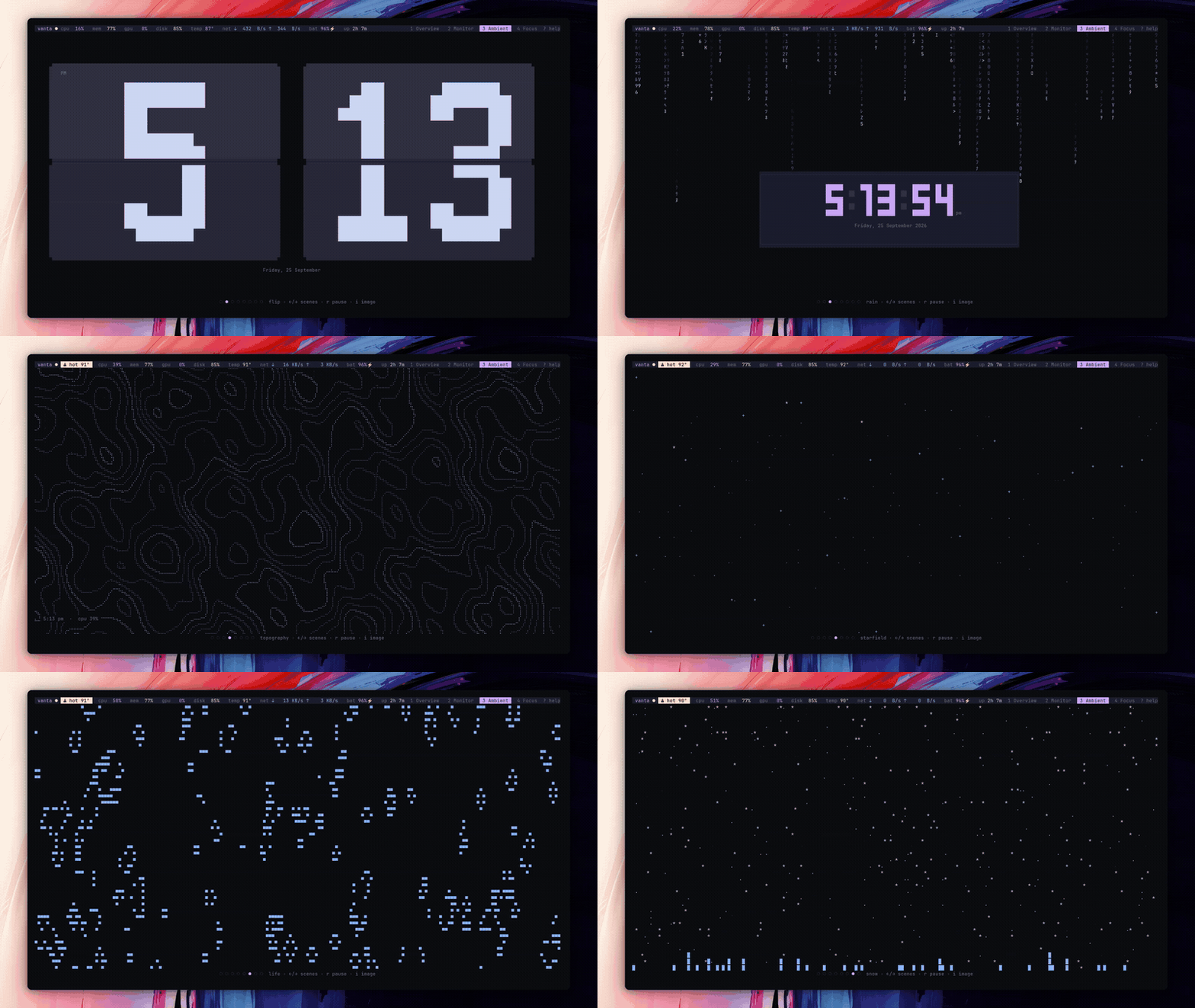
For when the build is running and you want a premium ambient display. Includes support for custom pinned images.
Includes 7 immersive ambient scenes:
- Audio Visualizer
- Matrix Rain
- Flip Clock
- Topographic Map
- True 3D Starfield (reacts to CPU spikes and music bass)
- Conway's Game of Life (auto-seeding)
- Terminal Snowfall (piles up and melts dynamically)
4 — Workspace
Turn your terminal into a productivity hub. Manage files (with image previews), read RSS news, track tasks, and view your Obsidian vault with markdown syntax highlighting. Press e on any focused panel to edit content in your $EDITOR.
⌨️ Keybinds
| Key | Action |
|---|---|
1 2 3 4 5 |
Switch workspace (persisted as startup page) |
Tab / Shift-Tab |
Cycle panel focus · Esc clears |
Enter |
Zoom the focused panel to the full page · Esc back |
T |
Next theme (persisted) |
v |
Visualizer style: bars / mirror / wave / peaks |
+ / - |
Sample faster / slower |
Space n p |
Play/pause · next · previous (MPRIS, any page) |
< > |
Volume down / up |
? |
Help overlay |
q |
Quit |
~ / F12 |
Toggle Debug Logs overlay (s saves them to file) |
S / , |
Open Settings overlay |
Ctrl + ←/→ |
Resize dashboard columns horizontally |
Ctrl + ↑/↓ |
Resize dashboard components vertically |
Processes (Monitor): ↑↓ PgUp PgDn Home End select · / filter · s sort field · r reverse · t tree · ←→ fold · c full command · k SIGTERM · K SIGKILL.
🎨 Themes & Customization
Cycle through built-in themes with T:
dark · catppuccin · tokyo-night · nord · gruvbox · dracula · light · solarized-light
Custom Themes
You can load custom themes dynamically without recompiling Orbit:
- Create a
themesfolder inside your config directory (e.g.~/.config/orbit/themes/). - Drop in a
.tomlfile with your theme name (e.g.,cyberpunk.toml). - Define your colors using hex codes (
bg,accent,surface, etc.). - Press
Tin Orbit to cycle to it.
Want more? There are some community presets (Night Owl, Nightfox, Rosé Pine Dawn and more) in themes/. Copy one over or just orbit link themes/<name>.toml.
🔌 Extensions & Plugins
Orbit is fully extensible via sandboxed WebAssembly (WASM). Anyone can install community widgets or build their own!
Quick Tutorial: Installing Extensions
Browse and install verified extensions directly from the terminal:
# 1. Browse community extensions
orbit browse

# 2. Install any extension (e.g. 3D Crypto Coin)
orbit install crypto_coin

# 3. Enable in ~/.config/orbit/config.toml
orbit enable crypto_coin
Drop the installed widget ID (e.g. "coin") anywhere into your [dashboard.layout] in ~/.config/orbit/config.toml:
[dashboard]
layout = [
    ["system", "coin", "cpu", "storage"],
    ["clock", "media", "processes", "network"],
    ["weather", "calendar", "upnext", "status"]
]
Quick Tutorial: Building Your Own Extension
We provide ready-to-use templates for every extension type:
- Component (Widget): Rust WASM plugin returning a UI widget (
templates/component) - Page (Workspace): Multi-column custom page layout (
templates/page) - Theme (Palette): Custom 9-color TOML palette (
templates/theme)
Test your plugin locally in Orbit without publishing:
orbit link /path/to/my_widget.wasm
Explore the official registry and templates: 👉 github.com/ziuus/orbit-integrations
📚 Documentation
- CONFIGURATION.md: Layouts, custom shell widgets, and performance profiles.
- EXTENSIONS.md: Orbit Extension Developer Guide (WASM).
- AGENTS.md: AI Agent architecture guide for modifying Orbit.
- ORBIT_CONFIG_SKILL.md: Prompt instructions for your AI to configure your dashboard.
🏗️ Architecture
All telemetry is collected on a single background sampler thread (/proc, /sys, sysinfo, D-Bus) into lock-guarded snapshots. The render loop only reads snapshots and never blocks on I/O.
| Layer | Technology |
|---|---|
| TUI | Ratatui 0.29 + Crossterm |
| Telemetry | sysinfo, /proc, /sys/class/{hwmon,drm,power_supply} |
| GPU | NVIDIA (nvidia-smi), AMD (sysfs), Intel (clock only) |
| Media | MPRIS over D-Bus (dbus crate) |
| Audio viz | cava raw output, idle wave fallback |
🤝 Contributing
Issues, new themes, and PRs are welcome!
git clone https://github.com/ziuus/orbit-tui.git && cd orbit-tui
cargo run --release

# Ensure CI passes
cargo fmt --all -- --check
cargo clippy --all-targets -- -D warnings
cargo test
Read CONTRIBUTING.md first to understand our sampler-thread rule (never do I/O inside a render()) and our UI degradation contract.
Looking for something to work on? Check out our good first issues.
🧩 Ecosystem & Companion Tools
- settings-tui — Lightweight universal Linux Settings Center for your terminal (D-Bus, PipeWire, BlueZ, Hyprland, systemd). The settings management companion to Orbit's system monitoring.
📄 License
MIT — Do what you like, keep the notice.