
zainsharief/torchvulkan
zainsharief/torchvulkan has 34 GitHub stars and 4 forks. Star changes are not measured yet. Last checked 2026-11-14 05:16 UTC. Last push 2026-11-12.
Crecimiento de estrellas medido
- in 24h
- Recopilando historial
- in 7 days
- Recopilando historial
- in 15 days
- Recopilando historial
- in 1 month
- Recopilando historial
Cambios netos en períodos que se solapan, no totales diarios. Los datos no disponibles se dejan en blanco. Las estrellas indican interés, no calidad.
Acerca de
Cross-Platform Vulkan Backend for PyTorch
Aprendizaje automáticoREADME.md
Originaltorchvulkan
A Cross-Platform Vulkan Backend for PyTorch



torchvulkan registers a vulkan device with PyTorch and runs tensor operations as Vulkan compute shaders. Vulkan runs on GPUs from AMD, Intel, NVIDIA, and Apple (via MoltenVK), plus software rasterizers, so you get one vendor-neutral GPU backend across Linux, macOS, and Windows.
You use it like any other PyTorch device:
import torch
import torchvulkan  # registers the 'vulkan' device on import

x = torch.randn(1024, 1024).to("vulkan")
y = torch.randn(1024, 1024).to("vulkan")

z = (x @ y).relu()      # runs on the GPU via Vulkan compute shaders
print(z.sum().item())   # move a scalar back to the CPU
[!WARNING] Experimental.
torchvulkanis an early-stage project. Most of PyTorch's operators run natively on the GPU; the few that don't fall back to the CPU. Expect breaking changes before1.0.
Table of contents
- Installation
- Quickstart
- Examples
- Benchmarks
- Python API
- CPU fallback
- Environment variables
- Limitations
- How it works
Installation
pip install torchvulkan
At runtime you need a Vulkan 1.3 (or newer) driver: your GPU's driver on Linux and Windows. On macOS the wheel bundles MoltenVK, so nothing else is needed; set TORCHVULKAN_SYSTEM_VULKAN=1 to use the system Vulkan loader instead. Verify it worked:
import torchvulkan
print(torchvulkan.is_available(), torchvulkan.device_count())
Quickstart
import torch
import torchvulkan

# Move tensors to the Vulkan device
a = torch.tensor([[1.0, 2.0], [3.0, 4.0]], device="vulkan")
b = torch.ones(2, 2, device="vulkan")

c = a @ b + 1.0          # matmul + broadcasted add
d = c.exp().sum(dim=0)   # elementwise + reduction

print(d.cpu())           # bring the result back to the CPU
nn.Modules move to the device the usual way:
model = torch.nn.Linear(128, 10).to("vulkan")
out = model(torch.randn(32, 128).to("vulkan"))
Examples
Each example trains a model end to end on the Vulkan device: forward pass, loss, backward pass and optimizer step all run through the backend.
| Example | Model | Data |
|---|---|---|
examples/mlp.py |
A multi-layer perceptron with GELU and dropout, trained with AdamW | MNIST |
examples/llm.py |
A small modern decoder-only transformer: RMSNorm, rotary embeddings, grouped-query attention, a SwiGLU MLP and tied embeddings. Samples text when it's done | Its own source code, character by character |
examples/resnet.py |
A ResNet with residual blocks, batch norm and global average pooling, trained with SGD and a one-cycle schedule | CIFAR-10 |
pip install torchvision     # for the MNIST and CIFAR-10 datasets
python examples/mlp.py
python examples/llm.py
python examples/resnet.py
Training looks the same as on any other device:
device = torch.device("vulkan" if torchvulkan.is_available() else "cpu")
model = ResNet().to(device)
optimizer = torch.optim.SGD(model.parameters(), lr=0.1, momentum=0.9)

for data, targets in train_loader:
    data, targets = data.to(device), targets.to(device)
    loss = criterion(model(data), targets)
    optimizer.zero_grad()
    loss.backward()
    optimizer.step()
Benchmarks
benchmark/benchmark.py times a combined forward + backward pass (float16 on accelerators, float32 on CPU) on every available backend, sweeping each model's size. Each backend runs in its own subprocess. The models are the ones from the examples:
mlp: sweeps the hidden width, up to ~141M parameters.llm: sweeps the model width (n_embd), up to ~26M parameters.resnet: sweeps the base channel width, up to ~6M parameters.
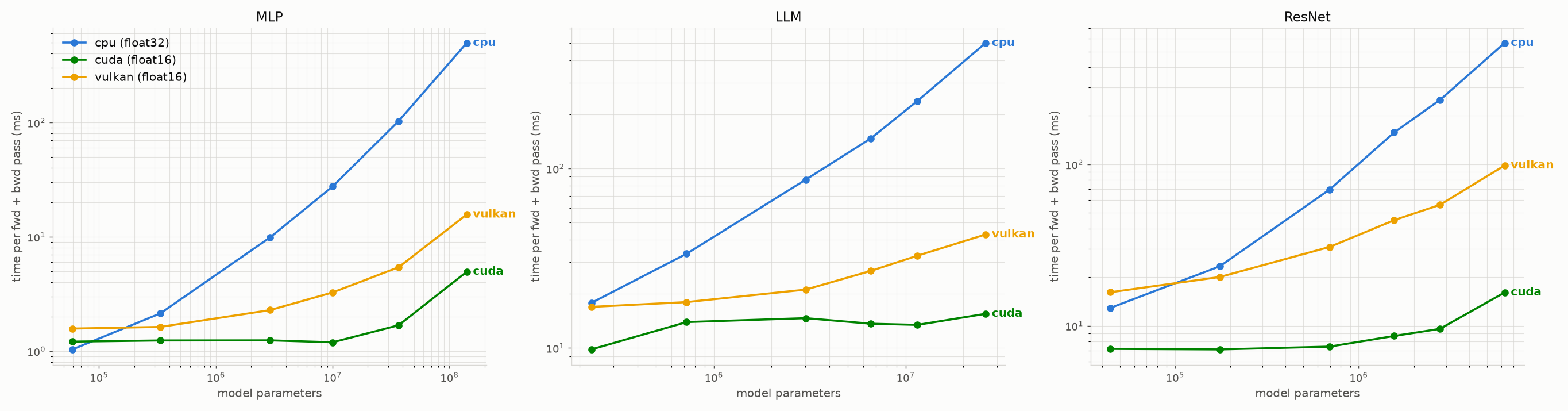
Vulkan vs. CUDA vs. CPU.
pip install matplotlib
python benchmark/benchmark.py all    # every model
Python API
torchvulkan mirrors the torch.cuda module, and is also reachable as torch.vulkan:
import torchvulkan

# devices
torchvulkan.is_available()            # -> bool: a usable Vulkan device was found
torchvulkan.device_count()            # -> int: number of Vulkan devices (discrete GPUs first)
torchvulkan.current_device()          # -> int: index of the current device
torchvulkan.set_device(1)             # make "vulkan" mean "vulkan:1"
torchvulkan.get_device_name()         # -> str
torchvulkan.get_device_properties()   # -> name, total_memory, vendor_id, api_version, subgroup_size, ...
torchvulkan.synchronize()             # block until queued GPU work has finished

# memory
torchvulkan.memory_allocated()        # bytes held by tensors
torchvulkan.max_memory_allocated()    # peak since the last reset_peak_memory_stats()
torchvulkan.memory_reserved()         # bytes held by the allocator, including its cache
torchvulkan.memory_stats()            # -> dict
torchvulkan.mem_get_info()            # -> (free, total): what can be allocated given the budget
torchvulkan.empty_cache()             # release cached device memory back to the driver

# random numbers (per-device)
torchvulkan.manual_seed(0)            # also: manual_seed_all, seed, seed_all, initial_seed
torchvulkan.get_rng_state()           # also: set_rng_state, get_rng_state_all, set_rng_state_all

torchvulkan.is_bf16_supported()       # -> bool: bfloat16 runs on the GPU
torchvulkan.__version__               # package version
Importing torchvulkan registers the backend, after which the device is addressed as "vulkan" / torch.device("vulkan") throughout PyTorch.
CPU fallback
By default, any operation, dtype, or tensor shape the backend doesn't implement natively runs on the CPU, so models keep working despite partial coverage. The warning is printed once, for the first operation that falls back; call torch.set_warn_always(True) to see every one.
Set TORCHVULKAN_STRICT=1 to turn those silent fallbacks into errors. This is useful for finding which operators a workload actually needs:
TORCHVULKAN_STRICT=1 python your_script.py
Environment variables
| Variable | Effect |
|---|---|
TORCHVULKAN_STRICT=1 |
Raise an error instead of falling back to the CPU. |
TORCHVULKAN_STRICT_ALLOCATION=1 |
Raise an out-of-memory error instead of allocating past the VRAM budget. By default torchvulkan allocates anyway (with a one-time warning), and the driver may put the memory in system RAM, which is much slower. |
TORCHVULKAN_SYSTEM_VULKAN=1 |
macOS: use the system Vulkan loader instead of the bundled MoltenVK. |
TORCHVULKAN_VALIDATION=1 |
Enable the Khronos validation layer, if it's installed. =sync also enables synchronization validation. On macOS this needs TORCHVULKAN_SYSTEM_VULKAN=1. |
TORCHVULKAN_PROFILE=1 |
Print each compute pipeline's driver statistics (such as register use) when it's compiled, on drivers that support VK_KHR_pipeline_executable_properties. |
TORCHVULKAN_PIPELINE_CACHE=0 |
Don't cache compiled pipelines between runs. By default they're cached in %LOCALAPPDATA%\torchvulkan on Windows and $XDG_CACHE_HOME/torchvulkan (or ~/.cache/torchvulkan) elsewhere. |
TORCHVULKAN_CACHE_DIR |
Directory for the pipeline cache. |
Limitations
torch.compilewith the default Inductor backend doesn't support thevulkandevice. Run eagerly, or usetorch.compile(model, backend="aot_eager").- Optimizers created with
fused=True(such astorch.optim.AdamW(..., fused=True)) run their update on the CPU. The default (foreach) implementation runs on the GPU. float64runs on the GPU only on devices withshaderFloat64; elsewhere it falls back to the CPU. Transcendental functions such asexp,sinandtanhare computed infloat32precision forfloat64tensors.bfloat16runs on the GPU only on devices withVK_KHR_shader_bfloat16; elsewhere it falls back to the CPU.- Complex tensors can live on the device and FFTs run on the GPU, but most complex arithmetic falls back to the CPU.
- APIs and coverage may change before
1.0.0.
How it works
- Importing the package registers a PyTorch
PrivateUse1backend and renames it tovulkan. - Operations dispatched to a
vulkantensor are routed to native implementations that record and submit Vulkan compute shaders. The shaders are written in Slang, compiled to SPIR-V at build time, and embedded into the extension. - Device memory is managed with VMA; Vulkan entry points are loaded with volk.
- Anything without a native implementation is handled by CPU fallback.
[!NOTE] Disclaimer:
torchvulkanis an independent open-source project and is not affiliated with or endorsed by PyTorch or the Linux Foundation.
Explorar proyectos relacionados
tensorflow/tensorflow
Un framework de código abierto de aprendizaje automático para todos
201,592 estrellashuggingface/transformers
🤗 Transformers: el framework de definición de modelos para modelos de aprendizaje automático de vanguardia en texto, visión, audio y multimodal, tanto para inferencia como para entrenamiento.
168,957 estrellasAUTOMATIC1111/stable-diffusion-webui
Interfaz web de Stable Diffusion
165,309 estrellasComfy-Org/ComfyUI
La GUI, la API y el backend más potentes y modulares para modelos de difusión, con una interfaz de grafos y nodos. El motor de inferencia local más rápido del mundo.
146,742 estrellas