
yogsec/endpoints-extractor
yogsec/endpoints-extractor has 35 GitHub stars and 10 forks. GitHot measured +1 stars in 24 hours and +1 in 7 days. Last checked 2026-11-24 09:38 UTC. Last push 2026-06-23.
What you can do
- Scan a single URL or a list of URLs.
- Extract URLs from HTML, JavaScript, and JSON content.
- Save the results to a file for further analysis.
- Simple and user-friendly interface.
Crecimiento de estrellas medido
- in 24h
- +1
- in 7 days
- +1
- in 15 days
- Recopilando historial
- in 1 month
- Recopilando historial
Cambios netos en períodos que se solapan, no totales diarios. Los datos no disponibles se dejan en blanco. Las estrellas indican interés, no calidad.
Acerca de
A powerful Bash script for extracting URLs and API endpoints from HTML, JavaScript, and JSON content of web pages. Designed for security researchers, bug bounty hunters, and developers to streamline endpoint discovery. Simple to use, supports single or multiple URLs, and offers file-saving capabilities.
SeguridadREADME.md
OriginalEndpoints Extractor Tool
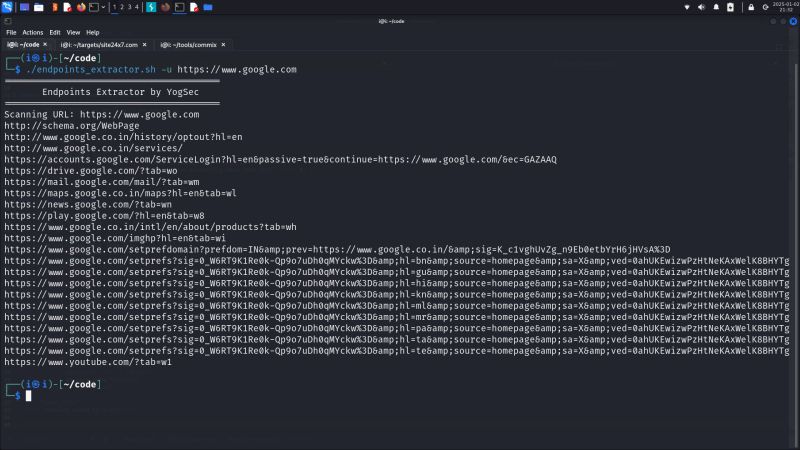
The Endpoints Extractor by YogSec is a Bash script designed to extract URLs and API endpoints from the HTML, JavaScript, and JSON content of web pages.
Features
- Scan a single URL or a list of URLs.
- Extract URLs from HTML, JavaScript, and JSON content.
- Save the results to a file for further analysis.
- Simple and user-friendly interface.
Prerequisites
- Bash: Ensure you are running the script in a Bash shell environment.
- cURL: The script uses
curlto fetch web page content. - grep: Used to extract URLs from the content.
- sort: Ensures the URLs are unique.
Usage
Display Help
./find_urls_endpoints.sh -h
Scan a Single URL
./find_urls_endpoints.sh -u <URL>
Example:
./find_urls_endpoints.sh -u https://example.com
Scan a List of URLs
./find_urls_endpoints.sh -l <FILE>
Example:
./find_urls_endpoints.sh -l urls.txt
Save Results to a File
./find_urls_endpoints.sh -u <URL> -s <OUTPUT_FILE>
Example:
./find_urls_endpoints.sh -u https://example.com -s results.txt
Combined Example
Scan a list of URLs and save results to a file:
./find_urls_endpoints.sh -l urls.txt -s endpoints.txt
Options
-u <URL>: Specify a single URL to scan.-l <FILE>: Specify a file containing a list of URLs.-s <FILE>: Save the output to the specified file.-h: Display the help message.
Example Output
For the URL https://example.com, the script may output:
https://example.com/api/v1/users
https://example.com/assets/js/script.js
https://cdn.example.com/library.js
Troubleshooting
- Error: Either -u or -l must be specified: Ensure you provide a URL with
-uor a file with-l. - Error: File does not exist: Verify the file path is correct.
- Empty Output: Ensure the target URL or file contains valid HTML, JS, or JSON content with endpoints.
Explorar proyectos relacionados
Cargando…