
yetidevworks/reeve has 101 GitHub stars and 7 forks. GitHot measured +1 stars in 24 hours. Last checked 2026-11-10 22:13 UTC. Last push 2026-10-31.
A TUI based local web development stack for macOS and Linux
What you can do
- Per-vhost PHP version — each vhost picks its PHP; versions run side by side.
- Per-version PHP tuning — memory_limit, upload sizes, OPcache, FPM pool, timezone, all without hand-editing php.ini.
- Multiple backends behind one abstraction: Caddy, Apache, nginx (OpenLiteSpeed is wired but unsupported on macOS — see below).
- Run several servers at once, on different ports, managed independently.
Crecimiento de estrellas medido
- in 24h
- +1
- in 7 days
- Actualización retrasada
- in 15 days
- Actualización retrasada
- in 1 month
- Actualización retrasada
Cambios netos en períodos que se solapan, no totales diarios. Los datos no disponibles se dejan en blanco. Las estrellas indican interés, no calidad.
README.md
Originalreeve
 _ __ ___  _____   _____
| '__/ _ \/ _ \ \ / / _ \
| | |  __/  __/\ V /  __/
|_|  \___|\___| \_/ \___|
       RunCloud, scaled down — for localhost.
A local web development stack manager for macOS and Linux. Think RunCloud, scaled down, localhost-only, open source: provision and manage web servers, per-vhost PHP versions, SSL, and DNS — from one CLI and TUI.
Written in Rust. It does not bundle servers or PHP; it orchestrates Homebrew-installed ones and manages them as per-user services — launchd on macOS, systemd user units on Linux — with no sudo for day-to-day use.
Why
The classic macOS + Homebrew + Apache + mod_php setup links exactly one
PHP version at a time. reeve drops mod_php for PHP-FPM, one master per
version, so two vhosts can run two different PHP versions simultaneously —
the thing the old switcher-script approach can't do.
Highlights
- Per-vhost PHP version — each vhost picks its PHP; versions run side by side.
- Per-version PHP tuning —
memory_limit, upload sizes, OPcache, FPM pool, timezone, all without hand-editingphp.ini. - Xdebug on tap —
reeve xdebug on/off/togglefrom inside a project turns it on for that site's PHP version, or pressXin the dashboard. Client host and port, start policy, IDE key and profiler output dir are set per version withoin the dashboard orreeve php set. Indebugmode Xdebug attaches only to requests carryingXDEBUG_SESSION/XDEBUG_TRIGGER(set by any IDE debug run configuration or browser extension), so background traffic from your other sites can't steal the IDE's connection slot. Command-line PHP keeps Xdebug off (reeve adds aconf.d/zz-reeve-xdebug.inioverride), so scripts and test suites run at full speed; useXDEBUG_MODE=debug php script.phpto debug a single run. - Multiple backends behind one abstraction: Caddy, Apache, nginx (OpenLiteSpeed is wired but unsupported on macOS — see below).
- Run several servers at once, on different ports, managed independently.
- Background services — install/start/stop MySQL, MariaDB, PostgreSQL, Redis, memcached, Mailpit via Homebrew + launchd/systemd, alongside the web stack. Each one's listening ports are configurable and remembered, so a service can share the machine with another tool that already owns its default port.
- Framework presets —
laravel,wordpress,symfony,grav,drupalset the right docroot + rewrites automatically,publicserves any app from itspublic/subdir; or point a vhost at an upstream dev server as a reverse proxy (Vite, Node, …). - Directory parking (Valet-style) — park
~/Sitesand every subfolder auto-serves as<folder>.test, framework auto-detected, no per-project setup. Odd folder names are slugified to valid hostnames automatically. - Per-project overrides — an optional
.reeve.tomlin a project sets its docroot, preset, and environment variables for PHP, on every backend. - Trusted local SSL via a shared mkcert CA —
https://app.testwith no warnings.--sslvhosts also redirect plainhttp://to HTTPS automatically, so an old bookmark or a bare-domain visit lands on the secure URL. - Wildcard DNS for one or more TLDs (
.test,.localhost,.lan, …) via a user-run dnsmasq (no root daemon). - Default site — optionally serve a catch-all from your sites root (with an
optional framework preset), so
http(s)://localhostworks without a vhost. Each server can override its default root, or share the global sites root. logs+doctor— tail any service's log, and a one-shot health check of the whole stack (Homebrew, servers, FPM, services, DNS, certs, ports).- Live traffic monitor (
tin the TUI, orreeve traffic) — a full-screen requests/sec chart with status-class breakdown, latency, top hosts/paths, and a live request tail, filterable to one server or one vhost. Backed by a consistent access log per server (logs/server-<name>-access.log) on every backend, soreeve logs <server>-accessworks the same everywhere too. - Honest, port-aware status —
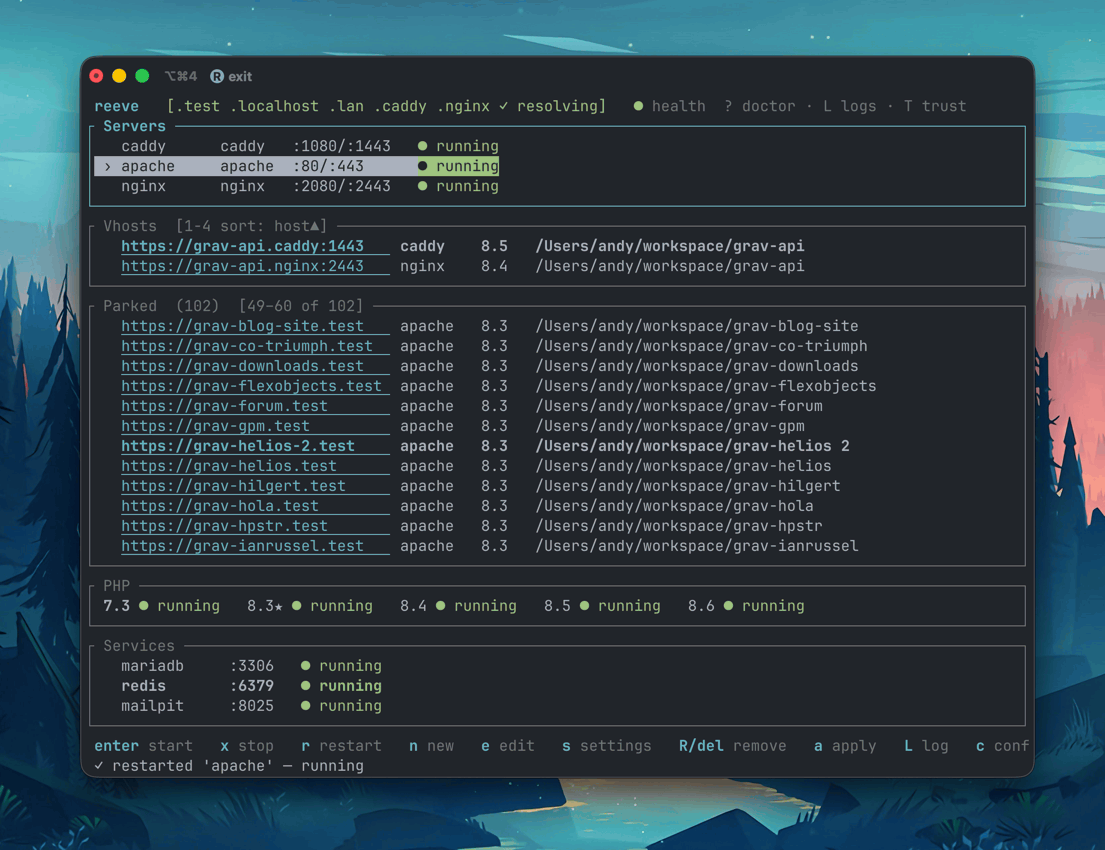
runningonly when the port is actually bound; otherwiseloaded, not bound,:<port> held by <process>, orcrashed.start/restartpreflight the ports and name any foreign process holding them. - TUI dashboard with live status — mouse-clickable, scrollable panels (a dedicated Parked panel for parked sites) — plus a scriptable CLI on the same engine.
- No sudo for day-to-day use; servers bind 80/443 as your user via launchd
on macOS, or systemd user units on Linux (after a one-time
sysctlthatreeve initoffers to set up).
Requirements
- macOS (built and tested on macOS 26 "Tahoe", Apple Silicon), or Linux (Ubuntu-first; needs systemd with a user session bus, and systemd-resolved for DNS). See Linux notes below.
- Homebrew — reeve will offer to install it if missing (Linuxbrew on Linux)
Installation
Homebrew (recommended)
brew install yetidevworks/reeve/reeve
From crates.io
cargo install reeve-cli
(The crate is published as reeve-cli because reeve is already taken on
crates.io; the installed binary is still reeve.)
From source
git clone https://github.com/yetidevworks/reeve
cd reeve
cargo install --path crates/reeve
Pre-built binaries
Download from GitHub Releases.
Updating
reeve update           # update to the latest release
reeve update --check   # just check whether a newer version exists
update detects how reeve was installed. Homebrew and cargo installs print the
matching upgrade command (brew upgrade reeve / cargo install --force reeve-cli); a plain binary (e.g. under ~/.local/bin) is downloaded and
replaced in place. Quit and relaunch reeve afterwards to pick up the new binary.
Quick start
reeve init                 # detect Homebrew, scaffold config/state
reeve php install 8.3      # install a PHP version + its FPM master
reeve php install 8.4      # ...and another, running at the same time
reeve server add caddy     # add a web server (default ports 80/443)
reeve vhost add app.test --root ~/Sites/app --php 8.3 --server caddy --ssl
reeve server start caddy   # render config, mint cert, start
Add a database and a mail catcher, tune PHP, or use a framework preset:
reeve service add mysql && reeve service start mysql   # MySQL on :3306
reeve service add mailpit && reeve service start mailpit  # SMTP :1025, UI :8025
reeve service set mailpit smtp 1026                    # move SMTP off a port another catcher owns
reeve php set 8.3 memory_limit 512M                    # tune php.ini
reeve xdebug on                                        # Xdebug for the site you're in, attaches on XDEBUG_SESSION
reeve php set 8.3 xdebug.client_host host.docker.internal   # point Xdebug at an IDE elsewhere
reeve vhost add shop.test --root ~/Sites/shop --php 8.3 --server caddy --ssl --preset laravel
reeve vhost add ui.test --proxy http://localhost:5173 --server caddy --ssl   # reverse proxy
Or park a directory so every project in it just works, no per-site setup:
reeve park add ~/Sites --server caddy --php 8.3 --ssl   # ~/Sites/blog → blog.test, etc.
reeve apply                                             # picks up new folders anytime
Parked folders are served from public/ or web/ when a framework (or just a public/index.*) is detected, otherwise from the folder itself. When that guess is wrong, or a project needs environment variables, drop a .reeve.toml in the project root — it works for parked and declared sites alike, on Apache, nginx, and Caddy, and is re-read on every apply:
# .reeve.toml — every key is optional
docroot = "dist"        # subdir to serve, relative to the project
preset = "grav"         # override auto-detection / the vhost's preset

[env]                   # reaches PHP as getenv("DB_USER") / $_SERVER["DB_USER"]
DB_USER = "root"
DB_PASS = "secret"
The file belongs beside the project, not inside the directory being served — a .reeve.toml in public/, web/, or dist/ is never read, and apply warns when it finds one there. To see exactly what a host resolves to, including which project file (if any) is feeding it:
reeve vhost show app.test
Add it to .gitignore if it holds secrets. On Apache, a plain .htaccess works too (AllowOverride All, with SetEnv and CGIPassAuth available); nginx can't express a literal $ in a value, so apply refuses such entries with a clear error rather than passing a mangled value to PHP.
One-time DNS + trust setup so *.test resolves system-wide and certs are trusted:
reeve dns setup            # installs dnsmasq + wires the system resolver
reeve ssl trust            # install the mkcert CA into your trust store (once)
ssl trust covers both stores a Linux box keeps — the system anchors that curl reads and the NSS database that Chromium and Firefox read, creating the latter if the machine doesn't have one yet. A browser reads that store at launch, so quit it fully (not just the last window) before expecting the padlock; reeve doctor warns if the CA hasn't reached the browser store.
dns setup points the system resolver at reeve's dnsmasq for each TLD. On macOS
it writes the root-owned /etc/resolver/<tld> files via the native admin dialog
— no manual sudo. On Linux it writes a systemd-resolved drop-in via sudo. In
the TUI, press D.
Then https://app.test just works in the browser.
TUI
Run with no arguments to open the dashboard:
reeve
 reeve   [.test ✓ resolving]   ● health (L logs)
┌ Servers ──────────────────────────────────────────────┐
│ › caddy    caddy   :80/:443     ● running             │
│   apache   apache  :8080/:8543  ● running             │
│   nginx    nginx   :9090/:9443  ○ stopped             │
├ Vhosts ───────────────────────────────────────────────┤
│   https://app.test   caddy   8.3   ~/Sites/app        │
├ Parked (37)  [1–4 of 37] ─────────────────────────────┤
│ › https://blog.test  caddy   8.3   ~/Sites/blog       │
│   https://shop.test  caddy   8.3   ~/Sites/shop       │
├ PHP ──────────────────────────────────────────────────┤
│ 8.3★ ● running  debug    8.4 ● running                │
├ Services ─────────────────────────────────────────────┤
│ › mysql      :3306        ● running                   │
│   mailpit    :1025/:8025  ● running                   │
└───────────────────────────────────────────────────────┘
 enter start · x stop · r restart · n new · s ports · L log · q quit
Navigation is shared across panels; the key bar is context-aware (it shows the keys for the focused panel).
| Key | Action |
|---|---|
↑ ↓ ← → / hjkl |
Move selection within the focused panel |
PgUp PgDn / Home End |
Page / jump through a long list (e.g. Parked) |
| mouse | Click a row to focus + select it; wheel scrolls the panel under the cursor |
Tab / Shift-Tab |
Switch panel (Servers → Vhosts → Parked → PHP → Services) |
n |
New — server / vhost / PHP install / service (per focused panel) |
e |
Edit — server (ports, backend, default site) / vhost / PHP extensions |
Enter |
Start server or service / restart FPM master |
x · r |
Stop · restart (Servers, Services) |
s |
Per-backend settings (Servers) / per-version PHP settings (PHP) / listening ports (Services) |
m |
Apache module picker (Servers panel, Apache instances only) |
X |
Cycle Xdebug off→debug→profile (PHP panel) |
o |
Xdebug options: mode, start policy, client host/port, IDE key, output dir (PHP panel) |
d |
Set default PHP version (PHP panel) |
p |
Park a directory / manage parks (Vhosts or Parked panel) |
L |
View the focused item's log |
t |
Live traffic monitor (← → cycle the server/vhost filter, / text search, Esc back) |
? |
Full doctor health report |
T |
Install the mkcert CA into your trust store (ssl trust) |
Del / Backspace |
Remove the focused item (with confirm) |
a · v |
Apply · validate all configs |
c |
Preferences (TLDs, sites root, default backend) |
D |
Set up wildcard DNS (admin prompt) |
q / Esc |
Quit |
The new-vhost wizard (n on Vhosts) covers framework presets and a
reverse-proxy target, so everything the CLI does is reachable from the TUI.
Traffic monitor
Press t (or run reeve traffic) for a full-screen live view of requests
hitting your sites — across all servers, one server, or one vhost:
 reeve traffic   filter: ‹ all servers ›   ● live
┌ Requests/sec — last 120s · 550 req · peak 15/s ──────────────────────────────┐
│                                        ▂▄▆█▆▄▂                          ▄█▇  │
│  ▁▂▃▄▃▂▁       ▂▄▆▄▂      ▁▃▅▃▁      ▂▄██████▄▂        ▂▃▄▃▂          ▃▆███▅ │
│▄█████████▄▄▄▄▆██████▆▄▄▅███████▅▄▄▄▆███████████▆▄▄▄▄▄▆███████▆▄▄▄▄▄▄▅███████│
└──────────────────────────────────────────────────────────────────────────────┘
┌ Status ────────────────────┐┌ Top hosts ──────────────┐┌ Top paths ──────────┐
│ rate  6/s  peak 15/s       ││ grav.test  ▐▐▐▐▐▐▐▐ 93  ││ /blog  ▐▐▐▐▐▐▐▐ 44  │
│ 2xx  ▐▐▐▐▐▐▐▐▐▐▐▐▐▐ 124    ││ app.caddy  ▐▐▐▐▐ 63     ││ /api   ▐▐▐▐▐ 41     │
│ 4xx  ▐▐▐▐           32     ││ api.test   ▐▐▐▐ 60      ││ /      ▐▐▐ 22       │
│ time  avg 27ms · max 120ms ││                         ││                     │
└────────────────────────────┘└─────────────────────────┘└─────────────────────┘
┌ Live requests ───────────────────────────────────────────────────────────────┐
│ 10:11:12 200 GET  grav.test   /blog                12ms   29.8 KB [apache]   │
│ 10:11:12 404 GET  app.caddy   /missing              2ms     236 B [caddy]    │
└──────────────────────────────────────────────────────────────────────────────┘
 ←→ filter   PgUp/Dn jump   / search   0 all   esc/t back
Every backend writes an access log to the same place
(logs/server-<name>-access.log) — Apache and nginx in a shared flat format,
Caddy in its native JSON — and reeve parses them all into the same stream. The
collector tails the logs only while the dashboard runs, keeps the last 10
minutes, and survives closing/reopening the view.
Commands
| Command | Description |
|---|---|
init |
Detect Homebrew, scaffold config/state |
php install <ver> |
Install (or adopt) a PHP version + FPM master |
php list / php use <ver> |
List versions / set the default for new vhosts |
php restart <ver> |
Restart a version's FPM master, re-applying its settings |
php cli [ver] |
Switch the terminal php (via the ~/.reeve/bin shim); omit to show current |
php ext add|remove|list <ver> [name] |
Manage extensions per version (pecl) |
php settings <ver> / php set <ver> <key> <value> |
Show / tune php.ini, OPcache, FPM pool |
xdebug [on|off|toggle|debug|profile|status] [ver|site] [--all] |
Turn Xdebug on/off for the site in the current folder (else the default PHP), a named version or site, or --all versions; no action lists every version's Xdebug state. on keeps an already-enabled mode; debug attaches only to requests carrying XDEBUG_SESSION/XDEBUG_TRIGGER; profile profiles every request |
php xdebug <ver> on|off|toggle|debug|profile |
Same, for an explicit version |
php set <ver> xdebug.<option> <value> |
Xdebug options: mode, start_with_request (auto|trigger|yes|no), client_host, client_port, idekey, output_dir. An empty value resets to the default |
server add <backend> [--http N --https N] [--default-site] [--root <dir>] [--preset <fw>] |
Add caddy|apache|nginx (optionally a catch-all default site; --root overrides its docroot, else the global sites root) |
server start|stop|restart|list|remove <name> |
Manage a server (independent) |
server mod list|add|remove <name> [module] [--all] |
Manage an Apache server's loaded modules (list shows what's loaded, --all the whole catalog) |
vhost add <host> --root <dir> --php <ver> --server <name> [--ssl] [--preset <fw>] [--proxy <url>] |
Add a vhost |
vhost list|remove <host> |
Manage vhosts |
vhost show <host> |
Show how a host is served: docroot, preset, PHP, and its .reeve.toml |
service add|start|stop|restart|remove|list <kind> |
Manage databases / redis / memcached / mailpit |
service ports <kind> / service set <kind> <key> <port> |
Show / re-point a service's listening ports (mailpit takes smtp and ui; the rest take port) |
park add <dir> --server <name> --php <ver> [--tld T] [--ssl] |
Auto-serve every subfolder as <folder>.<tld> |
park list|remove <dir> |
Manage parked directories |
apply |
Render generated configs + reconcile running services |
validate |
Run every backend's native config test |
traffic |
Open the dashboard straight into the live traffic monitor |
logs [<target>] [-n N] [--follow] |
View or tail a service's log (incl. server-<name>-access) |
doctor |
Diagnose the whole stack (brew, servers, FPM, services, DNS, certs, ports) |
update [--check] |
Self-update to the latest GitHub release (--check only reports) |
ssl mint <host> / ssl trust / ssl untrust / ssl status / ssl ca |
Local certificates: mint one, install/remove the mkcert CA in the trust store, or show its state |
dns setup / dns status |
Wildcard *.test DNS |
CLI PHP version
php cli <ver> switches the php on your terminal — the modern replacement for
the old sphp script. Instead of running brew link (which mutates Homebrew's
global state and fights keg-only versions), reeve keeps a shim directory of
symlinks at ~/.reeve/bin (php, pecl, phpize, php-config, phar) and
just repoints them. Switching is instant and Homebrew is never touched.
The shim needs to be on the front of your PATH once. reeve init and
reeve php cli offer to add it to your shell profile automatically — or add it
by hand:
# ~/.zshrc (or ~/.bash_profile)
export PATH="$HOME/.reeve/bin:$PATH"
reeve php cli 8.4    # point the CLI at PHP 8.4
reeve php cli        # show the current CLI version
php -v               # PHP 8.4.x …
doctor warns if ~/.reeve/bin isn't ahead of Homebrew on your PATH. To revert
entirely, remove that line from your profile — nothing else changes.
How it works
state.toml is the single source of truth (servers, PHP versions, vhosts).
reeve renders native configs (Caddyfile, httpd vhosts, nginx server
blocks, FPM pools) into generated/, then reconciles per-user services
(launchd agents on macOS, systemd user units on Linux) to match. You never
hand-edit generated files — you edit state via the CLI/TUI and apply.
# macOS
~/Library/Application Support/reeve/
  config.toml · state.toml · generated/ · certs/ · logs/
# Linux
~/.config/reeve/
  config.toml · state.toml · generated/ · certs/ · logs/

~/.reeve/run/            # sockets (kept space-free, short) — both platforms
OpenLiteSpeed
OLS has no official macOS build, and the only community Homebrew tap fails to
compile its (2022-deprecated) admin_php dependency against the current macOS
SDK. The backend is wired in and will activate if a working OLS install appears,
but it is not usable on macOS today. Use Caddy, Apache, or nginx.
Linux
reeve runs on Linux (Ubuntu-first) against Homebrew on Linux (Linuxbrew), with
the same CLI, TUI, and workflow as macOS. A few things work differently under
the hood, and reeve init sets most of them up for you:
- Services are systemd user units (
~/.config/systemd/user/reeve-*.service) instead of launchd agents. This needs a user session bus, so reeve does not run inside bare containers or over a session-less login.reeve doctorchecks thatsystemctl --userresponds. - Login lingering is enabled during
init(loginctl enable-linger) so your servers keep running after you log out and come back automatically on boot. - Privileged ports. Linux blocks non-root processes from binding ports below
initoffers to write/etc/sysctl.d/99-reeve.conf(net.ipv4.ip_unprivileged_port_start = 80) with onesudoso servers can bind :80/:443. Decline it and use ports ≥ 1024 instead.
- DNS uses a systemd-resolved drop-in (
/etc/systemd/resolved.conf.d/reeve.conf) rather than/etc/resolver, applied viasudo. Hosts that don't run systemd-resolved aren't supported for automatic DNS. - SSL trust installs the mkcert CA into the system store. For browser trust,
install
libnss3-tools(apt) ornss(brew) so mkcert can add the CA to NSS too.
Not supported: distros without systemd (Alpine, WSL1) and container-only setups.
Development
cargo build              # debug build
cargo test               # unit tests
cargo clippy --all-targets -- -D warnings
cargo fmt --all
cargo install --path crates/reeve   # install the local binary
The repo is a Cargo workspace; the crate lives in crates/reeve. CI runs
fmt + clippy + tests on macOS and Linux; tagged v* pushes build release
binaries, publish reeve-cli to crates.io, and update the Homebrew tap.
License
MIT © 2026 Andy Miller
Explorar proyectos relacionados
codecrafters-io/build-your-own-x
Domina la programación recreando desde cero tus tecnologías favoritas.
561,775 estrellaspublic-apis/public-apis
Una lista colectiva de API gratuitas
498,126 estrellasmorluto/rea
Ingeniería inversa de cualquier cosa con agentes, desde el comportamiento de la aplicación hasta los binarios nativos.
451,963 estrellasopenclaw/openclaw
La IA que de verdad hace las cosas. Cualquier sistema operativo y cualquier plataforma. Al estilo langosta. 🦞
394,340 estrellas