
ycd/dstp
ycd/dstp has 1,298 GitHub stars and 35 forks. Star changes are not measured yet. Last checked 2026-11-09 06:53 UTC. Last push 2025-09-09.
🧪 Run common networking tests against any site.
Crecimiento de estrellas medido
- in 24h
- Actualización retrasada
- in 7 days
- Actualización retrasada
- in 15 days
- Actualización retrasada
- in 1 month
- Actualización retrasada
Cambios netos en períodos que se solapan, no totales diarios. Los datos no disponibles se dejan en blanco. Las estrellas indican interés, no calidad.
README.md
Original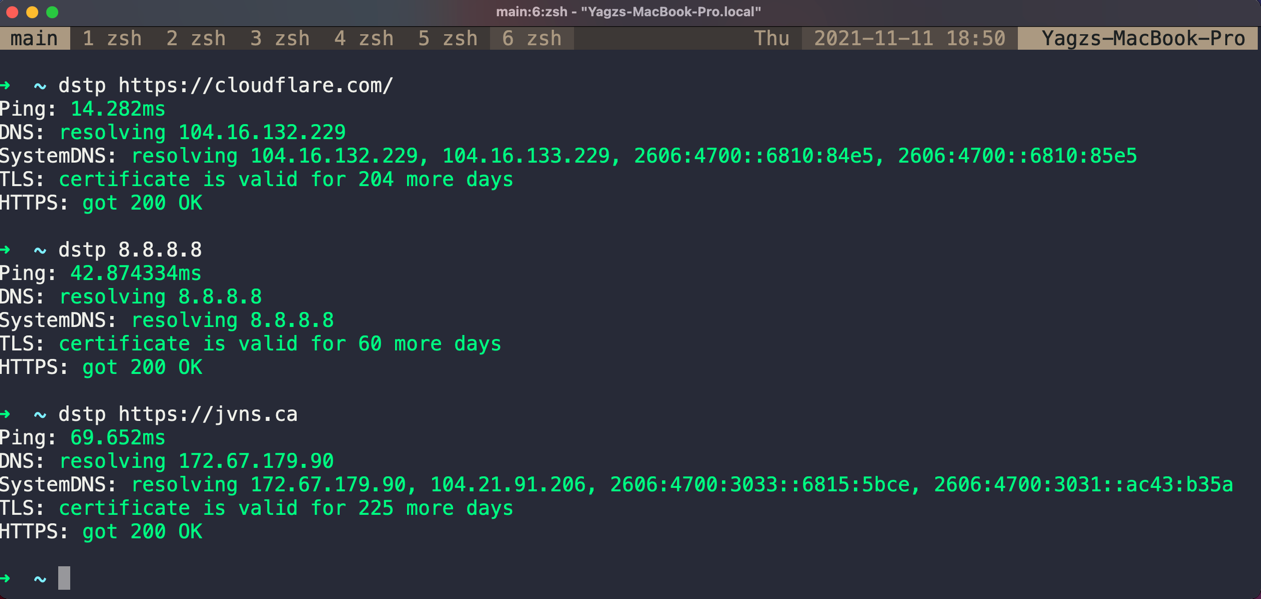
Usage
Usage: dstp [OPTIONS] [ARGS]
Options:
        -a, --addr   <string>  The URL or the IP address to run tests against      [REQUIRED]
        -o, --out    <string>  The type of the output, either json or plaintext    [Default: plaintext]
        -p           <int>     Number of ping packets                              [Default: 3]
        -t           <int>     Give up on ping after this many seconds             [Default: 2s per ping packet]
        --port       <string>  Port for testing TLS and HTTPS connectivity         [Default: 443]
        --dns        <string>  Custom DNS server to use for DNS resolution         [No default]
        -h, --help             Show this message and exit.
Motivation
A comment on lobste.rs, in a thread about DNS gave a great idea and thought a robust tool like that might come in handy!
Installation
Packages
Homebrew
brew install dstp
Go Install
go install github.com/ycd/dstp/cmd/dstp@latest
NixOS/nix
You can install dstp using one of these methods:
- Using
nix-shellornix shell(recommended for trying it out):
nix shell nixpkgs#dstp
- Adding to your NixOS configuration (system-wide installation):
# configuration.nix or home-manager configuration
{
  # ...
  environment.systemPackages = with pkgs; [
    dstp
  ];
}
- Or using
nix profile(for individual user installation):
nix profile install nixpkgs#dstp
Arch Linux
git clone https://aur.archlinux.org/dstp.git
cd dstp
makepkg -sri
Downloads
Binary downloads of example are available from the releases section on GitHub for 64-bit Windows, macOS, and Linux targets. They contain the compiled executable.
| platform |
|---|
| macOS ARM 64 Bit |
| macOS 64 Bit |
| Linux 32-Bit |
| Linux ARM 64 Bit |
| Linux 64 Bit |
| Windows 64 Bit |
| Windows 32 Bit |
| Windows ARM 64 Bit |
Installation from source
Verify that you have Go 1.17+ installed (The source code uses (
//go:build) conditional compilation directives that is introduced in Go 1.17.)$ go versionIf
gois not installed, follow instructions on the Go website.Clone this repository
$ git clone https://github.com/ycd/dstp
$ cd dstp
Build and install
Unix/Linux
# May require you to use sudo
$ go build cmd/dstp/dstp.go
$ cp dstp /usr/local/bin/dstp
Mac/BSD
# May require you to use sudo
$ make
$ cp dstp /usr/local/bin/dstp
Verify installation
$ dstp -h

Usage: dstp [OPTIONS] [ARGS]
Options:
      -a, --addr   <string>  The URL or the IP address to run tests against      [REQUIRED]
      -o, --out    <string>  The type of the output, either json or plaintext    [Default: plaintext]
      -p           <int>     Number of ping packets                              [Default: 3]
      -t           <int>     Give up on ping after this many seconds             [Default: 2s per ping packet]
      --port       <string>  Port for testing TLS and HTTPS connectivity         [Default: 443]
      -h, --help             Show this message and exit.
Appendix
The command dstp may collide with docker stopcommand if you are using the docker plugin with oh-my-zsh.
To fix this, you can add the following command at the end of your .zshrc file:
unalias dstp
Contributing
All kinds of Pull Requests and Feature Requests are welcomed!
Licence
dstp's source code is licenced under the MIT License.
Explorar proyectos relacionados
codecrafters-io/build-your-own-x
Domina la programación recreando desde cero tus tecnologías favoritas.
561,398 estrellaspublic-apis/public-apis
Una lista colectiva de API gratuitas
497,679 estrellasmorluto/rea
Ingeniería inversa de cualquier cosa con agentes, desde el comportamiento de la aplicación hasta los binarios nativos.
447,495 estrellasopenclaw/openclaw
La IA que de verdad hace las cosas. Cualquier sistema operativo y cualquier plataforma. Al estilo langosta. 🦞
394,261 estrellas