
vincentsch/explainroo
vincentsch/explainroo has 1,291 GitHub stars and 125 forks. GitHot measured +28 stars in 24 hours. Last checked 2026-11-14 05:43 UTC. Last push 2026-11-10.
Crecimiento de estrellas medido
- in 24h
- +28
- in 7 days
- Recopilando historial
- in 15 days
- Recopilando historial
- in 1 month
- Recopilando historial
Cambios netos en períodos que se solapan, no totales diarios. Los datos no disponibles se dejan en blanco. Las estrellas indican interés, no calidad.
Acerca de
Explainer videos and product demos made by your AI agent. Free and open source: a local voice (Kokoro), word timing (Whisper) and a canvas renderer turn a script into a narrated MP4.
Creación y multimediaREADME.md
Original

The video studio your AI agent runs.
Free and open source. The voice, the timing and the rendering run on your computer.
Website · Example videos · Docs · AGENTS.md
https://github.com/user-attachments/assets/6dd5dc32-c975-4e0e-8cd4-2ef3ccc11e61
A coding agent made this video with explainroo. You can also watch it on explainroo.com.
News
- Nov 10, 2026: explainroo 0.6 records your real app with
explainroo record, and a scene plays that recording with a pointer and zooms that land on the narration. New projects start in the studio look, and formats give one kind of video a ready shape.checkandverifywork on any video file, andcutedits your own recording by its words. The list of sizes moved toexplainroo sizes. - Nov 9, 2026: explainroo 0.5 runs with npx, so you don't have to clone it. It can also use outside services on your own key, like AI video clips and posting to your channels. German narration works with a paid voice or your own recording. A project made before keeps its look, frame for frame, until you add
"defaults": "0.5"to itsvideo.json, which brings the new look, like bigger arrow labels. - Oct 20, 2026: explainroo 0.4.1 keeps arrow and chart labels whole while a shot holds.
- Oct 15, 2026: explainroo 0.4 films each scene with a camera that follows the narration.
- Oct 13, 2026: explainroo 0.3 narrates in Japanese and Mandarin Chinese, and adds the editorial look.
- Oct 13, 2026: explainroo 0.2 adds five more languages, other voices and video clips.
All news is on explainroo.com/news.
Make a video
[!TIP] Tell your coding agent to use explainroo, and what the video should explain. It works with Claude Code, Codex, Pi and other coding agents. Right now it works best with Claude Code and Opus 5.5.
Copy this into your agent and put your topic in place of the brackets:
Make me a short explainer video about [your topic].
Use explainroo for it: run npx --yes explainroo docs and follow what it prints.
The agent sets up explainroo, makes the video and checks it. You get an MP4 file.
How does it work?
An explainer video is a short video where a voice explains a topic and
drawings appear while it speaks. For explainroo, the agent writes two files.
script.md has the words the voice says. scenes.js draws the pictures with
a bit of JavaScript, and each drawing can appear on a word from the script.
explainroo does the rest:
- Voice. Kokoro, an open voice model, reads the script aloud in English, Spanish, French, Italian, Brazilian Portuguese, Hindi, Japanese or Mandarin Chinese. It has 54 voices and needs no account or API key. You can also use an ElevenLabs or Cartesia voice, or record the narration yourself. German works with one of these, because Kokoro has no German voice. One project can make the same video in several languages, with a script for each.
- Timing. Whisper listens to the narration and notes when each word is spoken.
- Pictures. Chrome runs in the background and draws the frames. The lines can look hand drawn (Rough.js), and there are 1,800 icons from Lucide. A scene can also show charts, math formulas, code that changes step by step, your own screenshots and video clips such as screen recordings.
- Camera. A camera films each scene. It moves in on what the voice talks about when there is time, and pulls back at the end so the last frame shows the whole idea. Cards and labels are never cut in half while a shot holds. Things arrive with a little spring, and the final video has motion blur, like a film camera.
- Sound. explainroo makes its own background music for each video and adds small sound effects. The music gets quieter while the voice speaks.
- File. ffmpeg puts it all together into an MP4, with subtitle files, YouTube chapters and a cover image.
An agent can't watch a video, so explainroo gives it other ways to check its
work. It saves stills of the scenes and a sheet of small frames for the whole
video. A layout check finds text that is cut off or overlaps, and a speech
check finds words the voice got wrong. For a feed-sized player,
explainroo check videos/<name> --view-width 854 also flags small text.
Check or cut any video
check and verify also take a video file made with any tool:
npx --yes explainroo check talk.mp4 --script script.txt
They report:
- black or blank frames, and stretches where the picture stands still
- silence, the loudness and the true peak
- text too small to read on a phone, found in frames of the video
- with
--script, the words of your script that the speech model didn't hear
--json gives the same report for your agent.
explainroo cut talk.mp4 edits your own recording by its words. It writes
talk.cut.md, one sentence a line with the time of each word. Your agent
deletes words and long pauses there. Then explainroo cut talk.mp4 --apply
writes talk.cut.mp4, with a short crossfade at every join so the cuts don't
click. Both run on your computer, like the rest of explainroo.
What leaves your computer
Making a video needs no account and no key, and it costs nothing. The voice, the timing, the music and the rendering run on your computer. Your coding agent is a separate service with its own terms and prices.
Some commands send something to an outside service, and only when you or your agent run them:
| You run | What leaves your computer | Where it goes |
|---|---|---|
connect |
A test request with your key, or the code from your sign-in | That service |
voice with ElevenLabs or Cartesia |
The narration text | That company |
voices --provider elevenlabs or cartesia |
Your key, to list its voices | That company |
image or clip |
The prompt and any reference images | OpenRouter and the model's provider |
clip --dry-run |
A request for the list of video models and their prices, without your prompt or a key | OpenRouter |
services, when it lists clips |
The same request as clip --dry-run, at most once a day. It asks for the list of video models and their prices, without your prompt or a key |
OpenRouter |
share |
Nothing in this version, because the hosted service is coming. Once it runs, the video file and its title | explainroo.com |
publish |
The video or a link to it, its title and its text. With a link, first a request for the size of the file there | YouTube, Buffer or Blotato, and whatever they send it to. The size request goes to the host of the link |
publish --dry-run |
Your login, to read your channels or accounts, and the same size request | YouTube, Buffer or Blotato, and the host of the link |
capture |
Requests for the page you name and the files it loads | That site and the servers it loads from |
formats add --yes |
A git clone of the address you name. Without --yes it only prints what it will run |
The host of that Git repository |
presenter |
The narration of one scene, as sound, and the id of the avatar. --avatars and --dry-run send only your key |
The presenter service you set up. None is built in yet |
With ElevenLabs or Cartesia, the commands that make missing narration, like
check and render, send the narration text too.
The first run downloads the voice and speech models from Hugging Face. Other
languages need one more speech model, which downloads the first time, and
Japanese and Chinese also download their fonts from GitHub. On Debian and
Ubuntu, doctor --fetch downloads espeak-ng's packages from the computer's own
package sources when a language needs it. Nothing of yours goes along with
these downloads. explainroo has no telemetry, so it sends
nothing about how you use it.
Nothing uploads to the hosted service without the explicit explainroo share
command. In this version share sends nothing at all, because the service
doesn't run yet.
Looks
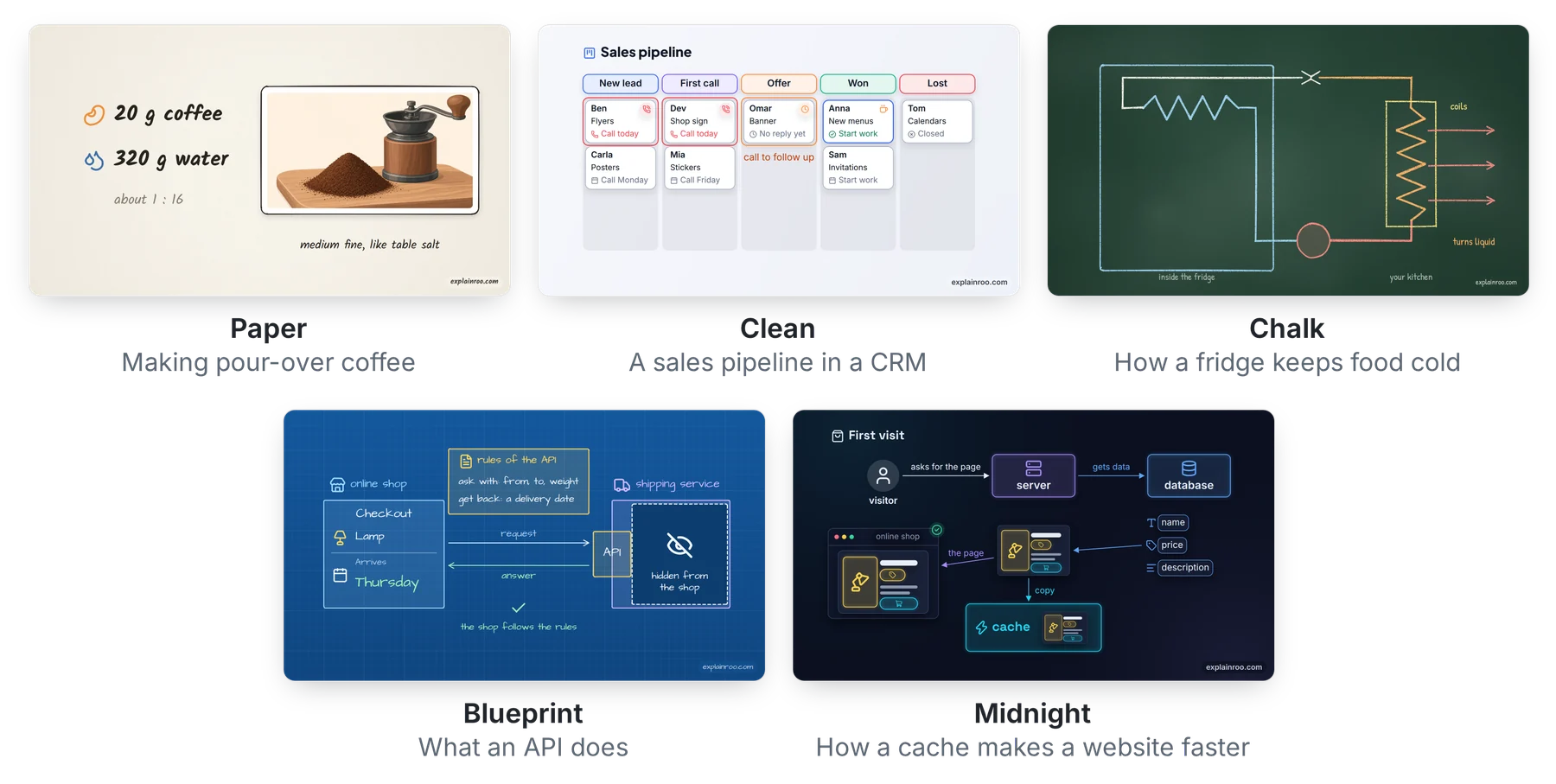
There are seven looks: studio, paper, clean, chalk, blueprint, midnight and
editorial. A new project starts in studio, which is light and calm, with white
cards and lists on cards. You change a video's look with one setting in
video.json. A project can also bring its own look, a small JSON file with its
colors, fonts and background. Here is one frame in six of the built-in looks,
from the example videos.
Sizes
You pick the size for the place the video goes. YouTube videos are wide, and Shorts, TikTok and Reels are tall. Instagram and LinkedIn posts use 4:5, and there is a square size too. Shorts, TikTok and Reels put their own buttons over the video, and explainroo keeps your text out of those spots.
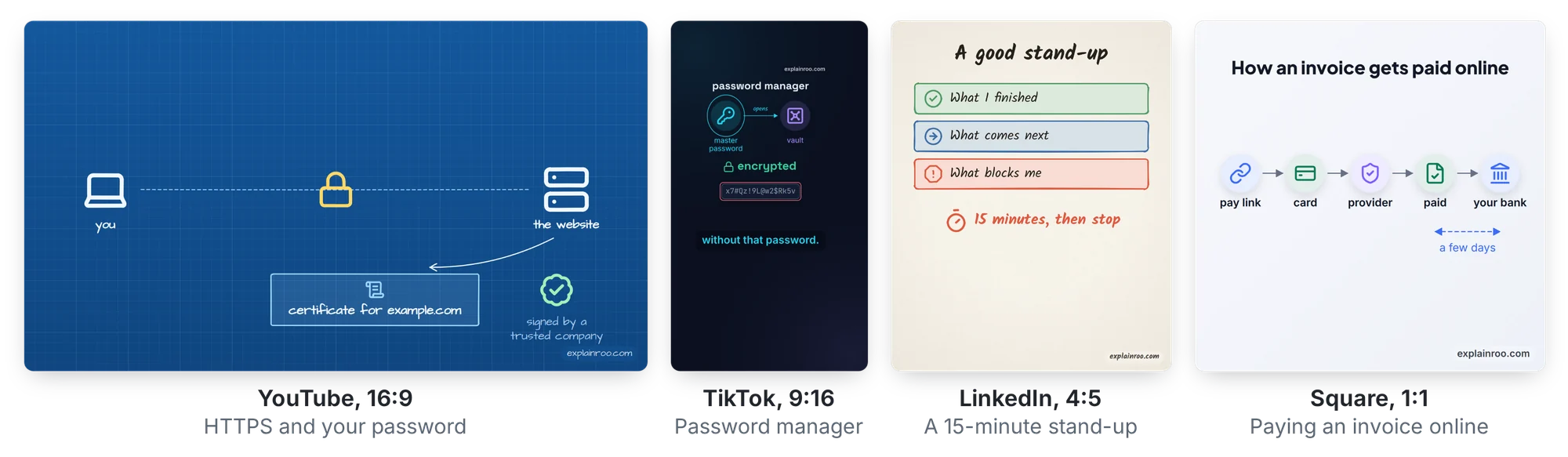
Tall, 4:5 and square videos get captions that light up word by word.
"captions": "bold" shows two to four big words at a time instead, with
numbers and marked words in color. For Shorts, TikTok and Reels, s.short
draws the parts short videos often have, like a hook title that is there on the
first frame (explainroo docs short-video). One project can render several
sizes: explainroo render videos/demo --size tiktok writes the TikTok version
next to the wide one. "sizes" in video.json gives one size settings of its
own, like bold captions and a quicker pace for TikTok only.
More than an MP4
Every render also writes subtitle files (.srt and .vtt) that YouTube and
LinkedIn accept, a cover image for the thumbnail, and YouTube chapters when
the script names them. --format gif makes a GIF for a README or a post.
--transparent --format mov makes a video with a transparent background, for
putting a diagram over camera footage in a video editor. explainroo export
writes a small web player that draws the video sharp at any size and embeds
with an iframe.
Pace
"pace": 1.2 in a video's video.json makes the voice, the pauses and the
animations 20% quicker. The music gets a little quicker too. Pace goes from
0.7 to 1.6, and 1 is normal.
Product demos
explainroo can also make product demos, the videos software companies make to
show their app. The agent rebuilds the app's screens from its code or its
website, with the same colors, fonts and button labels. A mouse pointer then
clicks through the screens and types into the fields. Tell your agent which
product it is and where to find its code or website. explainroo capture
saves the live site's screenshots, colors, font files, logo and wording first,
with the page's text and a list of its images. A real screen recording can
play inside a scene too.
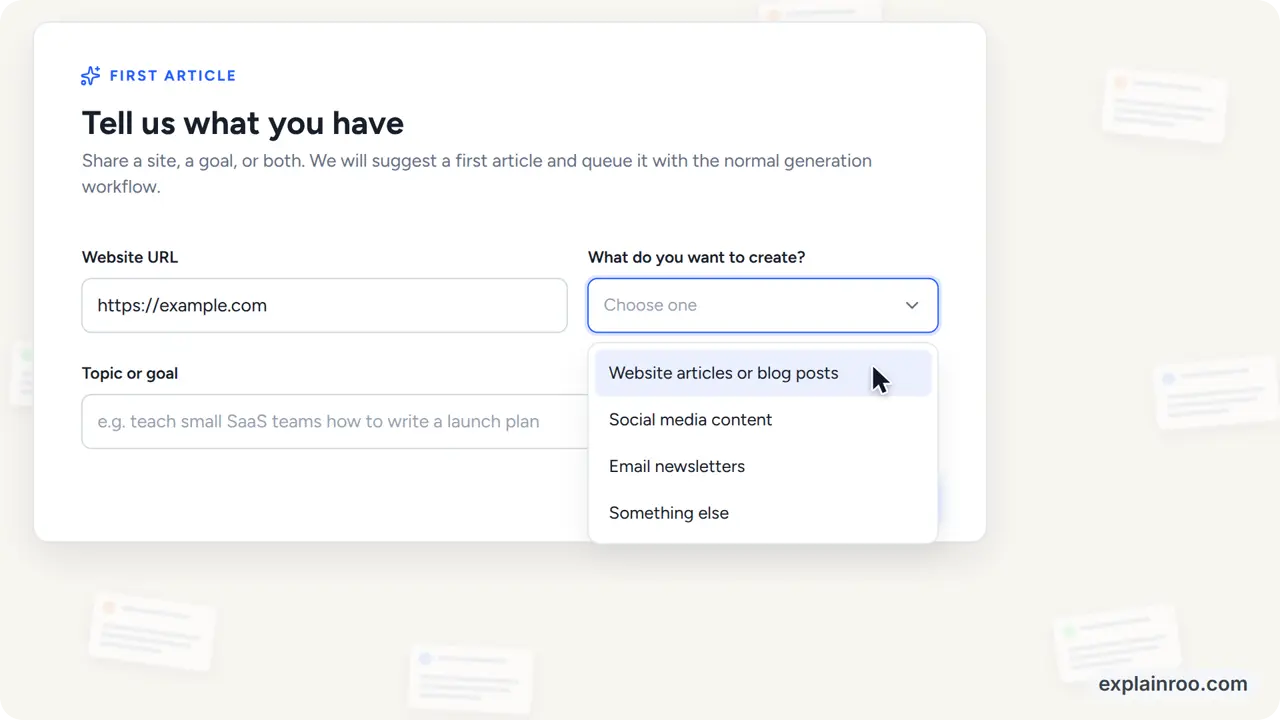
Here are the demos for Unspar and Vroni, two of my own products. The files for the Unspar demo are in examples/unspar-demo. explainroo.com also has unofficial demos of Gmail, ChatGPT and Claude.
Formats
A format is a ready way of making one kind of video, with a short guide for your agent, scene helpers, settings and a whole example video. Four come with explainroo:
| Format | For |
|---|---|
product-launch |
a launch video of about a minute |
narrated-explainer |
one idea explained in about a minute |
vertical-short |
a short for Shorts, TikTok and Reels, with the hook in the first second |
product-ad |
an ad of 15 to 30 seconds for a feed |
explainroo init videos/acme --format product-launch starts from one.
Anyone can publish a format as a Git repository, and
explainroo formats add <address> installs it. It first prints the git
commands it will run and installs only with --yes. A format's code runs
only when you make a video from it, and its author is named in the credits of
every package (explainroo docs formats).
Outside services
Each step of making a video has a free choice first. The services that cost money use your own account and key:
| Step | Free | Costs money |
|---|---|---|
| Voice | Kokoro, or your own recording | ElevenLabs, Cartesia |
| Timing | Whisper | |
| Images | The built-in icons and your own files | OpenRouter |
| Clips | Your own footage | OpenRouter |
| Presenters | Film yourself | An AI presenter service (coming, none built in yet) |
| Music | The built-in music, your own file, or Soundroo | |
| Sharing | A web player for your own site, or a link from share (coming) |
|
| Posting | A package you upload yourself, YouTube, or Buffer on its free plan | Blotato |
explainroo services lists every choice with what it costs and what data
leaves your computer. For clips it also shows today's price per second.
explainroo connect <service> sets one up and tests your key or login. One
OpenRouter key makes images and clips. explainroo's instructions tell your
agent to show you the options, free ones first, and to let you choose.
A project keeps a record of what was paid for in its history/ folder. The
same request again uses the file it already bought. After a crash, a clip that
was already ordered is picked up again, and a request whose outcome is unknown
is never sent again by itself. explainroo history shows the record, and
explainroo docs connectors says how to add a service.
Presenters
A presenter is a person who talks on screen next to the product. The free
choice is to film yourself. explainroo presenter can also make a clip of an
AI presenter who speaks the narration of a scene, through a presenter service
you pick. The code and its rules are built, and no presenter service is built
in yet. explainroo never makes a real person's face or voice without the
service's consent flow, and every package of a video with an AI presenter gets
the AI label (explainroo docs presenters).
AI video clips
explainroo clip buys a short video clip that an AI model makes from a text
prompt. It goes through OpenRouter on your own key, and the clip plays in a
scene like any other video file. --dry-run shows the price and spends
nothing, also before you have a project, and it lists the lengths the model
takes. A paid run needs --max-cost or a budget. Before it buys, clip checks
the price against that cap and stops when the price is higher. The final cost
is known only after the job, and it can come out a little higher than the
price. "clipBudget": 0.40 in video.json, or --budget 0.40, is one
budget for all clips of a video. With it --max-cost is optional, and clip
stops before a clip that would go over it. Clips work for short shots of the real world,
like a street or food. They get text and diagrams wrong, and a character looks
different in each clip.
explainroo docs clips has the details.
Music and sound files
A video can play your own music file instead of the built-in music. explainroo
brings it to the level of the built-in music and lowers it while the voice
speaks. s.sound plays a sound file on a word. Soundroo
is a free tool where your agent writes original music, and it renders the
track on your computer. explainroo docs music has the details.
Posting a video
explainroo package writes a folder with everything needed to post a video on
one platform: YouTube, Shorts, TikTok, Reels, LinkedIn or X. Next to the video
at the right size, it holds the words for the post. It also says whether to mark
the post as made with AI, and why. You can upload the folder yourself.
explainroo share uploads a finished video to explainroo.com and gives back a
page link. That hosted service is coming. Until it runs, share sends nothing,
says so and makes no link.
explainroo publish posts a package through YouTube, Buffer or Blotato, with
your own account. --dry-run shows the exact post first, and a real run posts
only after a yes. explainroo docs publishing has the details.
Partners
Partners are coming. A partner will be a company that pays to be built in as
one of the choices for a step. There are none yet. explainroo services
always labels a partner as a "paid partner", and the free choices stay first
in every step. explainroo's instructions tell your agent never to pick a paid
service for you.
Install it yourself
npx --yes explainroo doctor --fetch
This checks your computer and downloads the voice and timing models once, about 400 MB together. You don't have to clone anything. You need Node.js 20.11 or newer, ffmpeg, and Chrome or Chromium. You don't need a graphics card. I develop explainroo on Linux, and its tests run on Linux, macOS and Windows for every change.
On Linux, installing explainroo also makes ONNX Runtime, which the voice uses,
download its graphics card files from GitHub. explainroo doesn't use them. When
GitHub is slow, that download fails and npx stops without a word. Put
ONNXRUNTIME_NODE_INSTALL_CUDA=skip in front of the command to leave the
download out:
ONNXRUNTIME_NODE_INSTALL_CUDA=skip npx --yes explainroo doctor --fetch
For narration with Kokoro, the free voice, in Spanish, French, Italian,
Portuguese or Hindi, also install
espeak-ng, for example with
sudo apt install espeak-ng or brew install espeak-ng.
npx --yes explainroo doctor --language es checks what Spanish needs. On Debian
and Ubuntu without root, npx --yes explainroo doctor --fetch --language es
puts a copy of espeak-ng in explainroo's cache folder instead. Japanese and
Chinese need Python with misaki instead,
as described in docs/japanese-and-chinese.md.
German narration needs neither, and it works with ElevenLabs, Cartesia or your
own recording, as docs/languages.md describes.
Then ask your agent for a video in any folder, for example "Make a 60 second
video about how HTTPS keeps a password secret. Use explainroo: run
npx --yes explainroo docs and follow what it prints." The agent saves the
video in its project folder as out/video.mp4. The example videos are in
examples/, and their sources come with the package too, in the
folder that explainroo doctor prints. The full documentation is on
explainroo.com.
Your agent can also keep explainroo as a plugin or skill, so it knows the tool without being told:
- Claude Code:
/plugin marketplace add vincentsch/explainroo, then/plugin install explainroo@explainroo - Codex:
codex plugin marketplace add vincentsch/explainroo, thencodex plugin add explainroo@explainroo - skills.sh:
npx skills add vincentsch/explainroo
To change the code, clone it instead:
git clone https://github.com/vincentsch/explainroo.git
cd explainroo
npm install
node bin/explainroo.js doctor --fetch
The watermark
Each video has a small "explainroo.com" in one corner. "watermark": false in
video.json turns it off. Please keep it if you can, because that is how
other people find explainroo. A TikTok package has no watermark, because
TikTok's rules don't allow apps to add one. The
publishing page
quotes them.
Credits and license
explainroo is MIT licensed. The voice comes from Kokoro, and the word timing from Whisper through Transformers.js. The drawings use Rough.js and Lucide icons. MathJax typesets the formulas. Playwright runs Chrome, and ffmpeg makes the video file. For other languages, explainroo runs espeak-ng as a separate program, with phoneme rules from Kokoro's misaki, and misaki itself for Japanese and Chinese. OpenCC and pinyin-pro help the speech check compare Chinese, and HarfBuzz keeps web player fonts small. The fonts, including Noto Sans CJK for Japanese and Chinese, are under the SIL Open Font License.
Explorar proyectos relacionados
ytdl-org/youtube-dl
Programa de línea de comandos para descargar vídeos de YouTube.com y otros sitios de vídeo
141,557 estrellasexcalidraw/excalidraw
Pizarra virtual para esbozar diagramas con aspecto de dibujo a mano
135,652 estrellasgodotengine/godot
Godot Engine – Motor de videojuegos 2D y 3D multiplataforma
120,109 estrellasmrdoob/three.js
Biblioteca 3D de JavaScript.
118,337 estrellas