
vieitesss/minifugit.nvim
vieitesss/minifugit.nvim has 35 GitHub stars and 0 forks. Star changes are not measured yet. Last checked 2026-11-13 21:47 UTC. Last push 2026-11-12.
What you can do
- Open a Git status window with :MinifugitStatus.
- View your files' status.
- Discard unstaged changes or delete untracked paths, with confirmation by default.
- Stage and unstage files from the status window (visual mode as well).
Crecimiento de estrellas medido
- in 24h
- Recopilando historial
- in 7 days
- Recopilando historial
- in 15 days
- Recopilando historial
- in 1 month
- Recopilando historial
Cambios netos en períodos que se solapan, no totales diarios. Los datos no disponibles se dejan en blanco. Las estrellas indican interés, no calidad.
Acerca de
A lightweight Git status UI for Neovim, inspired by fugitive.vim
Herramientas de desarrolloREADME.md
Originalminifugit.nvim
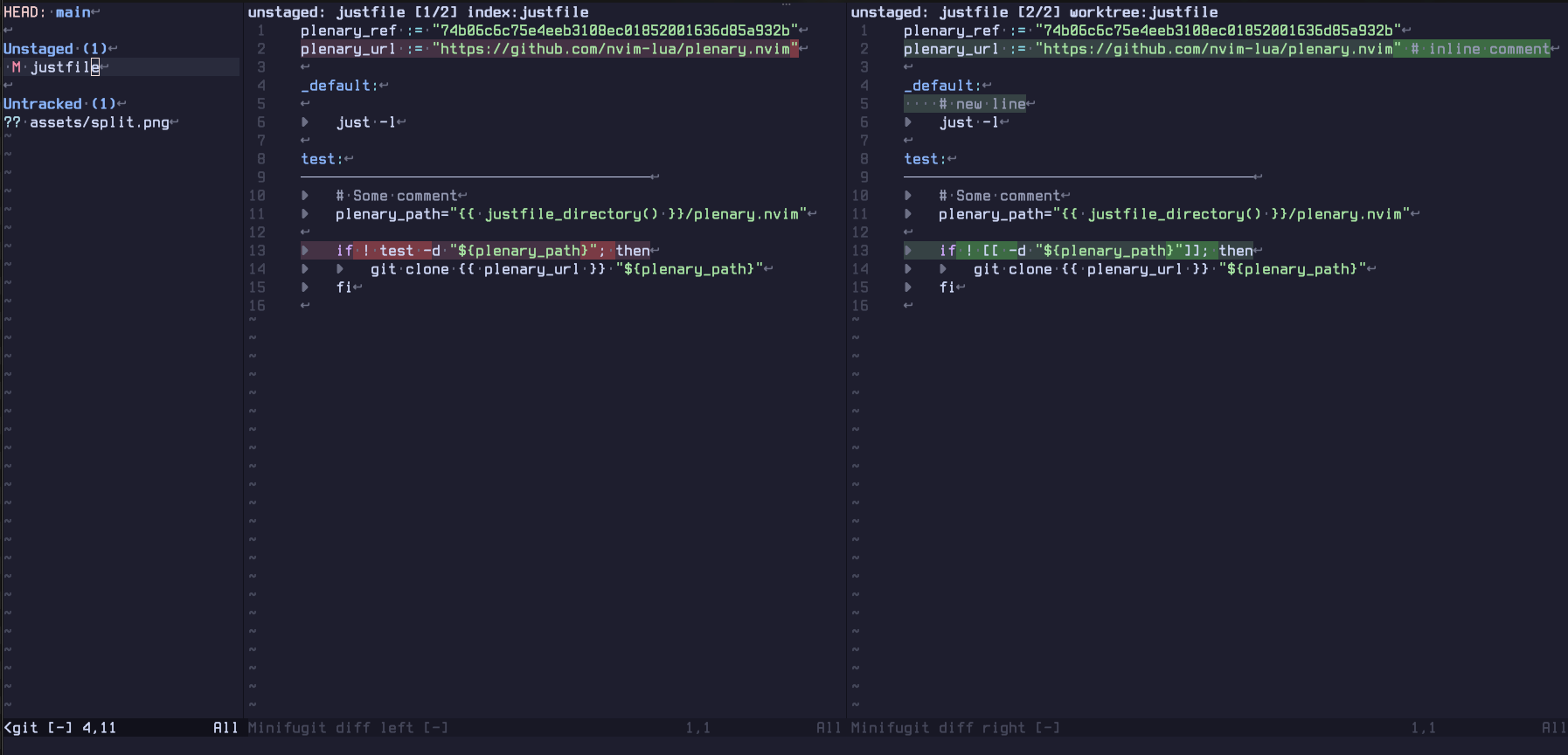
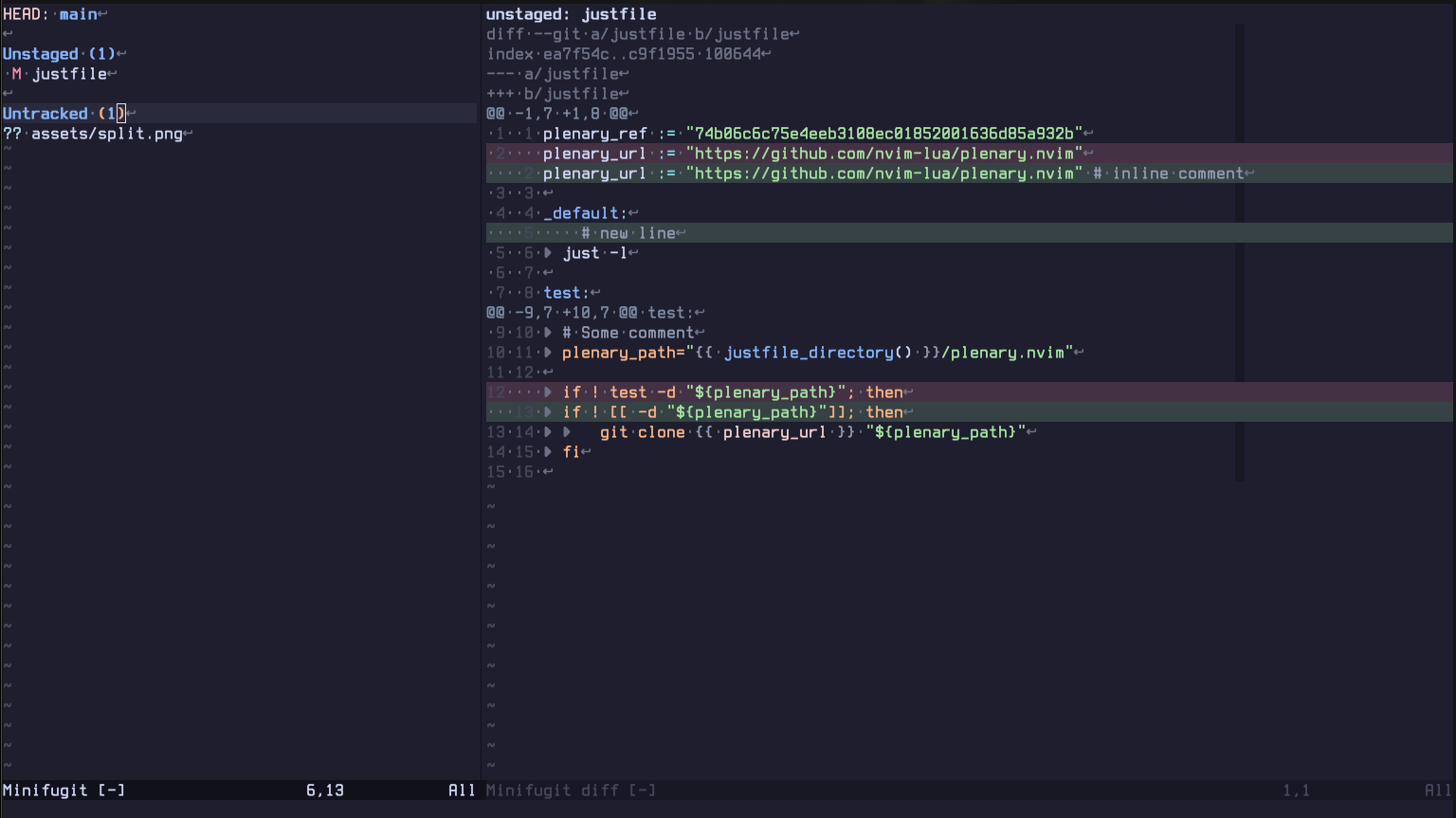
A lightweight Git status UI for Neovim, inspired by vim-fugitive.
minifugit.nvim focuses on a compact status window for everyday Git operations without leaving Neovim.
Features
- Open a Git status window with
:MinifugitStatus. - View your files' status.
- Discard unstaged changes or delete untracked paths, with confirmation by default.
- Stage and unstage files from the status window (visual mode as well).
- Preview diffs for the entry under the cursor in stacked or split view.
- Preview both sides of a conflict, even when one side deleted the file.
- Stage and unstage hunks from the diff window.
- Create commits.
- Animated loading spinner while pushing your commits.
- Non-blocking git reads: the status window and the diff preview load in the background, so the editor keeps responding on large repositories.
- Refresh the status window automatically when you return focus to Neovim, so
Git changes made elsewhere show up without pressing
r. Disable it withstatus.auto_refresh = false. - View unpushed commits in the status window and preview the diffs.
- Run
:checkhealth minifugitto verify Neovim and Git requirements.
Requirements
- Neovim 0.11+
gitexecutable onPATH
Configuration
vim.pack
vim.pack.add({
    'https://github.com/vieitesss/minifugit.nvim',
    version = vim.version.range("*") -- stable version
    -- version = "nightly"
})
lazy.nvim
{
    'vieitesss/minifugit.nvim',
}
Options
minifugit works without setup. Configure it with vim.g.minifugit before the
plugin loads:
vim.g.minifugit = {
    preview = {
        -- Start diff previews with wrapping disabled.
        wrap = false,

        -- Show old/new line numbers in diff previews.
        show_line_numbers = true,

        -- Show git diff metadata rows such as `diff --git`, `index`, `---`,
        -- and `+++`.
        show_metadata = true,

        -- Diff preview layout: 'stacked', 'split', or 'auto'.
        diff_layout = 'stacked',

        -- Editor width where 'auto' switches from stacked to split.
        diff_auto_threshold = 120,
    },
    status = {
        -- Fraction of the editor width used by the status window.
        width = 0.4,

        -- Minimum status window width in columns.
        min_width = 20,

        -- Open the minifugit workflow in a dedicated tab.
        open_in_tab = false,

        -- Refresh the status window when Neovim regains focus.
        auto_refresh = true,
    },
}
Or use setup() if your plugin manager expects Lua options:
require('minifugit').setup({
    preview = {
        diff_layout = 'auto',
    },
})
Diff-preview mappings can toggle preview.wrap, preview.show_line_numbers,
preview.show_metadata, and the diff layout at runtime for the current status
session.
Usage
Open the status window:
:MinifugitStatus
require('minifugit').status()
Conflicts
A conflicted file stays in the status window until you resolve it. =
previews both sides of the merge: the stacked layout shows Git's combined
diff with each side highlighted, and the split layout puts stage 2 (HEAD
with its branch) next to stage 3 (the incoming MERGE_HEAD, REBASE_HEAD,
CHERRY_PICK_HEAD or REVERT_HEAD ref, or theirs when no ref is
recorded). A side missing because the file was deleted shows an empty pane
marked (deleted); a file deleted on both sides says so instead of showing
a diff.
Stage the file with s once the markers are gone. Unstaging or discarding
would drop the merge stages, so u and d refuse.
Programmatic opening
local ok, err = require('minifugit').open({
    cwd = '/path/to/worktree',
    open_in_tab = false,
    on_close = function()
        print('Minifugit closed')
    end,
})
All options are optional:
cwd(string): a directory inside a Git repository, including a linked worktree. The resolved root is pinned without changing Neovim's cwd. Omit it to use the current cwd; withoutbase, this has the same behavior asstatus().base(string): open a read-only comparison of that revision with the working tree. The revision is resolved to a full commit hash once when opening; refresh keeps that commit pinned even ifHEADor a branch moves. The header shows its first seven characters andread-only. OneChanges since <short rev>section shows trackedA,M,D,R, andTchanges, plus non-ignored untracked files marked??. Renames showold -> new. ATmarks a type change, such as a file replaced by a symlink or a submodule. A path removed from the index withgit rm --cachedbut still present in the working tree shows as oneMchange from the base. Committed and uncommitted edits appear together in stacked and split previews. A rename or mode change without content changes previews as metadata in either layout. No unpushed-commits section is shown. Stage, unstage, discard, commit, push, and preview hunk actions only notifyread-only: changes since <short rev>; viewing, filtering, refresh, and opening working tree files still work. A clean comparison saysNo changes since <short rev>.open_in_tab(boolean): overridestatus.open_in_tabwhen opening a window.falseuses the current tab;trueopens or reuses a dedicated repository tab. Focusing a visible matching instance preserves its opening mode. A hidden instance is recreated if its opening mode differs.on_close(function): run once, scheduled after the status window disappears. Closing withqor:closemay leave its buffer hidden. Buffer deletion or wiping, owned-tab closure, and instance destruction (reset(), re-pin, or replacement) also count. Callbacks are consumed only when a scheduled check finds no window showing the status buffer; refresh and re-show do not run them. Multiple calls on the same instance register callbacks in order. Reopening before that check keeps all callbacks pending for the next real close. Callback errors are caught and logged without stopping other callbacks.
open() returns true on success. An explicit missing, non-directory, or
non-Git cwd returns nil, err (a string) without creating windows, buffers,
or tabs. An unknown, empty, or option-like (starting with -) base returns
nil, 'Invalid base revision: <base>' with no editor resources created. With
base but no cwd, resolution uses the current cwd, which must be in Git;
otherwise the error is Not inside a git repository: <cwd>.
Invalid option types raise validation errors.
The window's Git environment follows the same split. An explicit cwd names
the repository, so the window ignores the editor's GIT_DIR and
GIT_WORK_TREE. An omitted cwd uses them like Git does, which keeps
environment-only repositories (for example GIT_DIR=~/.dotfiles GIT_WORK_TREE=~) working. Either way the window pins the root's absolute Git
directory and work tree, so no later Git call of that window can be redirected
by the environment.
An explicit cwd for another root replaces the visible status instance. An
explicit base resolving to a different commit or root also replaces it; an
equivalent revision in the same root focuses and refreshes it. Omitting base
keeps the visible comparison; with no base, omitting cwd also preserves its
root pin. A hidden instance is destroyed and recreated if its
root, opening mode, or pinned base differs, including calls between base and
normal mode. Dedicated repository-tab reuse follows these same rules.
status() calls open({}) and ignores its return value.
Each tabpage has its own status window. With status.open_in_tab = true, calls
for a repository reuse its existing minifugit tab. Replacing a status window
never closes another tab's window: if closing the replaced tab lands on a tab
whose status window cannot be reused, the new window opens in its own tab.
The status header shows the pinned repository root. Changing cwd does not redirect an open window's actions; close and reopen status in another repository to switch repositories.
Returning focus to Neovim refreshes the visible status window of the current
tabpage after a short debounce, so a burst of focus events causes one read. The
refresh keeps the cursor, the filter, and the preview, and it is skipped while a
push spinner runs; a manual r cancels a pending auto-refresh. Hidden windows
and windows in other tabpages are left alone. Set status.auto_refresh = false
to disable it.
Default status-window mappings:
| Mode | Key | Action |
|---|---|---|
| n | <CR> / o |
Open the file or commit under the cursor |
| n | = |
Preview the diff for the entry under the cursor |
| n | q |
Close the status window |
| n | / |
Filter entries by path or summary |
| n | <BS> |
Clear the active filter |
| n | r |
Refresh Git status data |
| n | s |
Stage entry, or unstage it if already staged |
| v | s |
Stage the selected entries |
| n,v | u |
Unstage the entry or selected entries |
| n | S |
Stage all visible entries |
| n | U |
Unstage all visible entries |
| n | d |
Discard the entry with confirmation |
| n | D |
Discard the entry without confirmation |
| n | c |
Commit staged changes |
| n | p |
Push unpushed commits |
| n | aw |
Alternate diff preview line wrapping |
| n | an |
Alternate diff preview line numbers |
| n | am |
Alternate stacked diff preview metadata rows |
| n | al |
Alternate diff preview stacked/split layout |
| n | ? |
Toggle mappings help |
Default diff-preview mappings:
| Mode | Key | Action |
|---|---|---|
| n | q |
Close the diff preview |
| n | <CR> |
Open the file at the diff line under the cursor |
| n | [h / ]h |
Jump to the previous/next hunk |
| n | s |
Stage the hunk under the cursor |
| n | u |
Unstage the hunk under the cursor |
| n | d |
Discard the hunk under the cursor with confirmation |
| n | aw |
Alternate line wrapping |
| n | an |
Alternate line numbers |
| n | am |
Alternate metadata rows (stacked only) |
| n | al |
Alternate stacked/split layout |
| n | ? |
Toggle mappings help |
Explorar proyectos relacionados
codecrafters-io/build-your-own-x
Domina la programación recreando desde cero tus tecnologías favoritas.
562,332 estrellaspublic-apis/public-apis
Una lista colectiva de API gratuitas
498,770 estrellasmorluto/rea
Ingeniería inversa de cualquier cosa con agentes, desde el comportamiento de la aplicación hasta los binarios nativos.
457,468 estrellasopenclaw/openclaw
La IA que de verdad hace las cosas. Cualquier sistema operativo y cualquier plataforma. Al estilo langosta. 🦞
394,397 estrellas