
verseles/codewalk
verseles/codewalk has 191 GitHub stars and 20 forks. GitHot measured 0 stars in 24 hours, -1 in 7 days, and +1 in 15 days. Last checked 2026-11-12 23:28 UTC. Last push 2026-11-06.
A native (really fast!!) cross-platform client for OpenCode. V2 IS ON THE WAY!
What you can do
- 🌐 Fully translated into 14 languages: English, Português (Brasil), Español, Deutsch, Français, Italiano, Русский, 中文, 日本語, 한국어, हिन्दी, বাংলা, العربية, اردو — with instant switching, system-default detection, and RTL layout for Arabic and Urdu
- 💬 Realtime AI chat with streaming responses, older-history loading, and instant session reopen from cache
- 🗂 Project-centric sidebar with conversations grouped by project, pinning, and support for Git repositories and plain folders
- 🖧 Multi-server profiles with health checks, active-server switching, and OpenCode server install and launch from Settings
Crecimiento de estrellas medido
- in 24h
- 0
- in 7 days
- -1
- in 15 days
- +1
- in 1 month
- Actualización retrasada
Cambios netos en períodos que se solapan, no totales diarios. Los datos no disponibles se dejan en blanco. Las estrellas indican interés, no calidad.
README.md
OriginalCodeWalk
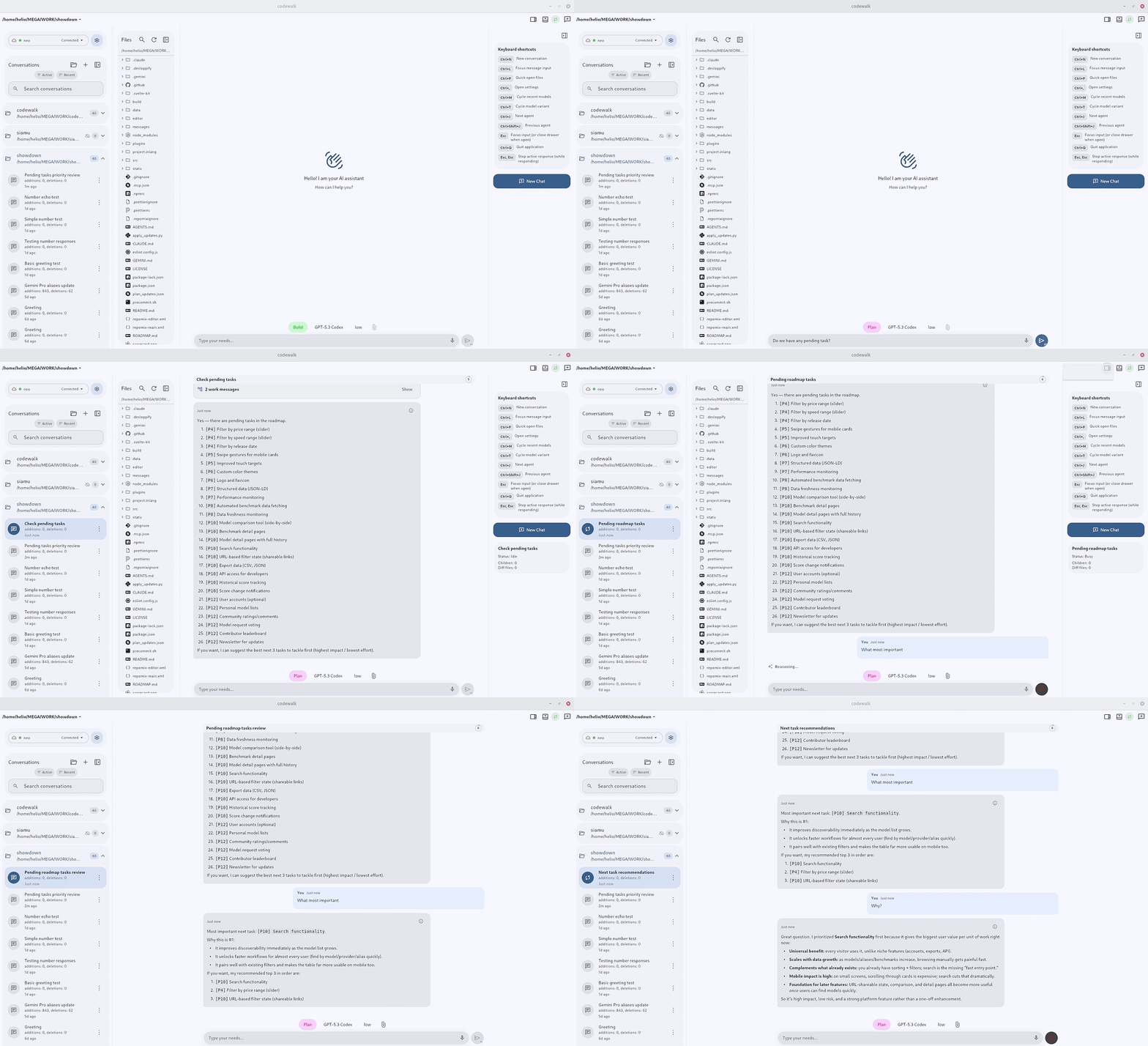
https://github.com/user-attachments/assets/032f64e2-e8ee-4024-b49a-ca95a774653f

A native (really fast!!) cross-platform client for OpenCode server mode. Built with Flutter, it provides a conversational interface for session-based AI coding interactions over HTTP APIs and streaming events.
🏷️ New in v1.244.0: Assistant replies now render basic HTML formatting and native progress bars. See supported tags and examples.
📰 New: CodeWalk now runs right in your browser — open https://codewalk.verseles.com, add your OpenCode server profile, and start chatting. No install needed.
Your OpenCode server must allow the web origin, otherwise the browser blocks the connection:
opencode serve --cors "https://codewalk.verseles.com"
Features
- 🌐 Fully translated into 14 languages: English, Português (Brasil), Español, Deutsch, Français, Italiano, Русский, 中文, 日本語, 한국어, हिन्दी, বাংলা, العربية, اردو — with instant switching, system-default detection, and RTL layout for Arabic and Urdu
- 💬 Realtime AI chat with streaming responses, older-history loading, and instant session reopen from cache
- 🗂 Project-centric sidebar with conversations grouped by project, pinning, and support for Git repositories and plain folders
- 🖧 Multi-server profiles with health checks, active-server switching, and OpenCode server install and launch from Settings
- 🧠 Model and provider selection with variants, favorites, and reasoning controls
- 🗃 Session tabs across the top of the window, browser-style, integrated into the title bar on desktop
- 📁 Built-in file manager and editor — browse, open, rename, duplicate and edit project files, with autosave, undo and redo, and syntax highlighting for every language the highlighter ships with
- 📎 Attach images and PDFs by dragging them in or pasting them, including screenshots straight from the clipboard
- ↪️ Forward a message to one or more other sessions
- 🧱 Block render mode — see each block as it finishes instead of watching text stream character by character
- 📉 Context usage metrics, so you can see how much of the window a session is consuming
- 🎨 Per-project icons discovered automatically from the repository, with matching session-tab colors you can disable in Appearance
- 📶 Data saver that scales back background sync on cellular
- 🖥 Server-hosted PTY terminal — a real command line running on the OpenCode host, embedded in the app
- 🎙 Speech-to-text on every platform, including Linux
- 🔊 Text-to-speech read-aloud for assistant messages, with adjustable speed and pitch
- 📊 Host quota monitoring for Claude, OpenRouter, Codex/OpenAI, Gemini, GitHub Copilot, OpenCode Go, NanoGPT, Wafer, Kimi, ZhipuAI, MiniMax, z.ai, Cursor, and Ollama Cloud
- 📈 Mermaid diagrams and LaTeX math rendered inline, straight from the conversation
- 🏷️ Basic HTML in assistant replies — bold, italic, underline, line breaks, subscript/superscript, and native
<progress>bars that follow the app theme - 📤 Share any message as a themed image, or export a whole session as Markdown or JSON
- ↩️ Revert to any earlier turn, with your draft restored
- 💬 Canned answers with global or per-project scope
- ⌨️ Keyboard-first on desktop, including Alt+Tab-style session cycling
- 🔐 Cloudflare Access OAuth with PKCE, for servers behind an enterprise reverse proxy
- 🔔 Interactive permission and question prompts, with notifications that clear themselves when the answer arrives
- 🔄 In-app updates with auto-check and direct install
- 📱 Responsive Material 3 across Linux, Windows, macOS, Web, and Android, with five density tiers
Basic HTML in Assistant Replies
Supported tags and examples
Assistant replies can mix these case-insensitive HTML tags with Markdown. Formatting and progress bars follow the app theme on mobile and desktop.
| Tag | Effect | Example |
|---|---|---|
<b> |
Bold | <b>Important</b> |
<i> |
Italic | <i>Note</i> |
<u> |
Underline | <u>Highlighted</u> |
<br> |
Line break; <br/> and <br /> also work |
First line<br>Second line |
<sub> |
Subscript | H<sub>2</sub>O |
<sup> |
Superscript | x<sup>2</sup> |
<progress> |
Native progress bar | <progress value="25" max="100">Loading</progress> |
Formatting tags can nest, for example <b><i>Bold and italic</i></b>. Progress defaults to max="1"; omit value for an indeterminate bar, such as <progress></progress>. Explicitly self-closing progress tags also work.
Tags inside code examples stay literal, and copying the whole message preserves its source markup. Underline/subscript/superscript decoration is omitted in Markdown link labels to keep links clickable. Support is limited to the tags above; arbitrary HTML and CSS are not rendered.
Install in One Command
Install using the install.cat pattern:
Linux & macOS
curl -fsSL install.cat/verseles/codewalk | shWindows (PowerShell)
irm install.cat/verseles/codewalk | iex
Run the same command again any time to update/reinstall to the latest GitHub release.
On Linux and macOS, install.sh also takes a release channel. Set the
variables for sh, the command that runs the script:
# Stay on CodeWalk 1 (remembered for later updates and reinstalls)
curl -fsSL install.cat/verseles/codewalk | CODEWALK_CHANNEL=v1 sh
# Opt in to CodeWalk 2 betas
curl -fsSL install.cat/verseles/codewalk | CODEWALK_CHANNEL=beta CODEWALK_MIGRATION=accept-v2 sh
# Install one exact release
curl -fsSL install.cat/verseles/codewalk | CODEWALK_VERSION=v1.265.1 sh
New installations use the stable channel; an installation keeps the channel
it was installed with. Moving a CodeWalk 1 installation to CodeWalk 2, which
works only with OpenCode 2 servers, requires CODEWALK_MIGRATION=accept-v2;
without it the installer stops and changes nothing. The Windows installer
always installs the latest release.
Installers automatically pick the right release for your platform.
In CodeWalk 2, opt in to Beta under Settings → Version and updates. Automatic checks can be disabled; Settings-entry and manual checks remain available. Android downloads and verifies updates in-app before asking the system installer for confirmation. Managed Linux installs support verified installation and restart; older or portable builds keep an exact-version installer command. Update dismissal and release news are independent, and interrupted downloads can resume.
On Linux, release files are installed under
${XDG_DATA_HOME:-$HOME/.local/share}/codewalk-app, separately from user data.
Existing installations keep their preferences and caches in the legacy
codewalk support directory; fresh installations use com.verseles.codewalk.
Updates and uninstall remove application files without deleting either user-data
directory.
Android
Open this in your Android browser to download the APK: install.cat/verseles/codewalk
Uninstall
Linux & macOS
curl -fsSL https://raw.githubusercontent.com/verseles/codewalk/main/uninstall.sh | shWindows (PowerShell)
irm https://raw.githubusercontent.com/verseles/codewalk/main/uninstall.ps1 | iex
Getting Started
Prerequisites
- Flutter SDK (>=3.8.1)
- Dart SDK
- An OpenCode-compatible server instance
- Platform toolchain for your target:
- Linux desktop:
clang,cmake,ninja,pkg-config - Windows desktop: build from a Windows host
- macOS desktop: build from a macOS host
- Linux desktop:
Setup
Install dependencies:
flutter pub getRun the app (examples):
flutter run -d linux --target lib/main_v2.dart
flutter run -d chrome --target lib/main_v2.dart
flutter run -d android --target lib/main_v2.dart
Build artifacts (examples):
flutter build linux --target lib/main_v2.dart
flutter build web --target lib/main_v2.dart
Make Targets
make check      # deps + analyze + coverage/v2-tool fixtures + full tests
make check-fast # same setup, with the fast test selection
make test-fast  # excludes slow/integration tests
make test-coverage-tools # LCOV validation and threshold regression fixtures
make test-release-tools  # v2 beta release plan, publication guards and tooling
make coverage   # full tests with coverage + global and protected-file floors
make release V=beta # main: cut the next v2.0.0-beta.N (DRY_RUN=1 prints the plan only)
On main, the Release workflow publishes only v2.0.0-beta.N tags: Android arm64
and Linux x64/ARM64 built from lib/main_v2.dart, verified (v2 entry library,
production signer, versionCode above every published APK, digests) and published
as a prerelease that is never latest. A manual dispatch from main with a
dry_run_version builds and verifies the same artifacts without publishing.
Stable, patch and CodeWalk 1 releases are cut on the v1 branch.
Use focused tests while iterating and make check at stable validation gates. Test targets default to four workers; override with TEST_JOBS=N when appropriate for the host.
The full make test suite has a 10-minute execution guard by default. For a
slower host, make check TEST_TIMEOUT=15m retains all tests and individual test
timeouts while allowing a larger finite suite budget. Guard expiry includes a
signal diagnostic; it is a failed or incomplete check, not a passing result.
Coverage filtering uses Python 3 and does not require system lcov. The gate validates fresh Flutter LCOV records, excludes .g.dart, generated localization, plugin registrant and packages/ sources, and enforces the 85% floor plus the protected-file floors in tool/ci/coverage_baseline.tsv. Package coverage is not gated yet (#477).
For a testable Android artifact, follow the apk section of AGENTS.md.
V2 development targets on main
The entry point is lib/main_v2.dart, and these targets select it explicitly:
make v2-native-check  # all workspace packages, architecture/l10n and VM/CHP tests
make v2-linux-debug   # Linux host architecture: x64 or arm64
make v2-android-debug # Linux x64 build host; Android arm64, split-per-ABI debug APK
Use a fresh checkout/copy with dependencies resolved for native compilation.
Existing build/linux or build/app outputs cause refusal rather than being
deleted or overwritten. Build receipts under build/native-evidence/ record the
source revision, Flutter SDK, explicit lib/main_v2.dart target and artifact
hashes, including ABI/ELF and nonempty debug-kernel checks. CI uses separate native
check and compiler jobs; no browser is required for this native aggregate.
These debug builds provide compilation evidence, not release AOT, signing,
installation or MVP acceptance. Android/Linux are the MVP targets; full deferred
platform evidence remains separate. make v2-foundations retains Chrome and Web
checks; the checker's --no-build option omits only the Web build.
Automatic push/PR CI runs make v2-native-check in both v2_foundations and
v2_native_checks, preserving the existing status contexts with strict native
gates. The V2 deferred Web checkpoint (v2-deferred-web.yml) is manual-only
and runs the full make v2-foundations profile. Its failures remain failures;
deferred Chrome/Web checks are not native MVP or full-GA acceptance. The retained
legacy browser checks in quality and the legacy Web deployment remain separate.
In the explicit native v2 app, expand a loaded catalog row and choose View history to open its auxiliary read-only reader. Back preserves the catalog. Refresh/pagination are manual and bounded; sending and live updates are not available. This incremental reader is not the final v1-parity chat interface or an installed-device/MVP acceptance result.
Isolated Linux development preview
The Linux native CI job packages codewalk-v2-preview-linux-x64.tar.gz and opens
those exact archive bytes under Xvfb before offering a verified-preview artifact.
Screenshots, the completed smoke report and the archive checksum accompany a
successful result. Compiler success alone is not this visual verification.
On a compatible Ubuntu 24.04 desktop with X11/XWayland, extract the verified
archive for that machine's architecture and run ./Open-preview.sh; a preview
refuses to open on a host of another architecture. No Flutter SDK or compilation is needed.
The launcher requires the ordinary desktop runtime, Python 3, D-Bus and GNOME
Keyring; it reports a missing prerequisite without falling back to the host's
credential session. PREVIEW.txt in the package contains opening/removal steps.
The preview uses a separately marked, locked profile, a private D-Bus and a supervised encrypted temporary keyring. Nonsecret preferences persist; credentials are cleared when the launcher session closes. This is normal-storage isolation, not an OS sandbox, GPU/Wayland acceptance, an updater or a public beta. The app does not register a new desktop/URI handler or replace the installed v1 app. The smoke report names the exercised screens and untested server/device paths.
make v2-linux-preview-package # requires the fresh verified build for this host (x64 or arm64)
make v2-linux-preview-smoke   # requires an existing Xvfb/X11 visual QA runtime
make v2-android-preview       # Linux x64 build host; profile APK under the preview identity
Owner previews (CP1)
The manual V2 owner preview workflow (v2-owner-preview.yml) builds every
preview from the dispatched commit and keeps only previews it launched: Linux
x64 and ARM64 archives (each built on its own architecture and smoked under
Xvfb) and an Android arm64 APK. The APK installs beside CodeWalk v1 as
CodeWalk v2 Preview (com.verseles.codewalk.v2preview, debug-signed
profile build) and never replaces it or its data. CI launches the same build's
x86_64 split on an Android 16 emulator; the arm64 APK itself is first launched on
the owner's device. The workflow only produces artifacts: it publishes, tags
and deploys nothing.
Web
The published Web app (https://codewalk.pages.dev) is CodeWalk 1 and deploys from the v1 branch. CodeWalk 2 on the Web comes later in ROADMAP.md; make v2-web is only a local build check.
Server Configuration
- Launch the app and open Settings from the sidebar
- Tap Add Server and run the Quick setup command in your terminal
- Keep the default
Server URL(http://127.0.0.1:4096) or set your server URL - Configure Basic Auth only if your server requires it
- Save and switch active/default profiles as needed
OpenCode Project Agent
When you run OpenCode from this repository, the repo ships a project agent at .opencode/agents/opencodeNews.md:
@opencodeNewsreviews the latest OpenCode release for CodeWalk impact@opencodeNews review vX.Y.Zor@opencodeNews check https://github.com/anomalyco/opencode/releases/tag/...reviews a specific release target mentioned in the same prompt
The agent returns a release summary, impact/risk by area, proposed adjustments, and an execution plan only when CodeWalk work is needed.
Architecture
The project follows Clean Architecture with three layers: Domain, Data, and Presentation. Dependency injection via get_it, HTTP via dio, state management via provider.
For the ADR-023 compatibility baseline and current OpenCode contract inventory, see CONTRACT_MATRIX.md.
Tech Stack
- Framework: Flutter
- Language: Dart
- State Management: Provider
- HTTP Client: Dio
- Local Storage: SharedPreferences
- Dependency Injection: GetIt
- Design System: Material Design 3
Community
Chat with users, get release news, and send feedback: Telegram — t.me/codewalkapp. Tagged releases can carry a What's-new note that surfaces in-app under Settings › About.
License
This project is dual-licensed:
- Open Source: GNU Affero General Public License v3.0 (AGPLv3) -- free for everyone.
- Commercial: A separate commercial license is available for organizations with annual revenue exceeding USD 1M that wish to use the software without AGPLv3 obligations.
Origin and Acknowledgment
CodeWalk is a fork of OpenMode, originally created by easychen. The original project is licensed under MIT.
Substantial modifications have been made since the fork, including licensing changes, code restructuring, rebranding, full English standardization, and documentation rewrites. All modifications are licensed under AGPLv3 (or the commercial license, where applicable).
See NOTICE for full attribution details.
Explorar proyectos relacionados
freeCodeCamp/freeCodeCamp
Base de código abierto y plan de estudios de freeCodeCamp.org. Aprende matemáticas, programación y ciencias de la computación gratis.
459,079 estrellasdonnemartin/system-design-primer
Aprende a diseñar sistemas a gran escala y prepárate para la entrevista de diseño de sistemas. Incluye fichas de Anki.
377,750 estrellasreact/react
La biblioteca para interfaces de usuario web y nativas.
252,572 estrellasvuejs/vue
Este es el repositorio de Vue 2. Para Vue 3, visita https://github.com/vuejs/core
212,526 estrellas