Proyectos Ver en GitHub
thekevinscott/UpscalerJS
thekevinscott/UpscalerJS has 905 GitHub stars and 84 forks. GitHot measured 0 stars in 24 hours and -1 in 7 days. Last checked 2026-11-21 05:33 UTC. Last push 2026-11-17.
Crecimiento de estrellas medido
- in 24h
- 0
- in 7 days
- -1
- in 15 days
- Recopilando historial
- in 1 month
- Recopilando historial
Cambios netos en períodos que se solapan, no totales diarios. Los datos no disponibles se dejan en blanco. Las estrellas indican interés, no calidad.
Acerca de
Enhance Images with Javascript and AI. Increase resolution, retouch, denoise, and more. Open Source, Browser & Node Compatible, MIT License.
Aprendizaje automáticoREADME.md
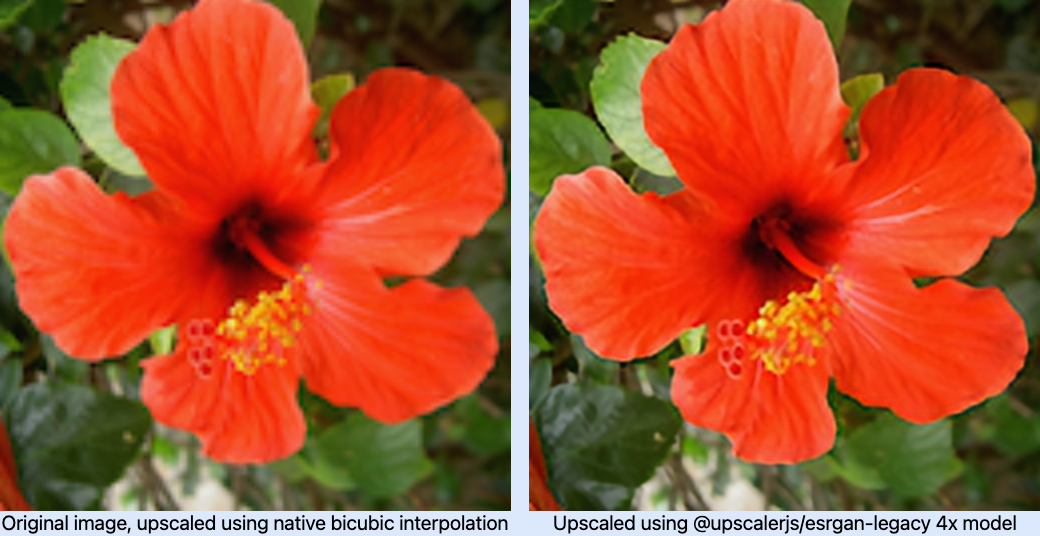
OriginalUpscalerJS





Enhance Images with Javascript and AI. Increase resolution, retouch, denoise, and more. Open Source, Browser & Node Compatible, MIT License.
- 🎁 Pretrained Models: Enhance images using UpscalerJS's diverse pretrained models, designed to suit various image styles and requirements including increasing image resolution, denoising, deblurring, and more.
- 🔌 Seamless Platform Integration: Integrate UpscalerJS across Browser, Node (CPU and GPU), and Workers environments.
- 📘 Comprehensive Documentation: Leverage UpscalerJS confidently with extensive documentation, thorough examples, and TypeScript support.
- 🚀 UI-Focused Enhancement: Performant UI support with built-in patch-based processing that supports performance without sacrificing quality.
- 📱 Device Compatibility: Consistent image enhancement across a variety of devices, including desktops, tablets, and phones.
- 🧩 Custom Model Integration: Extend UpscalerJS by integrating your own pretrained models for personalized image enhancements.
Quick Start
import Upscaler from 'upscaler';
const upscaler = new Upscaler();
upscaler.upscale('/path/to/image').then(upscaledImage => {
  console.log(upscaledImage); // base64 representation of image src
});
Documentation
Guides
You can view runnable code examples. You can also find the guides here on Github.
Support the Project
Add a ⭐️ star on GitHub or ❤️ tweet to support the project!