
shencangsheng/easydb_app
shencangsheng/easydb_app has 591 GitHub stars and 34 forks. GitHot measured 0 stars in 24 hours. Last checked 2026-11-16 22:26 UTC. Last push 2026-10-28.
What you can do
- High Performance — Built on Rust and DataFusion, effortlessly handles large files
- Low Memory Usage — Runs with minimal hardware resources
- Multi-format Support — CSV, TSV, Text, JSON, NdJson, Excel, Parquet, MySQL, PostgreSQL
- Ready to Use — No file conversion needed, query directly
Crecimiento de estrellas medido
- in 24h
- 0
- in 7 days
- Recopilando historial
- in 15 days
- Recopilando historial
- in 1 month
- Recopilando historial
Cambios netos en períodos que se solapan, no totales diarios. Los datos no disponibles se dejan en blanco. Las estrellas indican interés, no calidad.
Acerca de
EasyDB is a lightweight desktop app built with Tauri + Rust, powered by Apache DataFusion. Query local CSV, TSV, Text, NdJson, Excel, Parquet files and MySQL databases directly with SQL — no external database required. Handles datasets from hundreds of MB to several GB with ease. 让所有数据说同一种“语言”
DatosREADME.md
OriginalEasyDB

A lightweight desktop data query tool that uses SQL to query local files directly, with a built-in query engine


Introduction
EasyDB is a lightweight desktop data query tool built with Rust and Tauri, featuring a built-in Apache DataFusion query engine. No need to install a database or any other dependencies — just use SQL to query local files directly.
It treats files as database tables, supporting CSV, TSV, Text, JSON, NdJson, Excel, Parquet, MySQL, and PostgreSQL as data sources. It supports complex multi-table JOINs, subqueries, window functions, and other advanced SQL features. It effortlessly handles data files from hundreds of MB to multiple GB with minimal hardware resources.
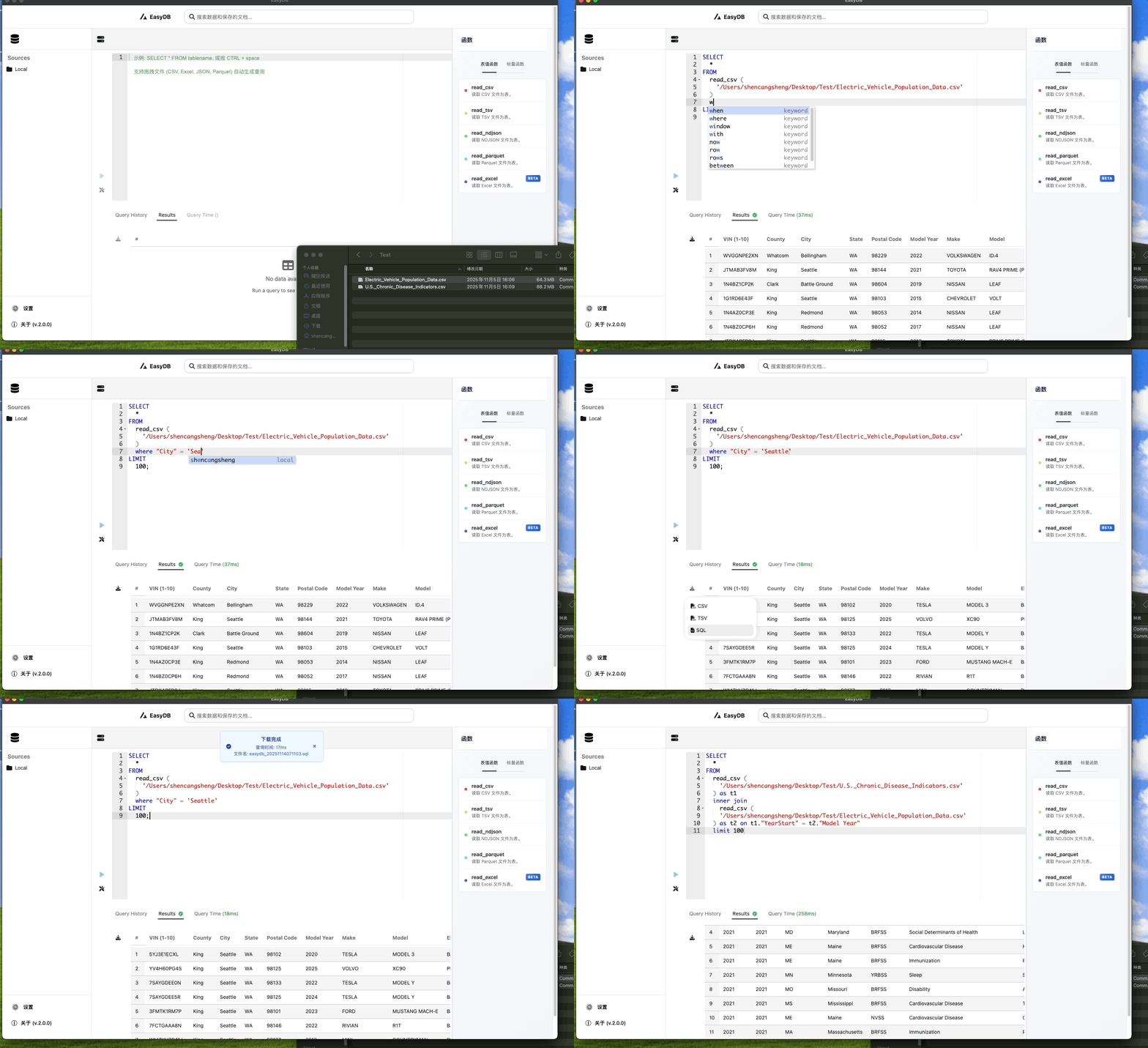
Core Features
- High Performance — Built on Rust and DataFusion, effortlessly handles large files
- Low Memory Usage — Runs with minimal hardware resources
- Multi-format Support — CSV, TSV, Text, JSON, NdJson, Excel, Parquet, MySQL, PostgreSQL
- Ready to Use — No file conversion needed, query directly
- Cross-platform — Supports macOS and Windows
- Full SQL Support — Multi-table JOINs, subqueries, window functions, regex matching, and more
- Smart Editor — SQL syntax highlighting, autocomplete (function names + column names), formatting
- Drag & Drop SQL Generation — Drag files into the editor to auto-generate query statements
- Internationalization — Supports Simplified Chinese and English, auto-detects browser language
- Virtual Scrolling & Pagination — Smooth rendering for large datasets with scroll-to-load
- Result Export — Export to CSV, TSV, or SQL (INSERT/UPDATE), with MySQL or PostgreSQL dialect options
- Query History — Automatically records the last 50 queries with execution status
- Modern Interface — Native desktop app built with Tauri v2 + HeroUI
Changelog
See CHANGELOG_EN.md
Features & Roadmap
File Reader Functions
-
read_csv()— Read CSV files with custom delimiter, header, and schema inference options -
read_tsv()— Read TSV files -
read_text()— Read text files with custom delimiter -
read_json()— Read JSON files with standard JSON arrays and NDJSON (auto-detected) -
read_ndjson()— Read NDJSON files (one JSON object per line) -
read_excel()/read_xlsx()— Read Excel files with worksheet selection -
read_parquet()— Read Parquet columnar storage files -
read_mysql()— Read MySQL database tables -
read_postgres()— Read PostgreSQL database tables
Scalar Functions
-
REGEXP_LIKE()— Regular expression matching
Editor & Interaction
- Drag & drop file auto-generate SQL (option to insert full SQL or just
read_xxx()function) - SQL smart autocomplete (function names, parameter names, result column names)
- Execute selected SQL fragment
- SQL formatting and clearing
Data Export
- Export query results to CSV / TSV / SQL
- SQL export supports INSERT and UPDATE statements
- SQL export supports MySQL and PostgreSQL dialects
- Query history recording
Planned
- Excel lazy loading performance optimization
- Excel enhanced data type compatibility
- Multi-session window support
- Directory browsing
- S3 remote file support
- Direct querying of server files
- Data visualization
Technical Architecture
Core Tech Stack
| Layer | Technology |
|---|---|
| Frontend | React 18 + TypeScript + Vite |
| Backend | Rust + Tauri v2 |
| Query Engine | Apache DataFusion 50.3 |
| UI Framework | HeroUI + Tailwind CSS |
| Virtual Scroll | @tanstack/react-virtual + @tanstack/react-table |
| SQL Editor | Ace Editor (react-ace) |
| SQL Parsing | sqlparser-rs (Rust) + node-sql-parser (JS) |
| i18n | Lightweight custom i18n, zh-CN / en-US |
| History Storage | SQLite (rusqlite) |
Query Engine Selection
Currently Using: Apache DataFusion
DataFusion is part of the Apache Arrow project, providing complete SQL query capabilities and supporting complex SQL syntax including multi-table JOINs, subqueries, window functions, and other advanced features. Compared to Polars, DataFusion offers more comprehensive SQL compatibility.
Version Evolution: v1.0 previously used the Polars engine, which excelled in stream processing and memory usage but had limitations in complex SQL support. v2.0 switched back to DataFusion for more complete SQL support while maintaining good performance and resource efficiency.
User Guide
Basic Syntax
-- Query CSV files
SELECT *
FROM read_csv('/path/to/file.csv', infer_schema => false)
WHERE "age" > 30
LIMIT 10;

-- Query TSV files
SELECT *
FROM read_tsv('/path/to/file.tsv');

-- Query text files (custom delimiter)
SELECT *
FROM read_text('/path/to/file.txt', delimiter => '\t');

-- Query Excel files (specific worksheet)
SELECT *
FROM read_excel('/path/to/file.xlsx', sheet_name => 'Sheet2')
WHERE "age" > 30;

-- Query JSON files (standard JSON array or NDJSON, auto-detected)
SELECT *
FROM read_json('/path/to/file.json')
WHERE "status" = 'active';

-- Query NDJSON files
SELECT *
FROM read_ndjson('/path/to/file.ndjson')
WHERE "status" = 'active';

-- Query Parquet files
SELECT *
FROM read_parquet('/path/to/file.parquet');

-- Query MySQL database
SELECT *
FROM read_mysql('users', conn => 'mysql://user:password@localhost:3306/mydb')
WHERE "age" > 30;

-- Query PostgreSQL database
SELECT *
FROM read_postgres('users', host => 'localhost', username => 'postgres', db => 'mydb', pass => 'password')
WHERE "age" > 30;

-- Cross-source join (Excel + MySQL)
SELECT *
FROM read_excel('/path/to/file.xlsx', sheet_name => 'Sheet1') AS t1
INNER JOIN
read_mysql('users', conn => 'mysql://user:password@localhost:3306/mydb') AS t2
ON t1."user_id" = t2."id"
WHERE t1."age" > 30;

-- Regex matching
SELECT *
FROM read_csv('/path/to/file.csv')
WHERE REGEXP_LIKE("Distance", '^([0-9]+)\.([0-9]+)?$');
Supported Data Sources
| Format | Function | Description |
|---|---|---|
| CSV | read_csv() |
Custom delimiter, header, schema inference |
| TSV | read_tsv() |
Tab-separated files |
| Text | read_text() |
General text files with custom delimiter |
| Excel | read_excel() / read_xlsx() |
.xlsx support, optional worksheet |
| JSON | read_json() |
Standard JSON arrays and NDJSON, auto-detected |
| NdJson | read_ndjson() |
One JSON object per line |
| Parquet | read_parquet() |
Columnar storage format |
| MySQL | read_mysql() |
Direct MySQL database table connection |
| PostgreSQL | read_postgres() |
Direct PostgreSQL database table connection |
Function Parameters
Every read_* function accepts columns, which sets the type of named columns. Other columns keep their inferred type.
SELECT *
FROM read_ndjson(
  'data.ndjson',
  columns => {control_phase: 'VARCHAR', id: 'BIGINT'}
)
| Type | Meaning |
|---|---|
VARCHAR, TEXT, STRING |
string |
BIGINT, INT, INTEGER |
64-bit integer |
DOUBLE, FLOAT |
64-bit float |
BOOLEAN |
boolean |
TIMESTAMP |
timestamp |
DATE |
date |
read_excel accepts VARCHAR, BIGINT, DOUBLE, BOOLEAN, and TIMESTAMP.
read_csv() parameters
| Parameter | Type | Default | Description |
|---|---|---|---|
infer_schema |
boolean | true | Auto-infer data types (based on first 100 rows) |
has_header |
boolean | true | Whether the file contains a header row |
delimiter |
string | , |
Field delimiter, supports escape sequences like \t, \n |
file_extension |
string | .csv |
File extension |
columns |
map | Column type overrides (see above) |
read_excel() parameters
| Parameter | Type | Default | Description |
|---|---|---|---|
sheet_name |
string | First sheet | Name of the worksheet to read |
infer_schema |
boolean | true | Auto-infer data types |
columns |
map | Column type overrides (see above) |
read_mysql() parameters
| Parameter | Type | Default | Description |
|---|---|---|---|
conn |
string | Required | MySQL connection string, e.g. mysql://user:password@host:port/database |
columns |
map | Column type overrides (see above) |
read_postgres() parameters
| Parameter | Type | Default | Description |
|---|---|---|---|
host |
string | Required | PostgreSQL server host |
username |
string | Required | PostgreSQL username |
db |
string | Required | PostgreSQL database name |
pass |
string | Optional | PostgreSQL password |
port |
string | 5432 |
PostgreSQL port number |
sslmode |
string | disable |
SSL mode |
columns |
map | Column type overrides (see above) |
read_json() parameters
| Parameter | Type | Default | Description |
|---|---|---|---|
file_extension |
string | Path extension | File extension override (e.g. NDJSON content stored in a .json file) |
columns |
map | Column type overrides (see above) |
read_json() auto-detects the format from file content: leading [ is parsed as a standard JSON array, leading { as NDJSON. Works with both .json and .ndjson files.
A field that is null in every sampled row is read as a string. Later text values then load instead of failing with expected null.
read_ndjson() parameters
| Parameter | Type | Default | Description |
|---|---|---|---|
file_extension |
string | .ndjson |
File extension |
columns |
map | Column type overrides (see above) |
A field that is null in every sampled row is read as a string, same as read_json().
read_text() parameters
| Parameter | Type | Default | Description |
|---|---|---|---|
infer_schema |
boolean | true | Auto-infer data types |
has_header |
boolean | true | Whether the file contains a header row |
delimiter |
string | \t |
Field delimiter |
file_extension |
string | .txt |
File extension |
columns |
map | Column type overrides (see above) |
Quick Start
System Requirements
- macOS: 10.15+ (Catalina or higher)
- Windows: Windows 10 or higher
- Memory: 4 GB or more recommended
- Storage: At least 100 MB available space
Installation
- Visit the Releases page and download the installer for your system
- macOS: Download the
.dmgfile, drag to Applications folder - Windows: Download the
.exefile, run the installer
FAQ
macOS "Application is damaged and cannot be opened"
This is caused by macOS Gatekeeper blocking unsigned applications. Run the following command in Terminal:
xattr -r -d com.apple.quarantine /Applications/EasyDB.app
If this doesn't work, go to System Preferences > Security & Privacy > General and click "Open Anyway".
SQL Syntax Notes
Field names should be wrapped in double quotes:
SELECT "id", "name" FROM table WHERE "id" = 1;
Backticks also work:
SELECT `id`, `name` FROM table WHERE `id` = 1;
String values in WHERE clauses use single quotes:
SELECT * FROM table WHERE "id" = '1';
Non-standard File Extensions
For files without CSV, XLSX, JSON, or Parquet extensions, EasyDB automatically uses the read_text() function.
Project Background
From Server to App
EasyDB Server is primarily deployed on Linux servers as a web service for efficient querying of large-scale text files. Although Docker deployment is available, the local experience on macOS and Windows is not as convenient.
EasyDB App is specifically optimized for macOS and Windows to improve the local user experience.
Project Naming
- EasyDB Server — Server-side version, based on DataFusion
- EasyDB App — Desktop client version, based on DataFusion (v2.0+)
Contributing
Contributions are welcome in all forms!
- Fork this repository
- Create a feature branch (
git checkout -b feature/AmazingFeature) - Commit your changes (
git commit -m 'Add some AmazingFeature') - Push to the branch (
git push origin feature/AmazingFeature) - Open a Pull Request
Development Environment
# Clone repository
git clone https://github.com/shencangsheng/easydb_app.git
cd easydb_app

# Install frontend dependencies
yarn

# Start development server
cargo tauri dev

# Build application
cargo tauri build
Prerequisites
- Rust 1.89+
- Node.js 18+
- Yarn
License
MIT License © Cangsheng Shen
Author
Cangsheng Shen
- GitHub: @shencangsheng
- Email: [email protected]
Acknowledgments
Thanks to the following open source projects:
- Apache DataFusion — High-performance SQL query engine
- datafusion-table-providers — DataFusion extension
- Tauri — Modern desktop application framework
- React — User interface library
- HeroUI — UI component library
- calamine — Excel file parsing
- Ace Editor — Code editor
Contributors
Contact
- Bug Reports: GitHub Issues
- Discussions: GitHub Discussions
- Email: [email protected]
If this project helps you, please give us a Star
Made with ❤️ by Cangsheng Shen