
rdbende/Sun-Valley-ttk-theme
rdbende/Sun-Valley-ttk-theme has 2,586 GitHub stars and 129 forks. GitHot measured -2 stars in 24 hours and -1 in 7 days. Last checked 2026-11-12 14:43 UTC. Last push 2025-06-08.
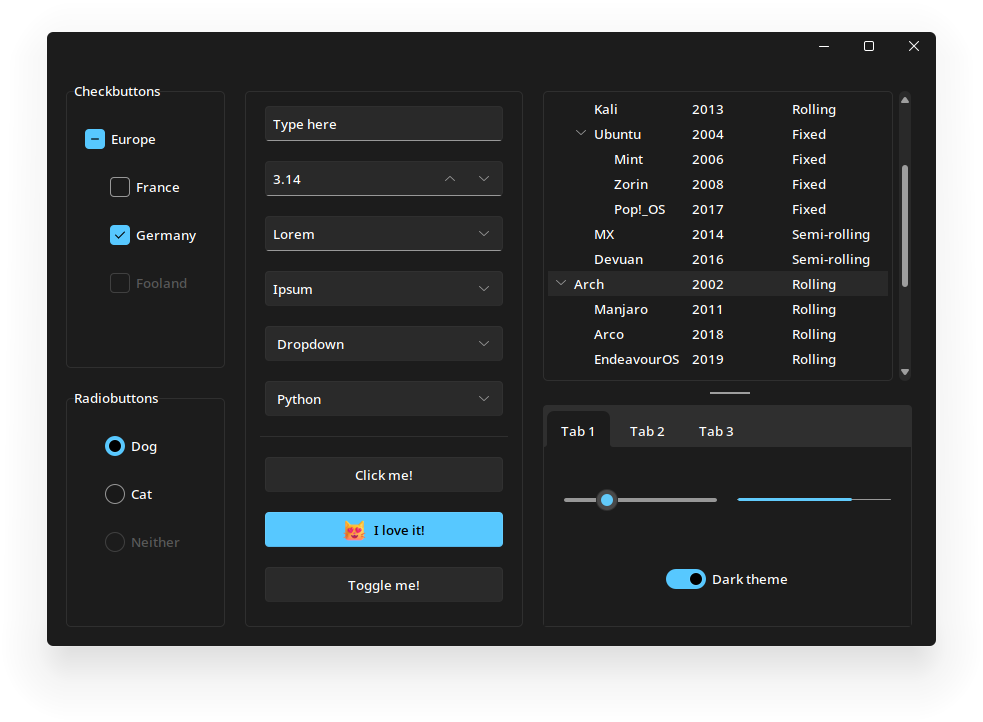
A gorgeous theme for Tkinter/ttk, based on the Sun Valley visual style ✨
Crecimiento de estrellas medido
- in 24h
- -2
- in 7 days
- -1
- in 15 days
- Actualización retrasada
- in 1 month
- Actualización retrasada
Cambios netos en períodos que se solapan, no totales diarios. Los datos no disponibles se dejan en blanco. Las estrellas indican interés, no calidad.
README.md
OriginalSun Valley ttk theme
Make your Tkinter application look better than ever with just two lines of code!
Installation 
The theme is easily installable as a Python package
pip install sv-ttk
Usage 
[!NOTE] The theme will only be applied to themable (
tkinter.ttk) widgets, and not with the regular Tkinter widgets, they only benefit from the colorscheme.
For detailed documentation, visit the wiki page.
import tkinter
from tkinter import ttk

import sv_ttk

root = tkinter.Tk()

button = ttk.Button(root, text="Click me!")
button.pack()

# This is where the magic happens
sv_ttk.set_theme("dark")

root.mainloop()
Tips and tricks
Our intention is to keep the sv-ttk package as simple as possible, while making it easy to integrate with other libraries.
Set the theme to the system theme
You can use the darkdetect package to detect the system color scheme. Here's an example:
import darkdetect

sv_ttk.set_theme(darkdetect.theme())
It's only a matter of an extra import and passing the result of darkdetect.theme() to sv_ttk.set_theme(). It's that easy!
Dark mode title bar on Windows
The Sun Valley theme doesn't change the title bar color on Windows when the theme is set to dark. You can use pywinstyles to achieve this. Here's an example:
import pywinstyles, sys

def apply_theme_to_titlebar(root):
    version = sys.getwindowsversion()

    if version.major == 10 and version.build >= 22000:
        # Set the title bar color to the background color on Windows 11 for better appearance
        pywinstyles.change_header_color(root, "#1c1c1c" if sv_ttk.get_theme() == "dark" else "#fafafa")
    elif version.major == 10:
        pywinstyles.apply_style(root, "dark" if sv_ttk.get_theme() == "dark" else "normal")

        # A hacky way to update the title bar's color on Windows 10 (it doesn't update instantly like on Windows 11)
        root.wm_attributes("-alpha", 0.99)
        root.wm_attributes("-alpha", 1)

# Example usage (replace `root` with the reference to your main/Toplevel window)
apply_theme_to_titlebar(root)
Note that on Windows 10, due to its limitations, you can only set the title bar's color to black for dark mode and white for light mode. On Windows 11 the title bar can be set to any color.
[!WARNING] The
apply_theme_to_titlebarworks on Windows only, so you should check whether the platform is Windows before calling this function.
Here's how the windows look after calling set_title_bar_color():
Screenshots
Windows 10

Windows 11

Wanna see more?
Check out my other ttk themes!
- The Azure ttk theme
- The Forest ttk theme
Explorar proyectos relacionados
sindresorhus/awesome
😎 Listas Awesome sobre todo tipo de temas interesantes [NOTA: Las pull requests están temporalmente desactivadas hasta que tenga ocasión de ponerme al día con las existentes]
536,090 estrellasEbookFoundation/free-programming-books
:books: Libros de programación disponibles de forma gratuita
401,514 estrellasnilbuild/developer-roadmap
Hojas de ruta interactivas, guías y otros contenidos educativos para ayudar a los desarrolladores a crecer en su carrera.
371,930 estrellasvinta/awesome-python
La lista definitiva que responde a «Quiero hacer X en Python, ¿qué herramienta debería usar?».
334,399 estrellas