
psmux/Tmux-Plugin-Panel
psmux/Tmux-Plugin-Panel has 86 GitHub stars and 1 forks. Star changes are not measured yet. Last checked 2026-11-13 22:17 UTC. Last push 2026-11-07.
What you can do
- ⌂ Dashboard - Quick-action cards for common tasks. Browse plugins, themes, configure settings, reset to defaults, manage registries.
- Browse - Category sidebar + plugin list + detail panel. Search, filter by compat, install with Enter.
- Installed - See all installed plugins. Update one (u), update all (U), remove (x), clean orphans (C).
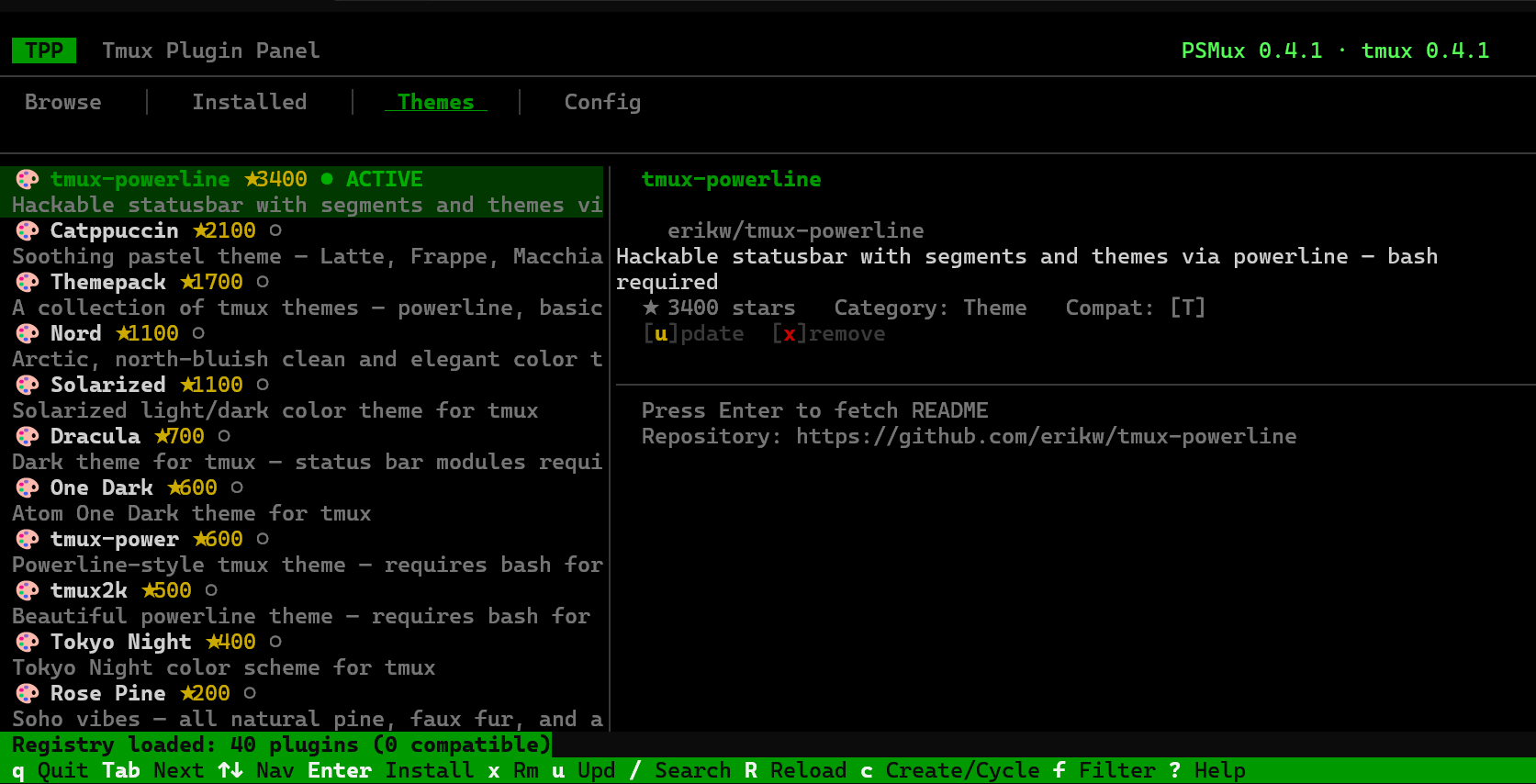
- Themes - Dedicated gallery for tmux themes. Install, activate, switch — one keypress.
Crecimiento de estrellas medido
- in 24h
- Recopilando historial
- in 7 days
- Recopilando historial
- in 15 days
- Recopilando historial
- in 1 month
- Recopilando historial
Cambios netos en períodos que se solapan, no totales diarios. Los datos no disponibles se dejan en blanco. Las estrellas indican interés, no calidad.
Acerca de
A full-fledged TUI plugin manager for tmux — the modern alternative to TPM. Browse, install, remove, update plugins and themes from a beautiful terminal interface.
Herramientas de desarrolloREADME.md
Original





⌨️ Tmux Plugin Panel
The best way to install plugins and themes for both PSMux and Tmux.
A full-featured TUI plugin manager — the modern alternative to TPM.
Browse, install, remove, update, and theme your tmux — all from a beautiful terminal interface.
🪟 Need native tmux for PowerShell? Install PSMux on Windows: winget install psmux
cargo install tmuxpanel · choco install tmuxpanel · scoop install tmuxpanel · winget install marlocarlo.tmuxpanel
Installation
Via Cargo (crates.io) — Windows, Linux, macOS
cargo install tmuxpanel
Linux users: You need a few system packages before building from source:
Debian / Ubuntu:
sudo apt install pkg-config libssl-dev build-essentialFedora / RHEL:
sudo dnf install pkg-config openssl-devel gcc makeArch Linux:
sudo pacman -S pkg-config openssl base-devel
Via Chocolatey (Windows)
choco install tmuxpanel
Via Scoop (Windows)
scoop bucket add tmuxpanel https://github.com/psmux/scoop-tmuxpanel
scoop install tmuxpanel
Via WinGet (Windows)
winget install marlocarlo.tmuxpanel
From GitHub Releases — Pre-built binaries
Download the latest release for your platform from GitHub Releases:
| Platform | Archive |
|---|---|
| Windows x64 | tmuxpanel-vX.Y.Z-windows-x64.zip |
| Windows x86 | tmuxpanel-vX.Y.Z-windows-x86.zip |
| Windows ARM64 | tmuxpanel-vX.Y.Z-windows-arm64.zip |
| Linux x64 | tmuxpanel-vX.Y.Z-linux-x64.tar.gz |
| Linux ARM64 | tmuxpanel-vX.Y.Z-linux-arm64.tar.gz |
| macOS x64 (Intel) | tmuxpanel-vX.Y.Z-macos-x64.tar.gz |
| macOS ARM64 (Apple Silicon) | tmuxpanel-vX.Y.Z-macos-arm64.tar.gz |
From Source
git clone https://github.com/psmux/Tmux-Plugin-Panel.git
cd Tmux-Plugin-Panel
cargo build --release
./target/release/tmuxpanel
After installation, three commands are available:
tmuxpanel— Main TUI plugin managertmuxplugins— Opens directly to the Browse tabtmuxthemes— Opens directly to the Themes browser
Why Tmux Plugin Panel?
TPM works, but it's a shell script with no UI, no search, no browsing. Tmux Plugin Panel gives you a complete graphical plugin manager — think "app store for tmux" — right inside your terminal. Works with both tmux on Linux/macOS and PSMux on Windows.
- Browse a curated registry of 40+ plugins, sorted by category and stars
- Search GitHub for any tmux plugin in real-time
- One-key install/remove/update — no editing config files manually
- Theme gallery — preview and switch tmux themes instantly
- Settings editor — toggle tmux options (mouse, status bar, keybindings) without memorizing
set -gsyntax - Auto-detection — finds tmux and PSMux installations, versions, and config files automatically
- Config management — creates, parses, and updates
tmux.conf/psmux.conffor you - Offline fallback — ships with an embedded plugin registry; works without internet
Features at a Glance
| Tab | What it does |
|---|---|
| ⌂ Dashboard | Quick-action cards for common tasks. Browse plugins, themes, configure settings, reset to defaults, manage registries. |
| Browse | Category sidebar + plugin list + detail panel. Search, filter by compat, install with Enter. |
| Installed | See all installed plugins. Update one (u), update all (U), remove (x), clean orphans (C). |
| Themes | Dedicated gallery for tmux themes. Install, activate, switch — one keypress. |
| Config | Full settings editor. Toggle booleans, cycle choices, edit values inline. Grouped by category. Reset individual settings or factory reset. |
Quick Start
Prerequisites
- tmux on Linux/macOS — or PSMux on Windows
- git on PATH (for cloning plugins). On Windows:
winget install Git.Git
First Run
- Tmux Plugin Panel auto-detects your tmux installation and config file
- If no
tmux.confexists, presscto create one - Browse plugins → press
Enterto install - Press
Rto reload tmux with your new plugins
Command Line
Everything the TUI does for plugins also works from the shell, so you can script it or keep your plugin list only in your config:
tmuxpanel install catppuccin/tmux tmux-plugins/tmux-yank   # clone and add to the config
tmuxpanel remove tmux-plugins/tmux-yank                    # delete and remove from the config
tmuxpanel update                                           # git pull every plugin (or name some)
tmuxpanel sync                                             # install every @plugin line not on disk yet
tmuxpanel list                                             # what the config declares and whether it loads
tmuxpanel --help
Use --config <path> to pick a config file. Without it the first config found is used (~/.psmux.conf, ~/.tmux.conf, and so on), the same one the TUI opens.
Config only workflow: add set -g @plugin 'org/repo' lines to your .psmux.conf or .tmux.conf, then run tmuxpanel sync. It clones what is missing and writes the matching run-shell / source-file line for each plugin.
Keybindings
| Key | Action |
|---|---|
q |
Quit |
Tab / Shift+Tab |
Switch tabs |
1–5 |
Jump to tab (1=Dashboard, 2=Browse, 3=Installed, 4=Themes, 5=Config) |
↑ ↓ / j k |
Navigate list (wraps around) |
← → / h l |
Switch category (Browse) / settings group (Config) |
Enter |
Install plugin / toggle setting / dashboard action |
x / d |
Remove plugin (with confirmation) |
u |
Update selected plugin |
U |
Update all plugins |
C |
Clean orphaned plugins |
/ |
Search plugins |
f |
Toggle compat filter (tmux / psmux) |
r |
Rescan config |
R |
Reload tmux config (tmux source-file) |
c |
Create config / cycle configs |
Backspace |
Reset single setting to default (Config tab) |
D |
Reset all settings to defaults (Config tab) |
Ctrl+D |
Factory reset entire config (Config tab) |
p |
Preview plugin/theme |
J / K |
Scroll README detail |
? |
Show help |
Architecture
src/
├── main.rs      # Entry point, terminal setup, event loop
├── app.rs       # Application state machine (5 tabs, selections, data)
├── ui.rs        # TUI rendering with ratatui (dashboard + 4 tabs + overlays)
├── registry.rs  # Plugin registry — embedded + external sources, search/filter
├── plugins.rs   # Git-based install/remove/update engine
├── themes.rs    # Theme management (install, activate, switch)
├── config.rs    # tmux.conf / psmux.conf parser, editor & factory reset
├── detect.rs    # Auto-detection of tmux/PSMux binaries & configs
└── github.rs    # GitHub API client for search & repo info
Plugin Registry
Tmux Plugin Panel ships with a curated registry of popular tmux plugins covering:
- ⭐ Essential — TPM, tmux-sensible, tmux-256color
- 🎨 Themes — Catppuccin, Dracula, Nord, Tokyo Night, Rose Pine, and more
- 💾 Session — tmux-resurrect, tmux-continuum
- 🧭 Navigation — vim-tmux-navigator, tmux-fzf
- 📊 Status Bar — tmux-cpu, tmux-battery, tmux-net-speed
- 📋 Clipboard — tmux-yank
- 🔧 Utility — tmux-fingers, tmux-open, tmux-logging
The registry is fetched from GitHub on startup and cached locally. An embedded copy is compiled into the binary as a fallback.
Custom Registry
You can extend the built-in registry by adding external sources (local JSON files or remote URLs). See REGISTRY_FORMAT.md for the full schema and setup instructions.
Registry sources are configured in ~/.config/tmuxpanel/registry_sources.json.
Tech Stack
- Rust — safe, fast, no runtime
- ratatui — modern terminal UI framework
- crossterm — cross-platform terminal manipulation
- tokio — async runtime for GitHub API calls
- reqwest — HTTP client
Configuration
Tmux Plugin Panel uses the standard TPM plugin syntax in your tmux config:
# ~/.tmux.conf
set -g @plugin 'tmux-plugins/tmux-sensible'
set -g @plugin 'catppuccin/tmux'
set -g @plugin 'tmux-plugins/tmux-resurrect'
Plugins are installed to ~/.tmux/plugins/ by default (~/.psmux/plugins/ for psmux).
Without TPM, tmuxpanel adds an activation line next to each @plugin line that points at the plugin's real entry script, for example run-shell '~/.tmux/plugins/tmux-resurrect/resurrect.tmux'. Run tmuxpanel sync to add any that are missing or broken.
Environment Variables
| Variable | Purpose |
|---|---|
GITHUB_TOKEN or GH_TOKEN |
Authenticate GitHub API requests (higher rate limits) |
License
MIT — see Cargo.toml.
Contributing
Contributions welcome! Feel free to open issues or submit pull requests.
- Fork the repo
- Create a feature branch
- Make your changes
- Submit a PR
Built with 🦀 Rust and ❤️ for the terminal
Explorar proyectos relacionados
codecrafters-io/build-your-own-x
Domina la programación recreando desde cero tus tecnologías favoritas.
562,340 estrellaspublic-apis/public-apis
Una lista colectiva de API gratuitas
498,777 estrellasmorluto/rea
Ingeniería inversa de cualquier cosa con agentes, desde el comportamiento de la aplicación hasta los binarios nativos.
457,534 estrellasopenclaw/openclaw
La IA que de verdad hace las cosas. Cualquier sistema operativo y cualquier plataforma. Al estilo langosta. 🦞
394,398 estrellas