
projectdiscovery/notify has 1,624 GitHub stars and 160 forks. GitHot measured +1 in 7 days. Last checked 2026-11-13 17:28 UTC. Last push 2026-11-02.
What you can do
- Supports for Slack / Discord / Telegram
- Supports for Pushover / Email
- Supports for Microsoft Teams / Google Chat
- Supports for File / Pipe input
Crecimiento de estrellas medido
- in 24h
- Actualización retrasada
- in 7 days
- +1
- in 15 days
- Recopilando historial
- in 1 month
- Recopilando historial
Cambios netos en períodos que se solapan, no totales diarios. Los datos no disponibles se dejan en blanco. Las estrellas indican interés, no calidad.
Acerca de
Notify is a Go-based assistance package that enables you to stream the output of several tools (or read from a file) and publish it to a variety of supported platforms.
Herramientas de desarrolloREADME.md
Original


Features • Installation • Providers • Usage • Running Notify • Notes • Join Discord
Notify is a Go-based assistance package that enables you to stream the output of several tools (or read from a file) and publish it to a variety of supported platforms.

Features
- Supports for Slack / Discord / Telegram
- Supports for Pushover / Email
- Supports for Microsoft Teams / Google Chat
- Supports for File / Pipe input
- Supports Line by Line / Bulk Post
- Supports using Single / Multiple providers
- Supports Custom Web-hooks
- Supports Custom data formatting
Usage
notify -h
This will display help for the tool. Here are all the switches it supports.
| Flag | Description | Example |
|---|---|---|
-bulk |
enable bulk processing | notify -bulk |
-char-limit |
max character limit per message (default 4000) | notify -cl 2000 |
-config |
notify configuration file | notify -config config.yaml |
-data |
input file to send for notify | notify -i test.txt |
-delay |
delay in seconds between each notification | notify -d 2 |
-id |
id to send the notification to (optional) | notify -id recon,scans |
-msg-format |
add custom formatting to message | notify -mf Hey {{data}} |
-no-color |
disable colors in output | notify -nc |
-provider-config |
provider config path | notify -pc provider.yaml |
-provider |
provider to send the notification to (optional) | notify -p slack,telegram |
-proxy |
HTTP/SOCKSv5 proxy to use with notify | notify -proxy http://127.0.0.1:8080 |
-rate-limit |
maximum number of HTTP requests to send per second | notify -rl 1 |
-silent |
enable silent mode | notify -silent |
-verbose |
enable verbose mode | notify -verbose |
-version |
display version | notify -version |
-update |
updates to latest version | notify -update |
-disable-update-check |
disables automatic update check | notify -duc |
Notify Installation
go install -v github.com/projectdiscovery/notify/cmd/notify@latest
Provider Config
The default provider config file can be created at $HOME/.config/notify/provider-config.yaml and can have the following contents:
slack:
  - id: "slack"
    slack_channel: "recon"
    slack_username: "test"
    slack_format: "{{data}}"
    slack_icon_emoji: ":ghost:"
    slack_webhook_url: "https://hooks.slack.com/services/XXXXXX"

  - id: "vulns"
    slack_channel: "vulns"
    slack_username: "test"
    slack_format: "{{data}}"
    slack_icon_emoji: ":ghost:"
    slack_webhook_url: "https://hooks.slack.com/services/XXXXXX"

discord:
  - id: "crawl"
    discord_channel: "crawl"
    discord_username: "test"
    discord_format: "{{data}}"
    discord_webhook_url: "https://discord.com/api/webhooks/XXXXXXXX"

  - id: "subs"
    discord_channel: "subs"
    discord_username: "test"
    discord_format: "{{data}}"
    discord_webhook_url: "https://discord.com/api/webhooks/XXXXXXXX"

telegram:
  - id: "tel"
    telegram_api_key: "XXXXXXXXXXXX"
    telegram_chat_id: "XXXXXXXX" # Optional topic id XXXXXXXX:Y
    telegram_thread_id: "YYYY" # optional forum topic / thread ID
    telegram_format: "{{data}}"
    telegram_parsemode: "Markdown" # None/Markdown/MarkdownV2/HTML (https://core.telegram.org/bots/api#formatting-options)
    telegram_preview: false # set true to enable link previews

pushover:
  - id: "push"
    pushover_user_key: "XXXX"
    pushover_api_token: "YYYY"
    pushover_format: "{{data}}"
    pushover_devices:
      - "iphone"

smtp:
  - id: email
    smtp_server: mail.example.com
    smtp_username: [email protected]
    smtp_password: password
    from_address: [email protected]
    smtp_cc:
      - [email protected]
    smtp_format: "{{data}}"
    subject: "Email subject"
    smtp_html: false
    smtp_disable_starttls: false

googlechat:
  - id: "gc"
    key: "XXXXXXXX"
    token: "XXXXXX"
    space: "XXXXXX"
    google_chat_format: "{{data}}"

teams:
  - id: "recon"
    teams_webhook_url: "https://<domain>.webhook.office.com/webhookb2/xx@xx/IncomingWebhook/xx"
    teams_format: "{{data}}"

gotify:
  - id: 'gotify'
    gotify_host: 'XXXXXX'
    gotify_port: '80'
    gotify_token: 'XXXXXX'
    gotify_format: '{{data}}'
    gotify_disabletls: false
    gotify_title: "recon"

custom:
  - id: webhook
    custom_webhook_url: http://host/api/webhook
    custom_method: GET
    custom_format: '{{data}}'
    custom_headers:
      Content-Type: application/json
      X-Api-Key: XXXXX

custom:
  - id: webhookJson
    custom_webhook_url: http://host/api/webhook
    custom_method: GET
    custom_format: '{"text":{{dataJsonString}} }'
    custom_headers:
      Content-Type: application/json
      X-Api-Key: XXXXX

custom:
  - id: webhook
    custom_webhook_url: http://host/api/webhook
    custom_method: GET
    custom_sprig: '{"text":"{{ .url }}"}'
    custom_headers:
      Content-Type: application/json
      X-Api-Key: XXXXX
Running Notify
Notify supports piping output of any tool or output file and send it to configured provider/s (e.g, discord, slack channel) as notification.
Send notification using piped(stdin) output
subfinder -d hackerone.com | notify -bulk
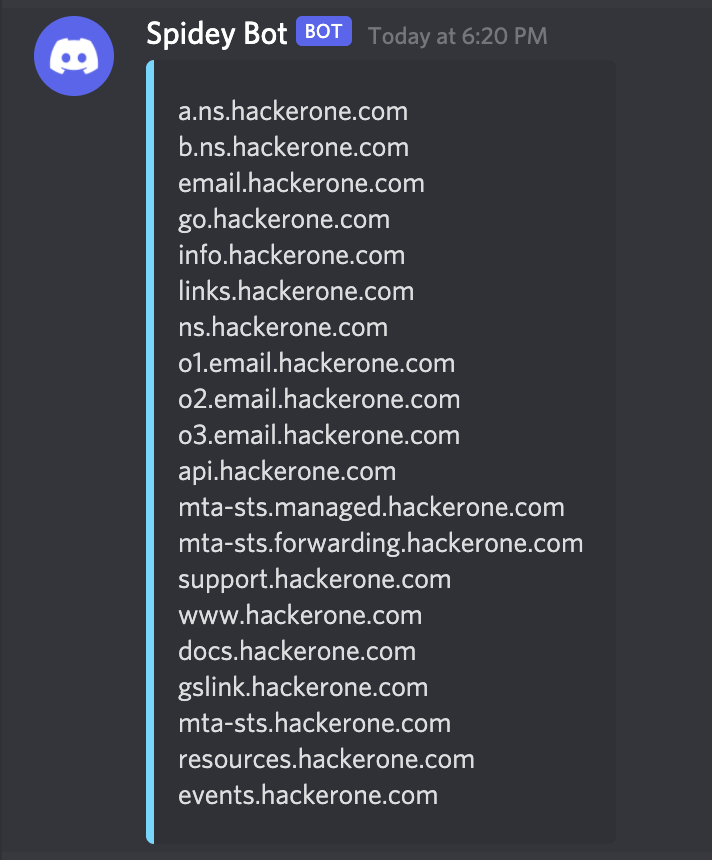
Send notification using output file
subfinder -d hackerone.com -o h1.txt; notify -data h1.txt
Send notification using output file in bulk mode
subfinder -d hackerone.com -o h1.txt; notify -data h1.txt -bulk
Send notification using output file to specific provider's
subfinder -d hackerone.com -o h1.txt; notify -data h1.txt -bulk -provider discord,slack
Send notification using output file to specific ID's
subfinder -d hackerone.com -o h1.txt; notify -data h1.txt -bulk -id recon,vulns,scan
Example Uses
Following command will enumerate subdomains using SubFinder and probe alive URLs using httpx, runs Nuclei templates and send the nuclei results as a notifications to configured provider/s.
subfinder -d intigriti.com | httpx | nuclei -tags exposure -o output.txt; notify -bulk -data output.txt
Provider Config
The tool tries to use the default provider config ($HOME/.config/notify/provider-config.yaml), it can also be specified via CLI by using provider-config flag.
To run the tool with custom provider config, just use the following command.
notify -provider-config providers.yaml
Notify Config
Notify flags can be configured at default config ($HOME/.config/notify/config.yaml) or custom config can be also provided using config flag.
Notes
- As default notify sends notification line by line
- Use
-bulkto send notification as entire message/s (messages might be chunked)
References
Notify is made with 🖤 by the projectdiscovery team.
Explorar proyectos relacionados
codecrafters-io/build-your-own-x
Domina la programación recreando desde cero tus tecnologías favoritas.
562,340 estrellaspublic-apis/public-apis
Una lista colectiva de API gratuitas
498,777 estrellasmorluto/rea
Ingeniería inversa de cualquier cosa con agentes, desde el comportamiento de la aplicación hasta los binarios nativos.
457,534 estrellasopenclaw/openclaw
La IA que de verdad hace las cosas. Cualquier sistema operativo y cualquier plataforma. Al estilo langosta. 🦞
394,398 estrellas