
mutonby/shortcast
mutonby/shortcast has 402 GitHub stars and 55 forks. GitHot measured 0 stars in 24 hours and 0 in 7 days. Last checked 2026-11-25 03:08 UTC. Last push 2026-06-04.
Crecimiento de estrellas medido
- in 24h
- 0
- in 7 days
- 0
- in 15 days
- Recopilando historial
- in 1 month
- Recopilando historial
Cambios netos en períodos que se solapan, no totales diarios. Los datos no disponibles se dejan en blanco. Las estrellas indican interés, no calidad.
Acerca de
Native macOS app: drop a long video → auto-cut viral shorts, captioned for TikTok/Reels/YouTube, reframed to vertical, and scheduled. 100% on-device (Gemma 4 12B + WhisperKit + MLX).
Creación y multimediaREADME.md
OriginalShortcast
Long videos → ready-to-post shorts for TikTok, Instagram Reels and YouTube Shorts. Found, cut, captioned, reframed and scheduled — fully on your Mac. Open-source.



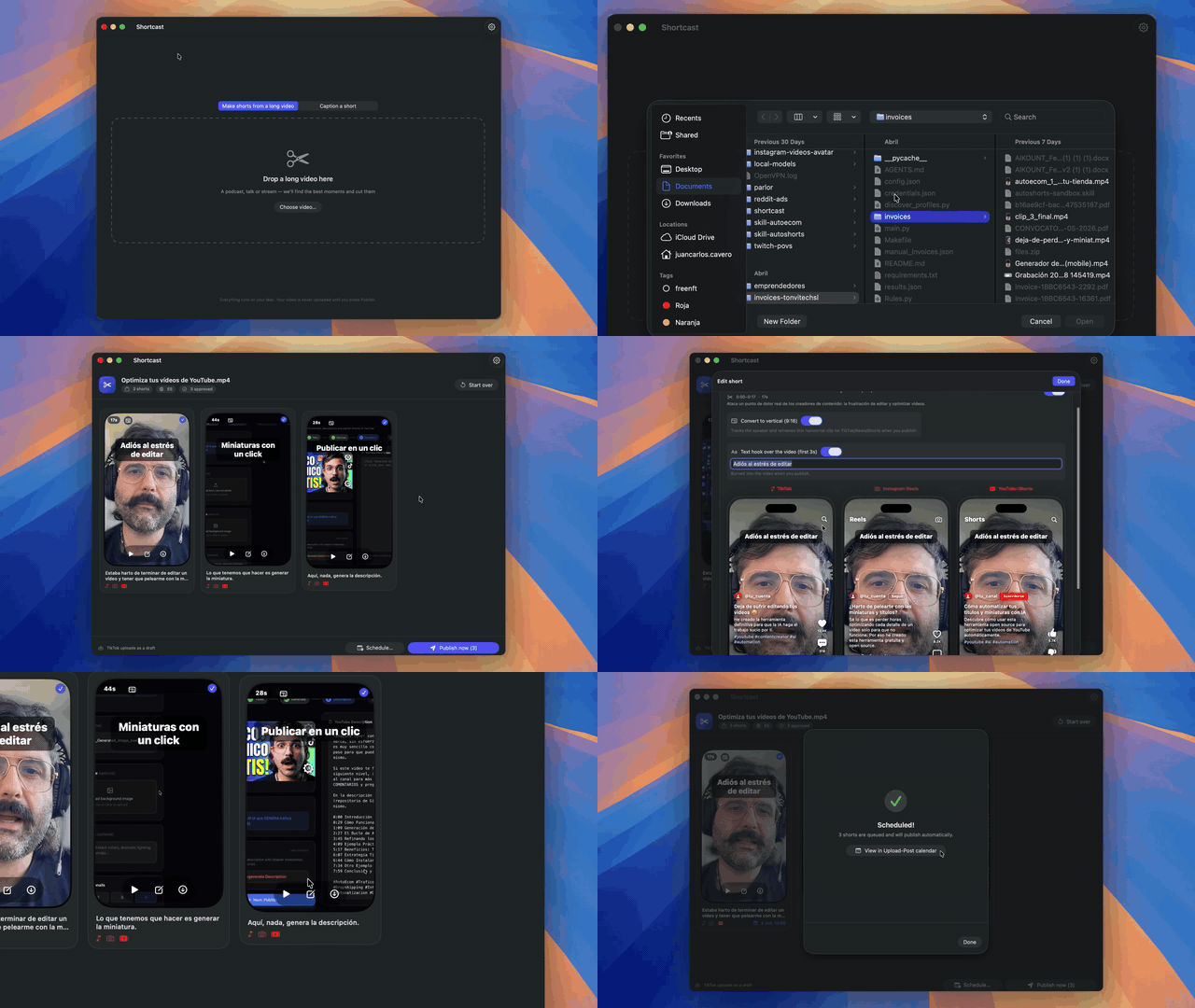
Drop a long video → it transcribes, finds the best moments, cuts them, writes the copy, reframes to vertical → review the grid → publish or schedule the whole week.
What it does
Shortcast has two modes:
🎬 Make shorts from a long video (the main one)
Drop a podcast, talk, stream or any long recording. Shortcast transcribes it on-device, finds the best 3–6 viral moments, cuts each one, and writes the full post copy for all three platforms — all in one pass. Horizontal (16:9) footage is reframed to vertical 9:16, tracking the speaker's face. You get a grid of finished shorts you can play with sound, edit, download, publish, or schedule one-per-day across the week.
✏️ Caption a short
Already have a short vertical clip? Drop it and Shortcast watches the frames and hears the audio (Gemma 4 E4B, multimodal) and writes the three platform captions directly, rendered as editable phone-style previews.
What's different about Shortcast:
- 🛰️ Nothing leaves your Mac during processing. No cloud model, no upload. Your video is only sent to a network when you choose to publish it.
- 🧠 One model does the thinking. A single on-device LLM reads the whole transcript, picks the moments and writes every caption in the same pass.
- 🎯 Tuned per platform. TikTok gets punchy. Instagram gets storytelling and 20–30 hashtags. YouTube gets short, search-friendly titles — in the language spoken in the video.
- 📐 Auto vertical reframe. On-device face tracking (Vision) turns 16:9 into 9:16, panning to keep the speaker centred, with a blurred-background fallback when there's no clear face.
- 🗓️ Schedule the week in one click. Distribute approved shorts one per day, pick the time, and Upload-Post publishes them automatically.
- 🪶 No Python. No Electron. No embedded runtime. Just Swift, MLX, AVFoundation, Vision.
How a long video becomes shorts
  ┌──────────────────────────────────────────────────────────────────────┐
  │  YOUR MAC — nothing leaves until you press Publish                    │
  │                                                                       │
  │  drop a long video                                                    │
  │        │                                                              │
  │        ▼                                                              │
  │  ┌──────────────┐   ┌────────────────────┐   ┌───────────────────┐    │
  │  │ WhisperKit   │──►│  Director LLM       │──►│ AVFoundation      │    │
  │  │ large-v3     │   │  Gemma 4 12B (MLX)  │   │ cut each clip     │    │
  │  │ transcribe   │   │  finds moments +    │   │ + reframe 9:16    │    │
  │  │ (GPU)        │   │  writes 3 captions  │   │  (Vision tracking)│    │
  │  └──────────────┘   │  in ONE pass        │   │ + hook overlay    │    │
  │                     └────────────────────┘   └───────────────────┘    │
  │                                                       │                │
  │                                                       ▼                │
  │                                              ┌───────────────────┐     │
  │                                              │ grid of shorts:   │     │
  │                                              │ play w/ sound,    │     │
  │                                              │ edit, download,   │     │
  │                                              │ approve           │     │
  │                                              └───────────────────┘     │
  └──────────────────────────────────────────────────────────────────────┘
                                  │  Publish now  /  Schedule the week
                                  ▼
                          ┌─────────────────┐
                          │   Upload-Post   │  TikTok · Instagram · YouTube
                          │       API       │  (now, or scheduled per day)
                          └─────────────────┘
Concretely:
- Transcribe. If the video has a
.srt/.vttsidecar, it's used instantly. Otherwise WhisperKit (large-v3) transcribes on the GPU. The transcript's language is detected from the text (NaturalLanguage), so captions stay in the spoken language. - Find the moments + write the copy. The Director — an on-device LLM — reads the whole transcript and returns a single JSON: the best clips (start/end, why, hook, a short on-screen overlay) and the full TikTok / Instagram / YouTube caption package for each, in one pass. A tolerant parser strips fences/thinking and validates clip durations.
- Cut. AVFoundation cuts each moment to its own file.
- Reframe (optional, automatic for horizontal clips). Vision samples faces across
the clip; if the speaker is found, an
AVMutableVideoCompositionpans a 9:16 crop to follow them (GPU-interpolated transform ramps). No clear face → a blurred-background letterbox. A short text hook can be burned over the top. - Review. A grid of phone-style tiles — loop each short, play it with sound, edit the
captions, download the rendered
.mp4, or approve it. - Publish or schedule. Publish now, or schedule the week: approved shorts go out
one per day at a time you choose, via Upload-Post's
scheduled_date. TikTok lands as a draft by default so you can finish in-app.
Choosing the model
Settings → Caption writer picks the on-device model that finds the moments and writes the captions:
| Model | Role | Notes |
|---|---|---|
| Gemma 4 12B (default) | Director + inline captions | Strongest writing, one model, one pass. Loaded via MLX. |
| Qwen 3.5 9B | Director + inline captions | Lighter and a bit faster, one pass. Huge context window. |
| Gemma 4 E4B | Clip-watching copywriter | Multimodal — watches each clip (frames + audio) and captions it in a separate pass. Also the model used by Caption a short. |
The model downloads once on first use. Everything runs offline afterwards.
Install
Releases are unsigned (not yet notarized), so macOS Gatekeeper blocks them the first time. This is expected — one Terminal command fixes it.
Download
Shortcast.dmgfrom the latest release.Open the DMG and drag Shortcast to your Applications folder.
Strip the download-quarantine flag, then open the app normally:
xattr -dr com.apple.quarantine /Applications/Shortcast.appNow double-click Shortcast and it launches.
[!NOTE] Seeing “Shortcast.app is damaged and can’t be opened”? That's the same Gatekeeper quarantine — on Apple Silicon, recent macOS shows “damaged” instead of “unidentified developer” and hides the Open Anyway button. The app is not actually damaged; the
xattrcommand above is the fix.
Prefer the GUI? (older macOS)
Double-click Shortcast, then open System Settings → Privacy & Security, scroll to the message about Shortcast and click Open Anyway. On recent macOS this button often doesn't appear for unsigned apps — use the Terminal command instead.
First run
- Shortcast downloads the models it needs on first use, with a visible progress bar: the Director (Gemma 4 12B ≈ 7 GB, or Qwen 3.5 9B ≈ 5 GB) and WhisperKit large-v3 for transcription. Happens once, then it works offline.
- Open Settings (⌘,) and add your Upload-Post API key and profile name (the one from Manage Users, not your social handle).
- Optionally set a caption language and paste a few of your own captions as style examples — the model will match your voice.
You can generate shorts without Upload-Post; only publishing/scheduling needs it.
Build from source
You need Xcode 16+ and XcodeGen. On Apple Silicon. macOS 15+.
brew install xcodegen
git clone https://github.com/mutonby/shortcast
cd shortcast
xcodegen generate
open Shortcast.xcodeproj
Build and run the Shortcast scheme. The .xcodeproj is generated from
project.yml and intentionally not committed — xcodegen regenerates it.
CLI builds need
-skipMacroValidation:xcodebuild -project Shortcast.xcodeproj -scheme Shortcast \ -configuration Debug -skipMacroValidation -destination 'platform=macOS' build
Release DMG
.github/workflows/release.yml builds an unsigned .dmg and attaches it to the
GitHub Release whenever a v* tag is pushed:
git tag v0.1.0
git push origin v0.1.0
The stack
| Layer | Used |
|---|---|
| UI | SwiftUI · AVKit |
| Transcription | WhisperKit large-v3 (Metal/GPU) |
| Director model | Gemma 4 12B or Qwen 3.5 9B (4-bit), runs as a text LLM via MLX |
| Clip-watcher | Gemma 4 E4B (4-bit), text + vision + audio |
| Inference | MLX (Metal, Neural Engine) |
| Gemma 4 runtime | gemma-4-swift-mlx, vendored in Vendor/ |
| Vertical reframe | Vision (face detection) + AVFoundation (transform ramps / Core Image) |
| Media | AVFoundation (cut, sample, export) · AVKit playback |
| Publishing | Upload-Post API (publish + schedule) |
| Build | XcodeGen · GitHub Actions |
Privacy
Transcription, moment-finding, captioning, cutting and reframing all run inside the app, on your Mac. The only outbound traffic before you publish is:
- First use only: one-time downloads of the model weights from Hugging Face.
- On Publish / Schedule: an upload to Upload-Post with the rendered short and the copy you approved (immediately, or at the scheduled time).
Your Upload-Post API key is stored locally on your Mac (app preferences) and is only ever sent to Upload-Post over HTTPS when you publish. It is never written into the repository.
Known limitations
- The Director runs a large model on-device. On an M1 Pro, a ~2-minute video takes a few minutes end-to-end (transcription + generation). Faster Macs (M3/M4) are quicker.
- Caption a short uses Gemma 4 E4B, whose audio encoder hears the first 30 seconds.
- The app is unsigned (see Install). Code signing + notarization will come once the project stabilises.
- One video at a time — no history, no batch processing. By design, for now.
- Upload-Post free tier limits monthly uploads. One publish to three networks counts as three.
Acknowledgements
- Google for the Gemma 4 family — open weights with full multimodal capability.
- Apple's MLX team for MLX and mlx-swift-lm.
- Vincent Gourbin for gemma-4-swift-mlx, the native Gemma 4 runtime we vendor.
- Argmax for WhisperKit.
- Alibaba for the Qwen 3.5 open weights.
- Upload-Post for the cross-platform publishing API.
License
Apache License 2.0 — see LICENSE.
Third-party components are listed in NOTICE. The vendored
gemma-4-swift-mlx runtime is MIT-licensed; the Gemma 4 weights are governed by
Google's Gemma Terms of Use.
Explorar proyectos relacionados
Cargando…