
marcoturi/react-redux-boilerplate
marcoturi/react-redux-boilerplate has 103 GitHub stars and 16 forks. GitHot measured 0 stars in 24 hours and 0 in 7 days. Last checked 2026-11-22 15:50 UTC. Last push 2026-11-20.
What you can do
- Build - Vite 8 + React 19 + @vitejs/plugin-react + React Compiler + pnpm + TypeScript 7
- State - Redux Toolkit 2 (includes RTK Query, Immer, Reselect)
- UI - Radix + shadcn/ui + Tailwind CSS 4
- Linting & formatting - Biome
Crecimiento de estrellas medido
- in 24h
- 0
- in 7 days
- 0
- in 15 days
- Recopilando historial
- in 1 month
- Recopilando historial
Cambios netos en períodos que se solapan, no totales diarios. Los datos no disponibles se dejan en blanco. Las estrellas indican interés, no calidad.
Acerca de
A meticulously crafted, extensible, and robust architecture for constructing production-grade React 19 applications 🚀
Web y aplicacionesREADME.md
Original



A production-ready, batteries-included starter template for building long-lived React applications. It provides opinionated guidelines for the key decisions every team faces at scale:
- Folder structure -- Vertical slice architecture for maintainability and easy extraction into a monorepo.
- State management -- Redux Toolkit 2 for predictable, traceable state with clear separation of concerns.
- Release automation -- Semantic-release for hands-off versioning, changelogs, and tags.
- Code quality -- Biome for blazing-fast linting and formatting in a single tool.
- UI system -- Radix + shadcn/ui + Tailwind CSS 4 for accessible, headless, minimal-dependency components.
- Testing -- Vitest + Testing Library for unit tests (Node) and component tests (browser mode), Cucumber + Playwright for E2E.
- Error tracking -- Sentry with Redux state replay for production debugging.
Features
| Category | Stack |
|---|---|
| Build | Vite 8 + React 19 + @vitejs/plugin-react + React Compiler + pnpm + TypeScript 7 |
| State | Redux Toolkit 2 (includes RTK Query, Immer, Reselect) |
| UI | Radix + shadcn/ui + Tailwind CSS 4 |
| Linting & formatting | Biome |
| Release | Husky + Commitlint + Semantic-release |
| API mocking | MSW (browser + test) |
| Unit & integration tests | Vitest 5 + Testing Library |
| E2E tests | Cucumber + Playwright |
| Monitoring | Sentry |
| Security | CodeQL analysis of the code and the workflows on pushes and pull requests to main, and weekly |
| AI-Ready | AGENTS.md — architecture rules and coding conventions for AI assistants |
Getting Started
Prerequisites
| Requirement | Version | Notes |
|---|---|---|
| Node.js | 26.x | Defined in .nvmrc. Use fnm or nvm: fnm use / nvm use |
| pnpm | 12.x | Pinned in packageManager: install pnpm with npm i -g pnpm, and it switches to that version by itself |
Quick start
npx degit marcoturi/react-redux-boilerplate my-app
cd my-app
git init           # Husky installs the Git hooks only in a repository

pnpm install       # Install dependencies
pnpm create:env    # Create .env from .env.example

# Chromium for the component tests, the E2E tests and the pre-commit hook
pnpm exec playwright install chromium

pnpm dev           # Start dev server at http://localhost:5173
degit also copies the boilerplate's release history and names: delete CHANGELOG.md, set name, description and author in package.json and version to 0.0.0 (Sentry reports it as the release until semantic-release sets the first one), and replace the name React Boilerplate in index.html, src/UI/Layout/Header/Logo.tsx and the page <title>s in src/routes/ (src/routes/index.spec.tsx asserts one of them).
Environment variables
| Variable | Required | Description |
|---|---|---|
VITE_API_URL |
Yes | Base URL of the API, inlined by pnpm build: without it the app stops at startup, also on the dev server and in the tests |
VITE_API_MOCKING |
No | true serves the API from the MSW handlers on the dev server; keep it for the E2E tests |
VITE_SENTRY_DSN |
No | Sentry DSN: only builds report, and only when it is set |
Commands
| Command | Description |
|---|---|
pnpm dev |
Start development server with HMR |
pnpm build |
Type-check + production build (output in dist/) |
pnpm preview |
Preview the production build locally |
pnpm test |
Run unit and component tests (Vitest, components in Chromium) |
pnpm test:coverage |
Run tests with V8 coverage and its thresholds |
pnpm e2e:local |
Run E2E tests (start dev server first in another terminal) |
pnpm e2e:debug |
Run only @only-tagged E2E scenarios with --fail-fast |
pnpm check |
Biome lint/format check + TypeScript type check |
pnpm check:fix |
Auto-fix lint/format issues, then type check |
pnpm check:ci |
pnpm check for CI, with Biome annotations on pull requests |
pnpm format |
Format all files with Biome |
pnpm lint |
Lint all files with Biome (pnpm lint:fix applies fixes) |
pnpm type:check |
TypeScript type check only (tsc -b) |
Folder Structure and Code Organization
TL;DR -- Embrace vertical slice architecture. Each feature owns its components, state, API calls, and tests.
src/
├── main.tsx                  → App entry point
├── AppProvider.tsx           → Providers (Redux, RouterProvider)
├── assets/                   → Static files (images, fonts, etc.)
├── routes/                   → Data router (client-side SPA, no SSR) + page components
│   ├── index.tsx             → Route tree: layout, layout and page ErrorBoundary, loaders, lazy pages
│   ├── Home/
│   ├── Subscriptions/
│   └── NotFound/
├── shared/
│   ├── config/               → Environment variables, Sentry setup
│   ├── helpers/              → Generic utilities (localStorage, error tracking, etc.)
│   └── store/                → Redux store setup, base RTK Query API, typed hooks
├── UI/
│   ├── Base/                 → shadcn/ui components, managed by the shadcn CLI
│   ├── Elements/             → Project UI components built on Base and Tailwind
│   └── Layout/               → Header and global CSS (theme)
├── features/                 → Feature slices
│   └── <feature>/
│       ├── store/            → Redux slice, selectors, API endpoints, effects, types, specs
│       └── components/       → Feature-specific React components
├── mocks/                    → MSW handlers and mock data, browser worker, Node server
└── test/                     → Test helpers and Vitest setup files
Why vertical slices over alternatives like Atomic Design or Feature-Sliced Design?
- Less navigation -- Feature code lives in one folder, not scattered across layers.
- Easy extraction -- A feature folder can move to a monorepo package with minimal refactoring: files inside a feature import each other with relative paths, and everything outside the feature through the
@/alias. - Parallel development -- Teams can work on different features without conflicts.
- Simpler testing -- Each feature can be tested in isolation.
FAQ
Q: What if the features/ folder grows too large?
A: Group related features inside scope folders (e.g., features/billing/invoices/). Aim for no more than ~6 folders at the same level.
Q: I only have a Redux slice with no components. Where does it go?
A: Still in features/. It may grow components later, and a consistent location makes it easy to find.
State Management: Why Redux?
TL;DR -- Redux keeps state changes predictable and traceable. Combined with Sentry, you get full replay of every user action in production.
Redux Toolkit 2 enforces a clear separation of responsibilities:
| Layer | Responsibility |
|---|---|
| Components | Dispatch actions, display data via selectors. Zero business logic. |
| Selectors & Reducers | Business and domain logic. Pure functions -- easy to test and compose. |
| RTK Query / Thunks / Listener Middleware | Side effects (API calls, async flows, cross-slice reactions). |
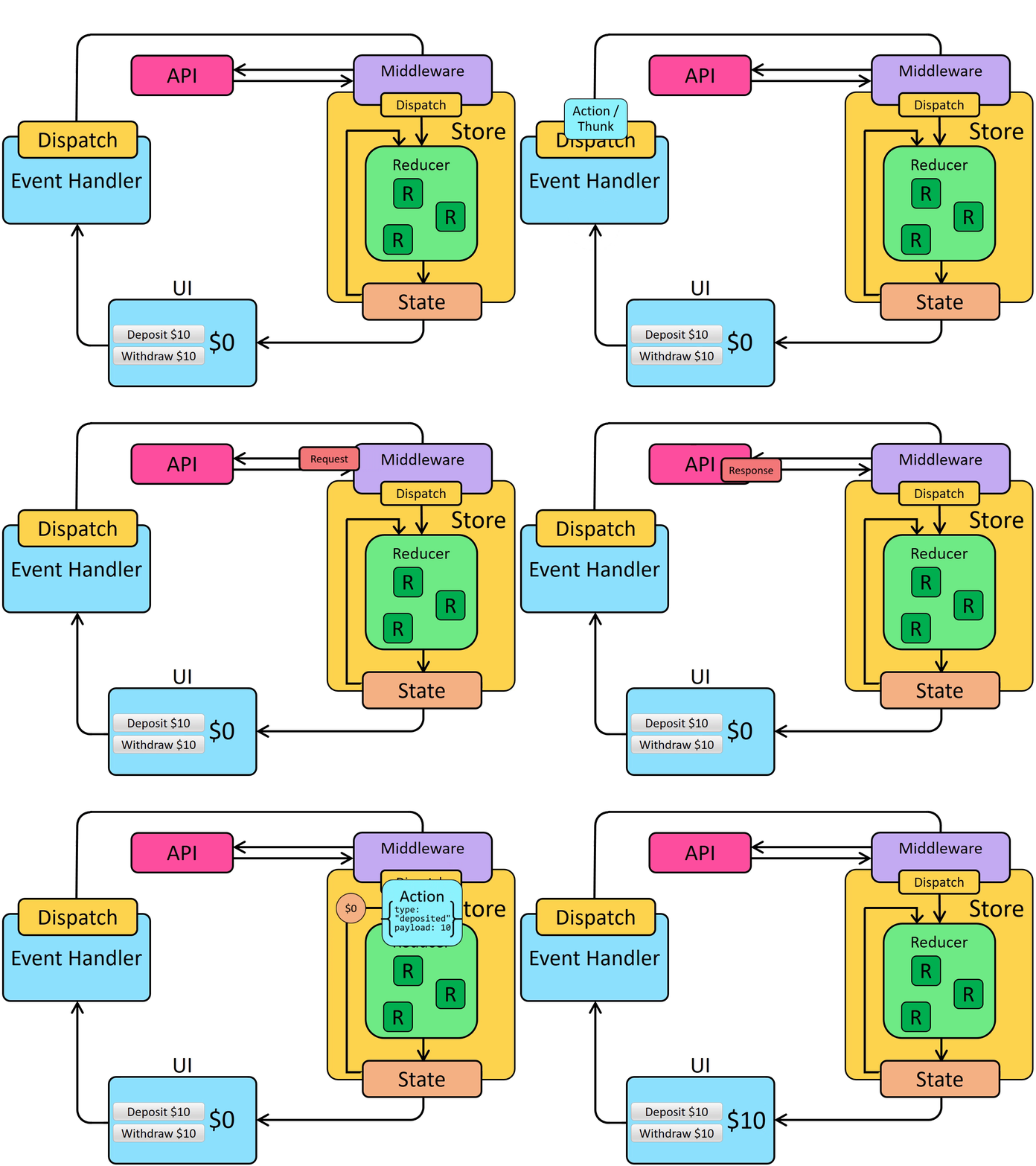
Newer state management solutions often trade boilerplate for ambiguity about where business logic belongs. Without a clear, project-defined location, domain logic gravitates into UI components -- making them large, hard to test, and hard to maintain.
With Redux, typed hooks (useAppDispatch, useAppSelector) and pure selectors keep components thin and logic centralized.
UI Components and Style System
TL;DR -- Pick a headless UI library with few dependencies. Encapsulate it so you can replace it later.
Radix + shadcn/ui
- Minimal dependencies -- Components are copied into your project, not installed as a black-box package.
- Separation of design and behavior -- Radix provides the accessible, headless behavior; shadcn/ui provides styled components on top of it that you own and customize.
- Accessible by default -- All components adhere to WAI-ARIA patterns. See this talk for details.
shadcn/ui components (style radix-vega) live in src/UI/Base/, one kebab-case file each (src/UI/Base/button.tsx), and are managed with the shadcn CLI, installed as a dev dependency:
pnpm exec shadcn add dialog          # adds src/UI/Base/dialog.tsx
pnpm exec shadcn add button --diff   # compare a component with the upstream version
pnpm check:fix                       # format the added files with Biome
Keep the files in src/UI/Base/ close to upstream so they stay easy to update. Compositions and project-specific components go in src/UI/Elements/<Name>/ (e.g. SkeletonList).
Tailwind CSS 4
Tailwind CSS 4 is used via the @tailwindcss/vite plugin -- no PostCSS config needed. Key benefits:
- Utility-first -- Consistent styling with zero CSS files to maintain.
- Design tokens -- Theme defined as CSS variables in
src/UI/Layout/global.css: tokens that read other variables in@theme inline, the type scale in@theme. - Built-in responsive and a11y -- First-class responsive utilities and accessibility helpers.
- Tree-shaken -- Only used classes end up in the production bundle.
Testing
Unit and component tests
Tests use Vitest 5 with Testing Library. Test files live next to the code they test: .spec.ts files (store, selectors, helpers) run in Node, .spec.tsx files (components, pages, routes) run in a real Chromium through Vitest browser mode. Install Chromium once with pnpm exec playwright install chromium.
API mocking uses MSW: the same request handlers in src/mocks/handlers power both development and tests, and a request without a handler fails the test. In development the msw/vite plugin serves the worker script straight from node_modules, so there is no mockServiceWorker.js to regenerate when MSW is upgraded, and neither the worker nor the mocks reach the production build.
pnpm test:coverage fails when coverage drops under the thresholds in vite.config.mts.
E2E tests
E2E tests use Cucumber (Gherkin syntax) with Playwright as the browser automation engine.
# First time setup (also needed by the component tests)
pnpm exec playwright install chromium

# Run (dev server must be running)
pnpm dev &
pnpm e2e:local
Build Optimization
Production builds put the libraries needed at startup in vendor chunks, which change rarely and stay cached:
| Chunk | Contents |
|---|---|
vendor-react |
React, React DOM, React Router, React Redux |
vendor-redux |
Redux Toolkit (RTK Query, Immer, Reselect) |
vendor-sentry |
Sentry SDK (session replay loads later from the Sentry CDN) |
Routes are lazy-loaded through the route lazy property of the React Router data router, and each route loader starts the page's API request while the page code downloads, so code and data load in parallel. UI libraries (Radix, Lucide icons, CVA) have no vendor chunk: each route loads only the components it uses.
Release System
TL;DR -- Merge to
mainand everything else is automated.
The release pipeline is fully automated with semantic-release:
- Every pull request to
mainruns the checks: Biome, types, unit and component tests with coverage thresholds, build and E2E. - Developer merges the PR into
main, and the same checks run again. - semantic-release analyzes commits, determines the version bump, generates the changelog, creates a GitHub release and git tag.
No manual version bumps. No manual changelog edits.
Toolkit
| Tool | Purpose |
|---|---|
| Commitlint | Enforces Conventional Commits format (feat:, fix:, chore:, etc.) |
| Husky | Runs Biome and tests on pre-commit, commitlint on commit-msg |
| Semantic-release | Automates versioning, changelogs, GitHub releases, and git tags |
Why Conventional Commits?
- Automated changelogs -- Commit messages drive what goes into
CHANGELOG.md. - Semantic versioning --
feat= minor;fix,perf,revert,refactor,styleanddocs(README)= patch; a!after the type (feat!:) or aBREAKING CHANGEfooter = major. - Readable history -- Anyone can scan
git logand understand the nature of each change at a glance.
Format and Style
TL;DR -- One tool, one config. Biome handles linting, formatting, and import sorting.
Biome replaces the traditional ESLint + Prettier combo with a single, Rust-powered tool. It provides:
- 300+ lint rules covering correctness, style, complexity, and suspicious patterns
- Built-in formatter for TypeScript, JSX, JSON, and CSS
- Automatic import sorting and
import typeenforcement - Sub-second execution on the entire codebase
Configuration lives in biome.json. The pre-commit hook runs biome check --staged and the tests automatically.
Error Handling and Analytics
TL;DR -- When Redux is used correctly, every user action is traceable in production.
Sentry is integrated with the Redux store enhancer, which means:
- In development -- Redux DevTools shows every state transition in real time.
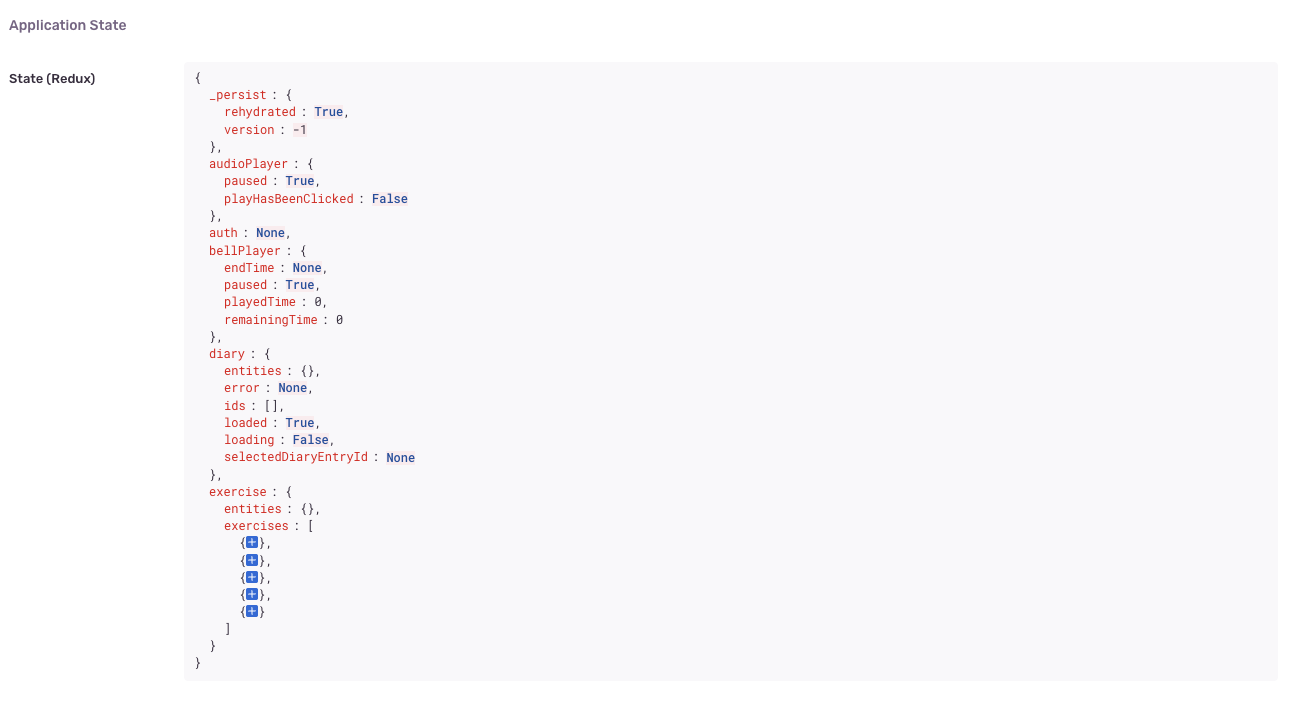
- In production -- Sentry captures the full sequence of dispatched Redux actions leading up to an error, plus the application state at the moment of the crash.
Sentry reports only from builds (pnpm build, in any --mode, which becomes the Sentry environment) with VITE_SENTRY_DSN set; it stays off on the dev server, in tests and when the DSN is empty.
For readable stack traces, run pnpm build with SENTRY_AUTH_TOKEN, SENTRY_ORG and SENTRY_PROJECT set in the shell or the CI environment (not in .env: the Vite config reads process.env): the Sentry Vite plugin uploads the source maps and then deletes them from dist/, and a failed upload fails the build. Without the token the build has no source maps.
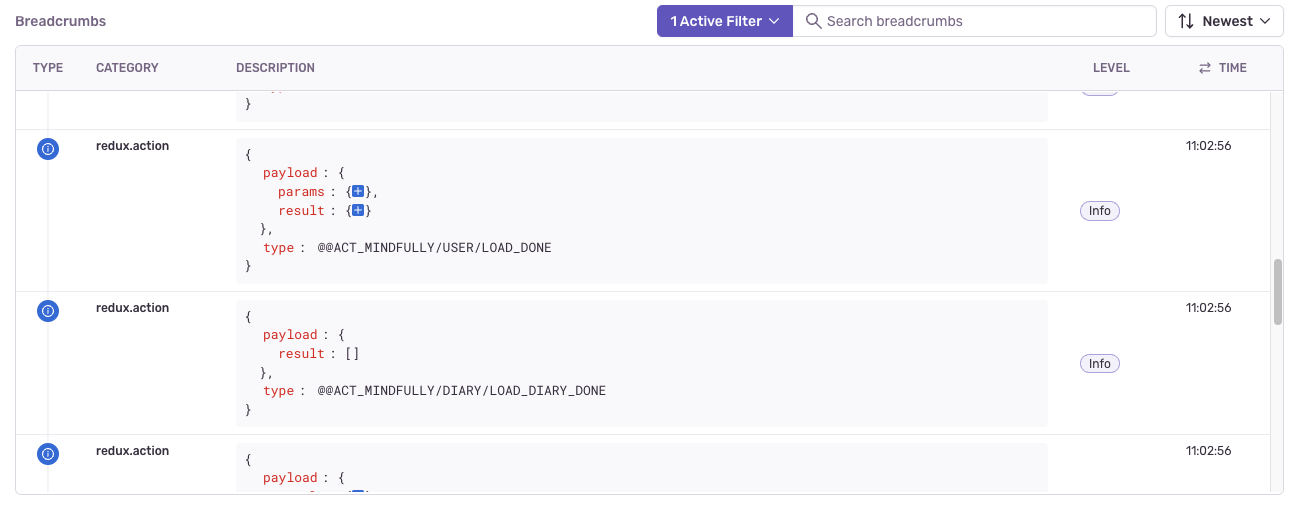
This allows you to reproduce issues by replaying the exact action sequence, or even rehydrating the state snapshot:
Recommended Libraries
These are not included in the boilerplate but are recommended additions depending on your needs:
| Need | Recommendation | Notes |
|---|---|---|
| Dates | date-fns | Modular, tree-shakeable. Moment.js is in maintenance mode. |
| Forms | react-hook-form | Zero dependencies, excellent performance and DX. |
Contributing
Contributions are welcome! To get started:
- Clone the repo and run the Quick start commands from
pnpm installon - Create a branch:
git checkout -b feat/your-feature - Make your changes
- Verify:
pnpm check(lint, format, types),pnpm testandpnpm build, pluspnpm e2e:localwhen routes or user flows change - Commit using Conventional Commits (enforced by the commit-msg hook)
- Open a Pull Request
This project includes an
AGENTS.mdfile with detailed instructions for AI coding agents.
License
Explorar proyectos relacionados
Cargando…