
junian/markdown-resume
junian/markdown-resume has 722 GitHub stars and 160 forks. GitHot measured +1 stars in 24 hours and +1 in 7 days. Last checked 2026-11-25 05:40 UTC. Last push 2026-11-15.
What you can do
- Write your resume in Markdown and preview it in real time — smooth experience!
- Works offline (PWA)
- Export to PDF, Markdown, self-contained HTML, and DOCX
- Export to A4 and US Letter paper sizes
Crecimiento de estrellas medido
- in 24h
- +1
- in 7 days
- +1
- in 15 days
- Recopilando historial
- in 1 month
- Recopilando historial
Cambios netos en períodos que se solapan, no totales diarios. Los datos no disponibles se dejan en blanco. Las estrellas indican interés, no calidad.
Acerca de
Crea currículums en Markdown con un formato fácil de procesar tanto por los sistemas ATS como por las personas. Un creador de currículums gratuito y de código abierto, respetuoso con la privacidad y local por diseño. Sencillo, privado y local.
SeguridadREADME.md
Original
Markdown Resume
Write an ATS-friendly resume in Markdown. Available for everyone, optimized for developers.


About
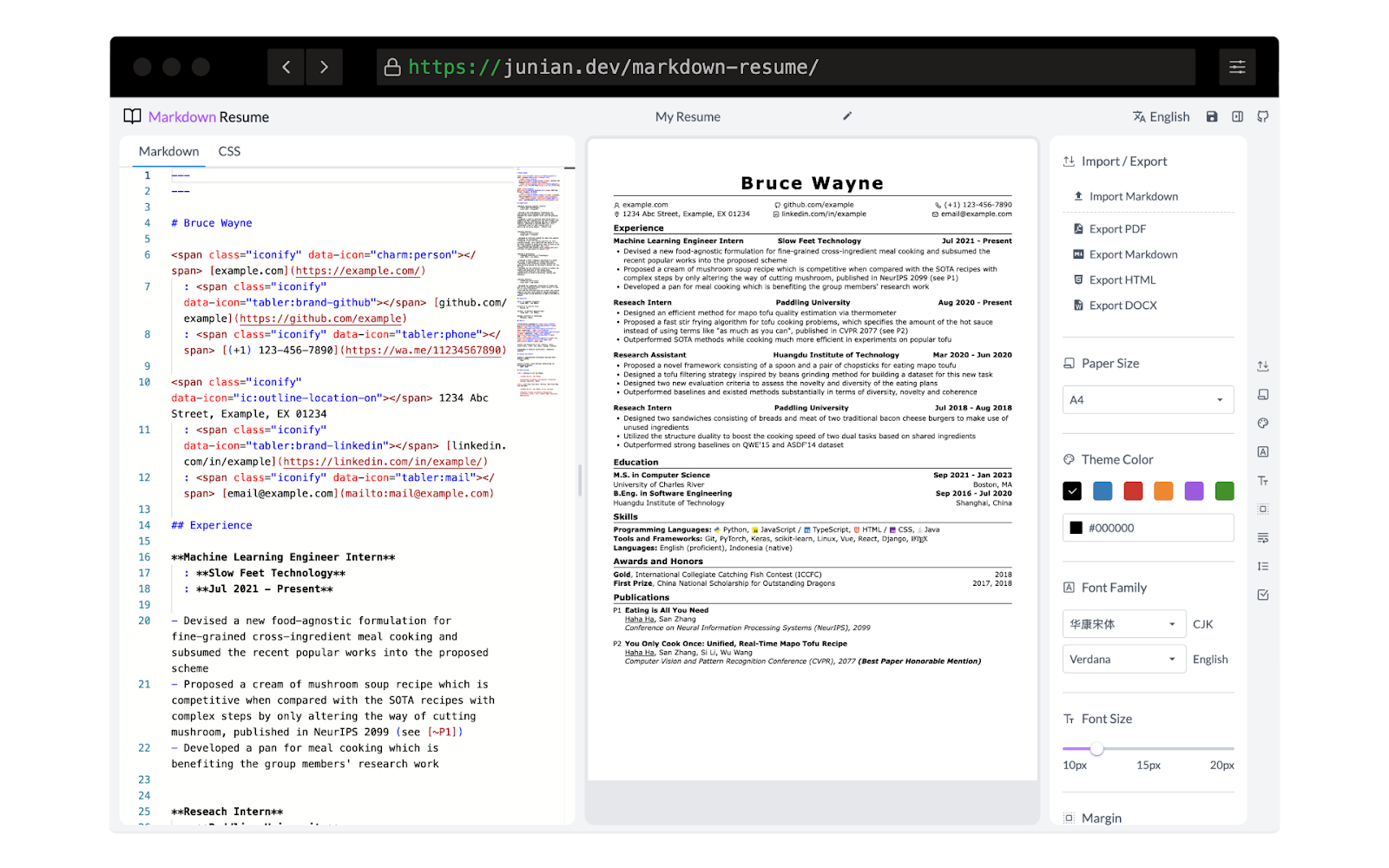
Markdown Resume is a local-first editor for creating clean, ATS-friendly resumes with Markdown. It combines a code editor with a paginated live preview, practical formatting controls, and self-contained export options.
The default template is based on CareerCup's resume template, using a restrained layout, web-safe fonts, and readable content structure so a resume works well for both applicant tracking systems and people.
Your resumes, images, and settings stay in your browser. No account is required, and your resume content is not uploaded to an application server.
I can’t guarantee that using this will improve your job search success rate. But I hope it helps.
See the Changelog for the complete project history and latest changes.
Notice
Highly recommend using Chromium-based browsers, e.g., Chrome or Microsoft Edge.
Features
- Write your resume in Markdown and preview it in real time — smooth experience!
- Works offline (PWA)
- Export to PDF, Markdown, self-contained HTML, and DOCX
- Export to A4 and US Letter paper sizes
- Customize page margins, theme colors, line heights, fonts, etc.
- Add icons easily with Markdown syntax (
::icon::) via Iconify (search icons on Icônes) - Fix legacy Iconify markup from older resumes by converting it to Markdown icon syntax
- TeX support (KaTeX)
- Cross-referencing (useful for academic CVs)
- Case correction (e.g.,
Github→GitHub) - Add line breaks (
\\[10px]) or start a new page (\newpage) like in LaTeX - Automatic page breaking
- Custom CSS support
- Manage, rename, duplicate, import, back up, and delete multiple resumes
- Automatically save editor changes when adding a new line, with Ctrl/Cmd+S support
- Responsive editing layout for desktop, tablet, and mobile
- Optional Monaco editor minimap
- Light document previews in every color theme
- Light, dark, and system appearance modes
- English and Indonesian interface languages
- Local storage usage estimates, refresh controls, and a protected factory-reset action
- Data is saved locally in your browser using IndexedDB browser feature (see
localForagerepo for details) - Image Gallery — upload images and reference them in your resume using Markdown or HTML (see below)
Icon Support
Add icons to your resume with Markdown syntax, e.g. ::mdi:home::. Search icons on Icônes and use the Iconify icon names.
You can also set the size and color of an icon:
::mdi:home =24 /red::
The Fix Icons toolbar tool automatically converts legacy markup — both old <span class="iconify" data-icon="..."> markup and <iconify-icon icon="..."> tags — into this Markdown syntax.
Image Support
The Image Gallery screen lets you upload images and use them directly in your resume.
Once uploaded, each image gets a stable URL in the format ./images/<id> served by a Service Worker — no external hosting needed. You can copy the URL from the gallery and paste it into your Markdown:

Or as an HTML tag:
<img src="./images/1234567890_abc123" alt="My photo" />
When exporting to HTML or DOCX, image references are automatically replaced with inline base64 data URLs so the exported file is fully self-contained.
Privacy: Images are stored entirely inside your browser's IndexedDB — the same storage used for your resumes. They are never uploaded to any server and never leave your computer.
Self-Hosting
Clone the repository:
git clone https://github.com/junian/markdown-resume.git
cd markdown-resume
(Optional) Set up your environment variables. Copy the example file and fill in the values you need:
cp .env.example .envSee the Environment Variables section for details on each variable.
Run the build script:
./build.shDeploy the contents of the
.output/publicdirectory to any static hosting provider (GitHub Pages, Netlify, Vercel, Nginx, etc.).
Environment Variables
Configuration is done via a .env file in the project root. You can copy .env.example as a starting point:
cp .env.example .env
| Variable | Description |
|---|---|
NUXT_PUBLIC_SITE_URL |
Site origin URL (e.g. https://example.com). Defaults to https://www.junian.dev. |
NUXT_APP_BASE_URL |
Site base URL (e.g. / for root or /my-app/ for a subpath). Defaults to /markdown-resume/. |
NUXT_PUBLIC_GOOGLE_FONTS_KEY |
Google Fonts Developer API Key. Required to enable the font picker that lists fonts from Google Fonts. Without this key the font selection will only show locally available fonts. |
NUXT_PUBLIC_SCRIPTS_GOOGLE_ANALYTICS_ID |
Google Analytics 4 Measurement ID (e.g. G-XXXXXXXXXX). Enables GA4 page-view and event tracking. Leave empty to disable analytics. |
NUXT_PUBLIC_DISQUS_SHORTNAME |
Disqus shortname for your site. Enables the Disqus comment section. Leave empty to hide comments. |
Development
Clone the repo and install dependencies:
pnpm install
Start developing / building the site:
pnpm run dev
pnpm run build
License
This project is licensed under the MIT license.
See ACKNOWLEDGMENTS for credits.
Made with ☕ by Junian.dev.
Explorar proyectos relacionados
Cargando…